> ## Documentation Index
> Fetch the complete documentation index at: https://cloro.dev/docs/llms.txt
> Use this file to discover all available pages before exploring further.
# Ads
> Schema for sponsored ad blocks returned by the Google AI Mode endpoint, including merchant branding, product carousel cards, pricing, and ad metadata.
This section documents the **ads** data returned by the [Google AI Mode endpoint](/api-reference/endpoint/monitor-aimode). Ads are part of the AI Mode response — no separate API call is needed.
## Example request
Ads are intent-detected: send a prompt with high commercial intent (for example, comparing or buying a specific product category). No flag is required.
```json theme={null}
{
"prompt": "best 3D printers for hobbyists",
"country": "US"
}
```
This produces a response containing the `ads` object documented below.
## Overview
Sponsored ad section extracted from the response when AI Mode surfaces sponsored shopping results.
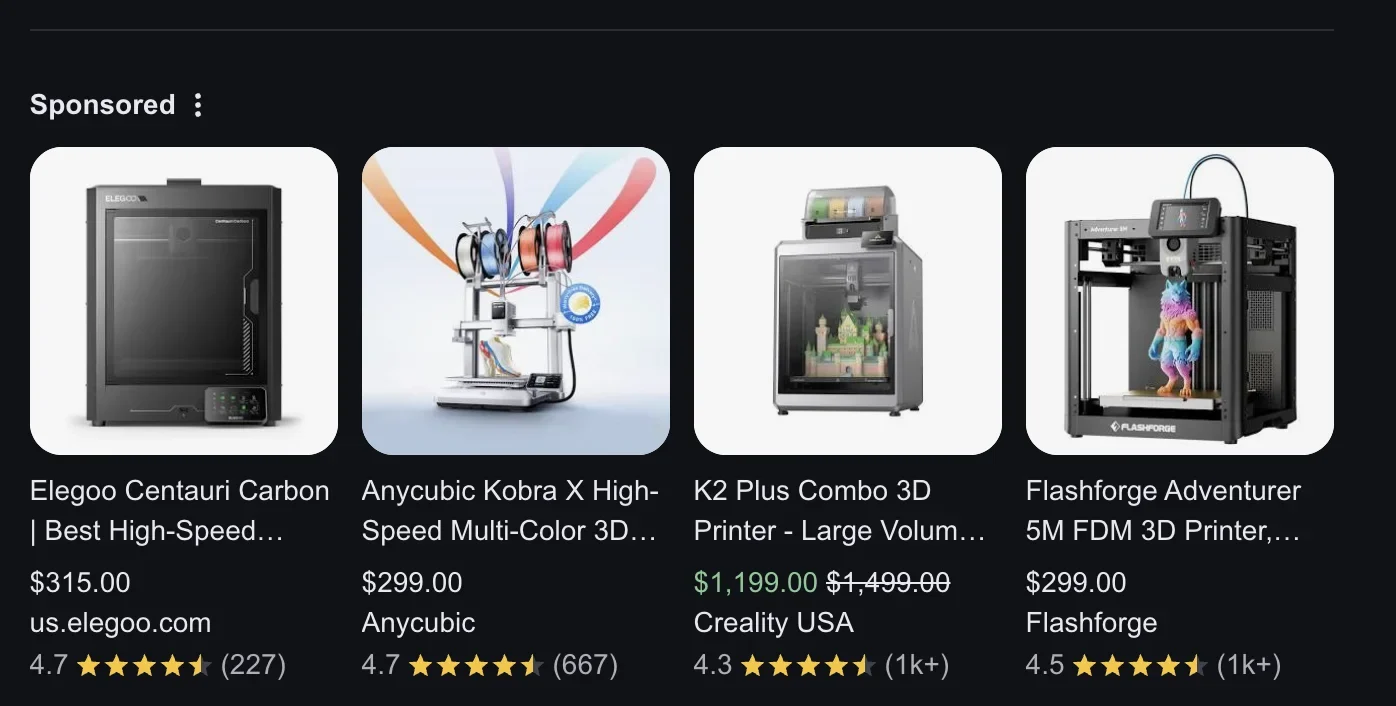 **`ads` is an object, not an array.** AI Mode wraps sponsored results in an `AdSection` object with a section `title` and an `ads` array of individual ad items. This differs from other providers (e.g., [ChatGPT ads](/api-reference/endpoint/chatgpt/ads)) where `ads` is a flat array — check the wrapper shape when parsing.
## AdSection structure
| Field | Type | Description |
| ------- | ------ | ------------------------------------------------------------------------- |
| `title` | string | Section title for the ads (e.g., "Here are some 3D printers to consider") |
| `ads` | array | Array of sponsored [ad items](#ad-item-structure) |
## Ad item structure
| Field | Type | Description |
| ---------- | ------- | ---------------------------------------------- |
| `title` | string | Ad product title |
| `url` | string | Ad click-through URL |
| `position` | integer | Position index of the ad |
| `price` | object | Structured pricing with `value` and `currency` |
| `store` | string | Merchant/store name |
| `rating` | number | Product rating |
| `reviews` | string | Review count |
### `price`
| Field | Type | Description |
| ---------- | -------------- | ----------------------------------------------------------------------------------------------- |
| `value` | number \| null | Parsed numeric price. `null` when the visible text can't be unambiguously parsed. |
| `currency` | string \| null | Currency symbol (e.g. `"$"`, `"£"`, `"R$"`, `"€"`). `null` when no symbol was found. |
| `raw` | string | Visible ad text verbatim (e.g. `"$149.99"`). Always present when the parser had any input text. |
See the [inline products docs](/api-reference/endpoint/aimode/inline-products#price-and-oldprice) for the full price-shape contract; it's shared across all AI Mode price-bearing fields.
## Response example
```json theme={null}
{
"success": true,
"result": {
"text": "Here are some 3D printers to consider...",
"ads": {
"title": "Here are some 3D printers to consider",
"ads": [
{
"title": "Bambu Lab X2D",
"url": "https://www.google.com/aclk?sa=L&ai=abc",
"position": 1,
"price": {
"value": 899.0,
"currency": "$"
},
"store": "Bambu Lab US",
"rating": 4.7,
"reviews": "584"
}
]
}
}
}
```
**`ads` is an object, not an array.** AI Mode wraps sponsored results in an `AdSection` object with a section `title` and an `ads` array of individual ad items. This differs from other providers (e.g., [ChatGPT ads](/api-reference/endpoint/chatgpt/ads)) where `ads` is a flat array — check the wrapper shape when parsing.
## AdSection structure
| Field | Type | Description |
| ------- | ------ | ------------------------------------------------------------------------- |
| `title` | string | Section title for the ads (e.g., "Here are some 3D printers to consider") |
| `ads` | array | Array of sponsored [ad items](#ad-item-structure) |
## Ad item structure
| Field | Type | Description |
| ---------- | ------- | ---------------------------------------------- |
| `title` | string | Ad product title |
| `url` | string | Ad click-through URL |
| `position` | integer | Position index of the ad |
| `price` | object | Structured pricing with `value` and `currency` |
| `store` | string | Merchant/store name |
| `rating` | number | Product rating |
| `reviews` | string | Review count |
### `price`
| Field | Type | Description |
| ---------- | -------------- | ----------------------------------------------------------------------------------------------- |
| `value` | number \| null | Parsed numeric price. `null` when the visible text can't be unambiguously parsed. |
| `currency` | string \| null | Currency symbol (e.g. `"$"`, `"£"`, `"R$"`, `"€"`). `null` when no symbol was found. |
| `raw` | string | Visible ad text verbatim (e.g. `"$149.99"`). Always present when the parser had any input text. |
See the [inline products docs](/api-reference/endpoint/aimode/inline-products#price-and-oldprice) for the full price-shape contract; it's shared across all AI Mode price-bearing fields.
## Response example
```json theme={null}
{
"success": true,
"result": {
"text": "Here are some 3D printers to consider...",
"ads": {
"title": "Here are some 3D printers to consider",
"ads": [
{
"title": "Bambu Lab X2D",
"url": "https://www.google.com/aclk?sa=L&ai=abc",
"position": 1,
"price": {
"value": 899.0,
"currency": "$"
},
"store": "Bambu Lab US",
"rating": 4.7,
"reviews": "584"
}
]
}
}
}
```