> ## Documentation Index
> Fetch the complete documentation index at: https://cloro.dev/docs/llms.txt
> Use this file to discover all available pages before exploring further.
# Google AI Mode product results schema
> Schema for expanded merchant offers behind each Google AI Mode product cluster: direct URLs, prices, installments, stock, and delivery badges.
Product results are the merchant offers behind each product cluster in a [Google AI Mode](/docs/api-reference/endpoint/monitor-aimode) response — merchant URL, price, installment terms, and stock, delivery and returns badges. Set `include.expandProducts` to get them as `result.productResults`.
```json theme={null}
{
"prompt": "best wireless headphones under $200",
"country": "US",
"include": {
"expandProducts": true
}
}
```
Without the flag, products are reported at cluster level only: [shopping cards](/docs/api-reference/endpoint/aimode/shopping-cards) and [inline products](/docs/api-reference/endpoint/aimode/inline-products) carry a headline price and a link to Google's product viewer. Expansion opens that viewer and returns the offers inside it. Both arrays are unchanged either way.
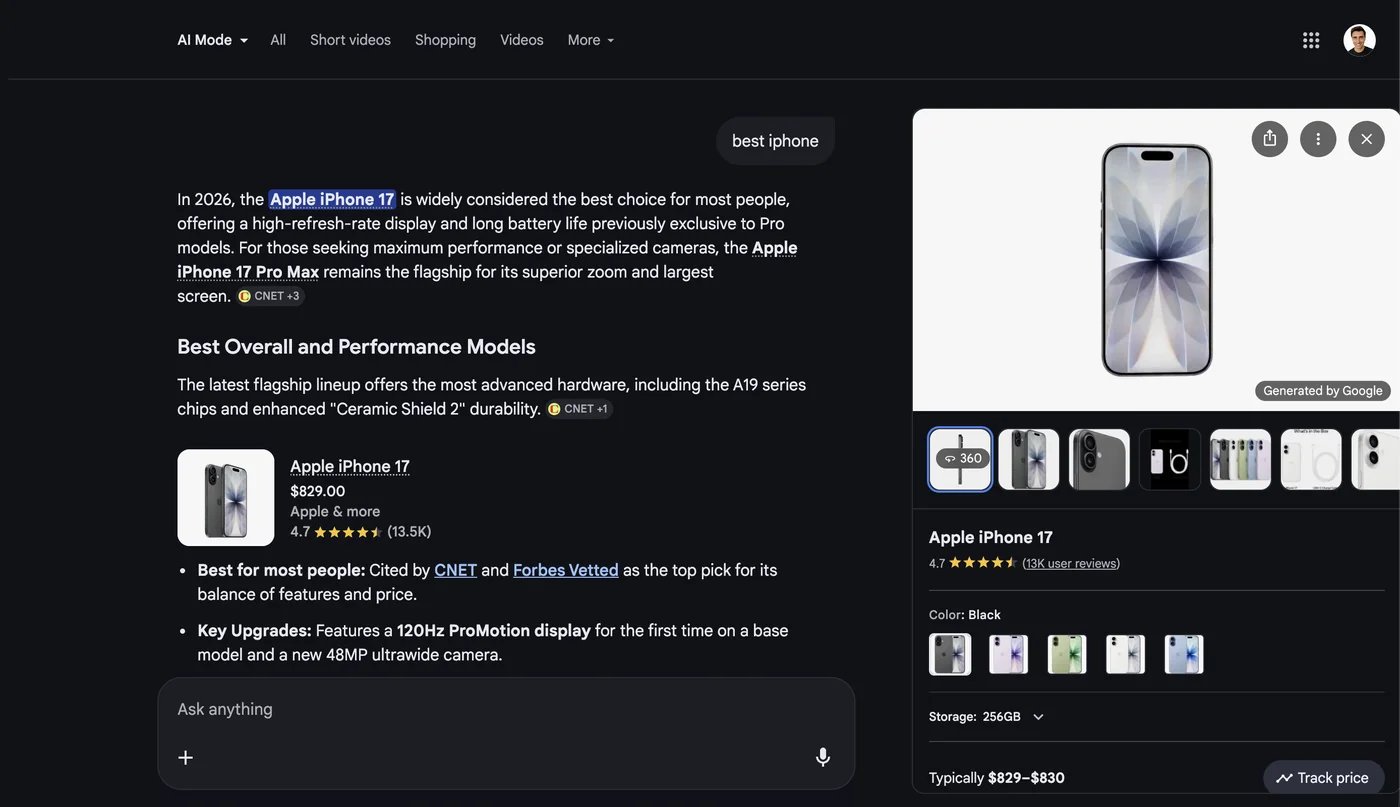 Same shape as [Google Search product results](/docs/api-reference/endpoint/google/product-results), where the panel is already in the SERP and needs no flag.
## Limits and cost
Each entry is one product cluster, deduplicated across `shoppingCards` and `inlineProducts`, and costs one extra fetch of Google's product viewer:
* **+1 credit** per entry returned, charged after the scrape completes
* **6 clusters** expanded per scrape at most, so the surcharge tops out at +6
* clusters that fail to fetch are dropped from the array, and not charged
See [providers](/docs/guides/providers#ai-mode-additional-features) for the pricing table.
## Product result structure
Each entry describes one product cluster and its merchant offers.
| Field | Type | Description |
| ----------------- | ------ | ------------------------------------------------------------------------- |
| `title` | string | Product cluster title, as Google displayed it |
| `stores` | array | Merchant offers. See [store structure](#store-structure) |
| `aboutTheProduct` | object | `description` (Google's prose blurb) and `features` (bullets, when shown) |
| `specifications` | object | Spec tables grouped by category. See [specifications](#specifications) |
| `images` | array | `mainUrl` and `thumbnailUrl` per image, often identical |
Only `title` is guaranteed — anything Google's panel omits is left out of the object rather than sent as `null`. Panels can also carry `brand`, `rating`, `reviews`, `priceRange`, `typicalPrices`, `variants`, `relatedProducts`, `userReviews`, `videos`, `discussionsAndForums` and `highlights`, emitted under those names when present, though most carry none of them.
### Specifications
A category name mapped to a flat set of spec key/value pairs:
```json theme={null}
{
"specifications": {
"general": {
"Brand": "Sennheiser",
"Noise cancellation": "Yes"
}
}
}
```
Category names and spec keys arrive in the **response language** — a `country: "MX"` request returns `{"general": {"Marca": "Sennheiser"}}`. Iterate the object; don't read a hard-coded key like `specifications.general.Brand`.
### Store structure
| Field | Type | Description |
| --------------- | ------ | -------------------------------------------------------------------------------------------------------------------------------------------------------------------------------- |
| `name` | string | Merchant name (e.g. `"Amazon"`) |
| `link` | string | Merchant product URL, passed through from Google verbatim |
| `price` | object | See [price shape](#price-shape). Omitted entirely when the displayed text can't be parsed |
| `installments` | string | Installment terms as displayed (e.g. `"for 24 mo, $0 now, $798.96 total"`) |
| `description` | string | Merchant's listing title, naming the exact SKU sold (e.g. `"iPhone 17 256GB White - Apple"`) — unlike `title`, which names the product overall |
| `buyingOptions` | array | Merchant badges in display order — stock status, rating, delivery promise, returns window. Google varies these per merchant and locale, so they stay an unparsed list of strings |
| `logo` | string | Merchant logo URL |
| `shipping` | string | Shipping cost or promise as displayed |
| `condition` | string | Item condition (e.g. `"New"`, `"Refurbished"`) |
| `rating` | number | Merchant rating |
| `reviews` | string | Merchant review count, abbreviated (e.g. `"384"`, `"2.3k"`) |
Expect the first six on most offers and the rest only occasionally. Everything beyond `name` is optional and omitted when absent — Google shows different combinations per merchant, so an "Out of stock" listing may have no price or link at all.
`link` is not validated against the cluster. Google occasionally serves a merchant URL for an unrelated SKU, so an offer's link can point at a different product than its `description` names. Verify against `description` if link correctness matters.
### Price shape
| Field | Type | Description |
| ---------- | ------ | --------------------------------------------------------------------------------------------------------------- |
| `value` | number | Parsed numeric price; always present when `price` is emitted. On installment offers this is the monthly payment |
| `currency` | string | ISO 4217 code (e.g. `"USD"`). Unrecognized symbols fall through as the glyph itself (e.g. `"R$"`) |
| `raw` | string | Visible price text verbatim (e.g. `"$149.99"`) |
`currency` here is an **ISO code** (`"USD"`), while [shopping cards](/docs/api-reference/endpoint/aimode/shopping-cards#price-and-oldprice) and [inline products](/docs/api-reference/endpoint/aimode/inline-products#price-and-oldprice) carry the raw symbol (`"$"`). Normalize before comparing across surfaces.
## Response example
```json theme={null}
{
"success": true,
"result": {
"text": "Here are highly-rated wireless headphones under $200...",
"shoppingCards": [
{
"title": "Sony WH-CH720N Noise Cancelling Headphones",
"position": 1,
"price": { "value": 149.99, "currency": "$", "raw": "$149.99" },
"store": "Amazon"
}
],
"productResults": [
{
"title": "Sony WH-CH720N Noise Cancelling Headphones",
"aboutTheProduct": {
"description": "Wireless noise-canceling headphones with up to 35-hour battery life and multipoint connection."
},
"specifications": {
"general": {
"Brand": "Sony",
"Noise cancellation": "Yes",
"Wireless technology type": "Bluetooth"
}
},
"images": [
{
"mainUrl": "https://encrypted-tbn3.gstatic.com/shopping?q=tbn:ANd9Gc...",
"thumbnailUrl": "https://encrypted-tbn3.gstatic.com/shopping?q=tbn:ANd9Gc..."
}
],
"stores": [
{
"name": "Amazon",
"link": "https://www.amazon.com/sony-wh-ch720n",
"price": {
"value": 149.99,
"currency": "USD",
"raw": "$149.99"
},
"description": "Sony WH-CH720N Wireless Noise Canceling Headphones, Black",
"shipping": "Free delivery by Thu, Aug 14",
"condition": "New",
"rating": 4.6,
"reviews": "2.3k",
"buyingOptions": [
"In stock online",
"4.6/5",
"Free delivery",
"30-day returns"
]
},
{
"name": "Best Buy",
"link": "https://www.bestbuy.com/site/sony-wh-ch720n",
"price": {
"value": 33.33,
"currency": "USD",
"raw": "$33.33"
},
"installments": "for 6 mo, $0 now, $199.98 total",
"description": "Sony - WH-CH720N Wireless Noise Cancelling Headphones - Black",
"buyingOptions": [
"In stock online",
"Free shipping"
]
}
]
}
]
}
}
```
Note the two `currency` conventions in the same payload: `shoppingCards[].price.currency` is the raw symbol (`"$"`), while `productResults[].stores[].price.currency` is an ISO code (`"USD"`).
Same shape as [Google Search product results](/docs/api-reference/endpoint/google/product-results), where the panel is already in the SERP and needs no flag.
## Limits and cost
Each entry is one product cluster, deduplicated across `shoppingCards` and `inlineProducts`, and costs one extra fetch of Google's product viewer:
* **+1 credit** per entry returned, charged after the scrape completes
* **6 clusters** expanded per scrape at most, so the surcharge tops out at +6
* clusters that fail to fetch are dropped from the array, and not charged
See [providers](/docs/guides/providers#ai-mode-additional-features) for the pricing table.
## Product result structure
Each entry describes one product cluster and its merchant offers.
| Field | Type | Description |
| ----------------- | ------ | ------------------------------------------------------------------------- |
| `title` | string | Product cluster title, as Google displayed it |
| `stores` | array | Merchant offers. See [store structure](#store-structure) |
| `aboutTheProduct` | object | `description` (Google's prose blurb) and `features` (bullets, when shown) |
| `specifications` | object | Spec tables grouped by category. See [specifications](#specifications) |
| `images` | array | `mainUrl` and `thumbnailUrl` per image, often identical |
Only `title` is guaranteed — anything Google's panel omits is left out of the object rather than sent as `null`. Panels can also carry `brand`, `rating`, `reviews`, `priceRange`, `typicalPrices`, `variants`, `relatedProducts`, `userReviews`, `videos`, `discussionsAndForums` and `highlights`, emitted under those names when present, though most carry none of them.
### Specifications
A category name mapped to a flat set of spec key/value pairs:
```json theme={null}
{
"specifications": {
"general": {
"Brand": "Sennheiser",
"Noise cancellation": "Yes"
}
}
}
```
Category names and spec keys arrive in the **response language** — a `country: "MX"` request returns `{"general": {"Marca": "Sennheiser"}}`. Iterate the object; don't read a hard-coded key like `specifications.general.Brand`.
### Store structure
| Field | Type | Description |
| --------------- | ------ | -------------------------------------------------------------------------------------------------------------------------------------------------------------------------------- |
| `name` | string | Merchant name (e.g. `"Amazon"`) |
| `link` | string | Merchant product URL, passed through from Google verbatim |
| `price` | object | See [price shape](#price-shape). Omitted entirely when the displayed text can't be parsed |
| `installments` | string | Installment terms as displayed (e.g. `"for 24 mo, $0 now, $798.96 total"`) |
| `description` | string | Merchant's listing title, naming the exact SKU sold (e.g. `"iPhone 17 256GB White - Apple"`) — unlike `title`, which names the product overall |
| `buyingOptions` | array | Merchant badges in display order — stock status, rating, delivery promise, returns window. Google varies these per merchant and locale, so they stay an unparsed list of strings |
| `logo` | string | Merchant logo URL |
| `shipping` | string | Shipping cost or promise as displayed |
| `condition` | string | Item condition (e.g. `"New"`, `"Refurbished"`) |
| `rating` | number | Merchant rating |
| `reviews` | string | Merchant review count, abbreviated (e.g. `"384"`, `"2.3k"`) |
Expect the first six on most offers and the rest only occasionally. Everything beyond `name` is optional and omitted when absent — Google shows different combinations per merchant, so an "Out of stock" listing may have no price or link at all.
`link` is not validated against the cluster. Google occasionally serves a merchant URL for an unrelated SKU, so an offer's link can point at a different product than its `description` names. Verify against `description` if link correctness matters.
### Price shape
| Field | Type | Description |
| ---------- | ------ | --------------------------------------------------------------------------------------------------------------- |
| `value` | number | Parsed numeric price; always present when `price` is emitted. On installment offers this is the monthly payment |
| `currency` | string | ISO 4217 code (e.g. `"USD"`). Unrecognized symbols fall through as the glyph itself (e.g. `"R$"`) |
| `raw` | string | Visible price text verbatim (e.g. `"$149.99"`) |
`currency` here is an **ISO code** (`"USD"`), while [shopping cards](/docs/api-reference/endpoint/aimode/shopping-cards#price-and-oldprice) and [inline products](/docs/api-reference/endpoint/aimode/inline-products#price-and-oldprice) carry the raw symbol (`"$"`). Normalize before comparing across surfaces.
## Response example
```json theme={null}
{
"success": true,
"result": {
"text": "Here are highly-rated wireless headphones under $200...",
"shoppingCards": [
{
"title": "Sony WH-CH720N Noise Cancelling Headphones",
"position": 1,
"price": { "value": 149.99, "currency": "$", "raw": "$149.99" },
"store": "Amazon"
}
],
"productResults": [
{
"title": "Sony WH-CH720N Noise Cancelling Headphones",
"aboutTheProduct": {
"description": "Wireless noise-canceling headphones with up to 35-hour battery life and multipoint connection."
},
"specifications": {
"general": {
"Brand": "Sony",
"Noise cancellation": "Yes",
"Wireless technology type": "Bluetooth"
}
},
"images": [
{
"mainUrl": "https://encrypted-tbn3.gstatic.com/shopping?q=tbn:ANd9Gc...",
"thumbnailUrl": "https://encrypted-tbn3.gstatic.com/shopping?q=tbn:ANd9Gc..."
}
],
"stores": [
{
"name": "Amazon",
"link": "https://www.amazon.com/sony-wh-ch720n",
"price": {
"value": 149.99,
"currency": "USD",
"raw": "$149.99"
},
"description": "Sony WH-CH720N Wireless Noise Canceling Headphones, Black",
"shipping": "Free delivery by Thu, Aug 14",
"condition": "New",
"rating": 4.6,
"reviews": "2.3k",
"buyingOptions": [
"In stock online",
"4.6/5",
"Free delivery",
"30-day returns"
]
},
{
"name": "Best Buy",
"link": "https://www.bestbuy.com/site/sony-wh-ch720n",
"price": {
"value": 33.33,
"currency": "USD",
"raw": "$33.33"
},
"installments": "for 6 mo, $0 now, $199.98 total",
"description": "Sony - WH-CH720N Wireless Noise Cancelling Headphones - Black",
"buyingOptions": [
"In stock online",
"Free shipping"
]
}
]
}
]
}
}
```
Note the two `currency` conventions in the same payload: `shoppingCards[].price.currency` is the raw symbol (`"$"`), while `productResults[].stores[].price.currency` is an ISO code (`"USD"`).