How cloro user accounts and organizations relate, how to manage team members, and how to delete either from the dashboard and what that removes.
Every cloro account has two layers. Your user account is your personal login, profile, and email address. Your organization is the workspace that holds your plan, credits, API keys, and teammates, and all API access and billing belong to it rather than to you personally.Both are managed by Clerk, our authentication provider, so you manage them from the dashboard rather than through the API — there is no API endpoint for either.
Your user account: open the user menu at the bottom of the sidebar (your name and email), then click Account.
The user menu at the bottom of the dashboard sidebar
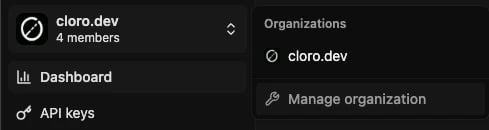
Your organization: open the organization switcher at the top of the sidebar, then click Manage organization.
The organization switcher at the top of the dashboard sidebar
Manage organization is a paid-plan feature. On the free tier the switcher shows Upgrade to invite your team instead, so organization settings aren’t reachable until you subscribe. Your user account settings are always available.
Free-tier accounts are single-seat — just the account owner. Inviting teammates requires a paid plan, and every paid plan includes unlimited team members, so upgrade from the dashboard and invite as many as you need.Teammates share the organization’s credits, concurrency limit, and API keys — there are no per-seat charges and no per-member credit allocations.
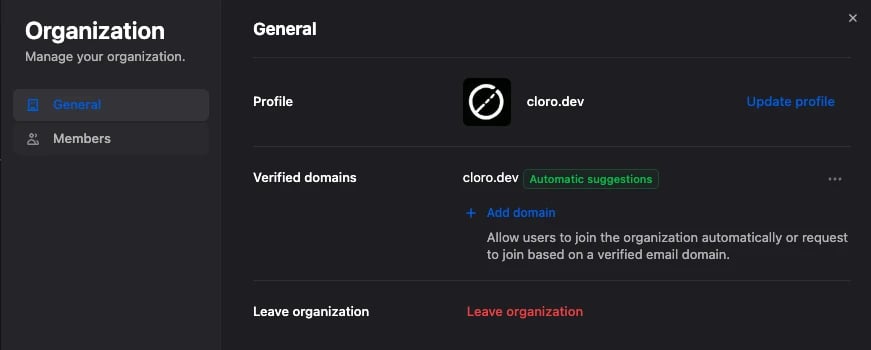
Organization settings don’t include a delete option — the General tab covers your profile, verified domains, and leaving the organization. To have the organization itself deleted, contact support.
The General tab of organization settings
Once the organization is deleted, cloro:
Cancels your subscription immediately — no refund is issued for the remaining cycle or unused credits
Deletes every API key in the organization. Requests then fail with 401 Unauthorized (keys are cached briefly, so calls may still succeed for up to a minute)
Deletes all organization data — memberships, subscription record, credit balance, and credit usage history
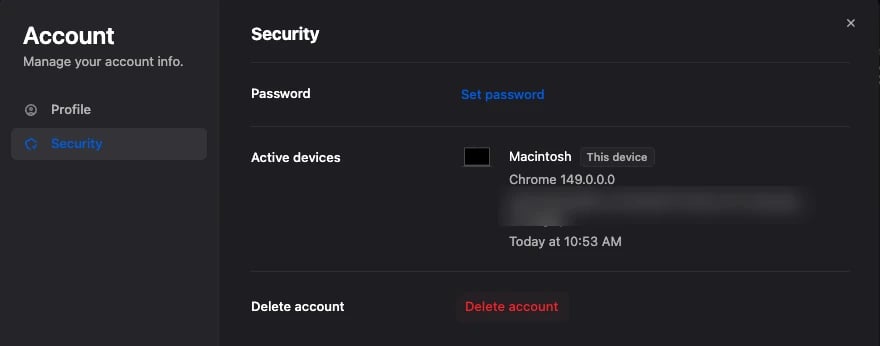
Deleting your own user removes your profile, removes you from every organization you belong to, and takes your address off cloro’s mailing list. In the Account modal, open the Security tab and use Delete account.
Delete account in the Security tab of your account settings
Deleting your user does not cancel your organization’s subscription — billing continues on the same cycle. If you’re closing your account to stop being charged, cancel the subscription first.
If you’re the only admin of an organization, contact support before deleting your user — otherwise nobody is left who can manage it.
No. Deleting your user leaves the organization and its billing untouched — cancel the subscription from the dashboard instead, without deleting anything.
No. Deletion is permanent, and API keys, credit history, and usage logs are removed with it. To start again, sign up and create a new organization — you’ll get new API keys and start on the free tier.
Can teams at my company have separate accounts and invoices?
Yes. Each team can create its own organization in the dashboard and subscribe to its own plan. Each organization gets its own invoice, API keys, credits and concurrency, and manages its own upgrades, downgrades and cancellation. Organizations do not share credits or concurrency, and there are no custom plans that span several organizations.If your teams want to share one credit balance and one concurrency limit, use one organization and create a separate API key for each team or environment. See API key management.
No. Upgrades and downgrades are handled from the dashboard with no interruption to your API keys — see Billing & credits.
Was this page helpful?
{"docsConfig":{"theme":"mint","$schema":"https://mintlify.com/docs.json","name":"cloro","colors":{"primary":"#60A5FA","light":"#93C5FD","dark":"#3B82F6"},"logo":{"light":"https://mintcdn.com/cloro/31REGvIJOWq8_kV2/logo/light.svg?fit=max\u0026auto=format\u0026n=31REGvIJOWq8_kV2\u0026q=85\u0026s=9649c139f2768786bbd491a86c1a9dd9","dark":"https://mintcdn.com/cloro/31REGvIJOWq8_kV2/logo/dark.svg?fit=max\u0026auto=format\u0026n=31REGvIJOWq8_kV2\u0026q=85\u0026s=8b254a805d19d5a08a152025628fc518","href":"https://cloro.dev/"},"favicon":"https://mintcdn.com/cloro/JJLSAXWoRDaE6XhQ/favicon.ico?fit=max\u0026auto=format\u0026n=JJLSAXWoRDaE6XhQ\u0026q=85\u0026s=fb070a58a43d3a399505f112fcb2cf5b","api":{"playground":{"proxy":false}},"navbar":{"primary":{"type":"button","label":"Dashboard","href":"https://dashboard.cloro.dev/"}},"footer":{"socials":{"github":"https://github.com/cloro-dev","website":"https://cloro.dev/"}},"seo":{"metatags":{"canonical":"https://cloro.dev/docs"}},"integrations":{"posthog":{"apiKey":"phc_O2d3bu6YrOXrcUYH9E1Dx6zc4kkW8eez5qXOFbBWii3","apiHost":"https://reverseproxy.cloro.dev"}},"banner":{"content":"The AI Assistant is here to help — ask it anything instead of browsing through the pages.","dismissible":true},"contextual":{"options":["copy","view","chatgpt","claude","perplexity","mcp","cursor","vscode"],"display":"header"},"styling":{"latex":false},"navigation":{"pages":[]}},"deployment":{"deploymentMetadataValue":{"subdomain":"cloro","hasAudioNarration":false,"actualSubdomain":"cloro","customDomains":["cloro.dev"],"gitSource":{"type":"github","owner":"cloro-dev","repo":"docs","deployBranch":"main","contentDirectory":"","isPrivate":true,"mountPath":"","label":""},"chroma":{"liveDeploymentHistoryId":"6adf2305ebccf90c95aede77","collectionId":"fd38d441-7d33-4ca6-98c2-4fa31bd5ae44","schemaVersion":"v3","latestBuiltDeploymentHistoryId":"6adf2305ebccf90c95aede77"},"feedback":{"thumbs":true,"agentFeedback":true},"entitlements":{"AI_CHAT":{"status":"ENABLED"}},"buildId":"6adf2305ebccf90c95aede77","clientVersion":"0.0.3971","searchFilterCounts":[{"language":"default","tag":"API Reference","count":60},{"language":"default","tag":"Documentation","count":21},{"language":"default","tag":"Google","count":14},{"language":"default","tag":"Guides","count":12},{"language":"default","tag":"AI Mode","count":10},{"language":"default","tag":"ChatGPT","count":9},{"language":"default","tag":"Integrations","count":7},{"language":"default","tag":"Perplexity","count":6},{"language":"default","tag":"Async tasks","count":5},{"language":"default","tag":"Copilot","count":5}]},"assistantConfig":{"deflection":{"enabled":true,"email":"support@cloro.dev"}},"basePath":"/docs","hasChatPermissions":true,"hasWebMcpPermissions":false,"toggles":[{"name":"kill-isr","enabled":true,"variant":{"name":"disabled","enabled":false,"feature_enabled":true},"impressionData":false},{"name":"agent-mintlify-slack","enabled":true,"variant":{"name":"disabled","enabled":false,"feature_enabled":true},"impressionData":false},{"name":"editor-v7-file-tree","enabled":true,"variant":{"name":"disabled","enabled":false,"feature_enabled":true},"impressionData":false},{"name":"agent-integrations-settings","enabled":true,"variant":{"name":"disabled","enabled":false,"feature_enabled":true},"impressionData":false},{"name":"automations-pr-grouping","enabled":true,"variant":{"name":"disabled","enabled":false,"feature_enabled":true},"impressionData":false},{"name":"custom-prefix","enabled":true,"variant":{"name":"disabled","enabled":false,"feature_enabled":true},"impressionData":false},{"name":"analytics-v7","enabled":true,"variant":{"name":"disabled","enabled":false,"feature_enabled":true},"impressionData":false},{"name":"user-flows-analytics","enabled":true,"variant":{"name":"disabled","enabled":false,"feature_enabled":true},"impressionData":false},{"name":"no-publish-flow","enabled":true,"variant":{"name":"disabled","enabled":false,"feature_enabled":true},"impressionData":false},{"name":"workos-onboarding","enabled":true,"variant":{"name":"disabled","enabled":false,"feature_enabled":true},"impressionData":false},{"name":"llms-txt-v2","enabled":true,"variant":{"name":"disabled","enabled":false,"feature_enabled":true},"impressionData":false},{"name":"pause-universal-search-reconcile","enabled":true,"variant":{"name":"disabled","enabled":false,"feature_enabled":true},"impressionData":false},{"name":"snapshot-serving-live","enabled":true,"variant":{"name":"disabled","enabled":false,"feature_enabled":true},"impressionData":false},{"name":"stripTemperatureMiddleware","enabled":true,"variant":{"name":"disabled","enabled":false,"feature_enabled":true},"impressionData":false},{"name":"per-site-search-delta","enabled":true,"variant":{"name":"disabled","enabled":false,"feature_enabled":true},"impressionData":false},{"name":"support-platform-pylon-zendesk","enabled":true,"variant":{"name":"disabled","enabled":false,"feature_enabled":true},"impressionData":false},{"name":"snapshot-serving","enabled":true,"variant":{"name":"disabled","enabled":false,"feature_enabled":true},"impressionData":false},{"name":"instant-rollback","enabled":true,"variant":{"name":"disabled","enabled":false,"feature_enabled":true},"impressionData":false},{"name":"granular-notifications-server","enabled":true,"variant":{"name":"disabled","enabled":false,"feature_enabled":true},"impressionData":false},{"name":"granular-notifications","enabled":true,"variant":{"name":"disabled","enabled":false,"feature_enabled":true},"impressionData":false},{"name":"editor-private-page-search","enabled":true,"variant":{"name":"disabled","enabled":false,"feature_enabled":true},"impressionData":false},{"name":"automations-fable","enabled":true,"variant":{"name":"disabled","enabled":false,"feature_enabled":true},"impressionData":false},{"name":"fixed-ai-action-pricing","enabled":true,"variant":{"name":"disabled","enabled":false,"feature_enabled":true},"impressionData":false},{"name":"automation-resolve-merge-conflict","enabled":true,"variant":{"name":"disabled","enabled":false,"feature_enabled":true},"impressionData":false},{"name":"scoped-publishing","enabled":true,"variant":{"name":"disabled","enabled":false,"feature_enabled":true},"impressionData":false},{"name":"mintql","enabled":true,"variant":{"name":"disabled","enabled":false,"feature_enabled":true},"impressionData":false},{"name":"page-level-analytics","enabled":true,"variant":{"name":"disabled","enabled":false,"feature_enabled":true},"impressionData":false},{"name":"editor-version-history-v2","enabled":true,"variant":{"name":"disabled","enabled":false,"feature_enabled":true},"impressionData":false},{"name":"editor-nav-generations","enabled":true,"variant":{"name":"disabled","enabled":false,"feature_enabled":true},"impressionData":false},{"name":"billing-page-v2","enabled":true,"variant":{"name":"disabled","enabled":false,"feature_enabled":true},"impressionData":false},{"name":"workspace-projects","enabled":true,"variant":{"name":"disabled","enabled":false,"feature_enabled":true},"impressionData":false},{"name":"assistant-v5","enabled":true,"variant":{"name":"disabled","enabled":false,"feature_enabled":true},"impressionData":false},{"name":"byok-sep-25","enabled":true,"variant":{"name":"disabled","enabled":false,"feature_enabled":true},"impressionData":false},{"name":"fork-pr-previews","enabled":true,"variant":{"name":"disabled","enabled":false,"feature_enabled":true},"impressionData":false},{"name":"revalidation-jwt","enabled":true,"variant":{"name":"disabled","enabled":false,"feature_enabled":true},"impressionData":false},{"name":"vite-origin","enabled":true,"variant":{"name":"disabled","enabled":false,"feature_enabled":true},"impressionData":false},{"name":"editor-agent-model-picker","enabled":true,"variant":{"name":"disabled","enabled":false,"feature_enabled":true},"impressionData":false},{"name":"billing-updated-9-15","enabled":true,"variant":{"name":"disabled","enabled":false,"feature_enabled":true},"impressionData":false},{"name":"workos-sso-scim","enabled":true,"variant":{"name":"disabled","enabled":false,"feature_enabled":true},"impressionData":false},{"name":"hobby-abuse-scan","enabled":true,"variant":{"name":"disabled","enabled":false,"feature_enabled":true},"impressionData":false},{"name":"dashboard-inbox","enabled":true,"variant":{"name":"disabled","enabled":false,"feature_enabled":true},"impressionData":false},{"name":"workos-signup","enabled":true,"variant":{"name":"disabled","enabled":false,"feature_enabled":true},"impressionData":false},{"name":"workos-enabled","enabled":true,"variant":{"name":"disabled","enabled":false,"feature_enabled":true},"impressionData":false}],"isAtlas":false,"googleFontsInlined":false},"customCss":[],"page":{"pagePath":"guides/account","slug":"/guides/account","pageMetadata":{"title":"Account \u0026 organizations","description":"How cloro user accounts and organizations relate, how to manage team members, and how to delete either from the dashboard and what that removes.","icon":"user","href":"/guides/account"},"description":{"compiledSource":"\"use strict\";\nconst {jsx: _jsx} = arguments[0];\nconst {useMDXComponents: _provideComponents} = arguments[0];\nfunction _createMdxContent(props) {\n const _components = {\n p: \"p\",\n ..._provideComponents(),\n ...props.components\n };\n return _jsx(_components.p, {\n children: \"How cloro user accounts and organizations relate, how to manage team members, and how to delete either from the dashboard and what that removes.\"\n });\n}\nfunction MDXContent(props = {}) {\n const {wrapper: MDXLayout} = {\n ..._provideComponents(),\n ...props.components\n };\n return MDXLayout ? _jsx(MDXLayout, {\n ...props,\n children: _jsx(_createMdxContent, {\n ...props\n })\n }) : _createMdxContent(props);\n}\nreturn {\n default: MDXContent\n};\n","frontmatter":{},"scope":{}},"pageType":"default","mdx":{"mdxSource":{"compiledSource":"\"use strict\";const{Fragment:_Fragment,jsx:_jsx,jsxs:_jsxs}=arguments[0];const{useMDXComponents:_provideComponents}=arguments[0];function _createMdxContent(props){const _components={a:`a`,code:`code`,li:`li`,p:`p`,strong:`strong`,ul:`ul`,..._provideComponents(),...props.components},{Frame,Heading,Note,OptimizedImage,Warning}=_components;if(!Frame)_missingMdxReference(`Frame`,true);if(!Heading)_missingMdxReference(`Heading`,true);if(!Note)_missingMdxReference(`Note`,true);if(!OptimizedImage)_missingMdxReference(`OptimizedImage`,true);if(!Warning)_missingMdxReference(`Warning`,true);return _jsxs(_Fragment,{children:[_jsxs(_components.p,{children:[`Every cloro account has two layers. Your user account is your personal login, profile, and email address. Your organization is the workspace that holds your plan, credits, API keys, and teammates, and all API access and `,_jsx(_components.a,{href:`/guides/billing`,children:`billing`}),` belong to it rather than to you personally.`]}),`\n`,_jsxs(_components.p,{children:[`Both are managed by Clerk, our authentication provider, so you manage them from the `,_jsx(_components.a,{href:`https://dashboard.cloro.dev`,children:`dashboard`}),` rather than through the API — there is no API endpoint for either.`]}),`\n`,_jsx(Heading,{level:`2`,id:`where-to-manage-each`,children:`Where to manage each`}),`\n`,_jsxs(_components.ul,{children:[`\n`,_jsxs(_components.li,{children:[_jsx(_components.strong,{children:`Your user account`}),`: open the user menu at the bottom of the sidebar (your name and email), then click `,_jsx(_components.strong,{children:`Account`}),`.`]}),`\n`]}),`\n`,_jsx(Frame,{caption:`The user menu at the bottom of the dashboard sidebar`,children:_jsx(OptimizedImage,{src:`https://mintcdn.com/cloro/sdHDrVNDs3_UphUV/images/account/user-menu.webp?fit=max\u0026auto=format\u0026n=sdHDrVNDs3_UphUV\u0026q=85\u0026s=5208dec69af1de3de9de24f67d499694`,alt:`Dashboard sidebar user menu open, showing the Account and Log out options`,\"data-og-width\":`500`,width:`500`,\"data-og-height\":`173`,height:`173`,\"data-path\":`images/account/user-menu.webp`,\"data-optimize\":`true`,\"data-opv\":`3`,srcset:`https://mintcdn.com/cloro/sdHDrVNDs3_UphUV/images/account/user-menu.webp?w=280\u0026fit=max\u0026auto=format\u0026n=sdHDrVNDs3_UphUV\u0026q=85\u0026s=70c8cdacbcdd9597269cd3c1a5930685 280w, https://mintcdn.com/cloro/sdHDrVNDs3_UphUV/images/account/user-menu.webp?w=560\u0026fit=max\u0026auto=format\u0026n=sdHDrVNDs3_UphUV\u0026q=85\u0026s=ccd22e437e455bc2bd38e2225edd5d38 560w, https://mintcdn.com/cloro/sdHDrVNDs3_UphUV/images/account/user-menu.webp?w=840\u0026fit=max\u0026auto=format\u0026n=sdHDrVNDs3_UphUV\u0026q=85\u0026s=a205da90083f81b32177f398f01def28 840w, https://mintcdn.com/cloro/sdHDrVNDs3_UphUV/images/account/user-menu.webp?w=1100\u0026fit=max\u0026auto=format\u0026n=sdHDrVNDs3_UphUV\u0026q=85\u0026s=1e43d48167474f626151dc5bf378b83f 1100w, https://mintcdn.com/cloro/sdHDrVNDs3_UphUV/images/account/user-menu.webp?w=1650\u0026fit=max\u0026auto=format\u0026n=sdHDrVNDs3_UphUV\u0026q=85\u0026s=572309ff902266bf78a8de7399cfd0a7 1650w, https://mintcdn.com/cloro/sdHDrVNDs3_UphUV/images/account/user-menu.webp?w=2500\u0026fit=max\u0026auto=format\u0026n=sdHDrVNDs3_UphUV\u0026q=85\u0026s=63e0c5f4bc665748958343d8cfe0e1e0 2500w`})}),`\n`,_jsxs(_components.ul,{children:[`\n`,_jsxs(_components.li,{children:[_jsx(_components.strong,{children:`Your organization`}),`: open the organization switcher at the top of the sidebar, then click `,_jsx(_components.strong,{children:`Manage organization`}),`.`]}),`\n`]}),`\n`,_jsx(Frame,{caption:`The organization switcher at the top of the dashboard sidebar`,children:_jsx(OptimizedImage,{src:`https://mintcdn.com/cloro/sdHDrVNDs3_UphUV/images/account/organization-switcher.webp?fit=max\u0026auto=format\u0026n=sdHDrVNDs3_UphUV\u0026q=85\u0026s=577ff8bcf234871110af145993d0d431`,alt:`Organization switcher open, showing the organization list and the Manage organization option`,\"data-og-width\":`489`,width:`489`,\"data-og-height\":`130`,height:`130`,\"data-path\":`images/account/organization-switcher.webp`,\"data-optimize\":`true`,\"data-opv\":`3`,srcset:`https://mintcdn.com/cloro/sdHDrVNDs3_UphUV/images/account/organization-switcher.webp?w=280\u0026fit=max\u0026auto=format\u0026n=sdHDrVNDs3_UphUV\u0026q=85\u0026s=975d0375bf5388cc4728b14db68556d4 280w, https://mintcdn.com/cloro/sdHDrVNDs3_UphUV/images/account/organization-switcher.webp?w=560\u0026fit=max\u0026auto=format\u0026n=sdHDrVNDs3_UphUV\u0026q=85\u0026s=1913d6cf787dbe0d360afc3aafad0b47 560w, https://mintcdn.com/cloro/sdHDrVNDs3_UphUV/images/account/organization-switcher.webp?w=840\u0026fit=max\u0026auto=format\u0026n=sdHDrVNDs3_UphUV\u0026q=85\u0026s=40b5478061336451e7e1c78f3daab7e8 840w, https://mintcdn.com/cloro/sdHDrVNDs3_UphUV/images/account/organization-switcher.webp?w=1100\u0026fit=max\u0026auto=format\u0026n=sdHDrVNDs3_UphUV\u0026q=85\u0026s=a6b6caa3edae9509e24de6093183d787 1100w, https://mintcdn.com/cloro/sdHDrVNDs3_UphUV/images/account/organization-switcher.webp?w=1650\u0026fit=max\u0026auto=format\u0026n=sdHDrVNDs3_UphUV\u0026q=85\u0026s=1b71afa904804eeffc3debc0469dba2c 1650w, https://mintcdn.com/cloro/sdHDrVNDs3_UphUV/images/account/organization-switcher.webp?w=2500\u0026fit=max\u0026auto=format\u0026n=sdHDrVNDs3_UphUV\u0026q=85\u0026s=6ebc8705ca77ff798f055820aa29dd98 2500w`})}),`\n`,_jsx(Note,{children:_jsxs(_components.p,{children:[_jsx(_components.strong,{children:`Manage organization`}),` is a paid-plan feature. On the `,_jsx(_components.a,{href:`/guides/billing#free-tier`,children:`free tier`}),` the switcher shows `,_jsx(_components.strong,{children:`Upgrade to invite your team`}),` instead, so organization settings aren’t reachable until you subscribe. Your user account settings are always available.`]})}),`\n`,_jsx(Heading,{level:`2`,id:`team-members`,children:`Team members`}),`\n`,_jsxs(_components.p,{children:[`Free-tier accounts are `,_jsx(_components.strong,{children:`single-seat`}),` — just the account owner. Inviting teammates requires a paid plan, and `,_jsx(_components.strong,{children:`every paid plan includes unlimited team members`}),`, so upgrade from the `,_jsx(_components.a,{href:`https://dashboard.cloro.dev`,children:`dashboard`}),` and invite as many as you need.`]}),`\n`,_jsx(_components.p,{children:`Teammates share the organization’s credits, concurrency limit, and API keys — there are no per-seat charges and no per-member credit allocations.`}),`\n`,_jsx(Heading,{level:`2`,id:`deleting-your-account`,children:`Deleting your account`}),`\n`,_jsx(_components.p,{children:`Deletion is permanent: nothing is recoverable afterwards. Your user and your organization are deleted separately, and differently.`}),`\n`,_jsx(Heading,{level:`3`,id:`deleting-your-organization`,children:`Deleting your organization`}),`\n`,_jsxs(_components.p,{children:[`Organization settings don’t include a delete option — the `,_jsx(_components.strong,{children:`General`}),` tab covers your profile, verified domains, and leaving the organization. To have the organization itself deleted, `,_jsx(_components.a,{href:`/guides/billing#what-does-the-free-tier-include-and-can-free-tier-users-contact-support`,children:`contact support`}),`.`]}),`\n`,_jsx(Frame,{caption:`The General tab of organization settings`,children:_jsx(OptimizedImage,{src:`https://mintcdn.com/cloro/sdHDrVNDs3_UphUV/images/account/delete-organization.webp?fit=max\u0026auto=format\u0026n=sdHDrVNDs3_UphUV\u0026q=85\u0026s=3d9c9086361bc31fc1779bba47282c04`,alt:`Organization settings General tab, showing the profile, verified domains, and leave organization options`,\"data-og-width\":`871`,width:`871`,\"data-og-height\":`350`,height:`350`,\"data-path\":`images/account/delete-organization.webp`,\"data-optimize\":`true`,\"data-opv\":`3`,srcset:`https://mintcdn.com/cloro/sdHDrVNDs3_UphUV/images/account/delete-organization.webp?w=280\u0026fit=max\u0026auto=format\u0026n=sdHDrVNDs3_UphUV\u0026q=85\u0026s=26cd3261c6eb2c38bac878597986f120 280w, https://mintcdn.com/cloro/sdHDrVNDs3_UphUV/images/account/delete-organization.webp?w=560\u0026fit=max\u0026auto=format\u0026n=sdHDrVNDs3_UphUV\u0026q=85\u0026s=13d4dd1490aa924eacca53555e76df6e 560w, https://mintcdn.com/cloro/sdHDrVNDs3_UphUV/images/account/delete-organization.webp?w=840\u0026fit=max\u0026auto=format\u0026n=sdHDrVNDs3_UphUV\u0026q=85\u0026s=f571b1baf3fc85613f47dd2feab4f905 840w, https://mintcdn.com/cloro/sdHDrVNDs3_UphUV/images/account/delete-organization.webp?w=1100\u0026fit=max\u0026auto=format\u0026n=sdHDrVNDs3_UphUV\u0026q=85\u0026s=75fe8ec17828506411850e179914daec 1100w, https://mintcdn.com/cloro/sdHDrVNDs3_UphUV/images/account/delete-organization.webp?w=1650\u0026fit=max\u0026auto=format\u0026n=sdHDrVNDs3_UphUV\u0026q=85\u0026s=e934e8c15350aa5011f39ba0abf184c2 1650w, https://mintcdn.com/cloro/sdHDrVNDs3_UphUV/images/account/delete-organization.webp?w=2500\u0026fit=max\u0026auto=format\u0026n=sdHDrVNDs3_UphUV\u0026q=85\u0026s=bdbf239a522c02d5cd0592c246ad32d5 2500w`})}),`\n`,_jsx(_components.p,{children:`Once the organization is deleted, cloro:`}),`\n`,_jsxs(_components.ul,{children:[`\n`,_jsxs(_components.li,{children:[_jsx(_components.strong,{children:`Cancels your subscription`}),` immediately — no refund is issued for the remaining cycle or unused credits`]}),`\n`,_jsxs(_components.li,{children:[_jsx(_components.strong,{children:`Deletes every API key`}),` in the organization. Requests then fail with `,_jsx(_components.code,{children:`401 Unauthorized`}),` (keys are cached briefly, so calls may still succeed for up to a minute)`]}),`\n`,_jsxs(_components.li,{children:[_jsx(_components.strong,{children:`Deletes all organization data`}),` — memberships, subscription record, credit balance, and credit usage history`]}),`\n`,_jsxs(_components.li,{children:[_jsx(_components.strong,{children:`Discards your async tasks`}),`: queued tasks never run, and finished ones are deleted `,_jsx(_components.a,{href:`/api-reference/endpoint/get-task-status#task-retention-policy`,children:`24 hours after you created them`}),` as usual`]}),`\n`]}),`\n`,_jsxs(_components.p,{children:[`If you only want to stop being charged, you don’t need the organization deleted at all — `,_jsx(_components.a,{href:`/guides/billing#managing-your-subscription`,children:`cancel the subscription`}),` from the dashboard instead.`]}),`\n`,_jsx(Heading,{level:`3`,id:`deleting-your-user-account`,children:`Deleting your user account`}),`\n`,_jsxs(_components.p,{children:[`Deleting your own user removes your profile, removes you from every organization you belong to, and takes your address off cloro’s mailing list. In the `,_jsx(_components.strong,{children:`Account`}),` modal, open the `,_jsx(_components.strong,{children:`Security`}),` tab and use `,_jsx(_components.strong,{children:`Delete account`}),`.`]}),`\n`,_jsx(Frame,{caption:`Delete account in the Security tab of your account settings`,children:_jsx(OptimizedImage,{src:`https://mintcdn.com/cloro/sdHDrVNDs3_UphUV/images/account/delete-user-account.webp?fit=max\u0026auto=format\u0026n=sdHDrVNDs3_UphUV\u0026q=85\u0026s=29cc6b72e7b559b01a694a9ada4bc906`,alt:`Account settings Security tab, showing password, active devices, and the Delete account button`,\"data-og-width\":`880`,width:`880`,\"data-og-height\":`346`,height:`346`,\"data-path\":`images/account/delete-user-account.webp`,\"data-optimize\":`true`,\"data-opv\":`3`,srcset:`https://mintcdn.com/cloro/sdHDrVNDs3_UphUV/images/account/delete-user-account.webp?w=280\u0026fit=max\u0026auto=format\u0026n=sdHDrVNDs3_UphUV\u0026q=85\u0026s=c05d8f4e89c92733ab2cfca41f39d4f0 280w, https://mintcdn.com/cloro/sdHDrVNDs3_UphUV/images/account/delete-user-account.webp?w=560\u0026fit=max\u0026auto=format\u0026n=sdHDrVNDs3_UphUV\u0026q=85\u0026s=809208c3ee747a9fe9318dbefe15f046 560w, https://mintcdn.com/cloro/sdHDrVNDs3_UphUV/images/account/delete-user-account.webp?w=840\u0026fit=max\u0026auto=format\u0026n=sdHDrVNDs3_UphUV\u0026q=85\u0026s=39f1b91545ebf18e61b70684b2d680de 840w, https://mintcdn.com/cloro/sdHDrVNDs3_UphUV/images/account/delete-user-account.webp?w=1100\u0026fit=max\u0026auto=format\u0026n=sdHDrVNDs3_UphUV\u0026q=85\u0026s=b7449c828bf111338bf5e042d1272dc8 1100w, https://mintcdn.com/cloro/sdHDrVNDs3_UphUV/images/account/delete-user-account.webp?w=1650\u0026fit=max\u0026auto=format\u0026n=sdHDrVNDs3_UphUV\u0026q=85\u0026s=9291d81af4e3ba59a64707c00e782a85 1650w, https://mintcdn.com/cloro/sdHDrVNDs3_UphUV/images/account/delete-user-account.webp?w=2500\u0026fit=max\u0026auto=format\u0026n=sdHDrVNDs3_UphUV\u0026q=85\u0026s=2dde7d69d8d00b87475f7175078e0b9a 2500w`})}),`\n`,_jsx(Warning,{children:_jsxs(_components.p,{children:[`Deleting your user does `,_jsx(_components.strong,{children:`not`}),` cancel your organization’s subscription — billing continues on the same cycle. If you’re closing your account to stop being charged, cancel the subscription first.`]})}),`\n`,_jsxs(_components.p,{children:[`If you’re the only admin of an organization, `,_jsx(_components.a,{href:`/guides/billing#what-does-the-free-tier-include-and-can-free-tier-users-contact-support`,children:`contact support`}),` before deleting your user — otherwise nobody is left who can manage it.`]}),`\n`,_jsx(Heading,{level:`2`,id:`common-questions`,children:`Common questions`}),`\n`,_jsx(Heading,{level:`3`,id:`will-deleting-my-account-stop-my-subscription`,children:`Will deleting my account stop my subscription?`}),`\n`,_jsxs(_components.p,{children:[`No. Deleting your user leaves the organization and its billing untouched — `,_jsx(_components.a,{href:`/guides/billing#managing-your-subscription`,children:`cancel the subscription`}),` from the dashboard instead, without deleting anything.`]}),`\n`,_jsx(Heading,{level:`3`,id:`i’m-on-the-free-tier-and-want-my-organization-gone-what-do-i-do`,children:`I’m on the free tier and want my organization gone. What do I do?`}),`\n`,_jsx(_components.p,{children:`Delete your user account. A free-tier organization carries no subscription, so nothing is being charged and there’s nothing further you need to do.`}),`\n`,_jsx(Heading,{level:`3`,id:`can-you-restore-a-deleted-organization`,children:`Can you restore a deleted organization?`}),`\n`,_jsxs(_components.p,{children:[`No. Deletion is permanent, and API keys, credit history, and usage logs are removed with it. To start again, sign up and create a new organization — you’ll get new API keys and start on the `,_jsx(_components.a,{href:`/guides/billing#free-tier`,children:`free tier`}),`.`]}),`\n`,_jsx(Heading,{level:`3`,id:`can-teams-at-my-company-have-separate-accounts-and-invoices`,children:`Can teams at my company have separate accounts and invoices?`}),`\n`,_jsxs(_components.p,{children:[`Yes. Each team can create its own organization in the `,_jsx(_components.a,{href:`https://dashboard.cloro.dev`,children:`dashboard`}),` and subscribe to its own plan. Each organization gets its own invoice, API keys, credits and concurrency, and manages its own upgrades, downgrades and cancellation. Organizations do not share credits or concurrency, and there are no custom plans that span several organizations.`]}),`\n`,_jsxs(_components.p,{children:[`If your teams want to share one credit balance and one concurrency limit, use one organization and create a separate API key for each team or environment. See `,_jsx(_components.a,{href:`/guides/authentication#api-key-management`,children:`API key management`}),`.`]}),`\n`,_jsx(Heading,{level:`3`,id:`do-i-have-to-delete-my-account-to-switch-plans`,children:`Do I have to delete my account to switch plans?`}),`\n`,_jsxs(_components.p,{children:[`No. Upgrades and downgrades are handled from the `,_jsx(_components.a,{href:`https://dashboard.cloro.dev`,children:`dashboard`}),` with no interruption to your API keys — see `,_jsx(_components.a,{href:`/guides/billing#managing-your-subscription`,children:`Billing \u0026 credits`}),`.`]})]})}function MDXContent(props={}){const{wrapper:MDXLayout}={..._provideComponents(),...props.components};return MDXLayout?_jsx(MDXLayout,{...props,children:_jsx(_createMdxContent,{...props})}):_createMdxContent(props)}return{default:MDXContent};function _missingMdxReference(id,component){throw new Error(`Expected `+(component?`component`:`object`)+\" `\"+id+\"` to be defined: you likely forgot to import, pass, or provide it.\")}","frontmatter":{},"scope":{"config":{},"pageMetadata":{"title":"Account \u0026 organizations","description":"How cloro user accounts and organizations relate, how to manage team members, and how to delete either from the dashboard and what that removes.","icon":"user","href":"/guides/account"}}},"mdxSourceWithNoJs":null},"mdxExtracts":{"tableOfContents":[{"title":"Where to manage each","slug":"where-to-manage-each","depth":2,"children":[]},{"title":"Team members","slug":"team-members","depth":2,"children":[]},{"title":"Deleting your account","slug":"deleting-your-account","depth":2,"children":[{"title":"Deleting your organization","slug":"deleting-your-organization","depth":3,"children":[]},{"title":"Deleting your user account","slug":"deleting-your-user-account","depth":3,"children":[]}]},{"title":"Common questions","slug":"common-questions","depth":2,"children":[{"title":"Will deleting my account stop my subscription?","slug":"will-deleting-my-account-stop-my-subscription","depth":3,"children":[]},{"title":"I’m on the free tier and want my organization gone. What do I do?","slug":"i’m-on-the-free-tier-and-want-my-organization-gone-what-do-i-do","depth":3,"children":[]},{"title":"Can you restore a deleted organization?","slug":"can-you-restore-a-deleted-organization","depth":3,"children":[]},{"title":"Can teams at my company have separate accounts and invoices?","slug":"can-teams-at-my-company-have-separate-accounts-and-invoices","depth":3,"children":[]},{"title":"Do I have to delete my account to switch plans?","slug":"do-i-have-to-delete-my-account-to-switch-plans","depth":3,"children":[]}]}],"codeExamples":{}},"jsLinks":[],"subdomain":"cloro","siteName":"cloro","title":"Account \u0026 organizations - cloro","navMaps":{"firstHrefInVersion":{},"firstHrefInLanguage":{}},"lastModified":"2026-10-21T07:57:25.164Z","originalFileLocation":"guides/account.mdx"},"headHtml":"\u003cscript data-mint-head>(function(){var d=document.documentElement,p=null;if(!p){try{p=localStorage.getItem(\"isDarkMode\")}catch(e){}if(p==='true')p='dark';else if(p==='false')p='light';if(p!=='light'\u0026\u0026p!=='dark'\u0026\u0026p!=='system')p=\"system\"}var r=p==='system'?(matchMedia(\"(prefers-color-scheme: dark)\").matches?'dark':'light'):p;d.classList.remove(r==='dark'?'light':'dark');d.classList.add(r);d.setAttribute(\"data-theme-preference\",p)})();\u003c/script>\u003cmeta data-mint-head name=\"description\" content=\"How cloro user accounts and organizations relate, how to manage team members, and how to delete either from the dashboard and what that removes.\">\u003cmeta data-mint-head name=\"application-name\" content=\"cloro\">\u003cmeta data-mint-head name=\"generator\" content=\"Mintlify\">\u003clink data-mint-head rel=\"icon\" type=\"image/png\" sizes=\"192x192\" href=\"/docs/mintlify-assets/_mintlify/favicons/cloro/4KOv8pRhaY1jvVpr/_generated/favicon/android-chrome-192x192.png\" media=\"(prefers-color-scheme: light)\">\u003clink data-mint-head rel=\"apple-touch-icon\" type=\"image/png\" sizes=\"180x180\" href=\"/docs/mintlify-assets/_mintlify/favicons/cloro/4KOv8pRhaY1jvVpr/_generated/favicon/apple-touch-icon.png\">\u003clink data-mint-head rel=\"icon\" type=\"image/png\" sizes=\"16x16\" href=\"/docs/mintlify-assets/_mintlify/favicons/cloro/4KOv8pRhaY1jvVpr/_generated/favicon/favicon-16x16.png\" media=\"(prefers-color-scheme: light)\">\u003clink data-mint-head rel=\"icon\" type=\"image/png\" sizes=\"32x32\" href=\"/docs/mintlify-assets/_mintlify/favicons/cloro/4KOv8pRhaY1jvVpr/_generated/favicon/favicon-32x32.png\" media=\"(prefers-color-scheme: light)\">\u003clink data-mint-head rel=\"shortcut icon\" type=\"image/x-icon\" href=\"/docs/mintlify-assets/_mintlify/favicons/cloro/4KOv8pRhaY1jvVpr/_generated/favicon/favicon.ico\" media=\"(prefers-color-scheme: light)\">\u003clink data-mint-head rel=\"icon\" type=\"image/png\" sizes=\"192x192\" href=\"/docs/mintlify-assets/_mintlify/favicons/cloro/4KOv8pRhaY1jvVpr/_generated/favicon-dark/android-chrome-192x192.png\" media=\"(prefers-color-scheme: dark)\">\u003clink data-mint-head rel=\"icon\" type=\"image/png\" sizes=\"16x16\" href=\"/docs/mintlify-assets/_mintlify/favicons/cloro/4KOv8pRhaY1jvVpr/_generated/favicon-dark/favicon-16x16.png\" media=\"(prefers-color-scheme: dark)\">\u003clink data-mint-head rel=\"icon\" type=\"image/png\" sizes=\"32x32\" href=\"/docs/mintlify-assets/_mintlify/favicons/cloro/4KOv8pRhaY1jvVpr/_generated/favicon-dark/favicon-32x32.png\" media=\"(prefers-color-scheme: dark)\">\u003clink data-mint-head rel=\"shortcut icon\" type=\"image/x-icon\" href=\"/docs/mintlify-assets/_mintlify/favicons/cloro/4KOv8pRhaY1jvVpr/_generated/favicon-dark/favicon.ico\" media=\"(prefers-color-scheme: dark)\">\u003cmeta data-mint-head property=\"og:title\" content=\"Account \u0026amp; organizations - cloro\">\u003cmeta data-mint-head property=\"og:description\" content=\"How cloro user accounts and organizations relate, how to manage team members, and how to delete either from the dashboard and what that removes.\">\u003cmeta data-mint-head property=\"og:site_name\" content=\"cloro\">\u003cmeta data-mint-head property=\"og:url\" content=\"https://cloro.dev/docs/guides/account\">\u003cmeta data-mint-head property=\"og:type\" content=\"website\">\u003cmeta data-mint-head property=\"og:image\" content=\"https://cloro.mintlify.app/_mintlify/api/og/v2?division=Guides\u0026amp;title=Account+%26+organizations\u0026amp;description=How+cloro+user+accounts+and+organizations+relate%2C+how+to+manage+team+members%2C+and+how+to+delete+either+from+the+dashboard+and+what+that+removes.\u0026amp;theme=e60a6bd41fc1516842c4eacb\u0026amp;signature=9d7de0ea1f9135194e14ffb29cc2413e8b5869363b5e23f896bb7217bd92a1dd\">\u003cmeta data-mint-head property=\"og:image:width\" content=\"1200\">\u003cmeta data-mint-head property=\"og:image:height\" content=\"630\">\u003cmeta data-mint-head name=\"twitter:card\" content=\"summary_large_image\">\u003cmeta data-mint-head name=\"twitter:title\" content=\"Account \u0026amp; organizations - cloro\">\u003cmeta data-mint-head name=\"twitter:description\" content=\"How cloro user accounts and organizations relate, how to manage team members, and how to delete either from the dashboard and what that removes.\">\u003cmeta data-mint-head name=\"twitter:image\" content=\"https://cloro.mintlify.app/_mintlify/api/og/v2?division=Guides\u0026amp;title=Account+%26+organizations\u0026amp;description=How+cloro+user+accounts+and+organizations+relate%2C+how+to+manage+team+members%2C+and+how+to+delete+either+from+the+dashboard+and+what+that+removes.\u0026amp;theme=e60a6bd41fc1516842c4eacb\u0026amp;signature=9d7de0ea1f9135194e14ffb29cc2413e8b5869363b5e23f896bb7217bd92a1dd\">\u003cmeta data-mint-head name=\"twitter:image:width\" content=\"1200\">\u003cmeta data-mint-head name=\"twitter:image:height\" content=\"630\">\u003cmeta data-mint-head name=\"msapplication-config\" content=\"/docs/mintlify-assets/_mintlify/favicons/cloro/4KOv8pRhaY1jvVpr/_generated/favicon/browserconfig.xml\">\u003cmeta data-mint-head name=\"apple-mobile-web-app-title\" content=\"cloro\">\u003cmeta data-mint-head name=\"msapplication-TileColor\" content=\"#60A5FA\">\u003clink data-mint-head rel=\"canonical\" href=\"https://cloro.dev/docs/guides/account\">\u003clink data-mint-head rel=\"alternate\" type=\"application/xml\" href=\"/docs/sitemap.xml\">\u003clink data-mint-head rel=\"alternate\" type=\"text/markdown\" href=\"/docs/guides/account.md\">\u003cscript data-mint-head type=\"application/ld+json\">{\"@context\":\"https://schema.org\",\"@graph\":[{\"@type\":\"Organization\",\"@id\":\"https://cloro.dev/#organization\",\"name\":\"cloro\",\"url\":\"https://cloro.dev\",\"logo\":{\"@type\":\"ImageObject\",\"url\":\"https://mintcdn.com/cloro/31REGvIJOWq8_kV2/logo/light.svg?fit=max\u0026auto=format\u0026n=31REGvIJOWq8_kV2\u0026q=85\u0026s=9649c139f2768786bbd491a86c1a9dd9\"}},{\"@type\":\"WebSite\",\"@id\":\"https://cloro.dev/docs#website\",\"name\":\"cloro\",\"url\":\"https://cloro.dev/docs\",\"publisher\":{\"@id\":\"https://cloro.dev/#organization\"}},{\"@type\":\"WebPage\",\"@id\":\"https://cloro.dev/docs/guides/account#webpage\",\"url\":\"https://cloro.dev/docs/guides/account\",\"name\":\"Account \u0026 organizations\",\"description\":\"How cloro user accounts and organizations relate, how to manage team members, and how to delete either from the dashboard and what that removes.\",\"dateModified\":\"2026-10-21T07:57:25.164Z\",\"isPartOf\":{\"@id\":\"https://cloro.dev/docs#website\"},\"breadcrumb\":{\"@id\":\"https://cloro.dev/docs/guides/account#breadcrumb\"}},{\"@type\":\"BreadcrumbList\",\"@id\":\"https://cloro.dev/docs/guides/account#breadcrumb\",\"itemListElement\":[{\"@type\":\"ListItem\",\"position\":1,\"name\":\"Guides\",\"item\":\"https://cloro.dev/docs/guides/authentication\"},{\"@type\":\"ListItem\",\"position\":2,\"name\":\"Account \u0026 organizations\",\"item\":\"https://cloro.dev/docs/guides/account\"}]},{\"@type\":[\"Article\",\"TechArticle\"],\"@id\":\"https://cloro.dev/docs/guides/account#article\",\"headline\":\"Account \u0026 organizations\",\"name\":\"Account \u0026 organizations\",\"description\":\"How cloro user accounts and organizations relate, how to manage team members, and how to delete either from the dashboard and what that removes.\",\"url\":\"https://cloro.dev/docs/guides/account\",\"mainEntityOfPage\":{\"@id\":\"https://cloro.dev/docs/guides/account#webpage\"},\"dateModified\":\"2026-10-21T07:57:25.164Z\",\"publisher\":{\"@id\":\"https://cloro.dev/#organization\"},\"isPartOf\":{\"@id\":\"https://cloro.dev/docs#website\"}}]}\u003c/script>\u003cscript data-mint-head type=\"application/ld+json\">{\"@context\":\"https://schema.org\",\"@type\":\"WebSite\",\"name\":\"cloro\",\"creator\":{\"@type\":\"Organization\",\"name\":\"Mintlify\",\"url\":\"https://mintlify.com\"}}\u003c/script>","siteName":"cloro","nav":{"global":null,"tabs":[{"tab":"Documentation","icon":"book-open","groups":[{"group":"Introduction","icon":"book-open","pages":[{"title":"Welcome to cloro","href":""},{"title":"Quickstart: make your first cloro API request","sidebarTitle":"Quickstart","href":"/introduction/quickstart"}]},{"group":"Guides","icon":"file-text","pages":[{"title":"Authentication","icon":"key","href":"/guides/authentication"},{"title":"Making requests","icon":"send","href":"/guides/making-requests"},{"group":"Types of requests","expanded":true,"pages":[{"title":"Synchronous requests","icon":"bolt","href":"/guides/making-requests/sync"},{"title":"Asynchronous requests","icon":"clock","href":"/guides/making-requests/async"}]},{"title":"Webhooks","icon":"webhook","href":"/guides/webhooks"},{"title":"Error handling","icon":"shield","href":"/guides/error-handling"},{"title":"Versioning and deprecation","icon":"tag","href":"/guides/versioning"},{"title":"Rate \u0026 concurrency limits","icon":"zap","href":"/guides/concurrency"},{"title":"Supported AI providers, features, and credit pricing","sidebarTitle":"Providers","icon":"network-wired","href":"/guides/providers"},{"title":"Billing \u0026 credits","description":"cloro subscription plans, monthly credit allocation and expiration, billing cycles, invoices, enterprise contracts, and how to manage your subscription.","icon":"credit-card","href":"/guides/billing"},{"title":"Account \u0026 organizations","icon":"user","href":"/guides/account"},{"title":"Output formats","description":"Learn how to render proof-of-page HTML, request optional text and markdown outputs, and handle inline objects in cloro API responses for LLM analysis.","icon":"code","href":"/guides/output-formats"}]},{"group":"Integrations","icon":"plug","pages":[{"title":"MCP server: give any agent cloro's monitoring tools","sidebarTitle":"MCP server","icon":"plug-circle-bolt","href":"/integrations/mcp"},{"title":"Python SDK","icon":"python","href":"/integrations/python"},{"title":"TypeScript SDK","icon":"node-js","href":"/integrations/typescript"},{"title":"n8n integration — query AI engines from workflows","sidebarTitle":"n8n","icon":"diagram-project","href":"/integrations/n8n"},{"title":"Zapier integration — connect cloro to 8,000+ apps","sidebarTitle":"Zapier","icon":"bolt","href":"/integrations/zapier"},{"title":"LangChain","icon":"python","href":"/integrations/langchain"},{"title":"OpenClaw","icon":"claw-marks","href":"/integrations/openclaw"}]}]},{"tab":"API Reference","icon":"code","pages":[{"title":"API Reference","href":"/api-reference/introduction"}]},{"tab":"Changelog","icon":"newspaper","pages":[{"title":"Changelog","href":"/changelog"}]}]},"title":"Account \u0026 organizations - cloro","buildId":"dpl_GvhK4qVXq51DpfYJLCtPpYNN4YHN","deploymentId":"dpl_GvhK4qVXq51DpfYJLCtPpYNN4YHN","dynamics":["07c022d89b","a74be98ba7"],"chunks":["Frame-5VlDM5Io.js","DynamicMarkdown-DO1Fz7ar.js","zoom-image-lightbox-uyuQJRFs.js","lightbox-handle-r17bVUz3.js"]}