
Proxies for SERP Scraping in 2026: Don't DIY

On this page
If you are running your own proxies for SERP scraping in 2026 and still managing the pool by hand, you are paying for a problem that no longer needs solving. The case for DIY proxy management collapsed somewhere around the time Google started fingerprinting on TLS handshakes and residential bandwidth costs flat-lined at $4–$15 per GB. Buying a proxy list, rotating IPs, and retrying on failure used to be tractable. Now it is a full-stack anti-bot arms race that has very little to do with SERP analysis, the thing you actually wanted to do.
This guide quantifies the four costs nobody counts until they have already eaten them. It explains what “abstracting the proxy layer” really means in production. And it covers the few legitimate reasons you might still want to run your own proxies for SERP scraping. If you end up convinced a managed SERP API is the right call, the math is the reason.
The short version
Under roughly 50 million SERP requests a month, with no compliance rule blocking third-party APIs and a pipeline that can reach the internet, use a SERP API and skip proxies entirely: the bandwidth line alone usually costs more than the API call. Above that volume, bound by compliance rules, or running fully on-prem, build it yourself, knowing you’re operating a proxy-and-fingerprinting platform, not a scraping script. The numbers and the exceptions are below.
Why DIY proxies for SERP scraping broke this year
The standard DIY architecture for scraping Google looks like this. A queue of search queries feeds a worker pool. The workers pull a list of residential proxies with rotation logic, a captcha-solving service for when rotation fails, retry-and-backoff middleware, and a parser that extracts ranks, snippets, and ad blocks from the resulting HTML. Five years ago, that stack worked, and the bottleneck was simply IP quality. Find a clean residential pool, and you had a workable system.
Today the IP is only one of about a dozen signals that Google scores. Anti-bot vendors fingerprint clients on the TLS handshake itself: JA3 and JA4 fingerprints identify TLS clients based on how they initiate connections, before a single header is read. Layered on top are the order and casing of your request headers, the JavaScript execution profile when the page loads, mouse movement and scroll behavior, and the timing of consecutive requests from the same IP.
All of those signals get hashed into a fingerprint. A fresh residential IP attached to a poorly-configured Python requests session looks unmistakably like a bot. The captcha rate spikes, your IPs get burned faster, and you end up paying for both the proxies and the captcha-solving service to undo what your own scraper is signaling.
Teams who try to fix this in-house end up rebuilding what proxy-and-fingerprint platforms already charge for. That means a pool of healthy residential IPs paired with a managed browser stack that emits the right TLS hash, header order, and timing profile. By the time you have built that, you have a scraping platform, not a SERP project. And the scraping platform is somebody else’s product.
The four costs nobody quantifies until it’s too late
DIY advocacy usually treats the cost of proxies as the line item that matters. In practice it is the smallest of four costs. The table below sizes each layer for a mid-volume operation, before you count a single engineering hour.
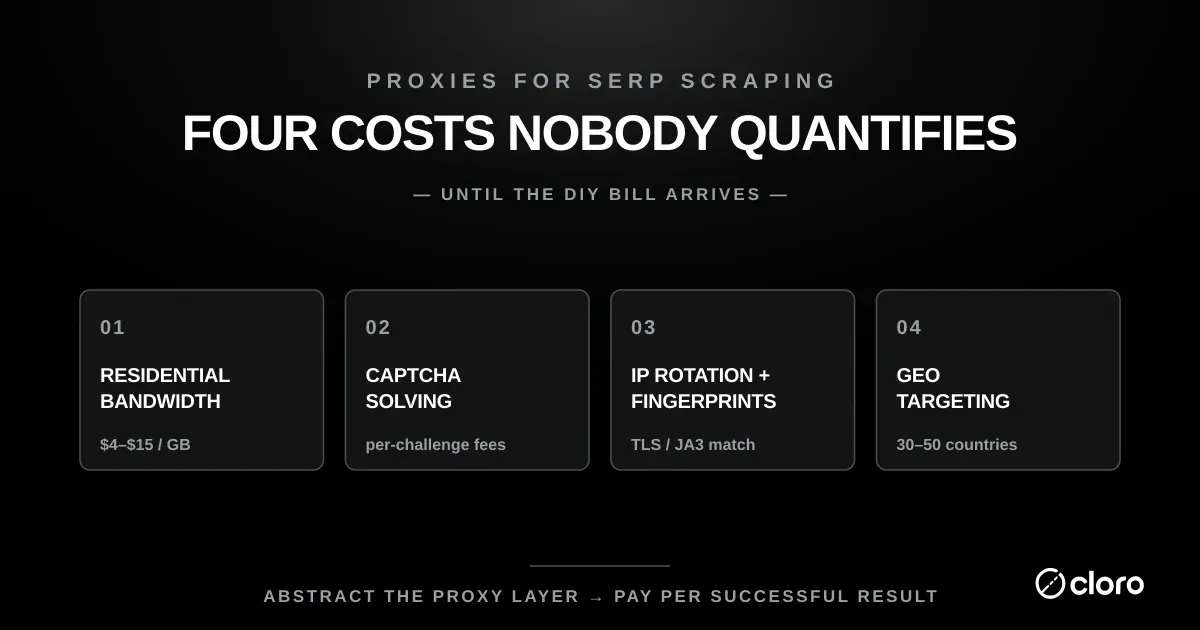
| Cost layer | What it covers | Typical monthly cost |
|---|---|---|
| Residential bandwidth | Traffic at $1.40 to $7/GB for 100,000 pages | $42 to $560 |
| Captcha solving | Third-party solver plus orchestration latency | Cents, then engineer time |
| Rotation and fingerprint | Session logic, IP scoring, TLS matching | Engineer time |
| Country geo pools | Healthy IPs across many countries | Engineer time |
The takeaway: the reason bandwidth is the smallest layer is visible only once engineer time is priced. Taking the US median software-developer salary of $131,450 (BLS, May 2024) with a 1.3x loaded-cost multiplier, an assumption rather than a citation, one engineer costs about $14,240 a month:
| Workload | Proxy | Managed browser | Engineering | Total | Engineering share |
|---|---|---|---|---|---|
| 100k requests, 0.1 FTE | $150 | $399 | $1,424 | $1,973 | 72% |
| 500k requests, 0.2 FTE | $999 | $992 | $2,848 | $4,839 | 59% |
| 1M requests, 0.5 FTE | $5,000 | $1,984 | $7,120 | $14,104 | 50% |
The takeaway: engineering is the largest single line at every volume, though it stops being a majority at the top. The FTE fraction moves the total more than anything else in the table: sliding it from 0.1 to 0.5 changes the answer by $5,696, against about $4,850 for proxy bandwidth across the same range. Any DIY estimate that quotes a per-GB rate and leaves the engineer fraction unstated has hidden its largest term, which is the actual reason these builds overrun.
1. Residential IP bandwidth
Residential proxy providers price by gigabyte of traffic, not by IP. Published rates, fetched 2026-08-13, run from $1.40/GB at 3,000 GB on Webshare (against $7.00/GB on its standard plan) through $3.00/GB on Decodo and $3.00/GB at 332 GB on Bright Data, falling to $2.50/GB at 798 GB, up to Oxylabs from $6/GB. This page previously quoted $4 to $15 per GB with no source; the sourced band is both lower and narrower, and re-checking is worth doing before you budget, since promotional rates are common and the list moves. That is not an arbitrary plateau. Residential IPs come from real consumer devices opted into proxy networks via SDK partnerships, and the supply of consumers willing to monetize their bandwidth is inelastic.
Mobile-carrier bandwidth sits in the same band: Proxies.sx publishes $4/GB falling to $2.40/GB at 250 GB, with no monthly subscription and no expiry on purchased traffic. That is bandwidth billed per GB of traffic; a managed SERP API bills per request and absorbs the proxy layer, which is the comparison the rest of this section makes.
A SERP scraping operation that hits 100,000 Google result pages per month pulls roughly 30–80 GB of traffic. The exact figure depends on whether you render JavaScript, and you usually have to, because AI Overview and inline shopping cards are drawn client-side. At even mid-market rates that is $120–$1,200/month in proxy bandwidth before any other layer of the stack.
A managed SERP API at $0.40–$2 per 1,000 calls is cheaper at almost any volume below the high end. We covered the wider pricing picture in our cheapest SERP APIs in 2026 roundup. The per-call economics have shifted a lot since the residential bandwidth market matured. Bandwidth is the one cost DIY defenders quote, yet for most teams running proxies for SERP scraping it is the smallest of the four.
2. Captcha solving
Even with clean residential IPs, captchas still happen. Google issues them when the fingerprint score crosses a threshold, regardless of the IP. Google’s own reCAPTCHA scoring model returns a risk score for each request without user friction, so a low score silently escalates you into a challenge.
The standard workaround is bolting on a third-party captcha-solving service such as 2Captcha and letting it queue against your scraping pipeline.
The unit cost is tiny — fractions of a cent per captcha — but the operational cost is not. Each solve forces a state machine for retry logic and hands you a single point of failure in your captcha vendor. Latency also varies by challenge type, whether it is reCAPTCHA, hCaptcha, or Cloudflare Turnstile, and it can add anywhere from a moment to nearly a minute per request.
We have a deeper write-up on solving captchas at scale. The short version is that the solving service is rarely the slow part. The slow part is the orchestration code that sits between your scraper and the solver.
3. IP rotation and fingerprint matching
IP rotation is the part DIY teams underestimate hardest. The mechanism is simple; doing it well means making automated traffic look like a real person’s traffic, not just cycling through addresses, and getting that wrong burns IPs faster than not rotating at all. Naive rotation (pop an IP off the pool, send the request, return the IP to the pool) produces request patterns that anti-bot systems flag immediately. A real user does not switch IPs every 2 seconds, and a real user’s traffic does not distribute evenly across a /16 subnet.
Production-grade rotation has to model real user behavior. You stick with an IP for a session, rotate at human-like intervals, and retire an IP entirely after a captcha or 403. You also score IPs by recent success rate and geo-bias the pool by query type. The TLS fingerprint and HTTP/2 frame ordering have to match the IP’s claimed device profile, because a residential mobile IP sending Chrome-on-Linux headers gets blocked instantly.
None of this is rocket science. It is also not weekend-project work, and it has to keep pace with anti-bot evolution. This is the layer where most homegrown proxies for SERP scraping quietly rot, because it needs constant maintenance nobody budgeted for.
4. Country-level geographic targeting
If your SEO reporting has to reflect what a searcher in a specific country actually sees, this is the layer that decides whether it does. Google personalizes the SERP based on the requesting IP’s geo, not just URL parameters. Google’s own documentation confirms that your current location is used to give you more helpful results, and that an IP address already reveals your general area. The Programmable Search geolocation flag helps too: the gl parameter boosts search results whose country of origin matches the value, but for genuinely local results you still need an IP physically routed in that country.
International SEO teams typically need clean coverage of 30–50 countries minimum. An SEO team in Berlin checking German queries cannot fake a Frankfurt IP with a URL flag alone.
Running a healthy proxy pool in every supported country, monitoring it for IP burn-out, and balancing requests across geos is a real ongoing project. The best SERP APIs we have tested all advertise 100+ country coverage out of the box, and that is not because they have access to better proxies. It is because they staff a dedicated team on the IP-pool operations work that you would otherwise carry yourself.
What “abstracting the proxy layer” actually means
When a SERP API like cloro tells you it abstracts the proxy layer, the concrete meaning is simple: there is no proxy in your code. You make a single HTTPS request to a REST endpoint, pass a query string and a country parameter, and get back parsed JSON. The provider’s infrastructure handles the whole chain — proxy selection, browser rendering, fingerprint matching, captcha solving, retry, parsing, and country targeting — in the time between your request and the response.
The economic effect is that infrastructure cost becomes a per-call line item instead of a fixed cost. You do not pre-buy bandwidth, run captcha-solver subscriptions, or maintain a country-balanced proxy pool. You pay for the calls you make, and the provider amortizes the underlying infrastructure across every customer. The unit economics work because proxy and fingerprinting infrastructure has high fixed cost and low marginal cost, which is exactly the shape that benefits from pooling.
The engineering effect matters more than the cost effect. The team that was spending half its sprints fighting blocks gets that time back for the actual SEO or competitive-intelligence work. Replacing DIY proxies for SERP scraping with one endpoint removes an entire category of on-call pain.
Our AI visibility platform makes this even more pronounced for SEO and brand teams tracking visibility across engines, because the same infrastructure that handles Google SERPs also handles ChatGPT, Perplexity, Gemini, and AI Overview. That means one credit pool, one API surface, and no per-engine integration work. Cross-engine consolidation is impossible to replicate with DIY proxies, because each engine fingerprints differently.
When DIY proxies for SERP scraping still make sense
The argument above is a strong default, not a universal rule. A few scenarios still favor running your own proxy infrastructure, and honest advice names them.
Compliance and data residency
Some regulated industries — finance, healthcare, parts of government work — have audit and data-residency rules that forbid routing requests through a third-party API that could in principle inspect or log the payload. If you can’t legally send a query to a third party, you have to scrape it yourself, with your own proxies, inside your own perimeter. A SERP API can’t argue its way around a hard compliance boundary.
On-premises and air-gapped pipelines
If your scraping pipeline runs inside a VPC that can’t reach external services, or entirely on-prem behind a firewall, a hosted SERP API is a non-starter. You need everything in-process, and that means your own proxy fleet and your own fingerprinting stack.
Extreme steady-state volume
At scraping volumes above roughly 50–100 million SERP requests per month with stable geographic distribution, the unit economics shift. Bulk residential bandwidth contracts and dedicated fingerprinting infrastructure start to beat the per-call API price. This is a small slice of the market — most teams that think they’re at this volume aren’t, once they measure honestly — but it is a real one. Enterprise scraping platforms that operate at this scale typically build it themselves.
If you are not in one of those buckets, the math points elsewhere. We laid out the broader architecture trade-offs in our large-scale web scraping guide. Across most volume bands the conclusion is the same: what you get back from a managed API beats the savings from rolling your own proxies for SERP scraping.
The decision in one paragraph
That’s the two-line version above. The reasoning underneath it: the bandwidth line is the smallest of the four costs, so if it alone already costs more than the API would, the other three layers only widen the gap. Build it yourself only past that volume or under those constraints, and go in knowing you are operating a proxy-and-fingerprinting platform as part of your business, not just running a scraping script. Either path can be the right one. The wrong path is the most common one: small teams running mid-volume DIY proxies for SERP scraping in 2026, paying full retail for residential bandwidth, eating captcha costs, and burning engineering hours on block-fighting because nobody quantified the costs upfront.
If you are ready to skip the proxy layer entirely, the cloro SERP API handles every component above — country-level IPs, fingerprint matching, captcha solving, and parsed JSON output — through a single REST endpoint with pay-per-call pricing. No proxy lists, no rotation logic, and no captcha service to bolt on.

About the author
Ricardo Batista
Founder, cloro
Ricardo is one of the founders and engineers behind its SERP and AI-search scraping infrastructure. Before cloro he scaled a financial comparison site to $7M ARR and ran the full-country operations of a unicorn to $65M ARR, then went back to building. He writes about search engine scraping, generative-engine optimization, and turning live search and AI-answer data into something teams can act on.
Frequently asked questions
Do I still need proxies if I use a SERP API like cloro?
No. The whole point of a SERP API is that the proxy layer is the provider's problem, not yours. You make a single REST call, the provider rotates IPs, solves captchas, manages fingerprints, and returns parsed JSON. You don't see, configure, or pay for individual proxies — pricing is per request, and the cost of the proxy infrastructure is amortized across every customer on the platform.
What does residential proxy bandwidth actually cost in 2026?
Residential proxy providers price by gigabyte of traffic, not by IP. Mid-market rates have hovered in the $4–$15 per GB range for several years and have not meaningfully fallen, because residential IP supply is inelastic — the IPs come from real consumer devices opted into proxy networks. A modest SERP scraping operation hitting 100,000 Google result pages a month pulls roughly 30–80 GB depending on whether you render JavaScript, which means proxy bandwidth alone runs $120–$1,200/month before you account for engineer time. A SERP API at $0.40–$2 per 1,000 calls is usually cheaper at any volume below the very high end.
Why do my own proxies keep getting blocked when scraping Google?
Google does not block IPs in isolation — it scores requests on a fingerprint that combines IP reputation, TLS handshake characteristics, browser headers, mouse movement (when JavaScript is loaded), navigation timing, and behavioral patterns across a session. A residential IP that looks fine in isolation will still get a captcha if the JA3 hash, header order, or scroll pattern doesn't match what Chrome on macOS actually sends. DIY proxy pools fail because the proxy is one input out of a dozen, and the other inputs need a managed browser fingerprinting layer that most teams underestimate.
Can I just use datacenter proxies for SERP scraping to keep costs down?
You can, but the captcha rate will be high enough that the apparent savings disappear. Datacenter IPs are cheap because they're trivially identifiable — Google has the IP ranges of every major cloud provider memorized. They work for low-volume scraping of small sites that don't have anti-bot protection, but for Google or Bing SERPs the realistic options are residential, mobile, or ISP-tier proxies. The cost gap between datacenter and residential exists because they solve different problems.
What about geographic targeting — do I need a proxy in every country I want to scrape?
If you want true country-level Google results (which is the entire point for international SEO), yes. Google personalizes the SERP based on the requesting IP's geo, not just the URL parameters. The `gl=` and `uule=` parameters help but don't fully replicate what a user in that country sees. A SERP API handles this by maintaining IP pools in every supported country and routing your request transparently — you pass `country: 'BR'` as a parameter and the provider picks an IP. Maintaining your own pool of healthy IPs in 50+ countries is a project, not a side task.
When does running my own proxy infrastructure actually make sense?
Three legitimate scenarios: (1) compliance — your data residency or auditing requirements forbid third-party traffic interception, common in regulated finance and healthcare; (2) on-prem — your scraping pipeline runs inside a VPC that can't reach external APIs; (3) extreme volume at predictable steady state — at scraping volumes above roughly 50–100 million SERP requests per month with stable geographic distribution, the unit economics of buying bulk residential traffic and a fingerprinting platform start to beat per-call API pricing. Below that, the engineer-time and infrastructure cost of running it yourself is the single largest hidden item.
Related reading
Best SERP APIs 2026: 9 Tested on Cost, AI and Tracking
9 SERP APIs tested head to head on AI Overview parsing, engine breadth, rank-tracking depth, and true cost per 1,000 calls. Full benchmark table inside.
Cheapest SERP API 2026: True Cost-per-Call Compared
The cheapest SERP API in 2026, ranked by true cost-per-call. Compare cloro, DataForSEO, Serper, and SerpApi, plus the hidden fees that flip rankings.

Large Scale Web Scraping for AI and SEO
Master large scale web scraping with this guide. Learn to build resilient architecture, structure data for AI, and optimize costs for enterprise-level SEO.