
AI Visibility Tracking Setup: 30-Minute Workflow

On this page
You can set up AI visibility tracking in 30 minutes. Not a polished dashboard. Not a stakeholder-ready program. Just a working measurement loop with real data.
The prototype is simple: pick your prompts, query the engines, log brand mentions and citations, then compare the baseline next week. That is enough to learn whether the program is worth productionizing.
This guide gives you the step-by-step workflow and copy-paste code for an AI visibility tracking setup you can finish before your next standup. For a broader program design, read AI search tracking and the ChatGPT visibility tracker.
What AI visibility tracking actually measures
One engine-level fact belongs in the setup, because it decides how you read every number that follows. Across roughly 2,500 prompts per engine, five of six engines grounded their answers in live sources 91-98% of the time while Gemini grounded just 41.1%, and on a 2026-08-19 re-measurement the panel ran 70.7% to 99.2% with Gemini still last. On an answer with no live source there is no citation to win, so a low mention rate on Gemini can be reporting the engine rather than your brand. Store grounded and ungrounded answers as separate states from day one; retrofitting that distinction later means rerunning your history.
AI visibility tracking reduces to three metrics, and every dashboard you eventually build is just these three sliced by engine, query, and time. Get the definitions straight now and the CSV you produce in 30 minutes will already answer the questions your stakeholders ask.
Mention rate
Mention rate is the share of tracked queries where an AI engine names your brand anywhere in its answer. It is the closest AI-era analogue to search impressions — did you show up at all? A brand can be named in the prose without being linked, which is exactly why mention rate and citation rate are tracked as separate columns.
Citation rate
Citation rate is the share of answers that link to your domain as a source. This is the metric tied to actual referral traffic, because a citation is a clickable path back to your site. When mention rate is high but citation rate is low, AI engines know who you are but aren’t sending visitors — that is an attribution gap, not an awareness gap, and it changes what you fix next.
Share of voice
Share of voice compares your mention rate against named competitors across the same query set. It answers a blunt question: of all the brands an engine could have surfaced for this prompt, what fraction of the airtime went to you? Share of voice is the number executives ask for first, so capture the competitor columns from the very first run. We go deeper on the metric in AI share of voice.
What you’ll need
- A cloro API key (sign up at cloro.dev). The free tier’s 500 credits a month cover a first pass on about 25 queries; the full 50-query, 4-engine run uses about 900 credits (ChatGPT and AI Overview 5 each, Perplexity and Gemini 4 each).
- Python 3.9+ installed locally (or any HTTP client; we use Python here)
- A Google Sheets or Excel doc to log results
- 30 minutes
No infrastructure, no dashboard tool, no scheduler. The goal here is to validate that AI visibility tracking is worth doing for your brand, not to build the production system.
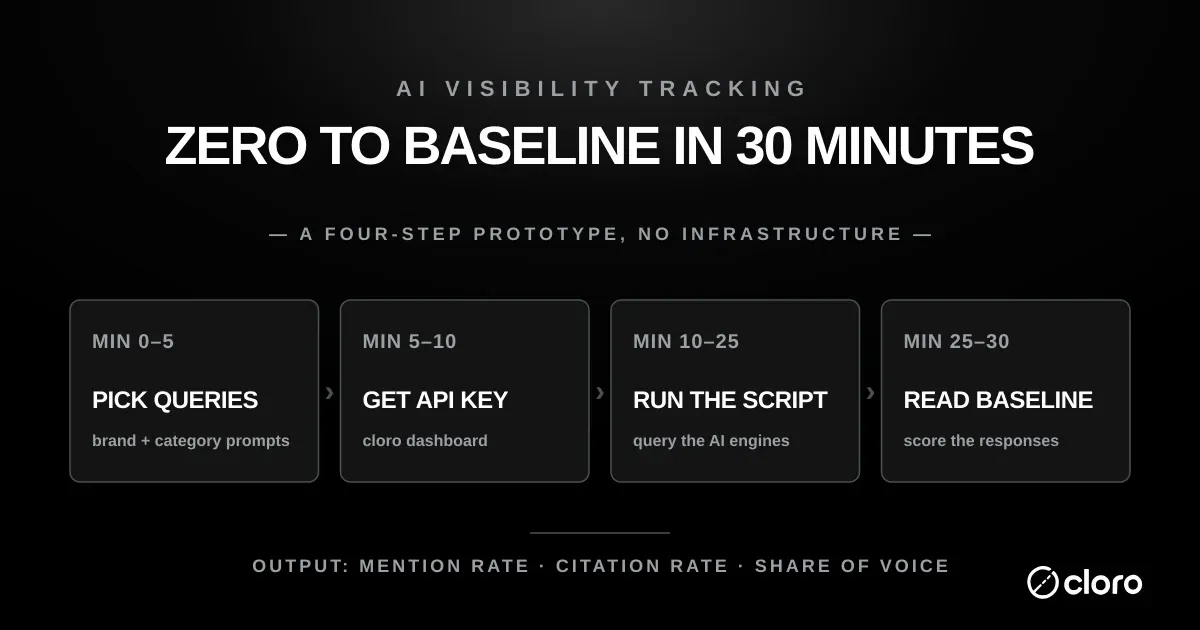
Minute 0–5: pick your queries
The biggest determinant of whether your tracking program produces useful data is the query set. Open a doc and list 50 queries split roughly:
- 15 branded queries that include your company name. Examples:
what does cloro do,cloro vs serpapi,is cloro reliable for SERP scraping. - 15 category queries about your product space without naming any brand. Examples:
best SERP API for AI search,top AI brand monitoring tools,cheapest scraping API for Google. - 20 use-case queries describing the job your product solves. Examples:
how to monitor brand mentions in ChatGPT,how to track AI overview citations,how do I scrape Google AI mode results.
Source the queries from your sales team’s first-call notes (what do prospects actually ask?), your existing Google Search Console data (what queries already drive impressions to your site?), and the autocomplete suggestions for your top 5 head terms. Don’t invent queries from scratch. They need to be queries your buyers actually type.
A whole AI visibility tracking setup lives or dies on this list, so spend the full five minutes here. Favour queries with clear commercial intent over vanity phrases nobody buys on. If you already run rank tracking, your highest-converting keywords are the obvious seeds; if you don’t, your sales inbox holds the exact language buyers use.
Minute 5–10: get a cloro API key
If you already have one, skip ahead. Otherwise, go to cloro.dev and sign up. From here the whole setup is one pipeline: authenticate with this key, send each query to cloro’s monitoring API for every engine, and let the script check the response for your brand before writing a row to CSV. Copy the sk_live_... key from your dashboard and export it as an environment variable so the script below picks it up:
export CLORO_API_KEY="sk_live_your_key_here"The free tier’s 500 credits a month cover a reduced first pass. Running the full prototype weekly (about 3,600 credits a month) fits inside Lite, $30/month for 37,500 credits.
Minute 10–25: run the script
Save the following as track-ai-visibility.py and run it. It hits 4 AI engines (ChatGPT, Perplexity, Gemini, Google AI Overview) with each of your queries and logs the results to a CSV. The script uses the Requests HTTP library, so run pip install requests first if you don’t already have it.
import csv
import os
import requests
from urllib.parse import urlparse

API_KEY = os.environ["CLORO_API_KEY"]
BRAND_DOMAIN = "cloro.dev"  # change to your domain
COMPETITOR_DOMAINS = ["competitor1.com", "competitor2.com"]  # change to yours
ENGINES = ["chatgpt", "perplexity", "gemini", "aioverview"]
COUNTRY = "US"

QUERIES = [
    # Paste your 50 queries here, one per line, as strings.
    "best AI brand visibility tracking tools",
    "how to monitor chatgpt mentions",
    # ... etc
]


def check_query(engine: str, query: str) -> dict:
    """Hit the cloro API for one engine + one query, return parsed mention data."""
    response = requests.post(
        f"https://api.cloro.dev/v1/monitor/{engine}",
        headers={
            "Authorization": f"Bearer {API_KEY}",
            "Content-Type": "application/json",
        },
        json={
            "prompt": query,
            "country": COUNTRY,
            "include": {"markdown": True},
        },
        timeout=120,
    )
    response.raise_for_status()
    data = response.json()["result"]

    sources = data.get("sources", [])
    text = (data.get("markdown") or "").lower()

    brand_mentioned = BRAND_DOMAIN in text or any(
        BRAND_DOMAIN in (s.get("url") or "") for s in sources
    )
    competitor_mentions = sum(
        1 for c in COMPETITOR_DOMAINS
        if c in text or any(c in (s.get("url") or "") for s in sources)
    )
    brand_cited = any(BRAND_DOMAIN in (s.get("url") or "") for s in sources)

    return {
        "engine": engine,
        "query": query,
        "brand_mentioned": brand_mentioned,
        "brand_cited": brand_cited,
        "competitor_mentions": competitor_mentions,
        "total_sources": len(sources),
    }


def main():
    rows = []
    for query in QUERIES:
        for engine in ENGINES:
            try:
                rows.append(check_query(engine, query))
                print(f"  {engine}: {query[:60]}")
            except Exception as e:
                print(f"  ! {engine}: {query[:60]} -> {e}")

    with open("ai-visibility-results.csv", "w", newline="") as f:
        writer = csv.DictWriter(f, fieldnames=rows[0].keys())
        writer.writeheader()
        writer.writerows(rows)

    # Summary
    total = len(rows)
    mentioned = sum(1 for r in rows if r["brand_mentioned"])
    cited = sum(1 for r in rows if r["brand_cited"])
    print(f"\nMention rate: {mentioned}/{total} = {100*mentioned/total:.1f}%")
    print(f"Citation rate: {cited}/{total} = {100*cited/total:.1f}%")


if __name__ == "__main__":
    main()
Run it:
python3 track-ai-visibility.pyFor a 50-query × 4-engine matrix, the script takes 5–15 minutes depending on engine response times. The output is a CSV with one row per query-engine pair plus a summary printed to stdout.
Minute 25–30: read the baseline
Open ai-visibility-results.csv in Sheets/Excel. The summary numbers at the bottom of the script output are your baseline mention rate and citation rate. Don’t over-interpret a single run — the value of this AI visibility tracking setup is the trend line, and you don’t have one yet. If you want something to sanity-check your first numbers against, the AI Visibility Leaderboard publishes the same two rates for twelve software categories every week. For now, just look for the obvious asymmetries across three cuts:
- Mention rate by engine. A pivot table on
engine×brand_mentionedshows whether you’re invisible on Perplexity but present on ChatGPT, or any other per-engine pattern. - Mention rate by query intent bucket. Tag each query as branded/category/use-case and pivot. Branded mention rate near 100% is expected. Category mention rate at 0% is your biggest opportunity. Use-case mention rate is where buying intent lives.
- Citation rate vs mention rate. The ratio between these two tells you whether AI engines drive traffic to you or just brand awareness without clicks. Low citation rate means you have an attribution problem, not a visibility problem.
How much of your first number is noise
“Don’t over-interpret a single run” is easy to say and easy to ignore, so here is the size of the problem, measured.
We took every prompt cloro tracks on a daily schedule and compared each day’s answer with the previous day’s, on the same prompt and the same engine, over 1 to 16 August 2026. For each pair we compared the set of domains cited. The measure is a Jaccard overlap: 1.0 means the two runs cited exactly the same domains, 0 means they shared none.
| Engine | Day-to-day pairs | Mean overlap | Identical source set | Shared nothing |
|---|---|---|---|---|
| Google AI Mode | 6,179 | 0.25 | 1.9% | 7.9% |
| ChatGPT | 4,863 | 0.33 | 8.4% | 7.9% |
| Gemini | 4,504 | 0.36 | 6.8% | 18.1% |
| Copilot | 6,233 | 0.48 | 18.0% | 14.4% |
| Perplexity | 6,750 | 0.61 | 29.4% | 6.2% |
Ask Google AI Mode the same question on two consecutive days and it reuses about a quarter of the domains it cited yesterday. Fewer than one pair in fifty comes back with the identical source list. Gemini shares no domain at all with its previous day’s answer on 18.1% of runs. Perplexity was the steadiest engine over that window and still turned over roughly 40% of its cited domains overnight.
Nothing changed on those days except the engines. Same prompt, same country, same infrastructure, 24 hours apart.
That “over that window” is doing real work, and it is worth seeing why. We re-ran the same measurement a few days later and Perplexity’s stability had gone. Tracking the share of yesterday’s cited domains that survive to today, day by day:
| Date (2026) | Perplexity | ChatGPT | Google AI Mode |
|---|---|---|---|
| Aug 11 | 89.6% | 51.3% | 38.3% |
| Aug 13 | 81.0% | 48.5% | 36.9% |
| Aug 15 | 72.0% | 48.6% | 37.8% |
| Aug 16 | 57.8% | 50.3% | 37.5% |
| Aug 17 | 39.7% | 51.0% | 37.2% |
| Aug 19 | 37.9% | 48.6% | 37.8% |
Perplexity went from the most stable engine we measure to the least, in eight days, while ChatGPT held between 48% and 51% and AI Mode never left the 36.8% to 38.3% band. The slide lines up with a jump in Perplexity’s error rate over the same days, so something changed at Perplexity rather than on the web.
We ran it again over the 16 days to 7 October 2026. Perplexity had recovered to 51.1%, ChatGPT sat at 51.9%, and AI Mode had climbed out of its band to 50.8%. Three engines that were 50 points apart on 11 August were within about a point of each other.
The lesson is not about Perplexity. It is that the noise floor is itself a moving number. Measure it on your own query set, from your own data, rather than copying a constant out of a blog post, and re-measure it when a number you trusted starts behaving oddly. The table above is a snapshot with a date on it, and so is yours.
That reframes what your CSV is. A row saying you were not cited for a category query is not a finding, it is one draw from a distribution, and on AI Mode it is close to a coin flip. The uncomfortable corollary is that the reverse is also true: the query where you did get cited may not be a win you can repeat.
The fix is replication, not cadence. Before you act on any single query, run it three to five times and use the rate rather than the outcome. That costs a few more credits and turns a binary into a measurement. It also means the weekly diff below should compare rates, not presence flags: a brand that went from cited to uncited on one run has told you almost nothing, and a brand that went from 4-in-5 to 1-in-5 has told you something real.
One ratio is worth writing down before you close the file: citations divided by mentions. Treat that number as the headline KPI of your AI visibility tracking setup, because it captures both whether engines know you and whether they send traffic. A ratio climbing week over week means your content is getting more cite-worthy; a flat ratio with rising mentions means awareness without clicks.
That’s the baseline. Save the CSV with today’s date in the filename, then run the script again next week and diff the two files. That diff is your AI search tracking program in week 2, and the same pattern scales to a weekly cadence indefinitely.
How to increase AI visibility when the baseline looks weak
Your first AI visibility tracking setup will almost always surface an uncomfortable number or two. That is the point — a baseline you feel good about on day one isn’t measuring anything real. Here is how to read the most common bad results, and what each one tells you to fix first.
Category mention rate near zero
If you appear for branded queries but vanish on category queries, AI engines recognise your name but don’t treat you as a default answer for the problem you solve. This is the most common pattern for younger brands, and it is a content-and-citation problem, not a tracking bug.
Publish the comparison pages, plain-language definitions, and how-to guides that engines pull from, and make sure each one is crawlable and quotable. Re-run the AI visibility tracking setup in two weeks and watch whether category mentions start to move.
High mentions but low citations
When engines name you but rarely link you, your attribution surface is thin. The fix is structural: sharp, quotable claims, a clean information architecture, and pages that answer the exact question a prompt implies. Citations follow quotability, not brand size, so a small brand with extractable pages can out-cite a much larger competitor. Track the mention-to-citation ratio every week and treat a widening gap as a content-formatting task, not a PR one.
One engine lagging the rest
Per-engine gaps are normal — the engines crawl differently and weight sources differently. If you are strong on ChatGPT but weak on Perplexity, that usually reflects which sources each engine trusts rather than a flaw in your setup. Don’t chase parity for its own sake. Prioritise the engine your buyers actually use, which your query-intent buckets already point you toward.
What productionizing looks like (when you’re ready)
The prototype above answers “is this worth doing”. Within a week or two of running it, the answer is usually yes. The path from prototype to production is five well-worn steps:
- Move the CSV to a warehouse. Pipe results into Postgres, BigQuery, or Snowflake instead of a flat file — BigQuery’s batch load ingests CSV directly, so the transition is mechanical. Store one row per query-engine-week.
- Schedule the script. A GitHub Actions scheduled workflow runs it on a cron trigger with no server to maintain; plain cron or Airflow work equally well. Weekly is the right default cadence.
- Build a dashboard. Looker or Metabase if you already run one, otherwise a lightweight Streamlit app. Show mention rate trend, share of voice trend, citation rate trend, and a query-level breakdown.
- Add competitor tracking. Expand the script to compute share of voice automatically against your top 3–5 competitors.
- Layer in sentiment. Pipe each response text through a sentiment classifier and store the score per row.
Or skip steps 1–5 entirely and let cloro’s AI visibility tracking API be the production layer. Same engine coverage, but you don’t build the warehouse, scheduler, or dashboard yourself. We covered the build-vs-buy trade-off in AI search visibility tools: build vs buy.
If your stakeholders want a finished dashboard rather than a data feed, hosted trackers set the price to beat. Otterly.ai starts at $29/month. Semrush’s AI Visibility Toolkit is an add-on from $99/month per domain with 25 tracked prompts, and Ahrefs Brand Radar is a $199/month add-on, per Zapier’s review. Compare those prompt limits against the query count your prototype showed you need.
How do you monitor brand visibility across thousands of AI prompts daily?
The prototype and a thousands-of-prompts-a-day program differ in plumbing, not method: switch to async delivery with webhooks, and budget by credits (ChatGPT 5 per call, Gemini, AI Mode, and Perplexity 4). At 1,000 prompts a day against ChatGPT that is about 150,000 credits a month, inside the Hobby tier ($100/month for 250,000); 3,000 a day across three engines lands in Starter ($250/month for 650,000). The weekly cadence argument applies at every scale.
Common gotchas
- Personalization. If you’re testing AI engines manually in a browser, your logged-in account skews the results. The API approach above sidesteps this. Every API call is a clean session.
- Rate limits. The upstream APIs behind ChatGPT, Gemini, and Perplexity all cap requests per minute, so a tight loop occasionally rate-limits. cloro’s API handles retries transparently, so the script above doesn’t need its own retry logic.
- Country drift. AI engines personalize by IP geo. The
country: "US"parameter ensures consistent country targeting. Change it for international tracking. - Query set staleness. The 50 queries that mattered three months ago aren’t the same queries that matter today. Refresh quarterly.
Turning the prototype into a weekly habit
The 30-minute AI visibility tracking setup is a prototype, but its value only compounds if you re-run it on a schedule. The cadence below works for most teams without turning tracking into a second job.
Weekly is the right default
Run the same query set once a week and diff the CSVs. Weekly is a budget decision more than a statistical one: monthly misses fast regressions, and daily costs five times as much without making any single answer more trustworthy, because the churn measured above does not shrink with a tighter schedule.
What does make a number trustworthy is repeating the query within each run. Three to five samples per query per week beats one sample per query per day at similar cost, and unlike the daily schedule it gives you an error bar instead of a sequence of coin flips.
Watch the deltas, not the absolute numbers
A single week’s mention rate is a snapshot. The diff between two weeks is the story. Flag any query where you dropped from mentioned to absent, and any query where a competitor appeared for the first time. Those two events are your early-warning system, and they surface long before a quarterly report would.
A single dropped query rarely matters; three dropped queries in the same intent bucket is a trend worth acting on that week. Given the day-to-day overlap measured above, that threshold is not conservatism, it is the minimum needed to clear the engines’ own churn.
Keep the query set stable, then version it
Resist the urge to rewrite queries every week — you cannot compare against a moving baseline. Freeze the set for a quarter, then version it deliberately when your positioning or product changes. Note the version in the CSV filename so an old and a new baseline never get diffed against each other by accident.
Next steps
Once you have a baseline, the next decisions are which engines to add (we recommend AI Mode, Copilot, and Grok in that priority), what cadence to settle on (weekly is the right default), and which platform tool to layer in for stakeholder dashboards (see LLM visibility tracking tools). The 30-minute prototype is the smallest end-to-end loop you can build. Everything from here is iteration.

About the author
Ricardo Batista
Founder, cloro
Ricardo is one of the founders and engineers behind its SERP and AI-search scraping infrastructure. Before cloro he scaled a financial comparison site to $7M ARR and ran the full-country operations of a unicorn to $65M ARR, then went back to building. He writes about search engine scraping, generative-engine optimization, and turning live search and AI-answer data into something teams can act on.
Frequently asked questions
Do I need an engineer to set up AI visibility tracking?
Not for the 30-minute setup in this post: anyone comfortable running a Python script and pasting output into a spreadsheet can complete it, and the same endpoint runs inside an n8n or Zapier workflow if you would rather not touch code at all. For ongoing automated tracking with weekly cadence and a real dashboard, you eventually want either a data engineer or a no-code platform like Peec AI/OtterlyAI/Profound. The 30-minute version gets you measuring; productionizing comes later.
What does the 30-minute setup cost?
Negligible. Running 50 queries against 4 engines is 200 API calls at cloro's pay-per-call pricing — under $1 for the initial run. Even at weekly cadence over a month, the API spend stays in the low single digits per month while you're validating the program. Productionizing changes the cost equation; the prototype phase essentially doesn't.
Which engines should I cover in the first run?
ChatGPT, Perplexity, Google AI Overview, and Gemini. Those four cover the majority of buyer-facing AI search behavior in 2026. AI Mode, Copilot, and Grok can be added in week 2 once the pipeline works end-to-end.
How do I pick the queries?
Split a 50-query starter set roughly 30/30/40 across (a) branded queries that include your company name, (b) category queries about your product space without naming any brand, and (c) use-case queries describing the job-to-be-done your product solves. Pull the actual queries from your sales team's first-call notes and your existing GSC data — don't invent them from scratch.
Where does the data live after I run the script?
For the 30-minute prototype, a spreadsheet is fine — Google Sheets or Excel, one row per query-engine pair, columns for mention rate / citation count / sentiment. Productionizing means moving to a data warehouse (BigQuery, Snowflake, Postgres) and a dashboard (Looker, Metabase, or a custom view). The prototype answers 'is this worth automating', and the answer is usually yes within the first week.
Related reading
Best LLM & AI Visibility Tools 2026: 12 Tested
We tested 12 LLM visibility tools (also sold as AI visibility trackers and checkers) on real brand-monitoring workflows across ChatGPT, Perplexity, and Gemini. What works, what doesn't.
ChatGPT Visibility Tracker: Track Your Brand Mentions
Learn how a ChatGPT visibility tracker works, run a free manual baseline, and compare the best tools to monitor your brand mentions in AI search.
AI Share of Voice: How to Measure Brand Visibility
AI share of voice measures how often your brand appears in ChatGPT, Perplexity, Gemini, and AI Overviews versus competitors. Learn the formulas.