
Google Ads Transparency vs SERP Ads: Which to Use When

On this page
Searches for google ads transparency hide two completely different jobs. One person wants Google’s public ad archive at adstransparency.google.com, where you can look up every ad a verified advertiser has run. Another wants competitor ad monitoring on the live SERP, where the question is which advertisers are bidding on a query right now. Often the searcher doesn’t realize those are separate products.
This post lays out what each one is, who needs which, and what tooling fits. One note up front: cloro covers the SERP-ads job, not the Ads Transparency Center one. The other half of this post points at what does.
The two products are completely different
Google Ads Transparency Center: the historical ad archive
Google launched the Ads Transparency Center on March 29, 2023 as a searchable hub of all ads served from verified advertisers across Search, YouTube, and Display. It is a standalone product, not part of Google Search, built to meet advertising-disclosure rules in the EU and elsewhere. At launch Google noted that more than 30 million people interact with its ads transparency and control menus every day, which is the scale the archive was built to serve.
The archive lists each advertiser’s name, location, the entity that pays for the ads, and every ad they served over a chosen time window, per Google’s Ads Transparency Center policy. Only advertisers who complete Google’s advertiser identity verification carry a “verified” badge, and once verified their organization name, location history, ad creatives, and ad run dates become public in the center. For users in the European Economic Area, the Ads Transparency Center adds three extra disclosures Google does not surface elsewhere: the ad’s targeting parameters, the total number of people it reached, and a subject-matter label, under the same policy.
What it shows:
- Ads an advertiser served across Google’s platforms: Search, Display, Gmail, and YouTube
- The date range each ad ran, filterable by date and by targeted location
- The ad creative itself, so you can see the format (text, image, or video)
What it does not show:
- Which keywords or queries triggered each ad
- Bid amounts or ad spend
- Which positions the ads occupied on the SERP
- Real-time data (there’s typically a 24–48 hour delay)
That combination, full creative history with no query or position, is why the archive answers “what has this advertiser run,” not “is it showing right now.”
Access pattern: free public web UI. There is no official API. Programmatic access requires scraping the React-rendered page with browser automation, plus session-cookie management since Google rate-limits the page aggressively.
Use cases:
- Compliance auditing (“what creative is Competitor X running across all Google surfaces?”)
- Brand-protection enforcement (detecting unauthorized advertisers running ads on your brand assets)
- Historical creative analysis (longitudinal study of ad creative trends in a vertical)
SERP ads: the real-time sponsored results
SERP ads are the inline sponsored results that appear on a live Google search, typically 1–4 ads stacked above the organic results and occasionally additional ads at the bottom or in a sidebar. Google marks these paid results with a “Sponsored” label that stays visible as the user scrolls the results page. The block is not fixed: Google runs an auction on every search to determine which ads show, their rank on the page, and whether any ads show at all, so the sponsored results you scrape are recomputed query by query.
What they show:
- Position on the live SERP for a specific query
- Advertiser identity and display URL
- Ad title, description, and sitelinks
- Country and device-specific rendering (mobile and desktop SERPs ship different ads)
What they do not show:
- Historical ads that aren’t currently live
- Ads outside the Google Search SERP (Display, YouTube, Performance Max)
- Bid amounts (though competitive bid intelligence can be inferred from position-over-time data)
That combination, the exact query and position but nothing before the current scrape, is why SERP ads answer “what’s showing right now,” not “what has this advertiser ever run.”
Access pattern: returned as the ads[] field in any Google SERP scraping API. cloro’s /v1/monitor/google endpoint returns sponsored ads inline alongside organic results, AI Overview, PAA, and related searches in one JSON response, so you can track ads and organic movement from the same call instead of stitching two tools together. Field-level documentation lives on the Google ads scraper page.
Use cases:
- Real-time competitor ad monitoring (“which advertisers are bidding on
best CRM softwareright now?”) - Position-over-time tracking (“when did Competitor X enter the auction for our branded keyword?”)
- Sponsored-ad rotation analysis (“how many distinct advertisers cycle through position 1 on a given query daily?”)
- SERP feature presence detection (“does the SERP for
enterprise CRMcarry sponsored ads at all, or has Google killed the auction for that query?”, since Google’s auction decides whether any ads show at all on a per-query basis)
Side-by-side: wide but shallow vs. narrow but deep
Worth sizing before you pick: on the same query cohort we measured, paid placements are rare on Google and common elsewhere. Our ChatGPT ads penetration study recorded ads on 1.05% of classic Google SERPs and 0.24% of Google AI Overviews, against 51.0% of US ChatGPT responses. Google’s own surfaces are sparse enough that a competitor-monitoring programme built only on live SERP ads will see very little, most days, for most queries.
That argues for using the Transparency Center for breadth of coverage and live SERP scraping for the specific commercial queries where ads actually render, rather than treating them as interchangeable.
The two surfaces answer different questions, so they return different data. This table maps the practical differences.
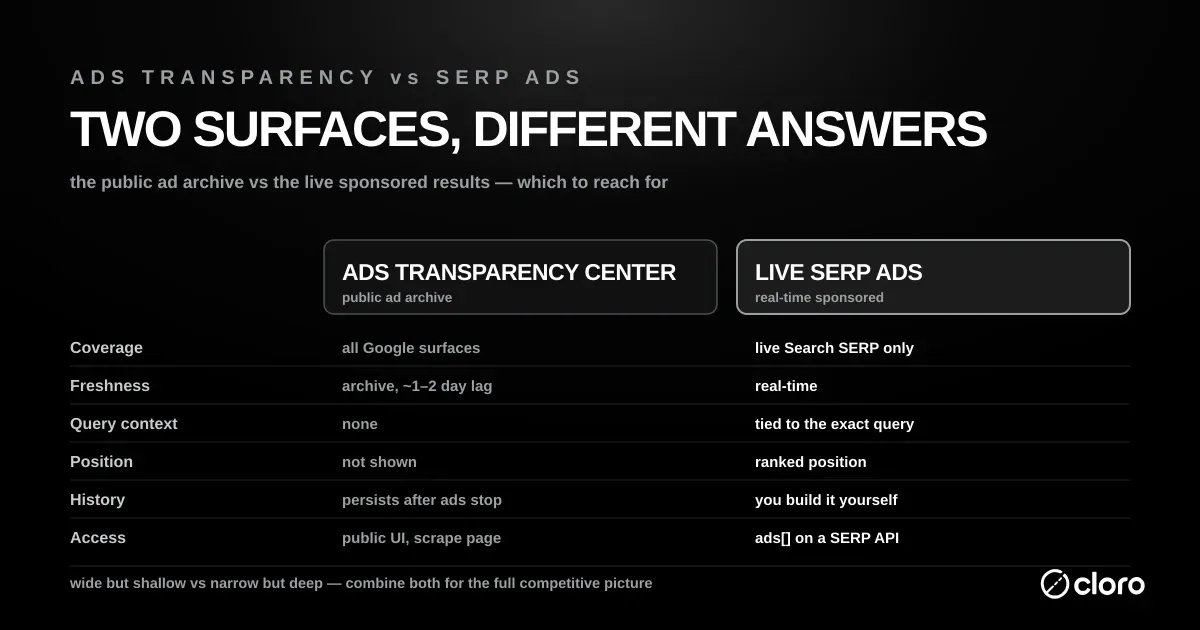
| Dimension | Google Ads Transparency Center | Live SERP ads |
|---|---|---|
| Coverage | Every ad an advertiser ran, across Search, Display, Gmail, and YouTube | Only ads currently live on the Search results page for a given query |
| Freshness | Historical archive, updated with a lag of roughly a day or two | Real-time — the ads showing at the moment you scrape |
| Query context | None — you cannot see which search term triggered an ad | Full — every ad is tied to the exact query you ran |
| Position | Not shown | Ranked position and block (top or bottom of page) |
| Historical depth | Long — ads persist in the archive after they stop running | None — the SERP shows only what is live now, so you build history yourself |
| Formats | Text, image, and video creative across all Google surfaces | Text ads, plus sitelinks, on the Search SERP |
| Geography | Filter by targeted location | One country and device per scrape |
| Access | Public web UI, no official API — scrape the rendered page | ads[] field on a SERP scraping API response |
Read the table as two axes. The Google Ads Transparency Center is wide but shallow: it spans every Google surface, but it never tells you the query, the position, or the live auction. SERP scraping is narrow but deep: one query at a time, but with the position, timing, and freshness the archive can’t give you.
Decision tree: which one do you need?
If your question is about a specific advertiser’s historical creative across Google’s network, you want the Google Ads Transparency Center. Examples:
- “Show me every ad Apple ran in the US between Jan and Mar”
- “Audit Competitor X for unauthorized brand-name advertising”
- “Track creative rotation patterns in the SaaS category over 12 months”
If your question is about the live SERP for a specific query, you want SERP scraping. Examples:
- “Which advertisers are bidding on
marketing automation softwaretoday?” - “When did our brand-name SERP start showing competitor ads?”
- “Track ad position 1 for our top 100 commercial keywords hourly”
If your question is both (a common need at enterprise scale), you’ll combine both data sources in your warehouse. Most large competitive-intelligence programs run nightly Ads Transparency Center pulls plus hourly SERP-ad sampling, joined by advertiser identifier.
Worked example: tracking a competitor’s brand-term campaign
Say a competitor starts bidding on your brand name. You want three things: when it started, what the creative says, and where the ad ranks. Neither surface answers all three alone.
Step 1: confirm the campaign exists (Google Ads Transparency Center). Search the competitor’s advertiser profile. Filter to your region and the last 30 days. If they’re running a text ad whose creative mentions your category, the archive shows the creative and its date range. Now you know the campaign is real and roughly when it launched.
Step 2: see where it lands on your branded SERP (SERP scraping). The archive can’t tell you whether that ad actually shows for the query <your brand>, or at what rank. So scrape your branded query directly. The ads[] array returns the live sponsored block, position-tagged, for the country and device you care about.
Step 3: watch it over time (SERP scraping, on a schedule). Run the branded query hourly. Persist each ads[] snapshot to your warehouse. Diff adjacent hours. You now see exactly when the competitor enters and exits the auction, and whether they hold the top block or get pushed to the bottom.
Step 4: join the two (warehouse). Key the archive pull and the SERP snapshots on the competitor’s advertiser identifier. The archive gives you creative and campaign lineage. The SERP feed gives you live position and timing. Joined, you get the full picture: what they’re saying, where it shows, and when it moves.
The lesson generalizes. Use the archive for what an advertiser has done. Use SERP scraping for what is happening on a query right now. When the question spans both, run both.
What neither surface gives you
Both tools have hard limits. Knowing them upfront saves a wasted integration.
- Exact spend and bids. Neither the archive nor the SERP shows what an advertiser paid. The archive shows creative; the SERP shows position. You can infer bid pressure from position-over-time, but the number itself is never exposed.
- Keyword-level targeting. The Google Ads Transparency Center never links an ad to the query that triggered it. SERP scraping gives you the query, but only for queries you actually scrape, so you have to know which terms to watch.
- Auction internals. Google’s Quality Score and ad-rank math are private. You see the outcome (which ad, which position) and never the inputs.
- Unified cross-surface reach. The archive spans Google’s surfaces but flattens them into a creative list. The SERP feed is Search-only. Outside the EEA disclosures, neither gives you a single “reached N people across Search and YouTube” number.
The practical takeaway: treat both as observational tools. They tell you what an advertiser is visibly doing, not what it costs them or why the auction resolved the way it did.
How to scrape the Ads Transparency Center programmatically
The Google Ads Transparency Center has no official API, so programmatic access means scraping. The page is React-rendered and uses Google’s standard anti-bot stack, so the approach is similar to scraping any modern Google product.
The shape that works:
- Headless browser. Playwright or Puppeteer with stealth patches. The page does not server-render the ad list; you have to wait for the React tree to hydrate and the ad cards to populate.
- Per-advertiser flow. Search by advertiser name, click through to the advertiser’s Transparency Center profile, paginate through the ad cards.
- Date filter URL parameter.
?domain=<domain>®ion=US&from=<date>&to=<date>lets you scope to a date range without clicking through the UI date picker. - Session cookies + residential IP. Google rate-limits the page after ~50 requests from a single IP. Residential proxy rotation plus session-cookie reuse is the standard pattern.
For the Ads Transparency Center specifically, cloro is not the right tool, because our scope is the Google SERP, not standalone Google products. Options that do fit:
- General-purpose web scrapers with session/cookie management (Bright Data, ScrapingBee, ScraperAPI). Pair those with your own browser-automation script targeting the React-rendered ad cards. See our ScraperAPI alternatives for buyers comparing managed options.
- A custom Playwright pipeline if you need fine control over the data extraction or have specialized requirements (e.g., creative-image OCR for compliance auditing).
How to monitor SERP ads with cloro
SERP ads are the live, query-specific sponsored results, and cloro’s /v1/monitor/google endpoint returns the ads[] array as part of the standard SERP response. Same call pattern as organic-result tracking, no special parameter required.
curl -X POST https://api.cloro.dev/v1/monitor/google \
  -H "Authorization: Bearer sk_live_your_api_key_here" \
  -H "Content-Type: application/json" \
  -d '{
    "query": "best crm software",
    "country": "US",
    "device": "desktop"
  }'
The response includes the parsed ads[] array:
{
  "success": true,
  "result": {
    "ads": [
      {
        "position": 1,
        "blockPosition": "top",
        "title": "HubSpot CRM — Free Forever Plan",
        "url": "https://www.hubspot.com/products/crm",
        "displayedUrl": "hubspot.com/crm",
        "domain": "hubspot.com",
        "description": "Manage your pipeline with the #1 free CRM. Easy setup, no credit card.",
        "sitelinks": [
          { "url": "...", "title": "Free Plan", "description": "..." }
        ]
      }
    ],
    "organicResults": [...],
    "peopleAlsoAsk": [...],
    "relatedSearches": [...]
  }
}
For real-time competitor ad monitoring, the right pattern is hourly snapshots across your tracked-query set, persisted to your warehouse. Diff between adjacent hours to detect:
- New advertiser entries (a domain that wasn’t in
ads[]an hour ago) - Position changes (advertiser moved from position 3 to position 1, which means they raised their bid)
- Advertiser exits (a domain that was bidding all morning is suddenly missing; paused for budget)
- Block-position shifts (top-of-page ads moving to bottom-of-page is a quality-score signal)
For broader SERP monitoring beyond ads (AI Overview source rotation, PAA churn, organic position changes), see the rank tracking + SERP monitoring use-case page.
Joining the two in your warehouse
The post keeps saying “join them by advertiser identifier.” Here is what that means in practice.
The Google Ads Transparency Center identifies advertisers by verified name and by an advertiser ID in the profile URL. SERP ads identify advertisers by display URL and destination domain. These don’t match automatically: a verified legal name is not a domain. So you need a bridge.
The usual pattern:
- Normalize the SERP side to a domain. Every
ads[]entry carries adomainfield. Use it as the join key on the SERP side. - Normalize the archive side to a domain. The archive lets you search by website, so pull an advertiser’s ads by domain and store that domain next to the advertiser ID.
- Maintain a domain → advertiser map. One domain can map to several advertiser IDs, such as regional entities and agencies. Keep the mapping explicit rather than assuming one-to-one.
- Load both feeds into fact tables. One table for archive creatives, keyed by advertiser and date range. One for SERP snapshots, keyed by query, domain, and timestamp. Join through the domain map.
With that in place, a single query answers “show me every creative this competitor ran, next to where and when their ads appeared on our tracked queries.” That join is the whole reason to run both pipelines instead of one.
Summary
| Product | Surface | Access | What it shows |
|---|---|---|---|
| Google Ads Transparency Center | Standalone Google product (adstransparency.google.com) | Public web UI; no API; scrape with Playwright | Historical ads per advertiser across all Google networks |
| SERP ads | Inline on live Google Search | SERP scraping APIs (cloro, SerpApi, etc.) | Live sponsored ads at position-tagged ranks per query |
These are complementary, not interchangeable. Match the tool to the question you’re trying to answer. If you need both surfaces, the cleanest approach is to run them as two pipelines joined by advertiser identifier in your warehouse.
For the SERP-ads side, cloro returns the parsed ads[] array on every /v1/monitor/google call. Same auth and response shape as the rest of the API, billed per call. Get started with the API. For buyers comparing against the established SERP-API category, see our SerpApi alternatives breakdown.

About the author
Ricardo Batista
Founder, cloro
Ricardo is one of the founders and engineers behind its SERP and AI-search scraping infrastructure. Before cloro he scaled a financial comparison site to $7M ARR and ran the full-country operations of a unicorn to $65M ARR, then went back to building. He writes about search engine scraping, generative-engine optimization, and turning live search and AI-answer data into something teams can act on.
Frequently asked questions
What is the Google Ads Transparency Center?
A public archive at adstransparency.google.com that shows historical ads run by any advertiser on Google's network: Search, Display, Shopping, YouTube, and more. It's a separate Google product launched in 2023 for ad-disclosure compliance, not part of the live SERP. Anyone can browse it for free; programmatic access requires scraping (Google does not offer an Ads Transparency Center API).
What are SERP ads?
The inline sponsored results that appear on a live Google SERP, typically 1–4 ads above the organic results and sometimes additional ads at the bottom. SERP ads rotate continuously based on advertiser bids and budget pacing. They are returned as part of the SERP response by Google SERP scraping APIs like cloro's `/v1/monitor/google` endpoint (in the `ads[]` field).
If I want to monitor competitor ads, which one do I need?
It depends on what 'monitor competitor ads' means for your use case. If you need historical ad creative (which ads has Competitor X run over the past 90 days?), use the Ads Transparency Center. If you need SERP-position monitoring (which advertisers are bidding on 'best CRM software' right now and at what rank?), use a SERP API. Most enterprise teams need both.
Does cloro scrape the Ads Transparency Center?
No. cloro's scope is Google SERP scraping: organic results, sponsored ads inline on the SERP, AI Overview, People Also Ask, and related searches. The Ads Transparency Center is a separate product with a different page structure, and scraping it requires different infrastructure. We recommend dedicated solutions for that use case (covered below).
Can the Google Ads Transparency Center API replace SERP ad scraping?
There is no official Google Ads Transparency Center API. Even if there were, it would not replace SERP ad scraping, because the two products show different data. The Ads Transparency Center shows what ads an advertiser has shown, anywhere on Google's network. SERP scraping shows which ads appear at which positions for a specific query right now. Different questions, different data.
Related reading
Best SERP APIs 2026: 9 Tested on Cost, AI and Tracking
9 SERP APIs tested head to head on AI Overview parsing, engine breadth, rank-tracking depth, and true cost per 1,000 calls. Full benchmark table inside.
Google Search API: Official vs SERP API
Google Search API options explained: Custom Search JSON API, DIY scraping, and modern SERP APIs. Compare limits, pricing, and real SERP coverage.
Cheapest SERP API 2026: True Cost-per-Call Compared
The cheapest SERP API in 2026, ranked by true cost-per-call. Compare cloro, DataForSEO, Serper, and SerpApi, plus the hidden fees that flip rankings.