

include.shopping: true, which adds +2 credits to the base cost. For use cases, pricing context, and copy-paste examples, see the ChatGPT shopping API page on the product site.
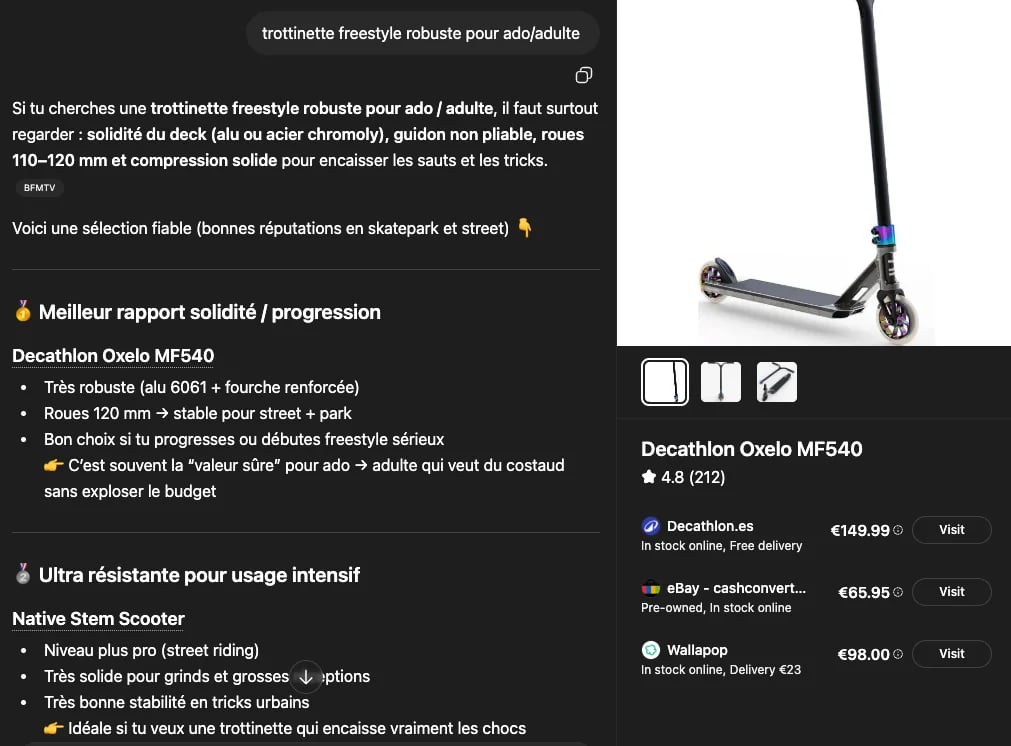
Shopping cards in ChatGPT
Model availabilityShopping cards mostly appear when ChatGPT uses the
gpt-5-3-mini model. ChatGPT selects the model per request, so cards may be absent even with the flag set.Shopping card structure
Each shopping card contains:Category and attribute dataThere is no dedicated
category field or generic attributes bag. Category signals live in the card’s tags (high-level, e.g. ["electronics", "deals"]) and each product’s featured_tag (product-level). Attributes are individual typed fields — title, price, rating, merchants, offers[] and so on.Product information
Each product includes the following e-commerce data:Offer information
Each offer contains merchant-specific details.Finding a product’s brandThere is no top-level
brand field. Brand is exposed as offers[].brand, but ChatGPT populates it on only a subset of offers, so it is frequently null or absent. When no offer carries it, parse product.title — the brand is usually the first token or two (e.g. "Adidas VL Court 3.0"). Fall back to merchants only when the merchant name matches the brand (e.g. "adidas + others").Price details
Offers include detailed price breakdown:Offer tag
Promotional tags on offers:Rating citation information
Products include rating source attribution:Supporting website
Used by:rating_grouped_citation.supporting_websites