

ads[] array of the Google Search endpoint response — no separate API call, no opt-in. For use cases, pricing context, and copy-paste examples, see the Google ads scraper page on the product site.

Sponsored ads in Google Search
Example request
Ad types
Each ad carries atype discriminator with two values:
RESULT— plain text ad. Displayed at the top or bottom of the main column with ad copy, sitelinks, and a normal destination URL.SHOPPING_CARD— shopping-style sponsored card. Carries a product image, price, optional MSRP /oldPrice, merchant name, and a Google-redirectedaclk?destination URL.
SHOPPING_CARD ads surface on three SERP positions, distinguished by blockPosition and category:
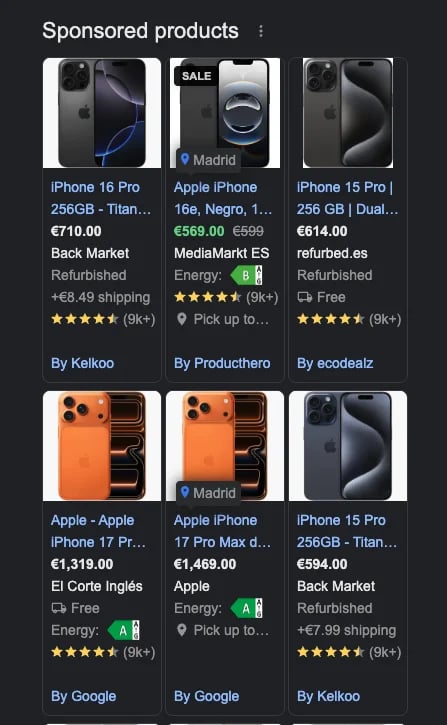
Top-of-page 'Sponsored products' shopping-card carousel on the Google SERP
Do not confuse
type: SHOPPING_CARD ads with the organic shoppingCards field. Sponsored cards live in ads[], are paid placements, and use Google aclk?-redirected URLs. Organic shopping cards live in shoppingCards[], come from the “Popular products” / “More products” grids, and use JS-hydrated productLink URLs that are usually empty in the static HTML response.Sponsored ad structure
Fields shared across all ad types:For
type: RESULT items, description is classic ad copy. For type: SHOPPING_CARD items it carries category-specific subtitle fragments joined with · — for example Used - 94k miles · Greeley on a “Sponsored vehicles” card.type: RESULT text ads:
Fields specific to
type: SHOPPING_CARD ads:
Price shape
price and oldPrice carry both a parsed and a raw representation:
raw is always present when price is emitted. Installment / down-payment labels (common on phone-contract cards) parse the leading "$0" as value: 0 — use raw to disambiguate genuine free items from down-payment phrasing.