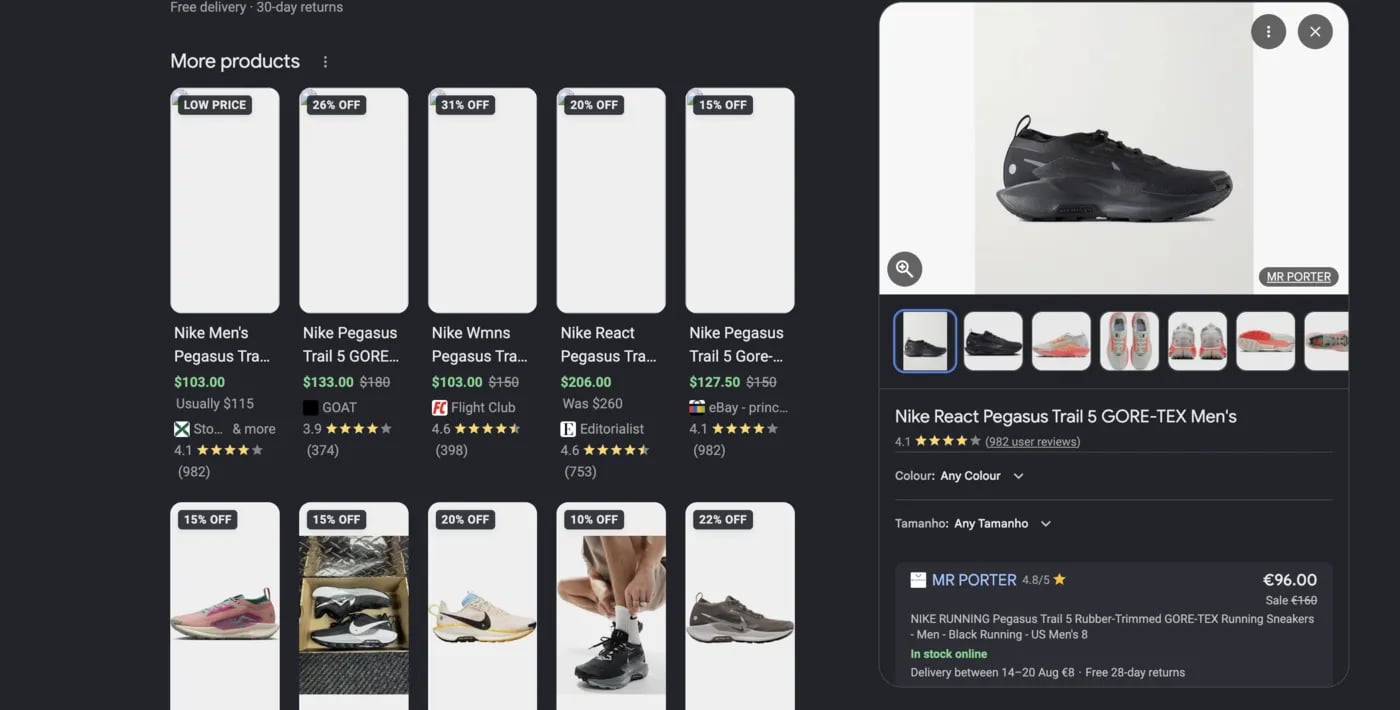
A shopping card opens a Google product panel, not a merchant page, and it carries no product URL. The card’s productResultToken gets you that panel. Google AI Mode shopping cards and inline products have the same token.
The product panel that opens from a 'More products' card
Send a Google Search request with device: "desktop" (the default). Cards on the first results page carry a token when Google serves them with a panel reference. A Google AI Mode request returns a token on each shopping card and inline product that links to a Google product viewer. The token adds no cost to either request.
A token expires five minutes after the scrape that issued it. Time in the async queue counts against those five minutes, for the search and for the product request. If your search ran async, its tokens can expire before you read the result. Use the token immediately, or scrape again.
The request takes only the token. The token keeps the query, locale and location of the request that issued it, so you cannot change them.It costs 1 credit plus the 2-credit sync surcharge, and only when it succeeds. It uses a concurrency slot. For async, send taskType: "GOOGLE_PRODUCT" with payload: { "productResultToken": "..." } to POST /v1/async/task or the batch endpoint. Async costs 1 credit.
If you send the product request async, set a high priority (for example 10). The default priority is 1, so the task waits behind your other queued tasks and the token can expire before the task starts.
The response has one entry in productResults, with the same shape as the right-rail product results.Each entry describes one product cluster and its merchant offers.
mainUrl and thumbnailUrl per image, often identical
Only title is guaranteed (Google Search entries also always carry stores) — anything Google’s panel omits is left out of the object rather than sent as null. Panels can also carry rating, reviews, variants, relatedProducts and userReviews, emitted under those names when present, though most carry none of them.
Category names and spec keys arrive in the response language — a country: "MX" request returns {"general": {"Marca": "Sennheiser"}}. Iterate the object; don’t read a hard-coded key like specifications.general.Brand.
Merchant’s listing title, naming the exact SKU sold (e.g. "iPhone 17 256GB White - Apple") — unlike title, which names the product overall
buyingOptions
array
Merchant badges in display order — stock status, rating, delivery promise, returns window. Google varies these per merchant and locale, so they stay an unparsed list of strings
Google’s /goto redirect for link, when Google served one. See redirect links
Expect the first six on most offers and the rest only occasionally. Everything beyond name is optional and omitted when absent — Google shows different combinations per merchant, so an “Out of stock” listing may have no price or link at all.
link is not validated against the cluster. Google occasionally serves a merchant URL for an unrelated SKU, so an offer’s link can point at a different product than its description names. Verify against description if link correctness matters.
Parsed numeric price; always present when price is emitted. On installment offers this is the monthly payment
currency
string
ISO 4217 code (e.g. "USD", "BRL", "MXN", "AED", "JPY"), or the displayed token verbatim when cloro can’t map it. See currency codes
raw
string
Visible price text verbatim (e.g. "$149.99")
currency here is an ISO code ("USD"), while shopping cards carry the symbol as displayed ("$") and inline products carry either, depending on the data Google supplies. Normalize before comparing across surfaces.
cloro maps the currency token Google displays next to the price to its ISO 4217 code. Multi-character and word tokens are recognized, so "R$ 5.597,99" returns "BRL", "MXN 19,499.00" returns "MXN", and "3,399.00 د.إ" returns "AED". Yen written as ¥, ¥ or 円 returns "JPY".A bare $ doesn’t name a market on its own, because Google writes US, Canadian and Australian offers the same way. On AI Mode, cloro resolves a bare $ from the request country: CA returns "CAD", AU returns "AUD", NZ returns "NZD", SG returns "SGD", HK returns "HKD", and any other country returns "USD". On Google Search, a bare $ always returns "USD".An explicit token always takes priority over the request country. A country: "CA" request that gets an offer displayed as "R$ 5.597,99" still returns "BRL".
cloro API key as a bearer token. One key grants every endpoint in this spec; per-key scopes are not available, so a client cannot request a narrower permission. Keys are created and revoked in the dashboard.
The productResultToken from a Google Search shopping card, or from a Google AI Mode shopping card or inline product. The token carries the query, locale and location of the request that issued it, so the request takes no other field.