
Google News RSS Feed: How It Works and Its Limits

On this page
The Google News RSS feed is the closest thing to a free, no-auth Google News API, and for a lot of hobby projects it is genuinely all you need. Point a feed reader at a URL, get back an XML list of stories, done. No key, no billing, no rate-limit dashboard.
But the feed is under-documented, quietly capped, and skewed in ways that only show up once you’re building on it. This guide is the reference we wish existed: the exact URL formats you can copy-paste, the limits Google doesn’t advertise, and some original data on how the RSS feed actually compares to a structured Google News endpoint when freshness matters.
There is no official Google News API. Google discontinued it years ago and never replaced it, so RSS is the only first-party surface. If you want the JSON alternative, jump to our Google News API guide; this post owns the RSS how-to.
Google News RSS URL anatomy
Is there official Google News RSS documentation?
No. Google has never published a reference for the Google News RSS endpoint. The search feed format is https://news.google.com/rss/search?q=<url-encoded-query>&hl=en-US&gl=US&ceid=US:en, documented by the community rather than by Google. Only hl and gl appear in an official Google reference, the Custom Search API; ceid does not.
That is the practical constraint behind everything below. The syntax works, it is stable enough to build on, and it can change without notice or a changelog entry.
The four feed shapes
Every Google News feed lives under https://news.google.com/rss. What you append to that base decides what you get. There are four useful shapes: search feeds, topic feeds, geo feeds, and publication/operator feeds. All four share the same three locale parameters, so let’s get those out of the way first.
The three locale parameters
Every feed URL takes the same trio:
hlis the interface (host) language, as a language-region code, e.g.en-US,en-GB,fr-FR.glis the geography, a two-letter country code, e.g.US,GB,DE.ceidis the “country edition ID”, written asCOUNTRY:language, e.g.US:en,GB:en,DE:de.
hl and gl are not News-specific. They’re Google’s standard localization parameters, and the Google search API reference defines gl as a two-letter country code that boosts results toward a country and hl as the interface language. The RSS feed reuses them verbatim; only ceid is Google-News-specific and undocumented.
ceid is the one people forget. It selects which Google News edition you’re reading, and it must agree with hl/gl or you’ll get an inconsistent or empty result. The safe rule: set all three together and keep them consistent.
hl=en-US   gl=US   ceid=US:en     ← US English
hl=en-GB   gl=GB   ceid=GB:en     ← UK English
hl=de      gl=DE   ceid=DE:de     ← Germany, German
hl=es-419  gl=MX   ceid=MX:es-419 ← Mexico, Latin-American Spanish
For the same underlying hl/gl pattern used across other Google surfaces, see our reference on Google search parameters.
1. Search feeds (the workhorse)
This is the format you’ll use most. It turns any query into a feed:
https://news.google.com/rss/search?q=<url-encoded-query>&hl=en-US&gl=US&ceid=US:enThe q value must be URL-encoded: under URL percent-encoding a space becomes %20 (or +), and operators need encoding too. Any reserved character (the : in site:, the space between terms) must be percent-encoded before the URL is assembled, exactly as RFC 3986 specifies. Skip that step and the Google News RSS feed quietly ignores the operator or hands back an empty result. A few copy-paste examples:
# "electric vehicles" in US English
https://news.google.com/rss/search?q=electric%20vehicles&hl=en-US&gl=US&ceid=US:en

# exact phrase
https://news.google.com/rss/search?q=%22interest%20rate%20cut%22&hl=en-US&gl=US&ceid=US:en

# your brand, UK edition
https://news.google.com/rss/search?q=acme%20corp&hl=en-GB&gl=GB&ceid=GB:en
Search feeds also accept Google News operators inside q, which is where they earn their keep:
# last 24 hours only
q=tesla%20when%3A1d          → tesla when:1d

# last hour
q=tesla%20when%3A1h          → tesla when:1h

# only one publisher
q=climate%20site%3Areuters.com   → climate site:reuters.com

# exclude a term
q=apple%20-fruit → apple -fruitwhen:1h, when:1d, when:7d are the freshness operators. They are the single most useful trick for cutting a noisy feed down to recent stories.
2. Topic feeds
Google News also groups stories into topics (World, Business, Technology, Sports, etc.), each with a stable topic slug, so you can follow a whole category as a feed instead of hand-building a keyword query for it:
https://news.google.com/rss/headlines/section/topic/TECHNOLOGY?hl=en-US&gl=US&ceid=US:en
https://news.google.com/rss/headlines/section/topic/BUSINESS?hl=en-US&gl=US&ceid=US:en
https://news.google.com/rss/headlines/section/topic/WORLD?hl=en-US&gl=US&ceid=US:en
https://news.google.com/rss/headlines/section/topic/SPORTS?hl=en-US&gl=US&ceid=US:en
The bare top-stories feed is just the base URL with locale params:
https://news.google.com/rss?hl=en-US&gl=US&ceid=US:enNote that beyond the well-known section names, Google also uses long opaque topic tokens (CAAqJgg...) for narrower topics. Those are undocumented and can change, so treat named sections as stable and opaque tokens as best-effort.
3. Geo feeds
To get local news for a place, use the geo section with a location name:
https://news.google.com/rss/headlines/section/geo/San%20Francisco?hl=en-US&gl=US&ceid=US:en
https://news.google.com/rss/headlines/section/geo/London?hl=en-GB&gl=GB&ceid=GB:en
Location matching is fuzzy and Google decides what “San Francisco news” means. You don’t get a radius or coordinates. For precise local monitoring, a search feed with the place name in q is often more predictable than the geo section.
4. Publication / operator feeds
There’s no dedicated “publisher feed” endpoint, but site: inside a search feed gets you the same thing, a per-publisher stream:
https://news.google.com/rss/search?q=site%3Anytimes.com&hl=en-US&gl=US&ceid=US:en
https://news.google.com/rss/search?q=site%3Abbc.co.uk%20ukraine&hl=en-GB&gl=GB&ceid=GB:en
Combine site: with a keyword and when: and you can build a tightly scoped feed (“everything Reuters published about semiconductors in the last day”) without any of Google’s topic taxonomy getting in the way.
Fetching a feed
Fetching is the easy part. The feed is plain RSS/XML, so there’s nothing to authenticate, and curl returns it raw:
curl -s "https://news.google.com/rss/search?q=electric%20vehicles&hl=en-US&gl=US&ceid=US:en"In Python, feedparser, a library whose one-line description is “Parse Atom and RSS feeds in Python”, handles the XML for you:
import feedparser
from urllib.parse import urlencode

def google_news_rss(query, hl="en-US", gl="US", ceid="US:en"):
    base = "https://news.google.com/rss/search"
    qs = urlencode({"q": query, "hl": hl, "gl": gl, "ceid": ceid})
    feed = feedparser.parse(f"{base}?{qs}")
    for entry in feed.entries:
        yield {
            "title": entry.title,
            "link": entry.link,          # a news.google.com redirect, not the publisher
            "published": entry.get("published"),
            "source": entry.get("source", {}).get("title"),
        }

for item in google_news_rss("electric vehicles when:1d"):
    print(item["published"], "-", item["title"])
That’s the whole happy path. Now the parts that bite.
The limits (documented, not FUD)
None of this makes RSS useless. But every one of these will surface the moment you try to build something real on top of it.
The ~100-item cap
A single feed returns roughly 100 items, maximum. There is no page, offset, or limit parameter, so you cannot request items 101 onward. If a query has thousands of relevant articles, you see about a hundred and the rest are simply invisible to that feed.
The only way deeper is to subdivide the query itself: add when:1h windows, narrow keywords, or site: filters, pull each as its own feed, and merge. Which leads directly to the next problem.
Links are Google redirects, not publisher URLs
Every <link> looks like this:
https://news.google.com/rss/articles/CBMiL{...long-opaque-token...}That is not the publisher’s URL. The RSS 2.0 specification defines an item’s <link> as “the URL of the item”, meaning the publisher’s page. Google puts a news.google.com redirect token there instead. It resolves to the real article only when followed in a browser. A well-behaved link would return a clean 301 Moved Permanently pointing straight at the source. The Google News RSS feed gives you an opaque token instead, and sometimes an interstitial page you have to click through.
So if your pipeline needs the canonical source URL (for deduplication, for storing, for attribution), you have to follow each redirect and absorb the latency. At a hundred links per feed across many feeds, this is a real engineering cost. It also breaks whenever Google adjusts the redirect scheme.
Inconsistent and missing metadata
RSS gives you a title, a link, a publish timestamp, and usually a source name. Those are all standard item elements defined in the RSS specification, which the feed is a dialect of. Past that point it gets unreliable. Snippets and descriptions are often absent, or just the title echoed back as HTML. Images and thumbnails aren’t part of the feed at all: Google News shows them in the UI, but the RSS payload doesn’t carry them. Author and section data, where it appears, is rarely clean.
So any “cards” you want to render (headline, source, blurb, thumbnail) you’ll be reconstructing yourself. That usually means fetching each resolved article and parsing its Open Graph tags, the og:title/og:image metadata pages expose in their <head>. That’s a scrape on top of a scrape, and the Google News RSS feed gives you no way to skip it.
No SLA, no versioning, silent format changes
The RSS feed is not a supported product with a contract. There is no status page for it, no version header, no deprecation notice. Google has changed the redirect link encoding and the topic-token scheme in the past with no announcement.
Anything you build on the Google News RSS feed assumes today’s undocumented format keeps working. That’s a fine bet for a side project and a risky one for a business.
Deduplication pain
Because you have to fan a query out into many sub-feeds to beat the 100-item cap, the same story comes back repeatedly across feeds. And because the links are opaque redirect tokens rather than canonical URLs, you can’t dedupe on URL cheaply. You end up deduping on fuzzy title matching, which is exactly as fun as it sounds.
How RSS actually compares: our measurements
To put numbers on “deep but stale”, we ran a small head-to-head in July 2026 across 48 news queries, comparing the Google News RSS search feed against cloro’s structured Google News endpoint. This is one sampling, so treat it as directional rather than gospel, but the shape of the result was consistent enough to be worth reporting.
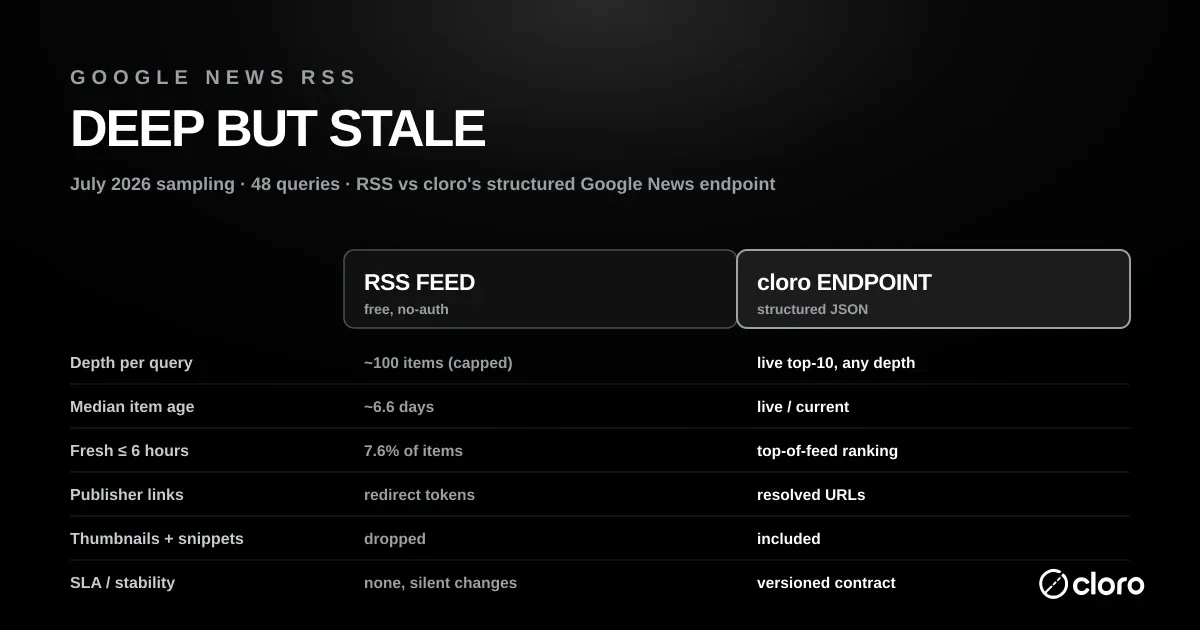
Coverage: RSS is broad. Of the endpoint’s fresh top-10 stories per query, 96.9% also appeared somewhere in the RSS feed. The reverse was only 22%. Most of what RSS returned never showed up in the endpoint’s top-10. That’s the 100-item cap working in RSS’s favor. RSS returned a median of 100 items per query, a much deeper pool than a top-10 view. If your goal is “cast the widest possible net”, RSS casts a wide one.
Source overlap is low. Publisher/source overlap between the two result sets was just 15.7%. RSS and a live top-10 endpoint are surfacing substantially different mixes of publishers, so they are not interchangeable data sources, even for the same query.
Freshness: RSS skews old. This is the catch. The median RSS item age was about 6.6 days, and only 7.6% of RSS items were six hours old or newer. RSS search behaves like a deep archive rather than a breaking-news wire. The endpoint’s value is the opposite: a small, current top-10 that reflects what Google News is ranking right now.
The takeaway: RSS is deep but stale-skewed; a structured top-10 endpoint is shallow but fresh. For “have I missed any coverage of this topic over the past week?”, RSS wins on recall. The question brand and PR monitoring actually asks is “what is Google News ranking for this query at this moment?”, and there the redirect links, missing thumbnails, and 6.6-day median age make RSS the wrong tool.
When RSS is fine, and when you need an API
Stick with the Google News RSS feed when:
- It’s a hobby project, a personal dashboard, or a prototype.
- Volume is low and best-effort freshness is acceptable.
- You don’t need thumbnails, clean snippets, or the canonical publisher URL.
- An occasional silent format change won’t page anyone.
Move to an API once you need scale beyond the ~100-item cap without hand-rolling query subdivision and dedup, or structure: parsed JSON with title, source, date, snippet, and thumbnail per result, instead of XML you reconstruct yourself. The same goes for freshness, when the live, in-the-moment top-of-feed ranking matters more than a week-old median, and for resolved publisher links instead of opaque news.google.com/rss/articles/... redirects.
Two more reasons sit further out. A versioned contract with an SLA beats an undocumented surface that can change overnight. And alerting that triggers on new stories is something RSS will not give you; the Google Alerts API walkthrough has a full breaking-news recipe.
If you just want other free sources to combine with RSS, we catalog them in the free news API roundup. If you’ve outgrown free entirely, the Google News API guide covers the structured options.
The structured alternative: cloro’s Google News endpoint
cloro returns the live Google News SERP as parsed JSON (titles, resolved publisher links, sources, dates, snippets, and thumbnails) from one endpoint, for any country and at any scale. The same call that RSS makes you reconstruct comes back ready to use:
curl -X POST https://api.cloro.dev/v1/monitor/google/news \
  -H "Authorization: Bearer sk_live_your_api_key_here" \
  -H "Content-Type: application/json" \
  -d '{
    "query": "electric vehicles",
    "country": "US",
    "pages": 3
  }'
import requests
response = requests.post(
"https://api.cloro.dev/v1/monitor/google/news",
headers={
"Authorization": "Bearer sk_live_your_api_key_here",
"Content-Type": "application/json",
},
json={
"query": "electric vehicles",
"country": "US",
"pages": 3,
},
)
for item in response.json()["result"]["newsResults"]:
print(item["position"], item["source"], "-", item["title"])
print(" ", item["link"]) # real publisher URL, not a Google redirectEach result carries position, title, link, snippet, source, date, page, and thumbnail. That’s the whole card, and you don’t need a second scrape.
Try it free. New accounts get 500 free monthly credits, enough to run the same 48-query comparison we did and see the freshness difference on your own topics. Start on the Google News endpoint and point it at the queries you’re already pulling over RSS.
Bottom line
As a free surface it holds up well, with a precise, copy-paste URL grammar: rss/search?q=… for keywords, rss/headlines/section/topic/… for topics, …/section/geo/… for places, and hl/gl/ceid to pin the locale. It’s the right tool for prototypes and low-volume monitoring.
But it’s capped at ~100 items, it hands you redirect links rather than publisher URLs, it drops thumbnails and snippets, it has no SLA, and per our July 2026 sampling it skews old (≈6.6-day median age, only 7.6% of items ≤6h old). The moment freshness, structure, or scale matters, that’s your signal to move from the feed to an API.

About the author
Ricardo Batista
Founder, cloro
Ricardo is one of the founders and engineers behind its SERP and AI-search scraping infrastructure. Before cloro he scaled a financial comparison site to $7M ARR and ran the full-country operations of a unicorn to $65M ARR, then went back to building. He writes about search engine scraping, generative-engine optimization, and turning live search and AI-answer data into something teams can act on.
Frequently asked questions
What is the Google News RSS feed URL format?
For a keyword search the format is `https://news.google.com/rss/search?q=
Is there official Google News RSS documentation?
No. Google has never published a reference for the Google News RSS endpoint, so every guide to its search syntax is community-derived from observed behaviour, including this one. Of the three locale parameters only `hl` and `gl` appear in an official Google reference, the Custom Search API reference, which defines `gl` as a two-letter country code and `hl` as the interface language; `ceid` is Google-News-specific and undocumented. In practice this means the format is stable enough to build on but carries no SLA, no versioning, and no changelog, so it can change without notice.
How many articles does a Google News RSS feed return?
A single feed is capped at roughly 100 items. There is no pagination parameter, so you cannot ask for items 101–200. To go deeper you have to vary the query itself (narrower keywords, date operators like `when:1d`, or `site:` filters) and merge the feeds yourself, deduplicating as you go.
Why do Google News RSS links point to news.google.com instead of the publisher?
Every `` in the feed is a Google redirect URL of the form `https://news.google.com/rss/articles/...`. Google resolves it to the real publisher page when a browser follows it, but the feed itself does not contain the canonical publisher URL. Resolving links at scale means following redirects (and handling the interstitial Google occasionally serves), which adds latency and breakage to any pipeline that needs the true source URL.
Is there an official Google News API?
No. Google retired its News API years ago and never replaced it, so the RSS feed is the only first-party, no-auth surface. For structured JSON with reliable freshness, dates, sources, and thumbnails you need a third-party endpoint; see our Google News API guide for the options.
Is the Google News RSS feed reliable enough for production?
For low-volume, best-effort use it is fine. For production it has no SLA, no versioning, and Google changes the format silently. In our July 2026 sampling the feed was deep but skewed toward older items: median item age was about 6.6 days and only 7.6% of items were six hours old or newer. If your product depends on breaking-news freshness or a stable contract, treat RSS as a prototype surface and move to an API.
Related reading

The Top 12 News API Free Options for Developers in 2026
12 news APIs with free tiers compared: request limits, keyword filters, source coverage, and paid-tier prices when you outgrow free.
Google Search Parameters: 2026 URL Guide for Scrapers
The complete guide to Google search parameters (gl, hl, uule, udm, tbs) to control location, language, time filters, and AI Overviews when you scrape at scale.

Scraping Google Trends
How to scrape Google Trends at scale: four extraction methods in Python, the blocking patterns you will hit, and how to normalize the data afterwards.