
Google Alerts API: It Doesn't Exist, So Build This Instead

On this page
Search for “Google Alerts API” and you’ll find Stack Overflow threads, half-finished GitHub repos, and forum posts all circling the same answer: it isn’t there.
There is no Google Alerts API. There never has been. Google Alerts is a consumer product with a web form and exactly two delivery options: email and an RSS feed. There is no REST endpoint to create an alert. There is no way to list your alerts. There is no authenticated read surface. If you came here to wire Google Alerts into a monitoring pipeline, that door is closed and always was.
One clarification, because it trips people up in search. Google Workspace does ship an Alert Center API, but it is not the Google Alerts API. The Alert Center API is an admin feed that surfaces security and abuse warnings for a Workspace domain (phishing, suspicious logins, data-loss events). That is a completely different product from the consumer Google Alerts keyword-monitoring tool this guide is about. If you searched “Google Alerts API” hoping to automate topic or brand alerts, the Alert Center API won’t help you. It doesn’t touch consumer Alerts at all.
The good news is that you don’t need an official Google Alerts API. Everything people actually want from one is straightforward to build on a real news API. That means programmatic queries, structured results, delivery to Slack or a webhook, and full country and language control. This guide first explains why the free alerting options lag breaking news, backed by a small first-party sample. It then walks through a complete build-your-own alerts pipeline in Python. And it covers one thing no off-the-shelf alerts product does: alerting on your brand’s appearance inside AI answers.
The Google Alerts API reality check: what you can and can’t do
Here’s the honest map of what each kind of searcher can actually do today, given that no Google Alerts API exists.
If you want to create or manage alerts programmatically, there is no supported way. You cannot POST a new alert. You cannot enumerate existing ones. You cannot change a delivery address through an API. The Alerts web UI is the only front door.
If you want to read alert results in a machine-readable format, there is exactly one workaround, and it’s a workaround, not an API. When you create an alert in the web UI, you can set “Deliver to” to RSS feed. Google then gives you a feed URL you can poll. That URL returns Atom XML you can parse.
It works right up until it doesn’t. The RSS-delivery path is:
- Undocumented. Google publishes no spec for it, no guarantees, no versioning. It can change shape or vanish in a redesign.
- Session-bound and opaque. The feed ID is generated for your account. There’s no programmatic way to recreate it if it breaks, and no support channel when it does.
- Coarse controls only. The Alerts form lets you pick a frequency, sources, a language, a region, and “only the best” or “all” results, once per alert. Nothing is set per request, and there is no dedup control. You get what Google’s alert engine decided to send, on Google’s cadence.
What about an unofficial Google Alerts API library?
Open-source packages that act as a Google Alerts API work by scripting the web UI, and each one inherits its fragility. The Python google-alerts package says it plainly: “Google does not provide an official API for this service, so interactions are done through web scripting.” It stores your account password (obfuscated) and a session cookie on disk, and warns they “can be stolen and re-used to compromise your account.” The Node google-alerts-api package asks you to copy your SID, HSID, and SSID cookies out of the browser after a Google change broke its login. They can create and list alerts, but every unofficial Google Alerts API depends on a login flow Google can change at any time.
So the practical situation is clear. There is no official create-or-manage Google Alerts API at all. What exists is a fragile read-only hack for results. That’s a thin foundation for anything you actually depend on.
Before we replace it, it’s worth understanding why the free path lags. The same weakness applies to every free polling approach, not just Google Alerts.
Why free alerting is unreliable
The core problem with Google Alerts, RSS hacks, and free polling in general isn’t the interface. It’s latency against a fast-moving surface. Rather than hand-wave at that, we ran a small first-party measurement.
Methodology. In July 2026 we sampled 48 Google News queries through cloro’s live Google News endpoint. We snapshotted each query’s top-10 results, waited roughly eight hours, then re-scraped to measure how much the ranking had turned over. Separately, we pulled the Google News RSS feed for the same queries and recorded the publish-age of every item. It is a small, directional sample, so treat the figures as an order-of-magnitude signal rather than a benchmark.
Here is what that sample showed:
| Metric — July 2026 sample, 48 Google News queries | Result |
|---|---|
| Top-10 results replaced over an ~8-hour window | ~31% |
| Median item age in the Google News RSS output | ~6.6 days |
| RSS items fresh to within 6 hours | 7.6% |
News is not a static SERP. The Google News ranking for a query re-sorts continuously as publishers push new articles. The top of the page turns over quickly: roughly 31% of our top-10 results were replaced inside eight hours.
A third of the front page churning inside a workday tells you the surface is live. Anything that samples it slowly will miss the fast-moving middle.
Now hold that against how the free feed paths deliver. Google News also exposes RSS feeds, and they are deep (they carry a lot of items) but they’re stale. In our sample the median RSS item age was about 6.6 days, and only 7.6% of items were fresh to within six hours.
A feed where fewer than one in twelve items is from the last six hours is not a breaking-news alarm. It’s an archive with a timestamp.
Put the two findings together and the conclusion is hard to escape. The surface reshuffles ~31% of its top results in eight hours. The channel feeding it to you carries median items nearly a week old. So the free path structurally lags the news it’s supposed to alert you about, and the RSS hack behind Google Alerts inherits exactly that problem. This is also why a hypothetical Google Alerts API would not fix things on its own. The feed underneath it is slow.
And that’s before the widely-reported coverage gaps. Across the SEO and PR communities, Google Alerts is a frequent target for simply missing mentions: skipping sources, dropping results, and delivering inconsistently. We didn’t measure Alerts’ miss rate ourselves, and you shouldn’t trust a number that claims to. But the pattern is common knowledge among people who’ve relied on it for brand monitoring.
Combine known coverage gaps with structural latency and the takeaway is simple: free alerting is fine for idle curiosity and unreliable for anything you’d act on. The fix isn’t a better free feed. It’s polling a live, structured surface on your schedule, with your dedup logic, and pushing results where your team already works. That’s a small amount of code.
Build your own alerts: the Google Alerts API replacement
This is the part that replaces Google Alerts for real, a build-your-own stand-in for the Google Alerts API that never shipped. The plan:
- Poll cloro’s Google News endpoint for each query you care about. Verify: JSON results come back with fresh dates.
- Deduplicate against a local store so you only alert on genuinely new articles. Verify: re-running the script produces zero duplicate alerts.
- Push new items to a webhook (Slack shown). Verify: a new article lands as a Slack message.
- Run it on a schedule. Verify: cron fires it every 15 minutes.
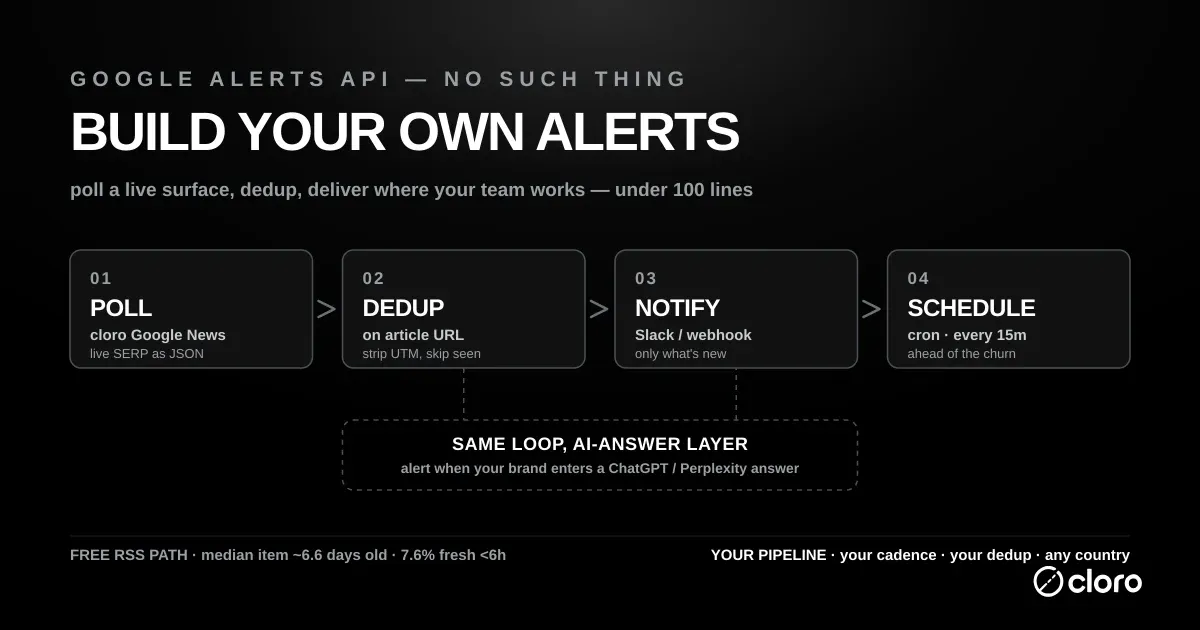
cloro’s Google News endpoint returns the live Google News SERP as structured JSON, the in-the-moment ranking rather than a week-old feed. That is exactly the freshness the RSS path can’t give you. It’s the same endpoint documented on the Google News API page; here we’re using it as the engine underneath an alerts loop. If you want the endpoint’s full parameter surface, the /google-news/ page is the reference.
Step 1: Pull structured news results
import os
import requests

API_KEY = os.environ["CLORO_API_KEY"]

def fetch_news(query: str, country: str = "US", pages: int = 1) -> list[dict]:
    """Return the live Google News SERP for a query as a list of article dicts."""
    resp = requests.post(
        "https://api.cloro.dev/v1/monitor/google/news",
        headers={
            "Authorization": f"Bearer {API_KEY}",
            "Content-Type": "application/json",
        },
        json={"query": query, "country": country, "pages": pages},
        timeout=60,
    )
    resp.raise_for_status()
    return resp.json()["result"]["newsResults"]


if __name__ == "__main__":
    for article in fetch_news("acme corp", country="US"):
        print(article["date"], "-", article["source"], "-", article["title"])
Each item in newsResults looks like this:
{
  "position": 1,
  "title": "Acme Corp Announces Q3 Expansion Into Europe",
  "link": "https://example.com/acme-europe",
  "snippet": "Acme said Tuesday it will open offices in Berlin and Madrid...",
  "source": "Reuters",
  "date": "2 hours ago",
  "page": 1,
  "thumbnail": "https://example.com/images/acme.jpg"
}
That’s the whole payload you need for an alert: a stable link to key dedup on, plus title, source, and date for the message body. No XML parsing, no session cookie, no guessing at an undocumented feed shape.
Step 2: Deduplicate so you only alert on what’s new
The point of an alert is new. You need a persistent record of what you’ve already sent so the same article doesn’t ping you every poll. A tiny JSON file keyed on article URL is enough for a single-node job. Swap in Redis or a database if you run this across workers.
import json
import pathlib

SEEN_FILE = pathlib.Path("seen_articles.json")

def load_seen() -> set[str]:
    if SEEN_FILE.exists():
        return set(json.loads(SEEN_FILE.read_text()))
    return set()

def save_seen(seen: set[str]) -> None:
    SEEN_FILE.write_text(json.dumps(sorted(seen)))

def find_new(articles: list[dict], seen: set[str]) -> list[dict]:
    """Return only articles whose canonical link we haven't alerted on before."""
    fresh = []
    for article in articles:
        key = article["link"].split("?")[0]  # strip tracking params
        if key not in seen:
            fresh.append(article)
            seen.add(key)
    return fresh
Stripping query strings before comparing matters. The same story often arrives with different UTM tags across polls, and you don’t want three alerts for one article.
Step 3: Push new articles to Slack (or any webhook)
Slack incoming webhooks take a simple JSON POST. The same shape works for Discord, Microsoft Teams, or your own endpoint. Change the URL and the payload key.
SLACK_WEBHOOK = os.environ["SLACK_WEBHOOK_URL"]

def notify_slack(article: dict, query: str) -> None:
    text = (
        f":newspaper: *New result for `{query}`*\n"
        f"*<{article['link']}|{article['title']}>*\n"
        f"{article['source']} — {article['date']}\n"
        f"{article['snippet']}"
    )
    requests.post(SLACK_WEBHOOK, json={"text": text}, timeout=15)
Prefer email? Point the same find_new output at SMTP or a transactional-email API instead. The delivery target is decoupled from the source, which is exactly the flexibility the Google Alerts RSS hack never gave you.
Step 4: Wire it together and schedule it
This step just connects the pieces above into one script: fetch, dedup, notify, on a loop cron drives for you, so the whole replacement runs unattended.
QUERIES = {
    "acme corp":        "US",
    "acme corp lawsuit": "US",
    "acme ceo":         "US",
}

def run_once() -> None:
    seen = load_seen()
    for query, country in QUERIES.items():
        try:
            articles = fetch_news(query, country=country)
        except requests.HTTPError as exc:
            print(f"[warn] {query}: {exc}")
            continue
        for article in find_new(articles, seen):
            notify_slack(article, query)
            print(f"[alert] {query}: {article['title']}")
    save_seen(seen)

if __name__ == "__main__":
    run_once()
Then let cron drive it. Every 15 minutes is a sensible cadence for news: often enough to stay ahead of that ~31%/8h churn, gentle enough on your credit budget:
*/15 * * * * cd /opt/alerts && /usr/bin/python3 alerts.py >> alerts.log 2>&1That’s a complete Google Alerts replacement in well under 100 lines. On the first run every matching article is “new,” so it will fire once per current result, which is expected. After that, you only hear about genuinely new stories.
Coverage Google Alerts can’t touch
Google Alerts offers one region setting per alert, delivered through the same slow feed. Set country per query on a live endpoint and you get locale-accurate monitoring as results rank now. Google News surfaces very different sources country by country. A global brand watching only the default locale silently misses most of its regional coverage. Add the same query under "DE", "BR", "JP" and you’re watching the story as it actually ranks in each market instead of in one blurred feed. Loop the ISO country codes you care about and you have multi-market coverage on your own schedule.
Extend it: alert on AI-answer appearances
Here’s the capability that doesn’t exist anywhere off the shelf. Your brand no longer shows up only in news and search. It shows up inside AI answers. When someone asks ChatGPT or Perplexity “what’s the best tool for X,” you want to know the moment your brand enters (or drops out of) that answer. No alerts product monitors this. You can, with the exact same pattern.
cloro can query AI engines and return the answer text plus the brand mentions and cited sources. Swap the news endpoint for an AI-monitoring one and reuse the dedup-and-notify loop:
AI_ENDPOINTS = {
    "chatgpt":    "https://api.cloro.dev/v1/monitor/chatgpt",
    "perplexity": "https://api.cloro.dev/v1/monitor/perplexity",
}

TARGET_BRAND = "acme"

def check_ai_answer(prompt: str, engine: str, country: str = "US") -> dict | None:
    resp = requests.post(
        AI_ENDPOINTS[engine],
        headers={
            "Authorization": f"Bearer {API_KEY}",
            "Content-Type": "application/json",
        },
        json={"prompt": prompt, "country": country,
              "include": ["answer", "sources", "brand_mentions"]},
        timeout=90,
    )
    resp.raise_for_status()
    data = resp.json()
    answer = data.get("answer", "")
    mentioned = TARGET_BRAND.lower() in answer.lower()
    return {"engine": engine, "prompt": prompt, "mentioned": mentioned,
            "sources": data.get("sources", [])} if mentioned else None
Track the boolean per (prompt, engine) pair in the same seen-store idea, and alert only on a transition: the first poll where your brand newly appears, or the poll where it disappears. That’s a brand-visibility alarm for the AI layer, built from parts you already have. If AI visibility is the real goal, the deeper setup lives in the AI visibility tracking setup guide. Monitoring the ad slots specifically is covered in monitoring ChatGPT ads.
Google Alerts alternatives, mapped to use case
Building isn’t always the right call. Since there’s no official Google Alerts API to fall back on, here’s the straight comparison of the real options, including when not to build.
| Option | Cost | Freshness / reliability | Programmatic control | Best for |
|---|---|---|---|---|
| Google Alerts | Free | Misses mentions (widely reported); RSS delivery lags | None (undocumented RSS hack only) | Casual, non-critical monitoring where gaps don’t hurt |
| Talkwalker Alerts | Free | Broader social coverage than Alerts; still a consumer tool, no SLA | None / email only | A free second opinion alongside Google Alerts |
| RSS hacks (Google News / site feeds) | Free | Deep but stale — median item ~6.6 days old in our sample | Parse-it-yourself; no query/locale control | Low-stakes topical reading, not breaking alerts. See Google News RSS |
| News aggregator APIs | Free tier → paid | Good multi-publisher breadth; freshness and limits vary by tier | Full, within rate limits and TOS | Broad coverage across many outlets. See free news API options |
| Build on cloro | Paid (free credits to start) | Live Google News SERP + AI answers; you own the cadence | Full — query, country, language, delivery, dedup | Fast, reliable alerts you control, including AI-answer visibility |
If you just want a loose finger on the wind, Google Alerts is genuinely okay and free. A missed mention now and then won’t hurt you, so use it. If you need many publishers and don’t care about sub-hour latency, a news aggregator API is the pragmatic pick.
But the moment “did we miss it?” carries a real cost, you want the live surface and your own logic on top of it. Think of a PR crisis, a competitor launch, a compliance trigger, or a shift in what AI engines say about you. That’s the build path, and it’s the only one that also covers the AI layer.
What does the replacement cost?
Google Alerts’ $0 buys its coverage gaps. At cloro’s 3 credits per Google News call, hourly checks on 20 brand terms run about 43,000 credits a month, inside Hobby ($100/month); daily cadence on a handful of terms fits the Free tier’s 500 credits. Semrush and Ahrefs ship alerting priced with the whole platform, the right buy only if you wanted the platform anyway.
Wrapping up
There is no Google Alerts API, and chasing one is a dead end. The RSS-delivery workaround is undocumented, uncontrollable, and structurally slow against a news surface that reshuffles a third of its top results inside a workday. The durable answer is to stop hunting for a hidden Google Alerts API and build the small pipeline instead. Poll a live, structured news endpoint, dedup, and deliver where your team works. It’s under 100 lines, it covers any country, and it extends to the one surface no alerts product watches: your brand inside ChatGPT and Perplexity answers.
Ready to build it? The news monitoring use case walks through the full setup, and you can start on 500 free monthly credits, enough to stand up a real alerts loop today.

About the author
Ricardo Batista
Founder, cloro
Ricardo is one of the founders and engineers behind its SERP and AI-search scraping infrastructure. Before cloro he scaled a financial comparison site to $7M ARR and ran the full-country operations of a unicorn to $65M ARR, then went back to building. He writes about search engine scraping, generative-engine optimization, and turning live search and AI-answer data into something teams can act on.
Frequently asked questions
Is there a Google Alerts API?
No. Google has never shipped a public Google Alerts API, and there is no documented, supported way to create, edit, or read alerts programmatically. The only machine-readable path is a workaround: when you create an alert in the web UI you can set delivery to "RSS feed" and poll that feed's URL. It works, but it's undocumented, tied to your Google session, and can break or disappear without notice. If you need dependable, structured alerts, you build them on a real news API instead.
How do I build my own news alerts?
Poll a structured news source on a schedule, deduplicate results against what you've already seen, and push new items to a webhook, Slack, or email. cloro's Google News endpoint returns the live Google News SERP as JSON (title, link, source, date, snippet), so a small Python script plus a cron job replaces Google Alerts with full control over queries, country, language, and delivery. The tutorial below is a complete, runnable version.
What is the best Google Alerts alternative?
It depends on the job. For casual, non-critical monitoring, Google Alerts or Talkwalker Alerts are fine and free. For broad multi-publisher coverage, a news aggregator API works. For fast, reliable, programmatic alerts you fully control (including alerts on how your brand appears inside ChatGPT and Perplexity answers), build on a news scraping API like cloro. The comparison table below maps each option to a use case.
Are Google Alerts still active in 2026?
Yes. Google Alerts is still a live, free product. You can create keyword alerts at google.com/alerts and receive them by email or RSS. It hasn't been shut down. The catch isn't availability, it's reliability: it's widely reported to miss mentions, and its RSS delivery lags breaking news badly (in a July 2026 cloro sample the median Google News RSS item was ~6.6 days old). It's fine for casual monitoring; it's not something to depend on when a missed mention has real cost. There is also still no official API to manage or read Alerts programmatically, only the fragile RSS-feed workaround.
Is Google Alerts a free service?
Yes. Google Alerts is free to use with a Google account at google.com/alerts, with delivery by email or RSS. The cost is reliability, not money: there is no official API, delivery lags breaking news, and it is widely reported to miss mentions. Unofficial libraries that automate it work by scripting the web UI with your login cookies, which breaks when Google changes its sign-in flow.
Is the Google Workspace Alert Center API the same as Google Alerts?
No. They are unrelated products with confusingly similar names. The Alert Center API is part of Google Workspace admin tooling and returns security and abuse alerts for a Workspace domain (phishing, suspicious logins, data-loss signals). Consumer Google Alerts is a keyword-monitoring tool for tracking mentions of a topic or brand across the web. The Alert Center API cannot create, read, or manage consumer Google Alerts, so it's not the 'Google Alerts API' people are usually looking for.
Related reading
The Top 12 News API Free Options for Developers in 2026
12 news APIs with free tiers compared: request limits, keyword filters, source coverage, and paid-tier prices when you outgrow free.
How to Monitor ChatGPT Ads (Technical Guide, 2026)
ChatGPT ads render as a `response.result.ads[]` array on the response, served from `bzrcdn.openai.com` and tagged `utm_source=chatgpt.com&utm_medium=src`. Here's how to detect them with cloro's API and build a real monitoring pipeline.
AI Visibility Tracking Setup: 30-Minute Workflow
Set up AI visibility tracking in 30 minutes: choose prompts, query four AI engines, log mention and citation rates, and build a baseline CSV.