
How to Scrape Perplexity: API vs Web Interface

On this page
Perplexity is both an answer engine and a citation surface. There are three ways to scrape Perplexity: the official Agent API, which replaced the Sonar Chat Completions API on 2026-09-27, structured-output workflows, or scraping the web UI when you need the exact user-facing answer.
The right path depends on your goal. The API is cleaner for production extraction, while the web UI matters when you want to measure how Perplexity presents sources, citations, and competitors to real users. If you only need clean answer text, you rarely need to scrape Perplexity’s front end at all.
What follows compares the official API, web-interface scraping, and managed workflows: what each method returns, and where each one breaks. For broader monitoring across engines, see LLM visibility tracking tools and the Perplexity API page.
Why scrape Perplexity responses?
The reason to scrape Perplexity is its intent classifier. Ask “best running shoes for marathons” and the response is a shopping_block with eight products. Each product carries merchant, price, original_price, rating, num_reviews, and an offers[] array — the structured Perplexity shopping data cloro returns per request. Ask “hotels near Lake Como” and the same answer slot becomes a hotels_mode_block with lat/lng, address arrays, a price_level enum, and image collections. The Agent API returns only answer text and a list of search results for both queries. Perplexity’s separate Search API returns a ranked results[] array of titles and snippets, but never the rich shopping or hotel blocks. That gap is the whole case for scraping the web UI.
Several things exist only in the SSE block stream. shopping_block.products[].offers[] carries per-merchant pricing, original_price, availability and image URLs. hotels_mode_block.places[] and maps_mode_block.places[] carry rated places with phone, address, coordinates, price_level and categories. media_block.media_items[] holds videos and images with thumbnail dimensions, source platform and duration. web_result_block.web_results[] holds the citation positions tied back to inline [1][2] markers in the answer, and related_query_items[] holds the suggested next queries Perplexity displays under the answer.
The citation layer is dependable enough to build on. Across roughly 2,500 prompts per engine, Perplexity grounded 94.9% of answers with 9.5 sources each, and a re-measurement on 2026-08-19 put it higher still at 99.2% and 13.0 sources. On either reading, a scrape that returns no sources is an error path rather than an expected state.
What that undersells is how concentrated those citations are. Over four weeks (20 July to 16 August 2026) we ran 61,296 Perplexity requests through cloro’s fleet alongside the same volume on five other engines, and recorded the length of every answer as well as its source count:
| Engine | Median answer | Sources | Sources per 1,000 characters |
|---|---|---|---|
| Perplexity | 1,641 chars | 11.1 | 6.8 |
| ChatGPT | 3,115 chars | 15.8 | 5.1 |
| Google AI Mode | 4,785 chars | 13.9 | 2.9 |
| Gemini | 3,774 chars | 6.7 | 1.8 |
| Copilot | 4,157 chars | 4.6 | 1.1 |
Perplexity writes the shortest answers of any engine we monitor, by a wide margin, and still carries the second-highest source count. Per thousand characters of prose it cites six times as densely as Copilot and a third more densely than ChatGPT. It is the least discursive and most link-heavy surface in AI search.
That shapes what scraping it is worth. If you are collecting answer text for tone or positioning analysis, Perplexity gives you the least material per request of any engine. If you are collecting citations, it gives you the most per byte parsed, and the parsing cost per source is the lowest on the list. Point a Perplexity scraper at citation questions and it earns its keep; point it at prose analysis and you are paying full protocol cost for a third of ChatGPT’s word count.
One caveat on reliability, and it is live as we publish. Across that same clean four-week window Perplexity failed on 0.78% of requests, in line with ChatGPT’s 0.74%. Since 17 August that has climbed sharply and only on Perplexity: 5.2% on the 17th, 17.8% on the 18th, 40.1% on the 19th, while every other engine on the same fleet held under 2%. We do not yet know whether that is a temporary block or a durable change in access, so treat the 0.78% as the baseline and build retries as if the bad days are coming back.
The answers that do come back changed at the same time, which suggests something upstream rather than a plain access problem. Comparing each day’s cited domains with the previous day’s for the same prompt, Perplexity retained 89.6% on 11 August and 37.9% by the 19th, while ChatGPT held between 48% and 51% and Google AI Mode never left a 37% to 38% band. Perplexity went from the most stable citation surface we monitor to the least in eight days. It has recovered part of the way: over the 16 days to 7 October 2026 it retained 51.1%, level with ChatGPT at 51.9% and AI Mode at 50.8%, and well short of its early-August figure. If you are scraping it for a citation time series, that discontinuity is in your data, and it is not yours.
Those blocks are what let teams ask questions the Agent API cannot reach. Price monitoring means tracking when iPhone 17 Pro shows up in Perplexity’s shopping_block and which merchants get the offer slot. Place tracking means asking which hotels Perplexity returns for “best boutique hotels NYC” over 30 days. Citation rank-tracking means checking where your docs page sits in the web_results list for branded comparison queries, and related-query mining means collecting what Perplexity suggests as follow-ups to high-intent buyer prompts. None of that is reachable from plain answer text, which is why the web UI still matters when the API returns none of the blocks.
For a wider view of the field, see our piece on AI Search Engines.
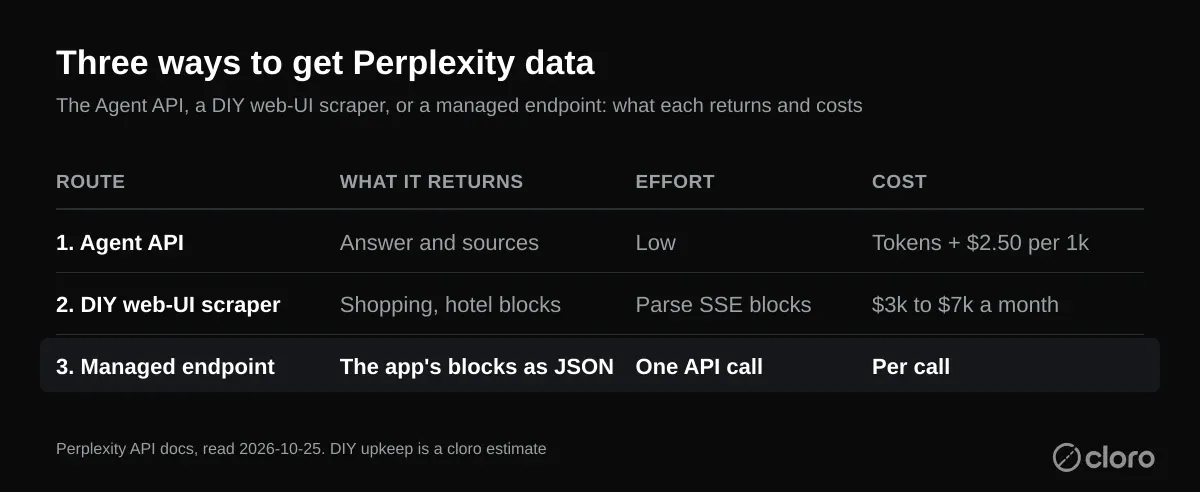
How Perplexity assembles an answer, stage by stage
Before you scrape Perplexity, it helps to know how the answer is assembled. Perplexity stitches together several systems to produce each result, and each stage leaves a fingerprint in the response you eventually capture. With the pipeline modelled, parsing is mostly mechanical. Without it, you end up guessing which field holds what.
The response generation pipeline
- Query analysis. Classifies search intent (shopping, travel, media, general).
- Search integration. Runs real-time web searches across multiple sources.
- AI synthesis. Uses LLMs to synthesize information with citations.
- Structured extraction. Pulls rich data objects based on intent.
- Streaming response. Delivers results via Server-Sent Events (SSE).
Multi-modal response structure:
// Perplexity combines text, sources, and rich data objects
{
  answer: "AI-generated response with citations [1][2]",
  sources: ["https://example.com/source1", "https://example.com/source2"],
  shoppingCards: [...], // When shopping intent detected
  videos: [...], // When media intent detected
  hotels: [...] // When travel intent detected
}
Server-Sent Events format:
event: message
data: {"final_sse_message": false, "blocks": [{"markdown_block": {"answer": "Hello"}}]}

event: message
data: {"final_sse_message": false, "blocks": [{"markdown_block": {"answer": "Hello world"}}]}

event: message
data: {"final_sse_message": true, "blocks": [...], "web_results": [...]}
Query intent detection
The intent classifier decides which block type you get back, so it is the thing to model first. Misread the intent and you will request one shape while parsing for another.
- Shopping queries → Product cards with pricing
- Travel queries → Hotel listings and places
- Media queries → Videos and images
- General queries → Text with citations
Anti-bot detection:
- Request pattern analysis
- Browser fingerprinting
- Rate limiting with exponential backoff
- Dynamic content loading challenges
The Server-Sent Events parsing challenge
Most of the work to scrape Perplexity is parsing the SSE stream and extracting structured data blocks. The transport is standard. Messages arrive as text/event-stream, and each block is terminated by a pair of newlines, so a browser could read it with the native EventSource interface. What makes it hard to scrape Perplexity is not the transport but the payload.
SSE event structure:
# Raw Perplexity SSE example
event: message
data: {"final_sse_message": false, "blocks": [{"markdown_block": {"answer": "Recent"}}]}

event: message
data: {"final_sse_message": false, "blocks": [{"markdown_block": {"answer": "developments"}}]}

event: message
data: {"final_sse_message": true, "blocks": [...], "web_results": [...]}
Why the final SSE event matters
The stream sends the answer token by token, so early events hold only partial text. The complete blocks list, with the shopping, hotels, and citation data, arrives only in the event flagged final_sse_message: true. Read the last event with that flag set, not the last event in the stream. When you capture the raw stream with a headless browser, response.text() returns the full concatenated payload for that request in one string.
Parsing challenges:
- Multi-event streaming. Content arrives across multiple SSE events.
- Final message detection. Only the last event contains complete structured data.
- Block-based structure. Different data types live in separate blocks.
- Mixed content types. Text, sources, media, and structured objects all combined.
Python SSE parsing implementation:
import json
from typing import List, Dict, Any, Optional

def get_last_final_message(sse_response: str) -> Optional[dict]:
    """
    Extract the last message with final=true from Perplexity SSE response.
    """
    messages = sse_response.strip().split("\n\n")

    for message in reversed(messages):
        if not message.startswith("event: message"):
            continue

        # Extract the data line
        lines = message.split("\n")
        for line in lines:
            if line.startswith("data: "):
                try:
                    data = json.loads(line[6:])  # Remove 'data: ' prefix

                    # Check if this is the final message
                    if data.get("final_sse_message"):
                        return data
                except json.JSONDecodeError:
                    continue

    return None

def extract_answer_text(final_message_data: Optional[dict]) -> str:
    """
    Extract the answer text from the final message data.
    """
    if not final_message_data:
        return ""

    blocks = final_message_data.get("blocks", [])

    for block in blocks:
        if "markdown_block" in block:
            return block["markdown_block"].get("answer", "")

    return ""
Source extraction from web results:
def extract_perplexity_sources(final_message_data: Optional[dict]) -> List[Dict[str, Any]]:
    """
    Extract sources from Perplexity SSE response.
    """
    sources = []

    if not final_message_data:
        return sources

    # Extract web_results from blocks
    blocks = final_message_data.get("blocks", [])

    for block in blocks:
        # Check for web_result_block
        if "web_result_block" in block:
            web_results = block["web_result_block"].get("web_results", [])

            for idx, result in enumerate(web_results, start=1):
                sources.append({
                    "position": idx,
                    "label": result.get("name", ""),
                    "url": result.get("url", ""),
                    "description": result.get("snippet") or result.get("meta_data", {}).get("description"),
                })

    return sources
What a Perplexity scraper needs that a ChatGPT scraper doesn’t
Perplexity’s stack adds two requirements ChatGPT scraping doesn’t have: an intent-classifier inspector and a block-aware schema dispatcher. Without both, a scraper either crashes on unexpected blocks or silently drops half the structured data. Either way, capture the network response directly rather than reading rendered DOM text.
What a Perplexity scraper needs, specifically:
- A network interceptor scoped to
rest/sse/perplexity_ask. Perplexity dispatches multiple background calls (search hydration, autocomplete, telemetry), and only this URL carries the answer stream. A headless browser can subscribe to every response with Playwright’spage.on('response')hook and keep just the one you want. - A block-shape dispatcher that reads
final_sse_message.blocks[]and branches onmarkdown_blockvsshopping_blockvshotels_mode_blockvsmaps_mode_blockvsmedia_block. Each has a different schema, so treat them as a tagged union. - A reader for
final_sse_message: true. Intermediate events stream tokens; only the final event carries the complete blocks list. Parse the last event with the flag set, not the last event period. - An inspector for
answer_modesandclassifier_results.shopping_intent, so you can assert that the shopping block you expected is the one you got. Silent classifier flips are otherwise easy to miss. - Cloudflare-aware navigation. Perplexity uses Cloudflare similar to ChatGPT but with a tighter rate-limit window per IP, and a residential pool at one request per IP per 60s is the safe cadence for batch monitoring.
Cloudflare and rate limits
Two throttles constrain anyone trying to scrape Perplexity at scale. The web UI sits behind Cloudflare, which challenges traffic that looks automated. The Agent API applies its own usage-tier rate limits, where a request over the ceiling returns a 429 and tokens refill on a leaky-bucket schedule. Plan for both. Space requests out per IP, back off on a 429, and rotate residential sessions so a single address never trips the challenge.
Is scraping Perplexity allowed?
It depends on Perplexity’s Terms of Service and on what you do with the data. Oxylabs’ own scraper repo calls it a gray area and puts compliance on the user, so read the terms before you run a batch job, and prefer the Agent API when you only need model output. The traffic also runs the other way. Perplexity’s crawler docs list two agents: PerplexityBot indexes pages for search results and is managed through robots.txt, while Perplexity-User fetches pages when a user asks a question and “generally ignores robots.txt rules.” If you want your own pages cited in the answers you scrape, allow PerplexityBot.
Complete scraper implementation:
import asyncio
from playwright.async_api import async_playwright, Page
import json
from typing import Dict, Any, List, Optional

class PerplexityScraper:
    def __init__(self):
        self.captured_responses = []

    async def setup_sse_interceptor(self, page: Page):
        """Set up Server-Sent Events interception."""

        async def handle_response(response):
            # Capture Perplexity SSE responses
            if 'rest/sse/perplexity_ask' in response.url:
                response_body = await response.text()
                self.captured_responses.append(response_body)

        page.on('response', handle_response)

    async def scrape_perplexity(self, query: str, country: str = 'US') -> Dict[str, Any]:
        """Main scraping function."""

        async with async_playwright() as p:
            browser = await p.chromium.launch(headless=False)
            context = await browser.new_context()
            page = await context.new_page()

            # Set up SSE interception
            await self.setup_sse_interceptor(page)

            try:
                # Navigate to Perplexity
                await page.goto('https://www.perplexity.ai', timeout=20_000)

                # Handle any modals or popups
                await self.remove_dialogs(page)

                # Fill and submit query
                await page.wait_for_selector('#ask-input', state="visible", timeout=10_000)
                await page.fill('#ask-input', query)
                await page.click('[data-testid="submit-button"]', timeout=5_000)

                # Wait for SSE response
                await self.wait_for_perplexity_response(page)

                # Parse the captured response
                if self.captured_responses:
                    raw_response = self.captured_responses[0]
                    return self.parse_perplexity_response(raw_response)
                else:
                    raise Exception("No SSE response captured")

            finally:
                await browser.close()

    async def remove_dialogs(self, page: Page):
        """Remove any modal dialogs or popups."""
        await page.evaluate("""
            // Remove all portal elements
            const elements = document.querySelectorAll("[data-type='portal']");
            elements.forEach(element => {
                element.remove();
            });
        """)

    async def wait_for_perplexity_response(self, page: Page, timeout: int = 60):
        """Wait for Perplexity SSE response completion."""

        for _ in range(timeout * 2):  # Check every 500ms
            # Check if we have captured responses
            if self.captured_responses:
                # Verify response contains final message
                final_message = get_last_final_message(self.captured_responses[0])
                if final_message:
                    return

            await asyncio.sleep(0.5)

        raise Exception("Response timeout after 60 seconds")

    def parse_perplexity_response(self, sse_response: str) -> Dict[str, Any]:
        """Parse the raw Perplexity SSE response into structured data."""

        # Extract final message data
        final_message_data = get_last_final_message(sse_response)

        # Extract core content
        text = extract_answer_text(final_message_data)
        sources = extract_perplexity_sources(final_message_data)

        result = {
            'text': text,
            'sources': sources,
        }

        # Extract shopping products if shopping intent detected
        if has_shopping_intent(final_message_data):
            shopping_cards = extract_perplexity_shopping_products(final_message_data)
            if shopping_cards:
                result['shopping_cards'] = shopping_cards

        # Extract media content
        media = extract_perplexity_media(final_message_data)
        if media['videos']:
            result['videos'] = media['videos']
        if media['images']:
            result['images'] = media['images']

        # Extract travel data
        if has_places_intent(final_message_data):
            hotels_places = extract_perplexity_hotels_and_places(final_message_data)
            if hotels_places['hotels']:
                result['hotels'] = hotels_places['hotels']
            if hotels_places['places']:
                result['places'] = hotels_places['places']

        # Extract related queries
        related_queries = extract_related_queries(final_message_data)
        if related_queries:
            result['related_queries'] = related_queries

        return result
Branch your parser by intent: shopping, media, travel
To scrape Perplexity well, branch your parser on the detected intent. Perplexity classifies query types and emits matching structured data, one block shape per intent, so detect the intent first and then pull the block that goes with it.
Shopping intent detection:
def has_shopping_intent(final_message_data: Optional[dict]) -> bool:
    """
    Check if the response indicates shopping intent.
    """
    if not final_message_data:
        return False

    # Check answer modes for shopping
    answer_modes = final_message_data.get("answer_modes", [])
    for mode in answer_modes:
        if isinstance(mode, dict) and mode.get("answer_mode_type") == "SHOPPING":
            return True

    # Check classifier results
    classifier_results = final_message_data.get("classifier_results", {})
    return classifier_results.get("shopping_intent", False)

def extract_perplexity_shopping_products(final_message_data: Optional[dict]) -> List[Dict[str, Any]]:
    """
    Extract shopping products from Perplexity response.
    """
    shopping_cards = []

    if not final_message_data:
        return shopping_cards

    blocks = final_message_data.get("blocks", [])

    for block in blocks:
        # Extract from shopping_block
        if "shopping_block" in block:
            shopping_block = block["shopping_block"]
            products = shopping_block.get("products", [])

            for product in products:
                if isinstance(product, dict):
                    product_info = {
                        "title": product.get("name"),
                        "url": product.get("url"),
                        "description": product.get("description"),
                        "price": product.get("price"),
                        "original_price": product.get("original_price"),
                        "rating": product.get("rating"),
                        "num_reviews": product.get("num_reviews"),
                        "image_urls": product.get("image_urls", []),
                        "merchant": product.get("merchant"),
                        "id": product.get("id"),
                        "variants": product.get("variants", []),
                        "offers": product.get("offers", [])
                    }

                    shopping_cards.append({
                        "products": [product_info],
                        "tags": shopping_block.get("tags", [])
                    })

    return shopping_cards
Media content extraction:
def extract_perplexity_media(final_message_data: Optional[dict]) -> dict:
    """
    Extract media items (videos and images) from Perplexity response.
    """
    videos = []
    images = []

    if not final_message_data:
        return {"videos": videos, "images": images}

    blocks = final_message_data.get("blocks", [])

    for block in blocks:
        # Extract from media_block
        if "media_block" in block:
            media_block = block["media_block"]
            media_items = media_block.get("media_items", [])

            for item in media_items:
                if isinstance(item, dict):
                    media_item = {
                        "title": item.get("name"),
                        "url": item.get("url"),
                        "thumbnail": item.get("thumbnail"),
                        "medium": item.get("medium", "").lower(),
                        "source": item.get("source"),
                    }

                    # Add image dimensions
                    for dim_field in ["image_width", "image_height", "thumbnail_width", "thumbnail_height"]:
                        if dim_field in item:
                            try:
                                media_item[dim_field] = int(item[dim_field])
                            except (ValueError, TypeError):
                                pass

                    medium = item.get("medium", "").lower()
                    if medium == "video":
                        videos.append(media_item)
                    elif medium == "image":
                        images.append(media_item)

    return {"videos": videos, "images": images}
Travel data extraction:
def extract_perplexity_hotels_and_places(final_message_data: Optional[dict]) -> dict:
    """
    Extract hotels and places from Perplexity response.
    """
    hotels = []
    places = []

    if not final_message_data:
        return {"hotels": hotels, "places": places}

    blocks = final_message_data.get("blocks", [])

    for block in blocks:
        # Extract from hotels_mode_block
        if "hotels_mode_block" in block:
            hotel_block = block["hotels_mode_block"]
            hotel_places = hotel_block.get("places", [])

            for place in hotel_places:
                if isinstance(place, dict):
                    hotel_item = {
                        "name": place.get("name"),
                        "url": place.get("url", ""),
                        "rating": place.get("rating"),
                        "num_reviews": place.get("num_reviews"),
                        "address": place.get("address", []) if isinstance(place.get("address"), list) else [place.get("address", "")],
                        "phone": place.get("phone"),
                        "description": place.get("description"),
                        "image_url": place.get("image_url"),
                        "images": place.get("images", []),
                        "lat": place.get("lat"),
                        "lng": place.get("lng"),
                        "price_level": place.get("price_level"),
                        "categories": place.get("categories", [])
                    }

                    hotels.append(hotel_item)

        # Extract from maps_mode_block
        elif "maps_mode_block" in block:
            maps_block = block["maps_mode_block"]
            map_places = maps_block.get("places", [])

            for place in map_places:
                if isinstance(place, dict):
                    place_item = {
                        "name": place.get("name"),
                        "url": place.get("url", ""),
                        "address": place.get("address", []) if isinstance(place.get("address"), list) else [place.get("address", "")],
                        "rating": place.get("rating"),
                        "lat": place.get("lat"),
                        "lng": place.get("lng"),
                        "categories": place.get("categories", []),
                        "map_url": place.get("map_url"),
                        "images": place.get("images", [])
                    }

                    places.append(place_item)

    return {"hotels": hotels, "places": places}
Related queries extraction:
def extract_related_queries(final_message_data: Optional[dict]) -> List[str]:
    """
    Extract related queries from Perplexity response.
    """
    if not final_message_data:
        return []

    # Extract from related_queries field (preferred source)
    queries = final_message_data.get("related_queries", [])
    if isinstance(queries, list):
        related = [q.strip() for q in queries if isinstance(q, str) and q.strip()]
        if related:
            return related

    # Check related_query_items for text fields
    query_items = final_message_data.get("related_query_items", [])
    if isinstance(query_items, list):
        related = []
        for item in query_items:
            if isinstance(item, dict):
                text = item.get("text")
                if isinstance(text, str) and text.strip() and text not in related:
                    related.append(text.strip())
        if related:
            return related

    return []
How do you get Perplexity AI answers and sources through an API?
Two honest options. Perplexity’s own API returns answers with citations, right when you want Perplexity as a component in your product. cloro scrapes the consumer surface at 4 credits per request, right when the question is what Perplexity tells its users, because the two answers are not guaranteed to match.
Using cloro’s managed Perplexity scraper

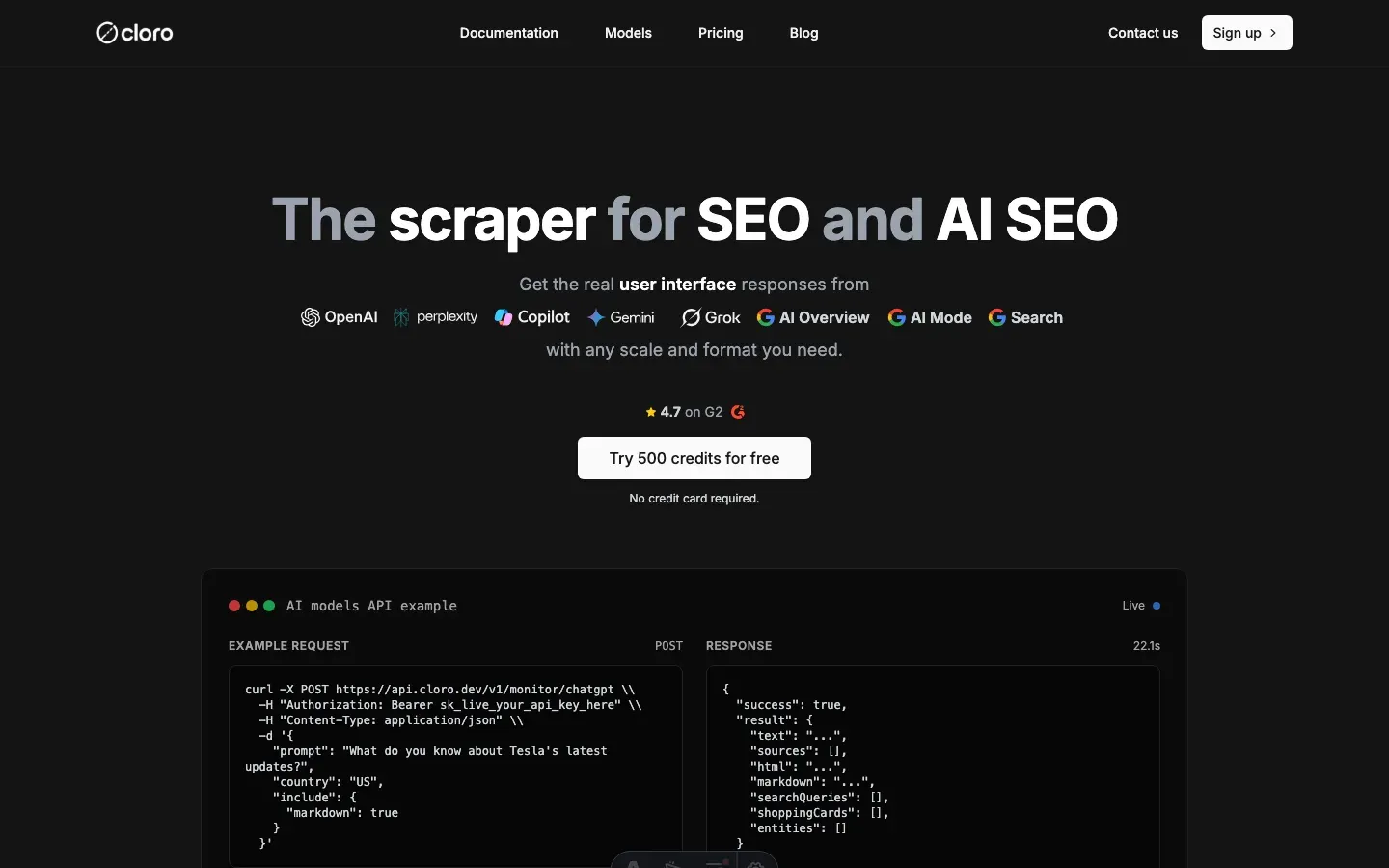
The hardest part of a DIY effort to scrape Perplexity is not writing the first parser, it is the upkeep afterwards. The block schemas aren’t documented and they drift. The shopping_block.products[].offers[] shape gained a variants[] field three months ago. The hotels_mode_block adopted a categories[] array. Each change is a parser update plus a schema-test pass. cloro’s /v1/monitor/perplexity endpoint absorbs the schema drift, so your code to scrape Perplexity does not break when the blocks move.
Simple API integration:
import requests
import json

# Your search query
query = "What are the latest developments in quantum computing 2026?"

# API request to cloro
response = requests.post(
    'https://api.cloro.dev/v1/monitor/perplexity',
    headers={'Authorization': 'Bearer YOUR_API_KEY'},
    json={
        'prompt': query,
        'country': 'US',
        'include': {
            'markdown': True,
            'html': True
        }
    }
)

result = response.json()
print(json.dumps(result, indent=2))
The endpoint dispatches on block shape for you. Whether the response carries shopping, hotels, maps or media blocks, the parsed output lands in stable top-level keys. It surfaces answer_modes and classifier_results.shopping_intent so you can assert what type of answer came back, and it merges hotels_mode_block and maps_mode_block into a single places[] output with a discriminator, so nothing downstream has to branch. Both the related_queries and related_query_items shapes are handled.
Underneath that, when Perplexity adds fields to shopping_block.products[].offers[] (variants, original_price, merchant variants), our parser absorbs them and the API contract you call doesn’t change. The residential session pool is tuned for Perplexity’s tighter per-IP cadence.
Sample structured output:
{
  "status": "success",
  "result": {
    "text": "Recent developments in quantum computing include breakthrough error correction methods...",
    "sources": [
      {
        "position": 1,
        "url": "https://example.com/quantum-breakthrough",
        "label": "MIT Technology Review",
        "description": "Scientists achieve 99.9% qubit fidelity in room temperature conditions..."
      }
    ],
    "shopping_cards": [
      {
        "products": [
          {
            "title": "Quantum Computing Book",
            "url": "https://example.com/product",
            "price": "$89.99",
            "rating": 4.8,
            "num_reviews": 1250,
            "image_urls": ["https://example.com/image.jpg"],
            "merchant": "TechBooks",
            "offers": [...]
          }
        ],
        "tags": ["education", "quantum"]
      }
    ],
    "videos": [
      {
        "title": "Quantum Computing Explained",
        "url": "https://youtube.com/watch?v=example",
        "thumbnail": "https://example.com/thumb.jpg",
        "medium": "video",
        "source": "youtube"
      }
    ],
    "hotels": [
      {
        "name": "Quantum Research Hotel",
        "url": "https://example.com/hotel",
        "rating": 4.5,
        "address": ["123 Tech Street", "Innovation City"],
        "price_level": "$$$",
        "categories": ["Hotel", "Business"]
      }
    ],
    "related_queries": [
      "What companies are leading quantum computing?",
      "How does quantum error correction work?"
    ]
  }
}
The part that matters over a year is the schema versioning, which is our problem rather than yours: when shopping_block.products[].variants[] showed up, customer code didn’t change. Pass assert_intent: "shopping" and the response carries a flag for whether the classifier matched what you expected, which is how you catch drift early. Nothing downstream branches between hotels_mode_block and maps_mode_block, since both flow into a single places[] output with a discriminator field, and nobody has to tune backoff by hand for Perplexity’s cooldown window.
Building this in-house typically runs $3,000–7,000/month. The line items are residential proxies, a Playwright fleet, schema-drift monitoring, and the on-call rotation for answer-mode changes. Most teams that scrape Perplexity underestimate that last cost.
If you need a custom build, the block-shape map above is the starting point, and you should budget for schema-drift work. Perplexity has shipped two answer-mode types in the last six months, the media block got merged into the main flow, and places split into hotels versus maps.
So it comes down to whether you want to own that maintenance or hand it off. Get started with cloro’s Perplexity API and skip the schema-drift maintenance.

About the author
Ricardo Batista
Founder, cloro
Ricardo is one of the founders and engineers behind its SERP and AI-search scraping infrastructure. Before cloro he scaled a financial comparison site to $7M ARR and ran the full-country operations of a unicorn to $65M ARR, then went back to building. He writes about search engine scraping, generative-engine optimization, and turning live search and AI-answer data into something teams can act on.
Frequently asked questions
How does Perplexity deliver answers?
Perplexity uses Server-Sent Events (SSE) to stream the answer token by token. You need an event stream parser to capture the final output.
Can I scrape the 'Related Questions'?
Yes, these are usually sent as a structured JSON object at the end of the event stream.
Does Perplexity block scrapers?
Yes, they use Cloudflare protection. You need bypass techniques similar to scraping ChatGPT.
Is scraping Perplexity allowed?
It sits in a gray area that depends on Perplexity's Terms of Service and how you use the data, so review the terms first. If you only need model output, Perplexity's official Agent API is the sanctioned route; scraping is for capturing what the consumer surface shows users.
What is query intent detection in Perplexity?
Perplexity automatically classifies the user's intent (e.g., shopping, travel, media) and tailors the response by extracting and presenting specific structured data, such as product cards or hotel listings.
What makes Perplexity responses valuable for businesses?
Perplexity combines AI reasoning with real-time web search and structured data extraction. Answers arrive with their citations attached, which is what makes them useful for market research and competitive intelligence.
Related reading

Best LLM & AI Visibility Tools 2026: 12 Tested
We tested 12 LLM visibility tools (also sold as AI visibility trackers and checkers) on real brand-monitoring workflows across ChatGPT, Perplexity, and Gemini. What works, what doesn't.
How to Scrape ChatGPT: SSE Streams and Citations
Learn how to scrape ChatGPT: capture SSE streams, expand citations, handle Cloudflare, and decide when a managed API is safer than DIY scraping.

How to Scrape Gemini: API, URL Context, and Web UI
Learn how to scrape Gemini with the API, URL context, or web UI automation. Compare structured outputs, citations, and anti-bot trade-offs clearly.