
AI Crawlers Explained: GPTBot, ClaudeBot & robots.txt

On this page
A new class of bot is hitting your servers. Traditional search bots scan your site to rank it. AI crawlers scan it to learn it or quote it, feeding large language models, grounding live answers in ChatGPT and Perplexity, and building rival search indexes. If you run a website, these are now some of your most frequent non-human visitors, and most site owners can’t name a single one of them.
This guide names them. It covers who the major AI crawlers are, the exact user-agent strings they announce themselves with, why they visit, how to spot them in your logs, and how to control them with robots.txt, including the cases where robots.txt won’t save you.
Search bots vs. AI crawlers
A search engine crawler and an AI crawler both request your pages over HTTP and follow links. The difference is what happens after the request. The distinction decides whether the visit earns you anything.
The content-for-traffic trade AI crawlers break
A search crawler indexes your content so a human can find it and click through to your site. The transaction is a fair trade: you give up content, you get a visitor. AI crawlers often break that trade. They use your content to train a model or to generate an answer inside the AI product, frequently without sending the reader to you at all. Your server pays the bandwidth; the referral may never come.
That inversion is the whole reason AI crawlers have become a governance topic. A search bot is a distribution channel you want. An AI crawler can be a distribution channel, a training input, or pure cost, depending on which bot it is and what you let it do.
Why AI crawlers need their own policy
Because the trade-off shifts per bot, “block all robots” and “allow all robots” are both wrong answers for AI crawlers. The old question was binary: do I want to be indexed? The new question has three parts: do I want my content training models, powering cited answers, or both, and at what cost?
You can answer those questions independently, and the major operators now expect you to. The rest of this guide gives you the roster, the detection method, and the control surface to make that decision crawler by crawler.
Why AI crawlers visit: train, cite, or index
Not all AI crawlers do the same job. Sorting them by purpose is the fastest way to decide how to treat each one.
- Training. These crawlers collect content to train or refine foundation models. OpenAI’s GPTBot “is used to crawl content that may be used in training our generative AI foundation models,” and disallowing it signals your content should not be used for training, per OpenAI’s crawler documentation. Anthropic’s ClaudeBot plays the same role, and “helps enhance the utility and safety of our generative AI models by collecting web content that could potentially contribute to their training,” per Anthropic’s crawler documentation.
- Live retrieval and citation. These fetch pages in real time to answer a specific user question, usually with a linked citation. OpenAI separates this into ChatGPT-User (user-initiated fetches) and OAI-SearchBot (surfacing sites in ChatGPT search); Anthropic splits out Claude-User and Claude-SearchBot the same way. Blocking these is what removes you from AI answers.
- Index building. Some crawlers build independent search indexes to reduce their dependence on Google and Bing. OAI-SearchBot and PerplexityBot are the clearest examples.
The practical upshot: a training crawler and a retrieval crawler carry different trade-offs. Block the training crawler and you protect your content from model ingestion. Block the retrieval crawler and you disappear from the answer, including the citation that could have sent a reader your way. For a product that wants to be found through AI, see our take on tracking your visibility in AI search.
What explains the surge in AI crawler traffic
Training is most of it. Cloudflare’s breakdown by purpose found training responsible for nearly 80% of AI bot crawling, with user-action and undeclared fetches under 5%, and GPTBot plus Amazonbot alone accounting for over 40% of crawling traffic. Radware ties the growth to two forces: each model generation needs more training data than the last, and retrieval systems added a second class of bots that fetch pages live. Across the web, most AI crawler volume is the training kind, the one that sends no referral back.
The AI crawler roster and their user-agent strings
Every crawler announces itself with a user-agent string in its HTTP requests. This is the string you match on in robots.txt and search for in your logs. The documented ones:
| Operator | Crawler | Purpose | User-agent token |
|---|---|---|---|
| OpenAI | GPTBot | Model training | GPTBot |
| OpenAI | OAI-SearchBot | ChatGPT search indexing | OAI-SearchBot |
| OpenAI | ChatGPT-User | User-initiated live fetch | ChatGPT-User |
| Anthropic | ClaudeBot | Model training | ClaudeBot |
| Anthropic | Claude-User / Claude-SearchBot | Live fetch / search | Claude-User, Claude-SearchBot |
| Google-Extended | Gemini training control token | Google-Extended | |
| GoogleOther | Generic R&D crawler | GoogleOther | |
| Meta | Meta-ExternalAgent | Model training | meta-externalagent |
| Amazon | Amazonbot | Products + AI training | Amazonbot |
| Perplexity | PerplexityBot | Search index | PerplexityBot |
| ByteDance | Bytespider | Model training | Bytespider |
| Common Crawl | CCBot | Open web dataset | CCBot |
| Apple | Applebot | Apple services + AI | Applebot |
A few of these are worth pulling out:
Google-Extended is a control token, not a crawler. It has no separate user-agent of its own. It is “a standalone product token that web publishers can use to manage whether content Google crawls from their sites may be used for training future generations of Gemini models,” and it “does not impact a site’s inclusion in Google Search nor is it used as a ranking signal,” per Google’s crawler documentation. You can opt out of Gemini training without touching your search rankings.
Amazonbot does double duty. It “is used to improve our products and services… and may be used to train Amazon AI models,” and Amazon “respects the Robots Exclusion Protocol, honoring the user-agent and the allow/disallow directives,” per Amazon’s crawler documentation.
CCBot feeds the open web dataset that trains many models. Common Crawl’s non-profit crawler identifies itself as CCBot/2.0 and can be blocked directly, per Common Crawl’s CCBot page. Because so many models train on the Common Crawl corpus, blocking CCBot has outsized reach.
Most site owners have never heard of Meta-ExternalAgent, which is the crawler behind the second-most bot requests on the entire web, ahead of GPTBot, per Cloudflare’s AI-crawler analysis. If your logs show a bot named meta-externalagent requesting large numbers of pages, that is Meta collecting training content, not a misconfiguration. Its share of AI crawler traffic makes it one of the first tokens to add to any block or throttle list you build.
A last practical note on the table: several of these operators run more than one token, and the tokens do different jobs. OpenAI alone runs three. Treating “OpenAI’s crawler” as a single thing is the most common mistake site owners make, because it collapses a training bot and two retrieval bots you might want to keep. Match on the exact token, never the operator name.
How to detect AI crawlers in your logs
Detecting AI crawlers comes down to reading your access logs for known user-agent strings, then confirming the ones that matter are genuine. You cannot set a policy for a bot you have never noticed.
Reading user agents in your access logs
Every request carries a user-agent. Human browsers send long strings identifying the OS and browser; most crawlers send short, declared tokens. Search your logs for the tokens in the table above to see which crawlers reach your site, how many pages they request, and how often.
At volume, manual log reading is impossible. Pipe logs into a log-analytics tool and filter by user-agent, or grep the raw access log for a single token to spot-check one bot. A line like grep GPTBot access.log | wc -l gives you a same-day count of OpenAI’s training crawler without any tooling.
Verifying a crawler is who it claims to be
A user-agent string is self-reported, so a request that says GPTBot is not proof that OpenAI sent it. The operators that publish AI crawlers also publish a way to check. Google documents two methods: run a reverse DNS lookup on the accessing IP and confirm it resolves to googlebot.com, google.com, or googleusercontent.com, or match the IP against Google’s published crawler IP ranges, per Google’s crawler-verification guide.
OpenAI, Amazon, Anthropic, and Common Crawl publish equivalent IP lists or reverse-DNS methods. The rule of thumb: trust the token to discover which AI crawlers hit you, but verify against IP before you act on a bot that claims a well-known name.
Which AI crawlers are busiest right now
For a continuously updated view of which bots are most active across the web, Cloudflare publishes live rankings. As of 2026, Meta-ExternalAgent sends the second-most requests of any bot on the web after Googlebot, with GPTBot ranking third, per Cloudflare’s AI-crawler analysis. If you see heavy meta-externalagent or GPTBot traffic in your logs, that is expected, not an anomaly. Knowing the baseline lets you flag the real outliers: a spike from a token nobody recognizes is the signal worth chasing.
How do I track AI crawler and agent visits to my site?
Track them in four layers, from free to managed:
- Grep your access logs by user-agent token. The table above is the filter list.
grep -c OAI-SearchBot access.logis a same-day count of ChatGPT search fetches with no tooling at all, and a log-analytics stack (GoAccess, Grafana Loki, or your CDN’s log pipeline) turns the same filter into a standing dashboard. - Turn on your CDN’s AI-crawler analytics. Cloudflare’s AI Crawl Control breaks out AI crawler traffic by bot, lets you allow or block each one, and carries its Pay Per Crawl beta for charging crawlers instead of blocking them. If your site already fronts with Cloudflare, this is the fastest route to per-bot visibility with zero code.
- Verify before you act. A spike that self-reports as
GPTBotstill needs the IP check from the verification section above; act on verified traffic, investigate the rest as possible spoofing. - Split crawlers from agents. Automatic crawlers (GPTBot, ClaudeBot, Meta-ExternalAgent) fetch on their own schedule; user-triggered agents (
ChatGPT-User,Perplexity-User) fetch because a human asked a question that needed your page. The second class is closer to a visit than a crawl, and robots.txt rules may not apply to it, so measure the two separately or your “AI traffic” number mixes two different behaviors.
A crawler fetch is the top of the funnel, and it is not the metric that pays. A bot reading your page tells you the engine can use it; whether an engine actually retrieves the page while answering a real prompt, and whether the answer then cites you, are separate stages with their own failure modes. We measured the relationship between blocking and disappearance in the AI crawler blocks study, and the retrieval and citation stages are what AI visibility tracking measures per prompt.
Which tool shows when ChatGPT’s crawler fetched my pages?
Your own access logs, filtered to OpenAI’s three published user agents, are the authoritative record, and a CDN dashboard like Cloudflare’s AI Crawl Control gives you the same answer without grepping. The part that trips people up is that “ChatGPT fetched my page” is three different agents with three different meanings, per OpenAI’s bot documentation:
OAI-SearchBotis the search crawler. It surfaces sites in ChatGPT’s search results, and OpenAI states that sites opted out of it will not be shown in ChatGPT search answers. This is the token to watch if you care about AI visibility.GPTBotis the training crawler. It collects content that may be used in training OpenAI’s foundation models; disallowing it signals your content should not be used for training, and says nothing about search.ChatGPT-Userfires when a user’s own action makes ChatGPT open your page. OpenAI states it is not used for automatic crawling and that robots.txt rules may not apply, because a person initiated the fetch.
The three are independent in robots.txt, so count them independently in your logs. A healthy pattern for a site that wants AI visibility is steady OAI-SearchBot coverage of your key pages and ChatGPT-User spikes that track real question demand; a GPTBot-only pattern means OpenAI is reading you for training but ChatGPT search is not fetching you for answers.
Controlling AI crawlers with robots.txt
robots.txt, placed at the root of your domain, is the primary control surface for AI crawlers. You match a crawler by its user-agent token and set an Allow or Disallow rule. Compliant operators read the file on their next visit and apply your directives.
A worked robots.txt for AI crawlers
The example below blocks the major training crawlers (the first five groups) while keeping the search and retrieval crawlers that can send you traffic (the last two):
User-agent: GPTBot
Disallow: /

User-agent: ClaudeBot
Disallow: /

User-agent: CCBot
Disallow: /

User-agent: Google-Extended
Disallow: /

User-agent: Bytespider
Disallow: /

User-agent: OAI-SearchBot
Allow: /

User-agent: ChatGPT-User
Allow: /
The key mechanic is that each token is independent. Allowing OAI-SearchBot while disallowing GPTBot tells OpenAI “surface me in search, don’t train on me,” a distinction OpenAI’s documentation explicitly supports. Treat every token as its own switch rather than blocking AI crawlers as a single block.
Throttling with Crawl-delay instead of blocking
Blocking is not the only option. Some operators honor Crawl-delay to throttle a crawler’s request rate rather than shut it out entirely. Anthropic supports it, so you can keep ClaudeBot’s access while capping how hard it hits your origin:
User-agent: ClaudeBot
Crawl-delay: 1
This is the middle path when the concern is server load rather than model ingestion: you stay in the corpus but slow the crawl to one request per second.
How fast robots.txt changes take effect
Changes are not instant. OpenAI notes it can take roughly 24 hours from a robots.txt update for its systems to adjust, and Amazon may use a cached copy of your robots.txt for up to 30 days. Set the rule, then give the AI crawlers time to re-read the file before you conclude a directive isn’t working.
When robots.txt isn’t enough
robots.txt is a request, not a wall. It works only for crawlers that choose to obey it, and two failure modes break that assumption. Both mean the file quietly stops protecting you against the bots that matter most.
Spoofed user agents
Nothing stops a bot from putting someone else’s name in its user-agent header. Common Crawl warns directly that it is “aware of crawlers falsely identifying themselves as CCBot” and recommends verifying against published IP ranges rather than trusting the string. Because the token is self-reported, a robots.txt rule keyed to it does nothing against a bot that lies about its name.
This is why verification matters. Google, OpenAI, Amazon, Anthropic, and Common Crawl all publish IP lists or reverse-DNS methods precisely so you can confirm a bot is who it claims to be before you trust it, or block it.
Non-compliant AI crawlers
Not every bot respects robots.txt, and some disguise their activity to scrape content without being blocked, per Cloudflare’s AI-crawler analysis. ByteDance’s Bytespider is the crawler most frequently flagged for high request volumes and inconsistent robots.txt adherence. A Disallow line is only as good as the crawler’s willingness to read it.
Server-level defenses that actually enforce
For AI crawlers that ignore the file or forge their identity, robots.txt alone won’t help. That is where server-level defenses come in: IP-range blocking, rate limiting, authentication, and bot-management tooling that fingerprints behavior rather than trusting the declared user-agent. These controls sit outside the scope of a robots.txt file, but they are the layer that actually enforces your intent against bad actors.
The trade-off is effort: robots.txt is one text file, while behavioral bot management is infrastructure you run and tune. Most sites layer both: the file to steer compliant AI crawlers, the server rules to stop the ones that don’t listen.
What the top domains actually do
Advice about AI crawler policy is easy to give and rarely measured, so we measured it. We fetched the robots.txt of the 1,058 most-prominent domains in cloro’s citation and organic corpus, meaning the sites most often cited by ChatGPT and Perplexity plus those ranking most often in Google’s top 10, and recorded which crawlers each one disallows at the site root. 88% resolved.
Publishers block the bots that train and leave open the bots that cite.
| Crawler | What it does | Share of top domains blocking it |
|---|---|---|
| CCBot (Common Crawl) | Training corpus | 17.8% |
| ClaudeBot | Training | 15.4% |
| GPTBot | Training | 13.9% |
| Google-Extended | Training | 13.2% |
| PerplexityBot | Retrieval | 8.6% |
| ChatGPT-User | Retrieval | 6.2% |
| OAI-SearchBot | Retrieval and search | 3.4% |
Training crawlers are blocked roughly two to five times more often than the ones that fetch a page to answer a live question. That gap is the three-bucket policy below already showing up in the wild: publishers are saying “do not train on me” while leaving “do cite me” open.
Blocking a retrieval bot tracks with vanishing from that engine
The same study joined those robots.txt rules to citation counts. Counting citations per Google-organic appearance controls for the fact that prominent domains collect more citations anyway.
Domains that block GPTBot show a median ChatGPT citation propensity of 0.003, against 0.417 for domains that allow it. Blocking OAI-SearchBot reads 0.0 against 0.394. The effect is engine-specific, which is what makes it credible: domains blocking PerplexityBot sit at 0.0 Perplexity propensity against 1.167 for everyone else, while blocking a non-OpenAI bot barely moves ChatGPT.
Read this as correlation rather than a proven mechanism. The figures are aggregate and directional, drawn from cloro’s monitored prompt mix rather than the whole web, and a site that blocks retrieval crawlers may differ from one that does not in other ways too. The full breakdown, including the per-engine table, is in the AI crawler blocks study.
For the decision below, the useful part is that the cost of blocking a retrieval crawler is measurable. It shows up as near-zero citations in the engine that owns that crawler.
Deciding your AI crawler policy
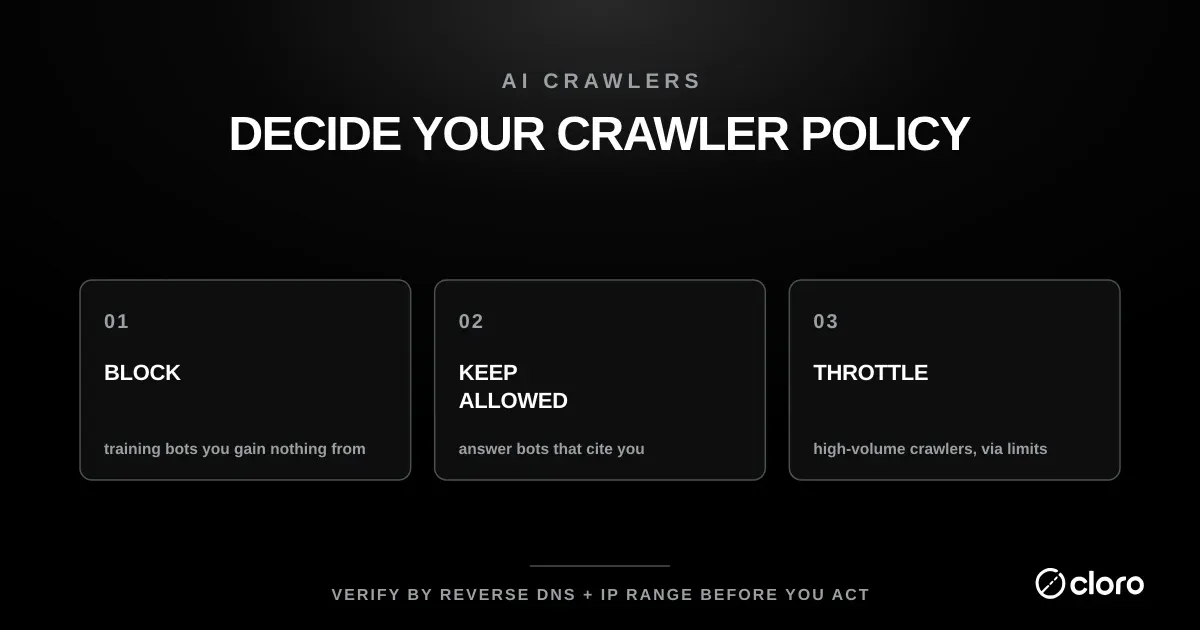
The right answer depends on what your content is worth to you and what you want it doing. Work through the roster one operator at a time and place each crawler in one of three buckets.
- Block outright. Training crawlers whose only value to you is model ingestion (GPTBot, ClaudeBot, CCBot, Google-Extended, Bytespider) if you have decided your content should not train foundation models. This protects the content but forfeits nothing in search traffic when you keep the retrieval bots allowed.
- Keep allowed. Retrieval and search crawlers that can cite you and send readers back: OAI-SearchBot, ChatGPT-User, Claude-SearchBot, PerplexityBot. Blocking these removes you from AI answers, which is the AI-era equivalent of deindexing yourself from search.
- Throttle, don’t block. Dual-use or high-volume crawlers where load is the real issue (Amazonbot, Applebot, or ClaudeBot under a
Crawl-delay) stay in the corpus at a rate your origin can absorb.
Whatever policy you choose, measure it. The point of allowing retrieval crawlers is to be quoted, so confirm you actually are: track your visibility in AI search to see whether opening the door to these AI crawlers is translating into citations. And if your interest runs the opposite direction, reliably extracting AI-search data yourself rather than governing who reads your site, that is the problem cloro’s API is built for.

About the author
Ricardo Batista
Founder, cloro
Ricardo is one of the founders and engineers behind its SERP and AI-search scraping infrastructure. Before cloro he scaled a financial comparison site to $7M ARR and ran the full-country operations of a unicorn to $65M ARR, then went back to building. He writes about search engine scraping, generative-engine optimization, and turning live search and AI-answer data into something teams can act on.
Frequently asked questions
What is an AI crawler?
An AI crawler is an automated bot that requests web pages to collect content for AI systems: to train models, retrieve live information for AI answers, or build a search index. It differs from a traditional search crawler, which indexes pages to refer human visitors back to your site.
How do I block AI crawlers?
Add rules to the robots.txt file at the root of your domain, matching each crawler by its user-agent token (for example GPTBot, ClaudeBot, CCBot) with `Disallow: /`. Compliant crawlers respect it, though changes can take up to 24 hours to take effect.
Does GPTBot respect robots.txt?
Yes. OpenAI documents that disallowing GPTBot in robots.txt signals your content should not be used to train its generative AI foundation models.
Should I block all AI crawlers?
Not necessarily. Blocking training crawlers protects your content from model ingestion, but blocking retrieval and search crawlers (like OAI-SearchBot or Claude-SearchBot) also removes you from cited AI answers that can send you traffic. Decide per crawler by purpose.
What is the difference between GPTBot and OAI-SearchBot?
They do different jobs, and OpenAI lets you control them independently. GPTBot crawls content that may be used to train foundation models, while OAI-SearchBot surfaces your site in ChatGPT's search results. Allow OAI-SearchBot to stay visible in search while disallowing GPTBot to opt out of training.
How do I track AI crawler and agent visits to my site?
Filter your access logs by the published user-agent tokens (GPTBot, OAI-SearchBot, ClaudeBot, PerplexityBot, Meta-ExternalAgent), or turn on a CDN view like Cloudflare's AI Crawl Control for per-bot analytics without code. Verify suspicious traffic against published IP ranges before acting, and count automatic crawlers separately from user-triggered agents like ChatGPT-User.
Related reading
Google Search Operators: Complete List and Examples
We tested which Google search operators still work in 2026: site, -site and intitle at 100%, inurl at 74%, related at 44%, cache returns nothing.

How to Scrape Google Search Results With Python (2026)
Learn how to scrape Google search results with Python, Playwright, or a SERP API. Compare HTML parsing, browser automation, and anti-bot risk.