
How to Scrape Google Search Results With Python (2026)

On this page
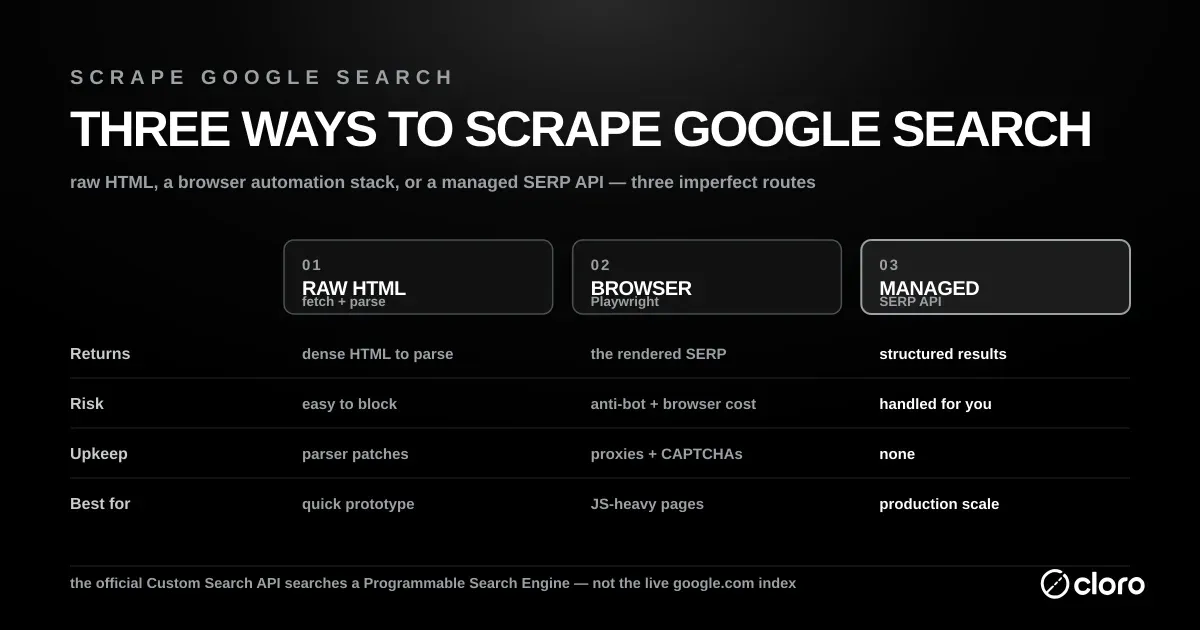
Scraping Google Search means choosing between three imperfect routes: raw HTML, browser automation, or a managed SERP API. However you do it, the aim is the same — scrape Google results accurately, from a real location, at a price that scales.
Raw HTML is fast to prototype and easy to block. Playwright gets closer to what users see, but adds browser cost and anti-bot risk. A SERP API costs money, but returns structured results without maintaining proxies, CAPTCHA handling, or parser patches. Note that “SERP API” covers two different products: Bright Data and Oxylabs sell the proxy layer and leave the parsing to you, while a parsed API hands back JSON fields.
The DIY toolkit is small. Most teams scrape Google Search with Python’s requests library for the HTTP fetch, then parse the markup with Beautiful Soup. Dynamic features force you to swap in a headless browser. Each choice trades raw speed for coverage.
This guide walks through the trade-offs, Python examples, and production decision points. For precise localization, pair it with Google search parameters; for provider selection, see best SERP APIs.
Why scrape Google Search results?
Google’s official Custom Search JSON API responses look nothing like what users see in the browser — it searches a configured Programmable Search Engine, not the live google.com index.
The economics push you toward scraping too. The Custom Search JSON API gives 100 free queries a day, then charges $5 per 1,000 queries up to a 10,000/day ceiling. Google has also closed that API to new customers, with a full shutdown scheduled for January 1, 2027. If you need the real SERP at volume, you scrape Google Search yourself or you buy a managed feed.
The gap is mostly the features, and they are now most of the page. Our SERP feature census scores every Google result cloro collects, 69,817 across 41 markets: organic results appeared on 98.0%, People Also Ask on 93.8% of US results, and an AI Overview on 85.4%. The organic ten is no longer the page, it is one block on it, and the two blocks that outrank it for frequency are exactly the ones a Programmable Search Engine cannot return. The sample leans toward conversational and commercial-research intent, so treat the AI Overview and PAA rates as the figures for question-shaped queries.
What you miss with the API:
- The actual search results users see
- AI Overview with source citations
- People Also Ask questions with related content
- Related searches for query expansion
- Location-based result personalization
Without scraping, you cannot monitor rankings or see what the search experience actually looks like. The reasons are practical rather than academic.
Common use cases:
- SEO monitoring. Track rankings across locations.
- Competitive analysis. Monitor competitor visibility and strategies.
- Market research. Analyze search trends and user intent.
- Brand monitoring. Track how your brand appears in search.
For more specific AI features, see our guide on scraping Google AI Overview.
Is there an official Google Search API for Python?
There is no official Google Search API for Python that reproduces the live results on google.com. Google’s Custom Search JSON API returns results from a configured Programmable Search Engine, requires an API key and search engine ID, and is closed to new customers with service ending January 1, 2027. Our best SERP APIs comparison covers the shutdown and the alternatives in more detail.
The googlesearch-python package is not a Google API. It is an unofficial library that uses Requests and Beautiful Soup to scrape Google. That makes it convenient for experiments, but it inherits the same fragile HTML selectors, rate limits, and blocking risk as any direct scraper.
For a production Google Search Python API, call a managed endpoint that handles browsers, proxies, CAPTCHA retries, and parsing behind the request. Plenty of vendors sell one. SerpApi, DataForSEO, and Serper return a parsed SERP. ScrapingBee, ZenRows, and Firecrawl are general scrapers where search is the URL-discovery step rather than the product, and Apify reaches Google through community-built actors.
For the broader product pattern, see how a web search API gives applications structured search data without a scraping stack. The flow is the same for any of these vendors: send a request with your query and location, and the service handles the browser and proxies, returning structured JSON instead of raw HTML. The example below calls our own endpoint:
import requests

response = requests.post(
    "https://api.cloro.dev/v1/monitor/google",
    headers={"Authorization": "Bearer sk_live_your_api_key"},
    json={
        "query": "best coffee shops",
        "country": "US",
        "pages": 1,
        "include": {"aioverview": {"markdown": True}},
    },
    timeout=60,
)
response.raise_for_status()

organic_results = response.json()["result"]["organicResults"]
print(organic_results)
The SERP API route keeps the Python integration small while returning structured organic results and optional AI Overview data. You avoid binding application code to Google’s changing markup, which is the main reliability problem with googlesearch-python and other unofficial wrappers.
Understanding Google Search’s architecture
Google Search runs through several layers that each complicate scraping. The page is not one document. It is a stack of blocks — organic links, ads, and dynamic modules — assembled per query. AI Overviews have rolled out broadly across Search, so what you scrape shifts with the feature set Google decides to render.
Request flow
- Initial request. User searches via google.com.
- Geolocation routing. Results personalized based on UULE parameters.
- Dynamic rendering. JavaScript loads organic results, AI Overview, and related content.
- Anti-bot checks. Multiple layers of bot detection and CAPTCHA challenges.
Response structure
Google Search returns dense HTML with several data sections:
- Organic results. Traditional blue links with titles and snippets.
- Sponsored ads. Paid search advertisements with positioning data.
- AI Overview. AI-generated summaries with source citations.
- People Also Ask. Related questions with expandable answers.
- Related searches. Suggested query variations.
- Knowledge panels. Entity information and rich media.
Technical challenges
- Location-based results. UULE parameters for precise geotargeting.
- Dynamic content. JavaScript rendering for interactive features.
- Anti-bot detection. Canvas fingerprinting and behavioral analysis.
- CAPTCHA challenges. reCAPTCHA for suspicious activity. See our notes on how to solve CAPTCHAs.
Why it’s hard to scrape Google Search at scale
Google’s HTML is dense and the page loads content dynamically, which makes parsing hard. You’ll likely also hit IP bans that force you to rotate through proxies. The class names are obfuscated and change without notice. A selector that works today can break next week. That is the core reason it’s hard to scrape Google Search reliably: the target moves.
Multi-format data sources
Organic results. Traditional search results with position tracking.
# Desktop selector example
".A6K0A .vt6azd.asEBEc"  # Main result container

# Mobile selector example
"[data-dsrp]"  # Mobile result container
AI Overview. AI-generated content with source attribution.
# AI Overview container variations
"#m-x-content [data-container-id='main-col']"  # Version 1
"#m-x-content [data-rl]"  # Version 2
Related features. People Also Ask and Related Searches.
# People Also Ask questions
"[jsname='Cpkphb']"  # Question containers

# Related searches
".s75CSd"  # Related search suggestions
Dynamic selectors
Google’s HTML varies by:
- Device type. Desktop vs mobile layouts.
- Search type. Web, news, images, or shopping.
- Feature availability. AI Overview, knowledge panels.
- Location. Country-specific result formats.
Content rendering modes
HTTP fetch mode. Direct HTTP requests for basic organic results.
- Faster and cheaper on resources
- Limited to static HTML content
- More likely to trip bot detection
Browser rendering mode. Full browser automation for dynamic content.
- Supports AI Overview and interactive features
- Handles JavaScript-heavy content
- Higher resource usage, but more complete
Browser rendering means driving a real engine. Selenium automates browsers through WebDriver, and Playwright can monitor and modify network traffic as each page loads. Both execute the JavaScript that a plain HTTP fetch skips. You pay for that coverage in memory and latency.
Building the infrastructure to scrape Google Search
The pieces below cover what a reliable Google Search scraper needs, so a stale cookie or a missed location parameter doesn’t take the whole job down.
Core components
import asyncio
import uule_grabber
from playwright.async_api import Page, Browser
from services.cookie_stash import cookie_stash
from services.page_interceptor import PlaywrightInterceptor
from services.captchas.solve import solve_captcha
from bs4 import BeautifulSoup

GOOGLE_COM_URL = "https://www.google.com/search"
ACCEPT_COOKIES_LOCATOR = "#L2AGLb"
MIN_HEAD_CHARS = 500
Request configuration
class GoogleRequest(TypedDict):
    prompt: str  # Search query
    city: Optional[str]  # Location targeting
    country: str  # Country code
    pages: int  # Number of result pages
    device: Literal["desktop", "mobile"]  # Device type
    include: Dict[str, bool]  # Content options
Session management
# Cookie persistence for better success rates
existing_cookies = await cookie_stash.get_cookies(
    proxy.ip, GOOGLE_COM_URL, device_type=device_type
)

if existing_cookies:
    # Remove UULE cookie to avoid conflicts
    filtered_cookies = [
        c for c in existing_cookies if c.get("name") != "UULE"
    ]
    await page.context.add_cookies(filtered_cookies)
Geolocation support
# UULE parameter for precise location targeting
uule = None
if city:
    uule = uule_grabber.uule(city)

# Build search URL with location parameters
search_url = build_url_with_params(
    GOOGLE_COM_URL,
    {
        "q": prompt,
        "hl": google_params["hl"],  # Language
        "gl": google_params["gl"] if not uule else None,  # Country
        "uule": (uule, False),  # Location
    },
)
Parsing organic results with Python
When you scrape Google Search results with Python, organic links are the first thing you parse. Results need careful handling because the desktop and mobile layouts differ. The same query returns different markup on each device.
Desktop vs mobile selectors
SELECTORS = {
    "desktop": {
        "item": ".A6K0A .vt6azd.asEBEc",
        "title": "h3",
        "link": "a",
        "displayed_link": "cite",
        "snippet": "div.VwiC3b",
    },
    "mobile": {
        "item": "[data-dsrp]",
        "title": ".GkAmnd",
        "link": "a[role='presentation']",
        "displayed_link": ".nC62wb",
        "snippet": "div.VwiC3b",
    },
}
Organic result parsing
def parse_organic_results(
    html: str,
    current_page: int,
    device_type: Literal["desktop", "mobile"],
    init_position: int,
) -> List[OrganicResult]:
    """Parse organic search results from Google HTML."""
    organic_results = []
    position = init_position
    soup = BeautifulSoup(html, "html.parser")

    selectors = SELECTORS[device_type]
    elements = soup.select(selectors["item"])

    for elem in elements:
        # Extract title
        title_element = elem.select_one(selectors["title"])
        if not title_element:
            continue
        title = title_element.get_text(strip=True)

        # Extract link
        link_element = elem.select_one(selectors["link"])
        if not link_element:
            continue
        link = link_element.get("href")

        # Extract displayed link
        displayed_link_element = elem.select_one(selectors["displayed_link"])
        displayed_link = (
            displayed_link_element.get_text(strip=True)
            if displayed_link_element
            else ""
        )

        # Extract snippet
        snippet = ""
        snippet_element = elem.select_one(selectors["snippet"])
        if snippet_element:
            snippet = snippet_element.get_text(strip=True)

        result: OrganicResult = {
            "position": position,
            "title": title,
            "link": link,
            "displayedLink": displayed_link.replace(" › ", " > "),
            "snippet": snippet,
            "page": current_page,
        }
        organic_results.append(result)
        position += 1

    return organic_results
Extracting AI Overview and related features
AI Overview loads dynamically and ships in several layout versions, so detection has to be defensive.
AI Overview detection and parsing
from typing import List
from playwright.async_api import Locator, Page

# AI Overview container locators
SV6KPE_LOCATOR = "#m-x-content [data-container-id='main-col']"
NON_SV6KPE_LOCATOR = "#m-x-content [data-rl]"
MAIN_COL_LOCATOR = f"{SV6KPE_LOCATOR}, {NON_SV6KPE_LOCATOR}"

async def wait_for_ai_overview(page: Page) -> str:
    """Wait for AI Overview to load and return the selector found."""
    try:
        # Wait for either AI Overview version
        await page.wait_for_selector(
            MAIN_COL_LOCATOR, timeout=10_000
        )

        # Check which version loaded
        if await page.locator(SV6KPE_LOCATOR).count() > 0:
            return SV6KPE_LOCATOR
        else:
            return NON_SV6KPE_LOCATOR
    except Exception:
        return ""
AI Overview source extraction
async def extract_aioverview_sources(page: Page) -> List[LinkData]:
    """Extract sources from AI Overview."""
    sources = []
    seen_urls = set()
    position = 1

    # AI Overview sources selector
    AI_OVERVIEW_SOURCES_LOCATOR = "#m-x-content ul > li > a, #m-x-content ul > li > div > a"

    aioverview_sources = await page.locator(AI_OVERVIEW_SOURCES_LOCATOR).all()
    for source_elem in aioverview_sources:
        url = await source_elem.get_attribute("href")
        label = await source_elem.get_attribute("aria-label")

        if url and label and url not in seen_urls:
            description = await _extract_aioverview_source_description(source_elem)

            source = LinkData(
                position=position,
                label=label,
                url=url,
                description=description or "",
            )
            sources.append(source)
            seen_urls.add(url)
            position += 1

    return sources

async def _extract_aioverview_source_description(element: Locator) -> str | None:
    """Extract description for AI Overview source."""
    try:
        parent = element.locator("xpath=..")
        description_div = parent.locator(".gxZfx").first
        return await description_div.inner_text(timeout=1000)
    except Exception:
        pass

    return None
People Also Ask and Related searches
def parse_people_also_ask(html: str) -> List[PeopleAlsoAskResult]:
    """Parse People Also Ask section from Google HTML."""
    people_also_ask = []
    soup = BeautifulSoup(html, "html.parser")

    # People Also Ask questions
    question_elements = soup.select("[jsname='Cpkphb']")

    for elem in question_elements:
        question = elem.get_text(strip=True)
        if question:
            result: PeopleAlsoAskResult = {
                "question": question,
                "type": "UNKNOWN",  # Could be expanded with link detection
            }
            people_also_ask.append(result)

    return people_also_ask

def parse_related_searches(
    html: str,
    search_url: str,
    device_type: Literal["desktop", "mobile"],
) -> List[RelatedSearchResult]:
    """Parse related searches from Google HTML."""
    related_searches = []
    soup = BeautifulSoup(html, "html.parser")

    # Related searches selector
    related_elements = soup.select(".s75CSd")

    for elem in related_elements:
        query = elem.get_text(strip=True)
        if query:
            result: RelatedSearchResult = {
                "query": query,
                "link": None,  # Could be constructed from query
            }
            related_searches.append(result)

    return related_searches
Handling geolocation and pagination
Results shift heavily by location, and pagination needs its own handling. This matters most when you scrape Google Search across regions. A query in London and the same query in New York return different pages. UULE encodes the target location so the SERP matches the market you care about.
Geolocation targeting
import uule_grabber

def get_location_parameters(city: str, country: str) -> Dict[str, str]:
    """Get location-specific parameters for Google Search."""
    params = {
        "hl": "en",  # Default language
        "gl": country.upper(),  # Country code
    }

    # Add UULE for city-level targeting
    if city:
        uule = uule_grabber.uule(city)
        if uule:
            params["uule"] = uule
            # Remove gl when using UULE for precision
            del params["gl"]

    return params
Multi-page support
async def scrape_multiple_pages(
    page: Page,
    prompt: str,
    n_pages: int,
    google_params: Dict[str, str],
    uule: Optional[str],
    device_type: str,
) -> Tuple[List[OrganicResult], List[str]]:
    """Scrape multiple pages of Google Search results."""
    organic_results = []
    html_pages = []

    for current_page in range(1, n_pages + 1):
        if current_page == 1:
            # First page - use existing page content
            html = await page.content()
        else:
            # Build next page URL
            next_page_params = {
                **google_params,
                "q": prompt,
                "start": (current_page - 1) * 10,  # Google uses 0-indexed
            }

            if uule:
                next_page_params["uule"] = uule

            next_page_url = build_url_with_params(
                GOOGLE_COM_URL, next_page_params
            )

            # Fetch next page
            response = await page.context.request.fetch(next_page_url)
            html = await response.text()

        # Parse organic results for current page
        page_results = parse_organic_results(
            html,
            current_page=current_page,
            device_type=device_type,
            init_position=len(organic_results) + 1,
        )

        organic_results.extend(page_results)
        html_pages.append(html)

    return organic_results, html_pages
Using a managed Google Search scraper
Building and maintaining a reliable Google Search scraper takes more engineering investment than most teams expect. The code is the easy part; the upkeep is the recurring cost.
Infrastructure requirements
Anti-bot evasion:
- Browser fingerprinting rotation
- CAPTCHA solving services
- Proxy pool management
- Rate limiting and backoff strategies
Performance:
- Geographic proxy distribution
- Cookie persistence systems
- Parallel request processing
- Error handling and retry logic
Maintenance overhead:
- Continuous selector updates
- Anti-bot measure adaptation
- Performance monitoring
- Compliance management
Managed solution API
import requests

# Simple API call - no browser management needed
response = requests.post(
    "https://api.cloro.dev/v1/monitor/google",
    headers={
        "Authorization": "Bearer sk_live_your_api_key",
        "Content-Type": "application/json"
    },
    json={
        "query": "best coffee shops",
        "country": "US",
        "pages": 3,
        "include": {
            "html": True,
            "aioverview": {"markdown": True}
        }
    }
)

result = response.json()
print(f"Found {len(result['result']['organicResults'])} organic results")
print(f"AI Overview: {'Yes' if result['result'].get('aioverview') else 'No'}")
Response structure
{
  "success": true,
  "result": {
    "sponsoredResults": [
      {
        "position": 1,
        "title": "Best Coffee NYC - Order Online",
        "link": "https://example-coffee.com",
        "displayedLink": "example-coffee.com",
        "snippet": "Premium coffee delivered. Fast shipping...",
        "page": 1
      }
    ],
    "organicResults": [
      {
        "position": 1,
        "title": "Best Coffee Shops in NYC 2026",
        "link": "https://example.com/coffee-shops",
        "displayedLink": "example.com",
        "snippet": "Guide to New York's best coffee shops...",
        "page": 1
      }
    ],
    "peopleAlsoAsk": [
      {
        "question": "What is the most famous coffee shop in NYC?",
        "type": "LINK",
        "title": "Iconic NYC Coffee Shops",
        "link": "https://example.com/iconic-coffee"
      }
    ],
    "relatedSearches": [
      {
        "query": "best coffee shops brooklyn",
        "link": "https://google.com/search?q=best+coffee+shops+brooklyn"
      }
    ],
    "aioverview": {
      "text": "New York City has a vibrant coffee culture...",
      "sources": [
        {
          "position": 1,
          "label": "NYC Coffee Guide 2026",
          "url": "https://example.com/nyc-coffee",
          "description": "Comprehensive guide to NYC coffee scene"
        }
      ]
    }
  }
}
Benefits
- P50 latency under 8s, versus minutes per query for manual scraping
- No infrastructure costs. We handle browsers, proxies, and maintenance.
- Structured data. Automatic parsing of organic results, AI Overview, and related features.
- Compliance. Ethical scraping practices and rate limiting.
- Scalability. Thousands of requests without tripping Google’s defenses.
For SEO teams tracking rankings, businesses watching competitors, or researchers analyzing search trends, structured Google Search data is hard to replace.
Which vendor you buy from depends on the shape of the job. SerpApi has the longest track record in the category and a large library of pre-built parsers. DataForSEO has no monthly minimum, which suits one-off audits, and prices AI Overview parsing as an add-on. Serper is built for speed on a fixed keyword set and parses fewer of the dynamic blocks. Oxylabs and Bright Data run SERP endpoints over their own proxy pools, so the output is closer to raw and the AI Overview parser stays yours.
Our best SERP APIs comparison benchmarks twelve of them, and cheapest SERP API runs the cost math.
Whichever you pick, a managed scraper gives you:
- Reliable scraping infrastructure out of the box
- Automatic data parsing and structuring
- Built-in anti-bot evasion and rate limiting
- Error handling and retries
- Structured JSON output with all metadata
- Geolocation targeting and multi-page support
At 500,000 to 1 million requests a month, building and running this yourself costs roughly $4,800 to $14,100. Infrastructure is the smaller part: 332 GB of residential proxy bandwidth is $999 on Bright Data, and a c6i.4xlarge browser instance is $0.68 an hour, about $496 a month each. The bigger part is people. At the US median software developer salary of $131,450, loaded, a fifth to a half of one engineer on selector fixes and block handling costs $2,800 to $7,100 a month. That engineer fraction moves the total more than every other line combined.
If you need a custom system, the code above is a reasonable starting point. Plan for ongoing maintenance, since Google updates its anti-bot measures and result page layouts often.
Build or buy, you want the same thing: Google Search results scraped cleanly, at scale, without fighting bot defenses every week. If you want to skip the infrastructure work, get started with cloro’s API.

About the author
Ricardo Batista
Founder, cloro
Ricardo is one of the founders and engineers behind its SERP and AI-search scraping infrastructure. Before cloro he scaled a financial comparison site to $7M ARR and ran the full-country operations of a unicorn to $65M ARR, then went back to building. He writes about search engine scraping, generative-engine optimization, and turning live search and AI-answer data into something teams can act on.
Frequently asked questions
What's the fastest way to scrape Google results?
A managed SERP API is the fastest way to scrape Google results — cloro's Google Search scraper returns structured JSON with P50 latency under 8s, and handles proxies, CAPTCHAs, and parser upkeep for you, so there's nothing to build or maintain.
How do I handle Google CAPTCHAs?
You can't easily solve them yourself at scale. Use a CAPTCHA solving service or, better yet, avoid them by rotating high-quality residential proxies.
What is the best library for scraping Google?
For organic results, raw HTTP requests with smart headers are fastest. For AI features, Playwright is essential.
How many pages can I scrape before getting blocked?
Without proxies, maybe 5-10. With a good proxy network, millions. It's entirely dependent on your IP reputation.
Why is geolocation important for Google Search scraping?
Google personalizes search results heavily based on the user's physical location. To get accurate, unbiased data for specific regions, you need to simulate searches from those precise locations using `uule` parameters and proxies.
What's the difference between HTTP fetch and browser rendering for Google?
HTTP fetch is faster but only gets static HTML, missing dynamic elements like AI Overviews. Browser rendering (Playwright/Selenium) executes JavaScript to get the full page, but is slower and more resource-intensive.
Is it legal to scrape Google Search results?
Scraping publicly available Google Search results is generally considered legal, but the details matter — personal data and copyrighted content carry more risk, and you should follow each site's terms. See our full breakdown on the legality of web scraping before running at scale.
Related reading
How to Track SERP Features in 2026 (Free + API Methods)
How to track SERP features in 2026 — the seven that move traffic, the free ways to start monitoring today, and the API method that scales to millions of keywords.

Google Search Operators: Complete List and Examples
We tested which Google search operators still work in 2026: site, -site and intitle at 100%, inurl at 74%, related at 44%, cache returns nothing.
Google Search URL Parameters: The Full List for 2026
Every Google search URL parameter in one table (q, gl, hl, uule, udm, tbs, start), what each one does, and which ones still work when you send the URL through an API.