
Google Dorking for Defenders: Find Your Exposures

On this page
Every organization has a footprint it manages and a footprint that manages itself. The managed one is the site you designed, the pages you meant to publish, the assets in your inventory. The other one is a backup file a deploy script left in a web root, a staging host a contractor stood up and forgot, an internal PDF that got linked from a public page, and a config file a crawler quietly added to Google’s index six months ago.
Google dorking is how attackers find that second footprint. Run against your own scope, it is also the fastest way for a defender to find it first. This guide is about the defensive use. It covers what google dorking is, which operators expose what, how to sweep your own domains, how to automate that sweep with an API, and how to get anything you find out of the index and keep it out.
One hard rule frames everything below. This is footprinting for defenders. Every query stays scoped to assets you own or are authorized to assess, every example is sanitized, and nothing here touches a system you don’t control. Keep that discipline and google dorking is passive, legal reconnaissance of your own exposure.
What Google dorking actually is
Google dorking (also called Google hacking) is the practice of using search engines’ advanced operators to find information that was indexed but never meant to be public. There is no exploit involved. The search engine crawls whatever is reachable, the operators just filter its public index down to the sensitive slice.
The technique is well documented on the defensive side. OWASP’s Web Security Testing Guide treats google dorking as a standard reconnaissance step. It notes that search operators can be chained to discover specific kinds of sensitive files and information. The offensive-security community maintains the Google Hacking Database, a categorized index of queries that uncover sensitive information made publicly available on the internet. It is organized into categories like files containing passwords, sensitive directories, and pages containing login portals.
That framing is the whole point of doing google dorking as a defender. The GHDB is a catalog of the exact queries someone will eventually point at your domains. If you run them first, scoped to your own assets, you see what they would see. Nothing findable this way is private, since it is already public, so the only question is whether you find it before someone with worse intentions does.
The core operators (and what each one exposes)
A handful of operators do most of the work in google dorking. Google documents the main ones itself, including site: and filetype:, with one syntax rule worth memorizing: do not put spaces between an operator and its term. For deeper syntax and chaining, our Google search operators reference goes wider than we will here.
For defensive google dorking, these are the operators that matter:
| Operator | What it does | What it exposes when abused |
|---|---|---|
site: | Restricts results to one domain | Your full indexed footprint, the anchor of every own-scope query |
filetype: | Matches a file extension | Indexed .env, .sql, .bak, .log, .xls files |
inurl: | Matches text in the URL path | admin, login, backup, config paths |
intitle: | Matches text in the page title | “Index of /” directory listings, dashboard titles |
intext: | Matches text in the body | API keys, internal hostnames, error strings |
- | Excludes a term | Filtering noise out of a large site: result set |
The power, and the risk, is in chaining them. A single operator is a blunt instrument; combined, they get surgical. site:yourdomain.com filetype:sql asks one precise question: does my domain have a database dump sitting in the index? That is exactly the chaining OWASP describes, turned toward your own scope instead of someone else’s.
Is Google dorking still relevant in 2026?
Yes. The core operators (site:, intitle:, inurl:, filetype:, intext:) still work, and OSINT analysts treat dorking as a foundational technique for finding exposed documents and misconfigured pages. A few operators are gone: cache: stopped returning stored pages when Google retired cached pages in 2024, and the old + operator was removed years earlier. Google also changes operator behavior without notice, so test each query in your dork set before you automate it.
Google dorking for defenders: find your own exposed assets first
It is worth knowing that this works, because we have run it on ourselves. To measure content theft we took 18 cloro articles, extracted distinctive phrases from each, and ran them as exact-phrase searches with our own domain filtered out. 27.8% had a detected non-cloro copy, a copy outranked the original 22.2% of the time, and 39 distinct republisher domains turned up. The method in that content theft study is exactly the pattern below, applied to prose: pick a string only you should have, search for it, and read every domain it surfaces besides your own.
This is the core of defensive google dorking. Each pattern below is a question you ask about your own domain, with the site: operator pinned to a property you control. Run them, review the hits, and treat anything sensitive as an incident to remediate. The queries are sanitized templates. Swap in your domain and never point them at anyone else’s.
Exposed config and backup files
Deploy scripts, editor swap files, and manual “just in case” copies leave artifacts in web roots. The filetype: operator finds the ones a crawler reached:
site:yourdomain.com filetype:env
site:yourdomain.com filetype:sql OR filetype:bak OR filetype:old
site:yourdomain.com filetype:log
site:yourdomain.com intitle:"index of" (backup OR db OR dump)
An indexed .env or .sql file is a high-severity finding, since it often carries credentials or a full data snapshot. This is precisely the “files containing passwords” category the GHDB catalogs. It is the first thing worth sweeping for.
Forgotten subdomains and staging environments
Staging sites, old campaign microsites, and abandoned subdomains are classic shadow IT. They rarely get the security review production does, yet they are fully indexed:
site:*.yourdomain.com -www
site:yourdomain.com inurl:staging OR inurl:dev OR inurl:test
The first query enumerates indexed subdomains and subtracts your main site, leaving the forgotten ones. This exposure lives at the host and path level. It pairs naturally with the certificate- and DNS-based discovery covered in attack surface management.
Indexed admin panels and login portals
Admin interfaces should never be in a public index, but misconfigured routing and missing auth walls put them there. “Pages containing login portals” is another named GHDB category:
site:yourdomain.com inurl:admin OR inurl:login OR inurl:dashboard
site:yourdomain.com intitle:"admin" OR intitle:"control panel"
A findable panel is a findable attack surface. Every one of these hits should either require authentication before the login page or be removed from the index entirely.
Leaked internal documents and secrets in indexed code
Internal PDFs, spreadsheets, and code snippets get linked from public pages more often than anyone expects. Once linked, they get crawled:
site:yourdomain.com filetype:pdf (confidential OR internal OR "do not distribute")
site:yourdomain.com intext:"BEGIN RSA PRIVATE KEY"
site:yourdomain.com intext:"api_key" OR intext:"secret_key"
Treat any hit here as a potential secret leak. Rotate the exposed credential first, assuming it is compromised the moment it is indexed, then remove the document and close the link path. Do not paste found secrets anywhere; note the URL and move to remediation.
Automating Google dorking with an API (own-scope only)
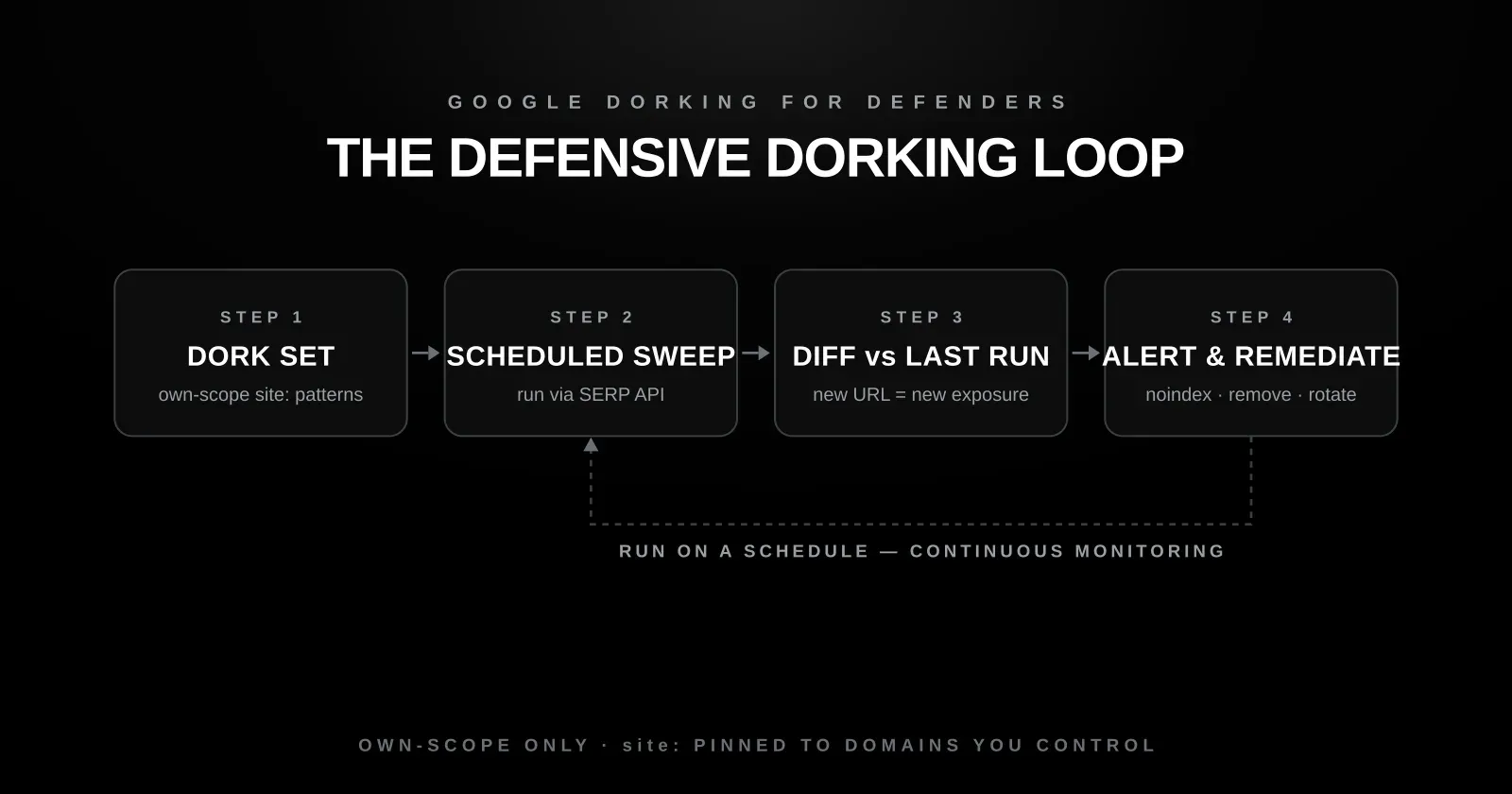
Manual google dorking has two hard limits. It doesn’t scale past a handful of queries. And running many automated searches against Google directly trips rate limits and CAPTCHAs fast. The fix is to drive a fixed, own-scope dork set through a SERP API that returns structured results you can store and diff.
The pattern is simple: keep a list of dork templates, bind each one to a domain you control, run them on a schedule, and compare each run to the last. A new URL in the results is a new exposure, and that diff is the alert you actually care about. Here is the shape of it, using cloro’s SERP API:
import os
import requests

# OWN-SCOPE ONLY: every query is pinned to a domain you control.
YOUR_DOMAINS = ["yourdomain.com"]  # never a third party's

DORK_SET = [
    'filetype:env',
    'filetype:sql OR filetype:bak',
    'inurl:admin OR inurl:login',
    'intitle:"index of"',
    'intext:"api_key"',
]

def sweep(domain):
    findings = []
    for dork in DORK_SET:
        query = f"site:{domain} {dork}"          # site: guarantees own-scope
        resp = requests.post(
            "https://api.cloro.dev/v1/monitor/google",
            headers={"Authorization": f"Bearer {os.environ['CLORO_API_KEY']}"},
            json={"query": query, "country": "US"},
            timeout=30,
        )
        for result in resp.json()["result"].get("organicResults", []):
            findings.append({"dork": dork, "url": result["link"]})
    return findings

# Diff against the previous run; alert only on newly indexed URLs.
current = {f["url"] for f in sweep(YOUR_DOMAINS[0])}
new_exposures = current - load_previous_run()
if new_exposures:
    alert(new_exposures)   # route to your SIEM / ticketing / Slack
A few guardrails make this safe by construction. The site: operator is non-negotiable and always pinned to your own domain, so the sweep can’t wander off-scope. The schedule should be reasonable, daily for high-sensitivity orgs and weekly otherwise, not a hammering loop. And the output is a diff, so you review new exposures, not the same steady-state results every run. If you are building the SERP-parsing side from scratch instead, our guide to scraping Google search results covers the mechanics.
Before you run a single query: authorization, scope, and the law
Defensive google dorking is safe because of a few disciplines, not by default. Get these right before automating anything.
Own-scope only. Every query keeps site: pinned to a domain you own or are explicitly, in-writing authorized to assess. The moment a query targets someone else’s property, you have left reconnaissance-of-yourself and entered territory that needs permission.
Know the legal line. Searching a public index is not access to a system. Using what you find to log into something you’re not authorized to reach is. In the U.S. that is prohibited by the Computer Fraud and Abuse Act, which covers intentionally accessing a computer without authorization or exceeding authorized access. Dorking your own scope never gets near it; acting on a third party’s exposure can. The same principle holds under the UK’s Computer Misuse Act 1990 and Singapore’s Computer Misuse Act 1993: the law regulates the access, not the search.
Handle incidental findings responsibly. If an own-scope sweep or a broad query accidentally surfaces another organization’s exposed asset, do not access it. Follow responsible-disclosure practice: report it through their security contact and leave it alone.
Remediation: getting an exposure out of the index
Finding an indexed exposure through google dorking is only useful if you can remove it. There are two clocks: getting it out of the public index quickly, and fixing the root cause so it doesn’t come back.
For speed, Google’s Removals tool pulls a page from results within a day, but that removal lasts about 6 months, so it buys time, not a permanent fix. The permanent fix is to change what the crawler finds: remove or update the content, require authentication, or add a noindex directive.
Reach for the right tool, because the common instinct is the wrong one. A noindex directive, either a <meta name="robots" content="noindex"> tag or an X-Robots-Tag: noindex HTTP header, makes Googlebot drop the page entirely once it recrawls, regardless of inbound links. Do not reach for robots.txt. Google is explicit that it is not a mechanism for keeping a page out of the index, and a disallowed page can still be indexed if another site links to it.
Then fix the root cause. Rotate any exposed secret, delete the artifact, correct the deploy step that published it, and add the path to the dork set so you’d catch a regression. Remediation without the root-cause fix just resets the same finding on the next crawl.
Continuous monitoring: from one-time sweep to alarm
A single google dorking sweep is a snapshot. The index changes every day: new pages get crawled, old fixes get undone by a bad deploy, an acquisition inherits someone else’s exposure. A point-in-time audit can’t see any of that.
Continuous monitoring turns the dork set into an alarm. Schedule the own-scope queries, store each run, and diff against the previous one so the only thing that reaches a human is a newly indexed URL. That’s the same scheduled-discovery pattern mature attack-surface programs already use, applied to the search-indexed layer they tend to underweight.
The monitoring surface overlaps with brand defense, too. The same scheduled queries that catch your own indexed exposure also catch look-alike domains and phishing pages impersonating you as they appear in the index, the discovery covered in brand protection monitoring. Exposure detection and impersonation detection are two reads of the same feed.
Where cloro fits
cloro is not a full attack-surface or vulnerability-management platform, and it shouldn’t be positioned as one. It doesn’t scan ports, fingerprint services, or enumerate cloud buckets. What it provides is one specific input: a structured, scheduled SERP feed you can point at your own dork set.
That is exactly what automated google dorking needs. Instead of driving Google directly and fighting rate limits, you run your site:-scoped patterns through the API. You get clean structured results, store them, and diff run over run. That surfaces the indexed files, panels, and off-baseline pages host-centric scanning never sees, delivered continuously, so a new exposure becomes an alert the day it’s indexed.
If you want the search-indexed layer of your own footprint watched this way, that’s the feed cloro is built to supply: scheduled own-scope sweeps, structured results, and an alert the day something new gets indexed. It funnels straight into cloro’s threat intelligence use case, and new accounts get 500 free monthly credits to baseline their domains against the full dork set. The queries are already public. Defensive google dorking is just making sure you are the one running them first.

About the author
Ricardo Batista
Founder, cloro
Ricardo is one of the founders and engineers behind its SERP and AI-search scraping infrastructure. Before cloro he scaled a financial comparison site to $7M ARR and ran the full-country operations of a unicorn to $65M ARR, then went back to building. He writes about search engine scraping, generative-engine optimization, and turning live search and AI-answer data into something teams can act on.
Frequently asked questions
Is Google dorking illegal?
Running search-operator queries against a public search engine is not, by itself, illegal, because you are only retrieving what the engine has already indexed and made public. The legal line is crossed when you use what you find to access a system you are not authorized to touch. In the United States that is governed by the Computer Fraud and Abuse Act, 18 U.S.C. § 1030, which prohibits intentionally accessing a computer without authorization or exceeding authorized access. The defensive workflow in this guide stays entirely on assets you own or are explicitly authorized to assess, so it never approaches that line. If a query incidentally surfaces someone else's exposure, follow responsible-disclosure practice instead of accessing it.
What is the difference between Google dorking and Google hacking?
They refer to the same technique: using advanced search operators to surface information that was published or indexed unintentionally. 'Google hacking' is the older term, popularized alongside the Google Hacking Database, a categorized index of queries that uncover sensitive information made publicly available on the internet. 'Google dorking' is the more common name today. Neither involves breaking into anything. The search engine does the indexing, and the operators just filter its public results. The security value is defensive: the same query an attacker would run tells you what of yours is already exposed.
Can robots.txt hide a page from Google dorks?
No, and relying on it is a common mistake. Google's own documentation states that robots.txt is not a mechanism for keeping a web page out of Google: a page disallowed in robots.txt can still be indexed if another site links to it. Worse, a public robots.txt file often advertises the very paths you were trying to hide. To keep a page out of the index, use a noindex directive or remove the content and require authentication.
How do I find exposed files on my own domain with Google dorks?
Start with a scoped inventory query like `site:yourdomain.com` and narrow it with `filetype:` for risky formats (`filetype:env`, `filetype:sql`, `filetype:log`, `filetype:bak`) and `inurl:` for sensitive paths (`inurl:admin`, `inurl:backup`, `inurl:config`). Always keep the `site:` operator pinned to a domain you control so the sweep never leaves your own scope. Review each hit, then remediate anything that should not be public: remove it, require authentication, and add a noindex directive. The automation section below turns this manual sweep into a scheduled, diffable job.
Is Google dorking still relevant?
Yes. The core operators (site:, intitle:, inurl:, filetype:, intext:) still work in 2026, and attackers still use them for recon, which is why defenders run the same queries against their own domains. A few operators are gone: cache: stopped returning stored pages when Google retired cached pages in 2024, and the + operator was removed years earlier. Google changes operator behavior without notice, so test each query before you automate it.
Is Google dorking used for OSINT?
Yes. Google dorking is a foundational open source intelligence (OSINT) technique. Analysts use it during authorized reviews to find exposed documents, staff details, and misconfigured pages, usually as a first pivot before moving to tools that link results across sources. For defenders, the same OSINT queries scoped to your own domains show what an outside investigator would find about you.
Related reading

Attack Surface Management: The Search-Indexed Layer
In an own-scope study of cloro.dev, Certificate Transparency surfaced 15 hostnames but only 3 were search-indexed. A defensive site: sweep found ~20 exposed URL paths host enumeration never sees. The two layers are complementary, not redundant.

Brand Protection in 2026: Search and the AI Layer
Across 40 major brands and 6 AI engines (2,400 answers), 31%–72% of triggered answers cited only third-party domains, never the brand's own site. On Perplexity, the brand's own domain is cited in ~0% of answers. Trustpilot, BBB, ConsumerAffairs, and Reddit narrate your brand when you're absent.

Google Search Operators: Complete List and Examples
We tested which Google search operators still work in 2026: site, -site and intitle at 100%, inurl at 74%, related at 44%, cache returns nothing.