
Open-Web Threat Hunting: Hunting Beyond Your Logs

On this page
Your SIEM has a perfect memory of everything that touched your network and total amnesia about everything that didn’t. That is the structural blind spot every hunting program inherits. The moment an attacker’s preparation happens outside your perimeter (a developer pastes a .env to a public gist, someone registers login-yourbrand.com, a crawler indexes a staging dashboard nobody meant to publish), your logs have nothing to say. Nothing crossed a sensor they own.
Threat hunting is the discipline built to close blind spots like this. This guide does two things. First, it lays out what threat hunting actually is: the proactive, hypothesis-driven loop, and where it usually runs. Then it makes the argument the rest of the vertical builds on: most threat hunting is log-based, and the open web is the layer it misses.
This is the hub post for cloro’s threat-intelligence work. The technique deep-dives link back up to it: attack surface management for exposed assets, brand-protection monitoring for impersonation infrastructure, and the search-operator mechanics in Google search operators.
What threat hunting actually is
Threat hunting, also called cyber threat hunting, is a proactive approach to finding threats that your automated defences did not. IBM defines it as “a proactive approach to identifying previously unknown or currently ongoing cyberthreats in an organization’s network.” The emphasis on proactive is the whole point. Alerting is reactive by design: it waits for known-bad behaviour to appear. Threat hunting goes looking before any alert fires.
The defining mental move is assuming compromise. As CrowdStrike puts it, “threat hunters assume that adversaries are already in the system, and they initiate investigation to find unusual behavior that may indicate the presence of malicious activity.” You are not asking whether something got in. You assume it did, and you ask what it would look like.
That framing exists because the threats worth hunting are the ones automated tooling missed. IBM is blunt about the gap: “while automated security tools and vigilant security operations center (SOC) analysts can detect most cybersecurity threats before they do major damage, some sophisticated threats can slip past these defenses.” Closing that gap is exactly what threat hunting is for.
The hypothesis-driven loop
A threat hunting cycle is a loop, not a scan. Whatever the specific threat hunting technique, it runs in the same four beats:
-
Hypothesize. State a specific, testable claim about adversary activity. For example: “an attacker is using a compromised service account for lateral movement,” a tactic MITRE defines as “techniques that adversaries use to enter and control remote systems on a network.” A good hypothesis is grounded in a real technique from a framework like MITRE ATT&CK and names behaviour you could actually observe in data.
-
Gather. Pull the telemetry that would confirm or refute it, such as authentication logs, process trees, network flows, and DNS.
-
Investigate. Look for the pattern the hypothesis predicts. Most hunts end here with “no evidence,” and that is a valid, useful result. It retires a hypothesis and narrows the space.
-
Codify. When a hunt does find something, its final act is to turn the finding into a new automated detection, so the next occurrence trips an alert instead of requiring another manual hunt.
That last step is why threat hunting and detection are partners, not rivals. Detection is the automated, reactive layer. Threat hunting is the manual, proactive layer that feeds it. Every hunt that lands makes the automated layer a little smarter.
Many hunts begin from an indicator of compromise. CrowdStrike defines an IOC as “a piece of digital forensics that suggests that an endpoint or network may have been breached.” A useful lens for choosing which indicators to hunt is David Bianco’s Pyramid of Pain, which shows “the relationship between the types of indicators you might use to detect an adversary’s activities and how much pain it will cause them when you are able to deny those indicators to them.” Hashes and IPs are trivial for an attacker to change; tactics and techniques are not. The most durable threat hunting targets behaviour, not brittle indicators.
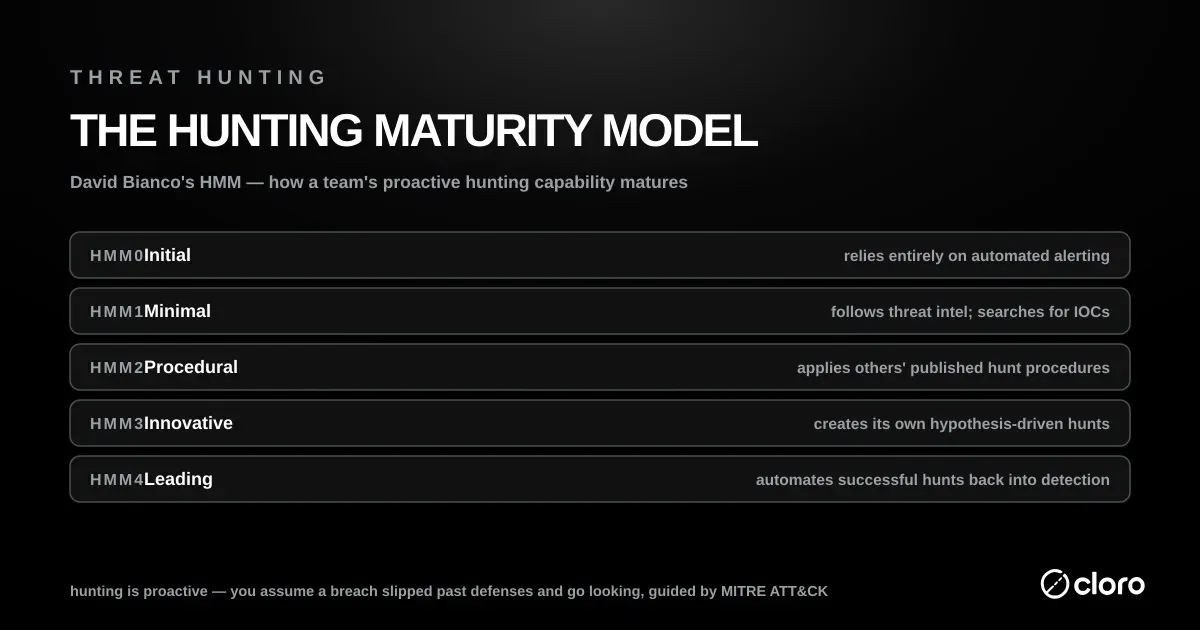
Threat hunting programs also mature over time. David Bianco’s Hunting Maturity Model ranks teams from HMM0, which relies entirely on automated alerting, up to HMM4, where “successful hunting processes” are themselves automated. Climbing that scale is the shift from reactive alerting toward genuinely proactive threat hunting.
What a threat hunter does
A threat hunter owns that loop. IBM describes hunters as security analysts, usually from inside the company’s IT department, who know the organization’s operations well. The day-to-day responsibilities follow the four beats: write hypotheses from ATT&CK techniques and fresh intelligence, query the telemetry, investigate anomalies, escalate confirmed findings to incident response, and turn each result into a detection rule. Huntress lists the skill mix as data analysis, network forensics, malware analysis, and scripting in Python or PowerShell to automate repeat work.
The role has spread fast. A SANS survey cited by Rapid7 found dedicated threat-hunting staff at 31% of organizations in 2017 and 93% four years later, and CrowdStrike notes a skills shortage that pushes many teams to managed hunting services.
Where threat hunting usually runs (and what it misses)
In practice, almost all of this happens inside internal telemetry. The hunter’s data sources are the SIEM, the EDR, endpoint process logs, authentication events, and network flow data. Vendor tooling reflects that. Microsoft describes its advanced hunting feature as “a query-based threat hunting tool that you use to explore up to 30 days of raw data,” used to “proactively inspect events in your network to locate threat indicators.” Most threat hunting, in other words, is a query language pointed at a log store, the right place to hunt for lateral movement, privilege escalation, and command-and-control beaconing that touches systems you instrument.
But it draws a hard boundary around the hunt: you can only hunt what your sensors recorded. An adversary’s reconnaissance, staging, and impersonation work largely happens on infrastructure you don’t own and can’t instrument. That means public code hosts, paste sites, the domain registration system, and the search index itself. None of it produces a log line on your network.
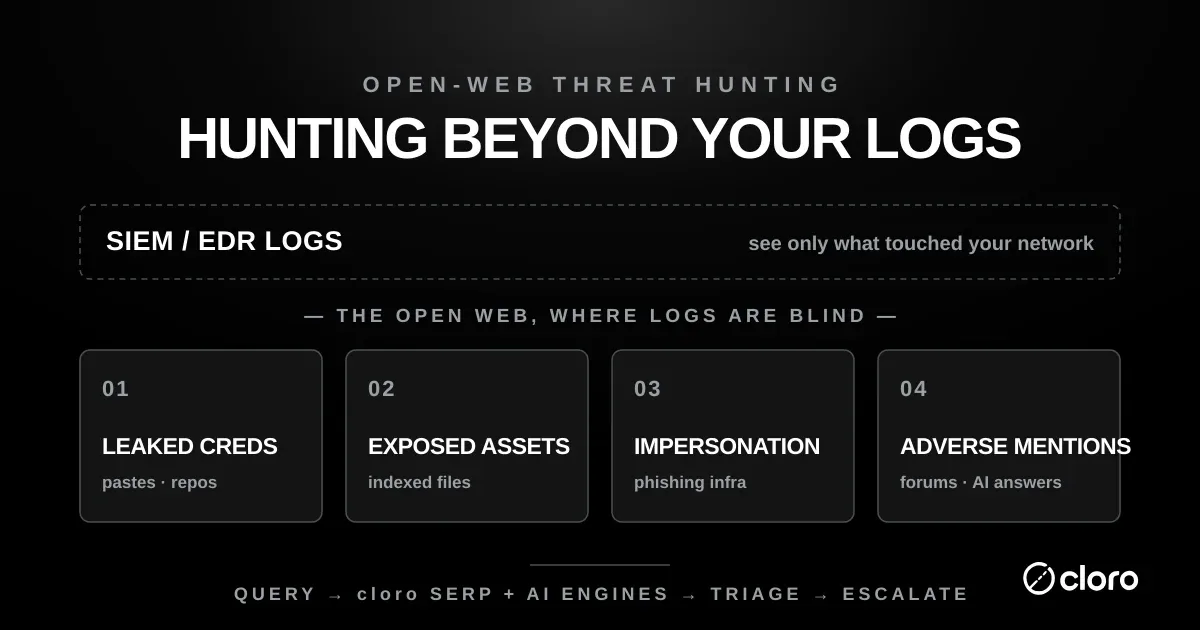
A log-only threat hunting program is, structurally, blind to the entire pre-attack and out-of-band surface. That is the layer the rest of this post is about.
The open-web threat hunting layer
Open-web threat hunting applies the same hypothesis-driven loop to signals that live outside your perimeter, the ones your SIEM will never index because nothing crossed a sensor.
Two of our own measurements give a sense of how much sits out there. Generating 400 typosquat permutations across a set of brands, 66% resolved to a live site and 53% of those were Google-indexed, so impersonation infrastructure is routinely both live and findable. Running an exact-phrase pipeline over 18 of our own articles, 27.8% had a copy on a domain we do not control, across 39 distinct republishers. Neither of those would register on a single network sensor, and both are discoverable from a search box. The hypotheses change, but the discipline is identical: state a testable claim, gather the public data, investigate, escalate what’s real.
This all stays firmly defensive. Every hunt here is scoped to your own organisation: your domains, your brand, your leaked data. You are reading what the public web has already made public about you. That is passive footprinting of your own footprint, exactly the safe, own-scope reconnaissance described in cloro’s attack surface management guide, not probing anyone else’s systems.
Four classes of signal make up the layer, and each maps to a repeatable hunt:
-
Leaked credentials and data such as API keys, passwords, and internal files pushed to public repositories or dumped into pastes. Your logs record a use of a leaked credential; they never record the leak, which happened on someone else’s server.
-
Exposed assets, meaning staging environments, exposed dashboards, and config and backup files a crawler indexed. This is the search-indexed exposure layer covered in depth in attack surface management; a hunt turns it into a scheduled feed.
-
Impersonation and phishing infrastructure covers look-alike domains, cloned login pages, and fake profiles standing up to phish your staff or customers. This overlaps directly with brand-protection monitoring and the typosquatting surface.
-
Mentions in threat-actor-adjacent sources and AI answers, where your organisation is named in a paste, a forum, or increasingly in the generated answer of an AI engine that pulled from those sources. This shares a risk persona with adverse-media screening: both hunt for negative or risk-bearing mentions of an entity across the open web. How each engine surfaces and cites those sources is its own mechanic, covered in LLM citations.
The engine for hunting all four is the same. A search index and the AI-answer layers on top of it are the sensor your SIEM isn’t. They have already crawled the public web, including the parts that expose you.
cloro is a SERP and AI-answer scraping API. It turns a hunt hypothesis into a structured query, runs it against Google and the AI engines, and returns parsed results you can triage and diff. The pattern for every open-web hunt is: query pattern → cloro SERP + AI engines → triage → escalate.
The hunt library
These are four own-scope, defensive threat hunting recipes. Each is a hypothesis plus a query pattern pointed at your organisation. Read every yourbrand / yourdomain.com below as a stand-in for an asset you own. None of these require touching a system you don’t control. They read the public index only.
Hunt 1: Leaked credentials and secrets
Hypothesis: a credential, key, or internal file belonging to us has been published to a public repository or paste and indexed.
The query pattern combines a brand or internal-hostname anchor with the file types and platforms where secrets leak:
site:pastebin.com "yourcompany.com"
site:github.com "yourcompany.com" (password OR api_key OR secret)
site:gist.github.com "internal.yourcompany.com"
"yourcompany.com" filetype:env
"yourcompany.com" filetype:log password
Run each as a monitored query. The triage question is severity. An indexed .env or a live-looking API key routes straight to incident response and secret rotation; a stale reference in an old paste is lower priority.
The hard scope rule: you confirm the exposure exists in the index. You do not test whether the credential still works. Validating a found credential is unauthorized access, even against your own systems if done outside your change process. Report it, rotate it, and let the owning team verify through proper channels.
Hunt 2: Exposed assets in the index
Hypothesis: a page, file, or environment we own is publicly indexed and shouldn’t be.
This is the attack surface management dork set, run as a scheduled hunt against your own domains:
site:yourdomain.com inurl:staging
site:yourdomain.com inurl:admin
site:yourdomain.com intitle:"index of"
site:yourdomain.com filetype:sql
site:yourdomain.com ext:bak OR ext:old OR ext:backup
Every query is site:-locked to a domain you control. You only ever retrieve your own indexed footprint.
Triage by exposure class. An indexed database dump or directory listing is high-severity remediation: remove the file, add noindex, block it in robots.txt, and rotate anything exposed. An indexed staging host is a scope decision about whether it should be public at all.
Post-filter before you triage, because the operators in that block are less exact than the hunt assumes. We tested each of them through cloro’s Google endpoint in August 2026, three queries apiece, scoring every returned organic result against the constraint it was supposed to enforce. site: and intitle: were exact, at 100% of results. inurl: satisfied its constraint on 74.1% and filetype: on 73.3%. cache: returned nothing at all.
Four of the five queries above lean on inurl: or filetype:, so on those numbers about a quarter of the raw hits are not what the operator promised. For a hunt that matters twice. A hunter working a queue padded with a quarter false positives learns to skim it, which is how the real indexed .sql dump gets closed as noise. And an exposure metric built on unfiltered hit counts drifts upward for reasons that have nothing to do with your attack surface.
Re-check each result against the constraint in code before it reaches a human: confirm the extension really is .sql, confirm the path really contains staging. The site: lock is exact, so scope is not the thing at risk here. Precision is.
Hunt 3: Brand impersonation and phishing pages
Hypothesis: someone has stood up a page or profile impersonating us to phish our staff or customers.
Here the anchor is your brand and product names appearing on domains that aren’t yours:
intitle:"yourbrand login" -site:yourbrand.com
"yourbrand" inurl:verify -site:yourbrand.com
"sign in to yourbrand" -site:yourbrand.com
intitle:"yourbrand" (support OR wallet OR refund) -site:yourbrand.com
The -site: exclusion drops your legitimate properties. What’s left is candidates for impersonation.
Triage confirms intent from the indexed result: a cloned login form, your logo on an unaffiliated domain, a support-scam page. The escalation path is takedown and responsible disclosure through the brand-protection workflow, not interacting with the phishing kit. Do not submit credentials to it, and do not go looking for its admin panel; both cross the line from hunting into activity you aren’t authorized to perform.
Hunt 4: Typosquat and look-alike infrastructure
Hypothesis: look-alike domains have been registered against our brand and are being indexed with content.
Typosquats are the raw material for phishing and are often visible in the index once they host a page. The typosquatting surface goes deep on generating and monitoring the permutation set; as a hunt, you watch for indexed content on the variants:
"yourbrand" -site:yourbrand.com inurl:yourbrand
intitle:"yourbrand" (site:yourbránd.com OR site:your-brand.com OR site:yourbrandapp.com)
Triage separates parked placeholders (low priority, worth logging) from domains actively serving cloned content or collecting credentials (high priority, escalate to takedown). As always, confirm from the indexed result; do not interact with the live infrastructure.
Across all four hunts, the discipline is the same one that keeps this work defensible: hunt only your own assets, read only the public index, and escalate through disclosure and remediation rather than access.
Automating the hunt
A hunt you run by hand once is an audit. A hunt you run on a schedule and diff against its last result is a detection. The point of the open-web layer is to reach the second state, hearing about a new leak, exposure, or look-alike the day it gets indexed rather than at the next quarterly review.
The mechanism is the same one the attack surface management post uses for indexed exposure, generalised to every hunt in the library. Treat each query as a monitored job and re-run the set on a cadence. cloro’s /v1/monitor/google endpoint returns the parsed organic results for a query as structured JSON, so you can store the result URLs per query and alert on the delta:
curl -X POST https://api.cloro.dev/v1/monitor/google \
  -H "Authorization: Bearer sk_live_your_api_key_here" \
  -H "Content-Type: application/json" \
  -d '{
    "query": "site:github.com \"yourcompany.com\" api_key",
    "country": "US",
    "device": "desktop"
  }'
The threat hunting automation loop is four steps:
-
Schedule the full hunt set, meaning the leaked-credential, exposed-asset, impersonation, and typosquat queries, at the cadence your risk tolerance calls for (daily for high-sensitivity orgs, weekly otherwise).
-
Diff each run’s result URLs against the previous run. Steady state is silence; the signal is a new URL appearing.
-
Enrich and triage new hits by hunt class and severity, so an indexed secret jumps the queue over a parked typosquat.
-
Route the new-hit event into your SOC as a ticket, a SIEM event, or a chat alert, so it lands in the same queue as your log-based detections and gets worked the same way.
Because the AI-answer engines increasingly surface the same public sources, the same scheduled approach covers the “mentioned in an AI answer” hypothesis. Run your brand-and-exposure queries against the AI engines too, and diff how they cite you over time. The citation mechanics are covered in LLM citations.
This is where the open-web layer stops being a one-off exercise and becomes part of the threat hunting program. It is a set of scheduled, diffable, own-scope hunts whose new-hit events flow into the SOC alongside everything your logs already catch. That continuous open-web feed (leaked data, exposed assets, and impersonation infrastructure, delivered as structured results you can route and act on) is what cloro’s threat intelligence surface is built to supply. New accounts get 500 free monthly credits, enough to baseline your own domains and brand across the full hunt library and see what the index already holds about you.
Your logs will always be the right place to hunt for what happened inside your network. The open web is where you hunt for what’s being prepared against it. Until you hunt there too, that half of the picture stays dark.

About the author
Ricardo Batista
Founder, cloro
Ricardo is one of the founders and engineers behind its SERP and AI-search scraping infrastructure. Before cloro he scaled a financial comparison site to $7M ARR and ran the full-country operations of a unicorn to $65M ARR, then went back to building. He writes about search engine scraping, generative-engine optimization, and turning live search and AI-answer data into something teams can act on.
Frequently asked questions
What is threat hunting?
Threat hunting is the proactive, hypothesis-driven search for cyber threats that have already slipped past automated detection. Instead of waiting for an alert, a hunter starts from an assumption (for example, that an adversary is already inside) and searches telemetry for the behaviour that assumption would produce. It complements, rather than replaces, the SIEM and EDR alerting that catches the majority of threats automatically; the hunt targets the sophisticated activity that evades those tools. The loop is always the same: form a hypothesis, gather the data that would confirm or refute it, investigate, and turn anything real into a new automated detection so the next occurrence trips an alert.
What is open-web threat hunting?
Open-web threat hunting extends the same hypothesis-driven loop to signals that live outside your network, where your SIEM and EDR have no visibility: credentials and data leaked into public pastes and code repositories, assets exposed in the search index, phishing and typosquat infrastructure registered against your brand, and mentions of your organisation in threat-actor-adjacent sources and AI answers. Logs record what touched your systems; they cannot record a credential pasted to a public gist or a look-alike domain spun up to phish your staff. Open-web hunting is scoped entirely to your own organisation's footprint. It is passive reconnaissance of what the public web already exposes about you, not intrusion into anyone else's systems.
Is open-web threat hunting legal?
The hunts in this guide are scoped entirely to assets, brands, and data belonging to your own organisation, and they read only what a search engine or public index has already made public. Querying `site:yourdomain.com` or searching for your own leaked credentials is passive footprinting of your own footprint, not unauthorized access. Scope discipline is the whole game: only hunt your own assets, get written authorization before assessing anything you don't own, never log in to or download from an exposure you find, and if a hunt incidentally surfaces a third party's exposed data, follow responsible-disclosure practice rather than accessing it. Confirming a leaked credential is valid by testing it, or entering a phishing kit's admin panel, crosses from defensive hunting into activity you are not authorized to perform.
What is the difference between threat hunting and threat detection?
Threat detection is automated and reactive: rules, signatures, and models in your SIEM and EDR fire an alert when known-bad behaviour appears. Threat hunting is manual and proactive: a human starts from a hypothesis about an adversary who is assumed to have evaded those automated controls, and goes looking for the evidence. Detection answers 'did anything match a known pattern?'; hunting answers 'what would an attacker who bypassed my patterns look like, and is it here?' The two feed each other: every successful hunt should end by codifying its finding into a new detection rule, so the manual discovery becomes an automated control from then on.
What are the responsibilities of a threat hunter?
A threat hunter writes testable hypotheses about adversary activity, often from MITRE ATT&CK techniques, pulls the telemetry that would confirm or refute them, investigates anomalies, escalates confirmed findings to incident response, and turns each successful hunt into an automated detection. The role needs data analysis, network forensics, malware analysis, and scripting skills. Hunters are usually security analysts inside the organization who know its systems well.
Related reading

Attack Surface Management: The Search-Indexed Layer
In an own-scope study of cloro.dev, Certificate Transparency surfaced 15 hostnames but only 3 were search-indexed. A defensive site: sweep found ~20 exposed URL paths host enumeration never sees. The two layers are complementary, not redundant.

Brand Protection in 2026: Search and the AI Layer
Across 40 major brands and 6 AI engines (2,400 answers), 31%–72% of triggered answers cited only third-party domains, never the brand's own site. On Perplexity, the brand's own domain is cited in ~0% of answers. Trustpilot, BBB, ConsumerAffairs, and Reddit narrate your brand when you're absent.

Typosquatting: How to Detect Lookalike Domains
Most typosquat coverage stops at registration counts. In cloro's July 2026 study of 400 dnstwist-style permutations across 15 brands, 66% resolved to a live site, and of the resolving squats we checked, 53% were already Google-indexed. Registration isn't reach. Indexing is.