
How to Solve CAPTCHAs for Web Scraping

On this page
CAPTCHAs are not the first problem to solve. They are the signal that your scraper already looks suspicious.
For compliant, authorized web scraping, the kind that respects a site’s terms and collects public data for testing, monitoring, or research, the right order is avoid, then solve. Match real browser fingerprints, use clean proxies, keep sessions stable, and only call solver APIs when prevention fails. That is especially true for reCAPTCHA, hCaptcha, and Cloudflare Turnstile, whose newest versions are built to resist automated solving outright.
This guide shows how to choose a strategy to solve CAPTCHAs and when solver APIs actually make sense. It also covers when a managed SERP API or proxy strategy is cheaper than maintaining the bypass stack yourself. It is written for engineers running legitimate automation who need a reliable, repeatable pipeline, not a one-off hack.
Solve or avoid? The first decision

What that 80% figure is, and is not. It comes from reviewing CAPTCHA challenges across cloro’s own request pipeline, so it reflects the targets we scrape (search engines and AI assistants) and the infrastructure we run. It is an operational observation rather than a controlled study: there is no published sample size, window, or per-target breakdown behind it, and a pipeline pointed at e-commerce or ticketing would likely see a different mix. Treat it as a strong prior for where to look first, not as a benchmark to plan capacity against.
Before you write a single line of solver code, answer one question. Do you actually need to solve CAPTCHAs on this target, or can you avoid triggering them in the first place?
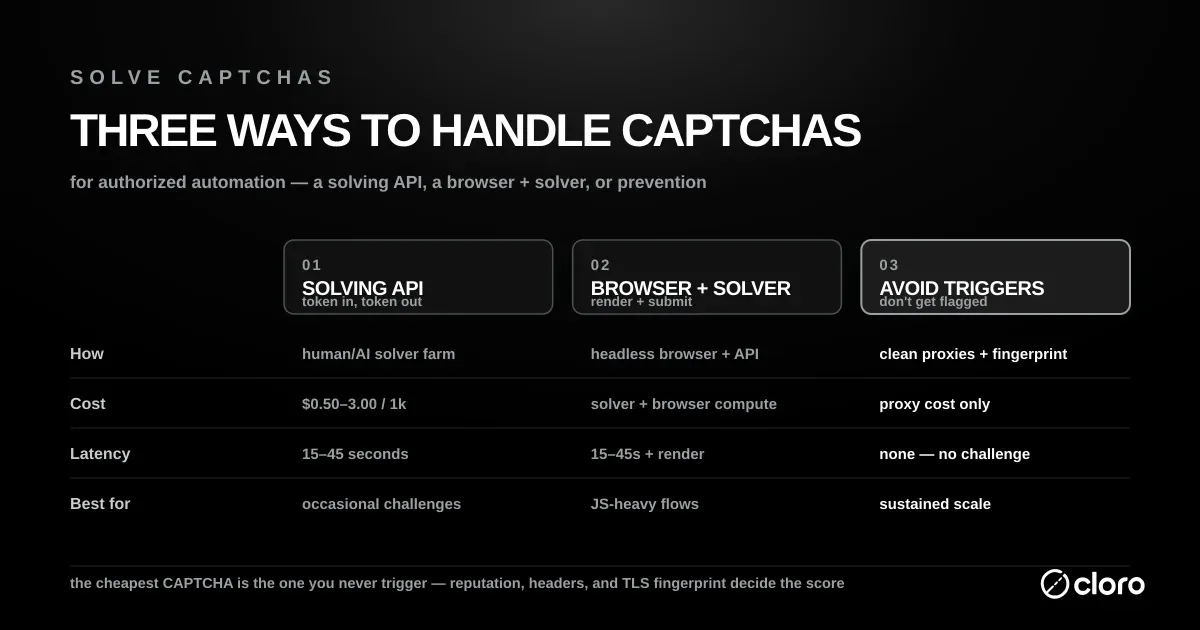
Based on our analysis of CAPTCHA challenges across cloro’s request pipeline, around 80% of CAPTCHAs are triggered by a fixable upstream signal. The usual culprits are a datacenter IP, a missing Accept-Language header, a stale TLS fingerprint, or burst request rates. Fix those and the CAPTCHA never appears. Try to solve CAPTCHAs instead of fixing the signal and you pay $0.50 to $3.00 per 1k requests indefinitely, forever treating a symptom rather than the cause.
The economics of when to solve CAPTCHAs versus when to prevent them are worth internalizing before you build anything. Prevention is a fixed engineering cost that scales for free; solving is a variable cost that scales linearly with volume. At a million pages a month, that difference is the gap between a rounding error and a five-figure line item.
Avoid the CAPTCHA when volume is high: above 100k requests a day, per-solve fees would dominate your scraping bill. Avoid it when latency matters, because real-time monitoring and price tracking cannot afford to wait on a solver. And avoid it when the site uses behavioural CAPTCHAs such as reCAPTCHA v3 or Turnstile, where a hidden risk “score” is the gate. Attempts to solve CAPTCHAs of that kind are unreliable, and preventing the trigger is far more durable.
Solving is the right call in the narrower set of cases where prevention has nowhere to go: an unconditional challenge that fires on every request whatever your fingerprint looks like, low volume (under 10k requests a month, where engineering time costs more than $30 in solver fees), or a CAPTCHA gating the login form itself when you need a real session token for logged-in scraping.
Is CAPTCHA solving illegal?
There is no single yes or no; it depends on what the CAPTCHA protects, the site’s terms, and the jurisdiction. To solve CAPTCHAs on the way to public pages is a different act from solving them to take over accounts or commit fraud, which is illegal. Even when solving succeeds, Steel’s CAPTCHA documentation tells users to respect the target site’s rate limits and terms of service. For the scraping side of the question, read cloro’s guide to scraping legality.
The use cases vendors list for tools that solve CAPTCHAs show where the legitimate work sits. 2Captcha names automated QA and end-to-end testing of flows such as registration and checkout, WAF and bot-protection testing, business-intelligence data extraction, and web accessibility. CapSolver adds SEO and SERP data, e-commerce price tracking, and ad verification.
The major families of CAPTCHAs
Before you can solve CAPTCHAs on any given target, you need to identify which one you are up against. Different vendors require different strategies, and a method that beats reCAPTCHA v2 will do nothing against Turnstile. Inspect the challenge iframe or embedded script to fingerprint the provider before writing any code.
1. reCAPTCHA (Google)
reCAPTCHA is the most common CAPTCHA family on the web, and it ships in two very different forms. Version 2 is the classic “I’m not a robot” checkbox that sometimes escalates into an image grid (“select all the traffic lights”). It is puzzle-based, which means a solver can hand the image to a human or a vision model and get an answer back.
Version 3 is a different animal. It never shows a puzzle at all. Instead it watches behaviour in the background and returns a risk score. Per Google’s reCAPTCHA v3 documentation, the API “returns a score (1.0 is very likely a good interaction, 0.0 is very likely a bot),” and the site decides what to do with that number. Because the score, not a puzzle, is the gate, you rarely solve CAPTCHAs of this type by force. You earn a passing score with a clean fingerprint instead.
2. hCaptcha
Sites that would rather not send traffic to Google tend to land on hCaptcha, the privacy-focused alternative. Functionally it behaves like reCAPTCHA v2, presenting image-selection challenges, but its puzzles are known for being slightly harder and more obscure (“select each image containing a seaplane”). Most AI solvers that handle reCAPTCHA image challenges handle hCaptcha as well, so the tooling overlaps.
3. Cloudflare Turnstile
Cloudflare Turnstile often shows no puzzle whatsoever. Instead of asking you to click images, it inspects your browser environment (TLS fingerprint, canvas rendering, installed fonts, and JavaScript behaviour) to decide whether you are a real browser. Turnstile can verify a visitor without ever showing a CAPTCHA, running non-interactive JavaScript challenges in the background instead. That design is exactly why you cannot reliably solve CAPTCHAs of the Turnstile family with an image API; you need a genuine, well-configured browser.
4. Geetest
Geetest is popular across Asian websites and leans on interactive puzzles: sliding a jigsaw piece into a gap, or clicking characters in a specified order. These require either a specialised solver trained on the puzzle mechanics or full browser automation that can replay realistic mouse motion.
5. DataDome and behavioural anti-bot systems
DataDome, PerimeterX, and similar enterprise anti-bot platforms are the hardest tier. They rarely present a visible challenge at all; instead they profile every request across hundreds of signals and block or challenge silently. You do not really solve CAPTCHAs from these systems so much as avoid tripping them, which makes clean residential proxies and consistent fingerprints non-negotiable.
How to avoid triggering CAPTCHAs in the first place
The cheapest CAPTCHA is the one that never fires, so before you invest in any solver, harden the request itself. Most challenges are a reaction to a suspicious fingerprint. Fixing that fingerprint prevents far more challenges than any solver resolves after the fact. That is why prevention beats solving on both cost and reliability.
Start with the network layer. Clean residential or mobile proxies look like ordinary consumer traffic, whereas datacenter IP ranges are flagged the moment they hit an anti-bot system like DataDome. Rotate IPs sensibly and pace your requests so a single session never bursts faster than a human plausibly would. Predictable, machine-gun request timing is one of the loudest bot signals there is.
Then fix the browser identity. Send a complete, consistent set of headers (a real User-Agent, Accept-Language, and Accept-Encoding) and make sure your TLS fingerprint matches the browser you claim to be. A request that advertises Chrome in its User-Agent but presents a Python TLS handshake is trivially caught.
Keep cookies and sessions stable across a crawl so your behaviour reads as one returning visitor rather than a thousand strangers. Get these signals right and you sidestep the need to solve CAPTCHAs on the large majority of your requests.
The decision framework: family to strategy to tradeoff
Match the CAPTCHA family to the strategy that beats it. This is the cheat sheet we hand to engineers when they ask “what should I use?”
| CAPTCHA family | Best primary strategy | Reliability | Cost per 1k | Avg. latency | When to switch |
|---|---|---|---|---|---|
| reCAPTCHA v2 | API solving service | 95–99% | $1.00–$3.00 | 15–45 s | Drop to AI vision if latency matters more than cost |
| reCAPTCHA v3 | Avoid via clean fingerprint | n/a | $0 | 0 s | If still gated, use AI scoring services (~$2.00/1k) |
| hCaptcha | AI solver (CapSolver, NopeCHA) | 90–95% | $1.00–$2.00 | 5–15 s | Fall back to human-solved 2Captcha for hard variants |
| Cloudflare Turnstile | Residential proxies + headless browser | 70–85% | $0.50–$2.00 | 2–8 s | Add fingerprint patches if the site upgrades to managed challenges |
| Geetest v3/v4 | Specialised solver (CapSolver) | 80–90% | $1.50–$3.00 | 10–30 s | Browser automation if API fails consistently |
| Image OCR | Tesseract / EasyOCR | 60–95% | ~$0 | ~1 s | Switch to API if accuracy drops below 80% on your set |
How to read this table. “Reliability” assumes a clean residential IP. With datacenter IPs, expect 10 to 20 percentage-point drops across the board. “Latency” is the time from challenge appearing to token returned, not end-to-end request time.
The takeaway: the CAPTCHA family decides the strategy, not preference. Puzzle-based challenges (reCAPTCHA v2, hCaptcha, Geetest) call for a solving service; behavioural ones (reCAPTCHA v3, Turnstile) call for prevention or a real browser; and Image OCR is worth building only where the near-zero cost offsets the tuning work.
Strategy 1: API solving services, the most reliable way to solve CAPTCHAs at scale
API solving services are the most reliable way to solve CAPTCHAs at scale, and they are the default choice for puzzle-based challenges like reCAPTCHA v2 and hCaptcha. The model is simple: you send the challenge data, typically the sitekey and the page URL, to a third-party service, and it does the hard part for you.
Behind the API, the service routes your challenge to either a human worker or a specialised AI vision model. The workflow is the same across providers: you submit the CAPTCHA to their server, receive a task ID, poll until the job is done, and collect the result: a token. You then inject that token into the website’s form field, and the server accepts it as a legitimately solved challenge. This decoupling is what lets a requests-based scraper solve CAPTCHAs without ever rendering a browser.
The three services worth knowing are 2Captcha, CapSolver, and Anti-Captcha. 2Captcha is the veteran, backed by a large pool of human workers; it is slower but solves almost anything you throw at it. CapSolver is AI-focused, which makes it faster and cheaper than human labour and a strong fit for reCAPTCHA and hCaptcha. Anti-Captcha is another dependable human-backed option, and its client libraries are mature in most languages, so it drops into an existing pipeline easily.
Code example: solving reCAPTCHA v2 with Python
Here is how to implement this in Python using the 2captcha-python library (or raw requests).
Scenario: a website has a reCAPTCHA v2 lock on its login form.
Step 1: find the sitekey. Inspect the HTML source of the target page. Look for data-sitekey="6Ld..." inside the CAPTCHA div or iframe.
Step 2: the Python script.
import time
import requests

# Configuration
API_KEY = 'YOUR_2CAPTCHA_API_KEY'
SITE_KEY = '6Ld_TARGET_SITE_KEY'
URL = 'https://target-website.com/login'

def solve_recaptcha():
    print("Sending CAPTCHA to 2Captcha...")

    # 1. Send the request to the solving service
    response = requests.post('http://2captcha.com/in.php', data={
        'key': API_KEY,
        'method': 'userrecaptcha',
        'googlekey': SITE_KEY,
        'pageurl': URL,
        'json': 1
    })

    request_id = response.json().get('request')
    print(f"Task ID: {request_id}")

    # 2. Wait for the solution
    print("Waiting for solution...")
    while True:
        time.sleep(5)
        result = requests.get(f'http://2captcha.com/res.php?key={API_KEY}&action=get&id={request_id}&json=1')
        result_json = result.json()

        if result_json.get('status') == 1:
            print("CAPTCHA Solved!")
            return result_json.get('request')  # This is the token

        if result_json.get('request') == 'CAPCHA_NOT_READY':
            continue
        else:
            print(f"Error: {result_json.get('request')}")
            return None

# 3. Use the token
token = solve_recaptcha()
if token:
    # Now you submit this token with your form data
    # usually in a field named 'g-recaptcha-response'
    login_data = {
        'username': 'myuser',
        'password': 'mypassword',
        'g-recaptcha-response': token
    }
    # requests.post(URL, data=login_data)
Code example: solving Cloudflare Turnstile
Turnstile is harder because there is no visible puzzle. You need to forward the page’s JavaScript challenge response. Most modern solvers expose a Turnstile-specific endpoint.
import requests
import time

API_KEY = 'YOUR_CAPSOLVER_KEY'
SITE_URL = 'https://target-site.com/'
SITE_KEY = '0x4AAAAAAA...'  # from data-sitekey on the cf-turnstile div

# 1. Create the task
task = requests.post('https://api.capsolver.com/createTask', json={
    'clientKey': API_KEY,
    'task': {
        'type': 'AntiTurnstileTaskProxyLess',
        'websiteURL': SITE_URL,
        'websiteKey': SITE_KEY
    }
}).json()

task_id = task['taskId']

# 2. Poll for the result
while True:
    time.sleep(2)
    res = requests.post('https://api.capsolver.com/getTaskResult', json={
        'clientKey': API_KEY,
        'taskId': task_id
    }).json()

    if res['status'] == 'ready':
        token = res['solution']['token']
        break

# 3. Submit the token in the cf-turnstile-response form field
payload = {'cf-turnstile-response': token, 'email': '[email protected]'}
requests.post(SITE_URL, data=payload)
Key gotcha: Turnstile tokens expire in 5 minutes. If your scraping pipeline queues requests, solve the CAPTCHA just before you need to submit, not at the start of a long job.
Strategy 2: browser automation plugins, the natural fit when you’re already driving a browser
If you already drive a real browser with Puppeteer, Playwright, or Selenium, you can solve CAPTCHAs inside the browser session instead of making separate API calls. Extensions and plugins hook into the page, detect the challenge, and inject a solution without you leaving the automation context. This is the natural fit when your scraper is browser-based already and you want to keep everything in one process.
The best-known tool is puppeteer-extra-plugin-recaptcha, which uses an AI backend to solve reCAPTCHA image challenges automatically as they appear. Buster takes a different angle: it is a browser extension that solves reCAPTCHA audio challenges by piping them through speech-to-text APIs. Both work well with Selenium and Playwright setups too, since the underlying browser is the same.
The tradeoff is speed and stability. Browser-based solving is slower than firing raw HTTP requests, and reliably detecting the “I’m not a robot” iframe across page loads can be flaky when a site tweaks its markup. If you only need HTML and not a live session, an API solver is usually the cleaner path.
Strategy 3: AI vision and OCR models, near-zero cost after the tuning work
For simple image CAPTCHAs, meaning distorted text on a noisy background, you do not need a paid service at all. Optical Character Recognition (OCR) can solve CAPTCHAs of this type locally, at effectively zero marginal cost, which makes it attractive for high-volume pipelines hitting legacy text challenges.
Tesseract, accessed through pytesseract, is the workhorse for clean text and handles undistorted characters well. EasyOCR is deep-learning based and copes far better with the warping and line noise that trip Tesseract up. For object-detection challenges, the “click every image with a bus” kind, a model like YOLO can locate and classify the target tiles.
The catch is engineering time. To reliably solve CAPTCHAs with these models, you often have to fine-tune them on the specific challenge style. That is real work up front, in exchange for a low per-solve cost later.
The cost of scraping
Solving CAPTCHAs is never free, and the bill arrives in three separate currencies. Understanding all three is what stops a proof-of-concept scraper from quietly becoming a budget problem in production.
The first is financial. API services charge per 1,000 solutions, roughly $0.50 to $3.00 per 1k. A job that scrapes a million pages can run $500 to $3,000 to solve CAPTCHAs alone, on top of proxy and compute costs.
The second is latency. A human worker takes 15 to 45 seconds to solve a reCAPTCHA, which is fatal for real-time monitoring, price tracking, or any workflow where freshness is the point.
The third cost is maintenance. Websites swap CAPTCHA providers without warning, reCAPTCHA today and Cloudflare Turnstile tomorrow, and when they do, your carefully tuned solver breaks and an engineer loses a day rewriting it. The financial cost you can budget for. The maintenance cost is the one that quietly erodes a team, because it turns a finished project into a permanent obligation to solve CAPTCHAs that keep changing shape.
The automated alternative
If your goal is the data, not the engineering challenge of breaking bot protection, then building and babysitting your own stack to solve CAPTCHAs is usually a waste of resources. You end up maintaining proxy pools, solver credits, and fingerprint patches that have nothing to do with the product you actually care about.
Advanced scraping platforms fold all of that into the request. cloro integrates the work to solve CAPTCHAs directly into its request pipeline, so detection, solving, and token injection happen before the response ever reaches you.
When you send a request through cloro to scrape Google Search or monitor ChatGPT, it detects the CAPTCHA, solves it (using a blend of AI and premium proxies), and returns the clean HTML.
You do not manage solver API keys or write retry logic, and nothing in your pipeline waits 45 seconds for a human to click traffic lights.

About the author
Ricardo Batista
Founder, cloro
Ricardo is one of the founders and engineers behind its SERP and AI-search scraping infrastructure. Before cloro he scaled a financial comparison site to $7M ARR and ran the full-country operations of a unicorn to $65M ARR, then went back to building. He writes about search engine scraping, generative-engine optimization, and turning live search and AI-answer data into something teams can act on.
Frequently asked questions
Can AI solve CAPTCHAs?
Yes, modern vision models (like GPT-4V or specialized solvers) can solve image CAPTCHAs with high accuracy.
What is the hardest CAPTCHA to solve?
Behavioral CAPTCHAs (like reCAPTCHA v3 or Cloudflare Turnstile) are hardest because they analyze browsing history and TLS fingerprints, not just a puzzle.
Is it illegal to bypass CAPTCHAs?
It depends on jurisdiction and intent. Bypassing access controls to access public data is often a legal grey area; bypassing them to commit fraud is illegal.
What is the cost of scraping with CAPTCHAs?
Solving CAPTCHAs adds significant financial and latency costs. API services charge per solution, and human-solved CAPTCHAs introduce delays of 15-45 seconds per challenge.
Are there automated alternatives to manual CAPTCHA solving?
Yes, dedicated scraping platforms like cloro integrate CAPTCHA solving directly into their request pipelines, handling detection, solving, and token injection automatically, saving engineering time and cost.
Should I solve the CAPTCHA or avoid triggering it in the first place?
Avoid first. A clean residential IP, realistic TLS fingerprint, and natural request pacing will prevent most CAPTCHAs from triggering. Solving is a fallback for the 5-15% of requests that still get challenged.
How do I tell which CAPTCHA family a site is using?
Inspect the iframe src or embedded script. reCAPTCHA loads from google.com/recaptcha, hCaptcha from hcaptcha.com, Turnstile from challenges.cloudflare.com, and Geetest from geetest.com. The data-sitekey attribute confirms the provider.
Related reading

Google Search URL Parameters: The Full List for 2026
Every Google search URL parameter in one table (q, gl, hl, uule, udm, tbs, start), what each one does, and which ones still work when you send the URL through an API.

How to Scrape ChatGPT: SSE Streams and Citations
Learn how to scrape ChatGPT: capture SSE streams, expand citations, handle Cloudflare, and decide when a managed API is safer than DIY scraping.

How to Scrape Copilot: WebSocket Events and Citations
Learn how to scrape Microsoft Copilot: capture WebSocket events, parse Bing-grounded citations, and compare DIY automation with managed APIs.