
How to Scrape Grok: API, Web UI, and What Each Returns

On this page
Grok is an answer engine wired into a real-time content stream that no other AI search product has: X (Twitter). That makes it a distinct target the moment you set out to scrape Grok. You can collect its data through xAI’s official API, by automating the Grok web interface, or through a managed endpoint that handles the access fight for you.
The right path depends on what you actually need. The official API is clean for model output but returns none of the consumer-surface formatting. The web UI is where Grok’s real-time X citations and rich source metadata live, but it is also the hardest surface on the modern web to automate reliably.
This guide compares all three paths and shows where each fits. It completes cloro’s how-to-scrape set alongside how to scrape Perplexity, how to scrape Gemini, and how to scrape ChatGPT. For the underlying reason to do any of this, see AI visibility tracking or the Grok API page.
Why scrape Grok responses?
Grok’s value is its grounding. Where ChatGPT and Gemini lean on web indexes that refresh in days or weeks, Grok can cite X posts published minutes ago. If you are monitoring brand visibility in AI answers, Grok is the engine where trending, real-time conversation actually moves your citation set.
One caveat belongs up front, because it is the reason this guide reads differently from its siblings. Grok is the one major engine missing from our six-engine grounding measurement, and it is missing because it blocked anonymous access upstream while that study was running. The same block is why cloro’s OpenClaw plugin ships seven engine tools and no Grok tool. Anything you build here should assume the access path is less stable than ChatGPT’s or Perplexity’s, and should fail loudly rather than silently returning empty.
There is a second reason to scrape Grok rather than just read the API. The product decides what a real user sees: the ordering, the trimming, and which X posts make the cut. That editorial layer is the thing brand teams need to monitor. It never appears in a raw API response, so the only way to observe it is to scrape Grok itself.
The catch is that the xAI API and the Grok product are two different things. The API returns model output, and returns citations programmatically for example, but not the rendered consumer surface, its formatting, or the full source panel a real user sees. Independent testing shows the gap: across ChatGPT and Perplexity, Surfer measured just 4–8% overlap in the sources an LLM’s API returns versus the ones its rendered UI actually shows. Grok wasn’t in that study, but the mechanism, a consumer surface layered on top of the raw model, is the same, and Grok’s live X grounding widens the gap further.
Use cases the rendered surface supports that the raw API doesn’t:
- Citation tracking. Where does your domain sit in Grok’s source list for branded and category queries?
- Real-time monitoring. Which X posts is Grok surfacing right now for high-intent prompts?
- Verification. Confirm what Grok actually tells users, with the sources it shows them.
- Competitive intelligence. Track how Grok frames competitors and which sources it trusts.
For broader coverage, pair this with LLM visibility tracking tools and the best ChatGPT scraper comparison.
The three paths to Grok data
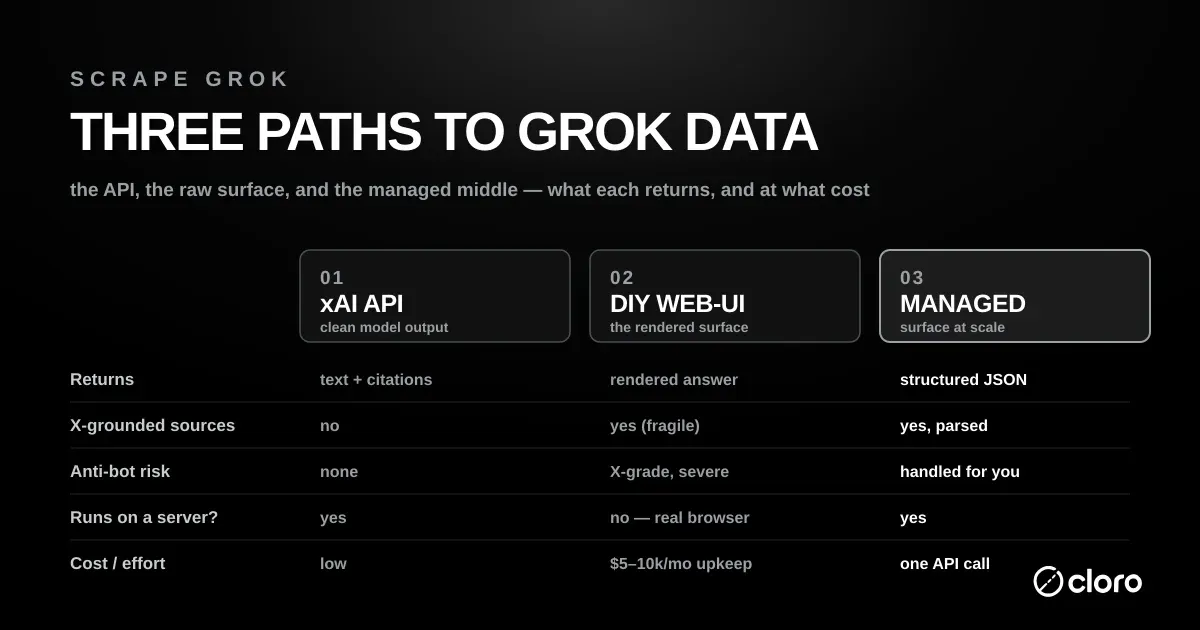
There are three ways to get Grok data, and they return different things at very different cost and risk. Before you pick one, be clear on why you want to scrape Grok in the first place: raw model text, or the rendered surface a real user sees.
Path 1: xAI’s official Grok API, the supported route for model output
This is the clean, supported route for model output. xAI’s Web Search tool enables Grok to search the web in real time and browse pages, and you call it through the Responses-style endpoint at https://api.x.ai/v1/responses with a model like grok-4.3. It is configurable: you can restrict or exclude domains, with a maximum of 5 allowed or excluded domains (and the two filters cannot be combined in one request). What you do not get is the consumer surface: the rendered answer, its formatting, and the full source panel are the product’s, not the API’s.
A note on keywords:
grok apiis a high-volume navigational term for xAI’s official developer platform. This guide is about scraping Grok, capturing the product surface, which is a different job. If you only need model output, the official API is the right tool and you can stop here.
Path 2: DIY web-UI automation, the riskiest target of the engine set
Grok’s real value lives here, and this is the riskiest DIY target of the whole engine set. Because the Grok surface is entangled with X, automating it means automating X. Open-source projects like an open-source Grok scraper drive Grok through Playwright to bypass API restrictions without an X API key, but that convenience comes with hard prerequisites (covered below) and a maintenance burden that dwarfs the initial build.
If you choose to scrape Grok this way, budget for the browser layer up front, not as an afterthought. The build is quick; keeping it alive against X is the real cost.
Path 3: a managed Grok endpoint, where someone else owns the access fight
You send a prompt, you get the rendered Grok answer as structured JSON, and someone else owns the access fight. This is the right call when you need the consumer surface at scale without running a browser fleet against X’s defenses.
The trade is simple. You give up direct control of the browser layer. In return, you scrape Grok without maintaining proxies, sessions, or anti-bot workarounds. For most monitoring teams, that is the right split of effort.
Is it legal to scrape Grok?
It depends on how you collect and what you keep. RealDataAPI’s guide points to three factors: the platform’s terms of service, copyright, and how the data is used. Automated collection that breaks platform rules can end in account suspension, which matters more on Grok than elsewhere because the DIY path runs on your own X Premium account. Two rules hold on every path: check the site’s terms and robots.txt first, as Roundproxies notes, and do not store personal data such as X usernames or profile images from cited posts without a legal basis under GDPR. The official xAI API is the lowest-risk route when model output is enough.
In short: use the official API for model output, a managed endpoint for the rendered surface at scale, and DIY only when you have a very specific reason and the appetite to maintain it.
What Grok-the-product returns that the API doesn’t
Ask Grok about a breaking story, a product launch, or a public figure, and its answer leans on X posts, often ones published in the last half hour. Run the same prompt twice an hour apart and the citation set can shift substantially. Grok’s grounding is X-native. xAI documents a dedicated X Search tool that sits alongside the standard Web Search tool, grounding in X (Twitter) content that no other AI engine’s API offers.
That has three consequences for anyone scraping Grok:
- The citation layer is time-sensitive. A daily snapshot misses most of what moved. The real-time X layer is exactly the signal worth catching, and it rewards frequent sampling over a once-a-day crawl.
- The source metadata is richer than an API URL list. The rendered Grok surface carries per-source fields (creator, preview, image, favicon) that describe who said something on X and how it looked. None of that lives in a flat API citation array.
- It is inherently volatile. Because Grok is wired to a live stream, it is the most volatile surface to monitor and the one richest in trending-brand signal. That is the trade: more signal, less stability.
Put simply, the xAI API tells you what Grok’s model can say. Scraping the product tells you what Grok actually showed a user, sourced from X, at a specific moment. For brand and citation monitoring, only the second one answers the question.
How often should you scrape Grok?
Cadence is what separates a useful Grok dataset from a stale one. Because Grok is grounded in a live X stream, its citation set can turn over within the hour. Scrape Grok once a day and you capture a single frozen frame, missing most of the movement in between.
For brand and citation monitoring, sample the prompts that matter several times a day. Trending, high-intent queries deserve the tightest cadence, because that is where the X layer shifts fastest. Stable, evergreen prompts can run less often without losing much signal.
The practical rule is to match your sampling rate to how fast the topic moves on X. Scrape Grok hourly for breaking or competitive prompts, and daily for slow ones. A managed endpoint makes that cadence cheap, because you are not babysitting a browser fleet to hit it. Set the interval once, and the endpoint keeps pace with the topic instead of with your infrastructure.
DIY starting point and the maintenance reality
If you want to build it yourself, here is the starting point, and the reason most teams don’t stay on this path.
The mechanics are browser automation. You launch a real browser, restore a logged-in X session, send a prompt to Grok, and capture the rendered response:
import asyncio
from playwright.async_api import async_playwright

async def scrape_grok(prompt: str, session_state: str = "session/state.json"):
    async with async_playwright() as p:
        # A real, non-headless browser with a persisted X login is required.
        browser = await p.chromium.launch(headless=False)
        context = await browser.new_context(storage_state=session_state)
        page = await context.new_page()

        try:
            await page.goto("https://grok.com", timeout=30_000)

            # Submit the prompt into the composer.
            await page.wait_for_selector("textarea", state="visible", timeout=15_000)
            await page.fill("textarea", prompt)
            await page.keyboard.press("Enter")

            # Wait for the streamed answer + source panel to settle.
            await page.wait_for_selector("[data-testid='grok-response']", timeout=60_000)
            await asyncio.sleep(3)  # let the X-post citations hydrate

            answer_html = await page.locator("[data-testid='grok-response']").inner_html()
            return answer_html
        finally:
            await browser.close()
The code is the easy 10%. The hard 90% is everything around it:
- You need an X Premium account and a logged-in session. The key-free DIY route requires an X Premium account and a logged-in session; without a valid session, queries fail. That entangles your scraper with a real X account, along with its rate limits, its 2FA, and its ban risk.
- It won’t run where you want to run it. The same approach is not supported on headless servers or CI/CD, because login needs a real browser window. So your “pipeline” is a desktop or a GUI VM babysitting a browser, not a clean cloud job.
- Anti-bot is X-grade. Grok inherits some of the most aggressive anti-automation on the public web. DIY pipelines tend to measure uptime in hours, burn through proxy budgets, and still sit at sub-50% success rates.
- Sessions expire and selectors drift. Every X login refresh, every UI tweak to the Grok composer or source panel, is a maintenance event.
Rolled up, a serious in-house Grok scraper runs real money every month: residential proxies, a browser fleet with GUI sessions, X account management, session-refresh automation, and the on-call rotation for when access breaks. At 500,000 to 1 million requests a month that is roughly $4,800 to $14,100: $999 for 332 GB of residential bandwidth, a few c6i.4xlarge browser instances at $0.68 an hour, and a fifth to a half of one engineer at the $131,450 US median software developer salary, loaded, which is $2,800 to $7,100 of it. The engineer fraction, not the infrastructure, decides where in that range you land. For a surface this volatile, that maintenance never really ends.
Using cloro’s managed Grok scraper
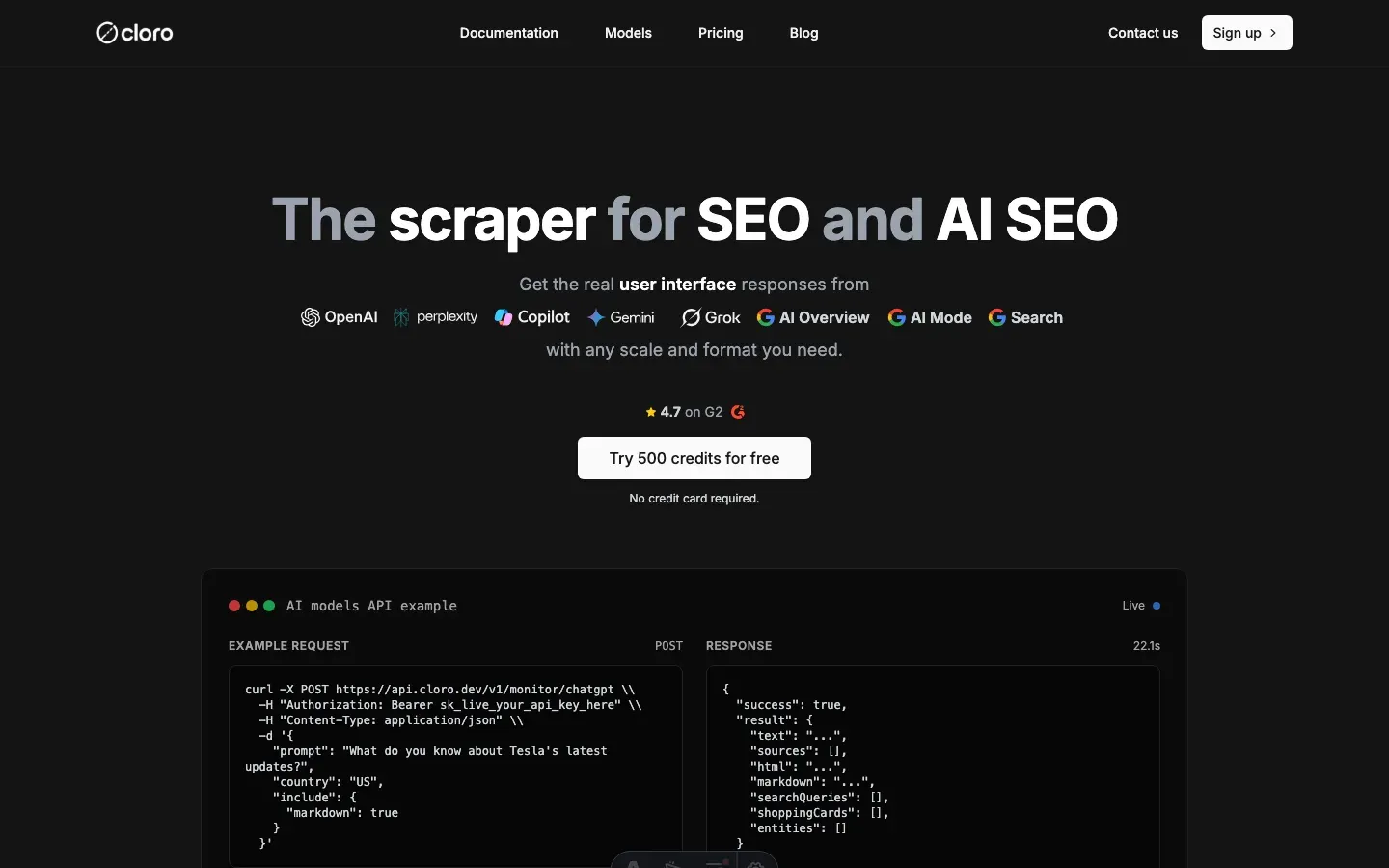
The managed path trades that maintenance for one API call. cloro’s Grok API returns the rendered Grok answer with its X-grounded source metadata as structured JSON, the fields the xAI API never returns, with markdown output and country targeting. One request is enough to scrape Grok for a given prompt and country, and the same call shape scales from a handful of checks to thousands a day.
Python:
import requests
import json

response = requests.post(
    "https://api.cloro.dev/v1/monitor/grok",
    headers={"Authorization": "Bearer YOUR_API_KEY"},
    json={
        "prompt": "What are the latest developments in quantum computing 2026?",
        "country": "US",
        "include": {
            "markdown": True
        }
    }
)

result = response.json()
print(json.dumps(result, indent=2))
curl:
curl -X POST https://api.cloro.dev/v1/monitor/grok \
  -H "Authorization: Bearer YOUR_API_KEY" \
  -H "Content-Type: application/json" \
  -d '{
    "prompt": "What are the latest developments in quantum computing 2026?",
    "country": "US",
    "include": { "markdown": true }
  }'
Structured output, with the X-grounded sources parsed for you:
{
  "status": "success",
  "result": {
    "text": "Recent developments in quantum computing include...",
    "model": "grok-4-auto",
    "sources": [
      {
        "position": 1,
        "url": "https://x.com/example/status/1234567890",
        "creator": "@researcher",
        "preview": "New error-correction result crossing the threshold...",
        "image": "https://pbs.twimg.com/media/example.jpg",
        "favicon": "https://abs.twimg.com/favicons/twitter.ico"
      }
    ],
    "markdown": "Recent developments in **quantum computing**...",
    "searchQueries": ["quantum computing 2026 breakthroughs"]
  }
}
What cloro absorbs for you:
- The access fight. Anti-bot evasion, X session management, and the browser fleet are ours to run, not yours.
- X-grounded source metadata. Creator, preview, image, and favicon come back as structured fields: the same rich data the UI shows and the API omits.
- Country targeting and markdown. Any country, markdown out, from one endpoint. The same API key also covers ChatGPT, Perplexity, Gemini, AI Overview, AI Mode, and Copilot.
One honesty note, because Grok is the volatile one: it is wired to a live stream and sits behind X’s defenses, so access to the Grok surface can be intermittent for everyone, and anonymous access in particular is periodically blocked. The value of a managed endpoint is that when the surface shifts, absorbing that break is our problem, not a 2 a.m. page for your team.
Conclusion
It is worth the effort to scrape Grok precisely because of what makes it awkward: it is the only major AI engine grounded in a real-time X stream, so its citations carry trending, time-sensitive signal you can’t get anywhere else.
Pick your path by what you need. Use the official xAI API for clean model output. Automate the web UI only if you have a specific reason and can live with an X-Premium-bound, non-headless, high-maintenance pipeline. For the rendered consumer surface, with X-grounded sources parsed and the access fight handled, a managed endpoint is the shortest way to scrape Grok at scale.
The space is still small: few providers scrape Grok today, and cloro is one of them. Getting your monitoring in place now, while the field is thin, is the whole point.
Ready to pull Grok data? Get started with cloro’s Grok API.

About the author
Ricardo Batista
Founder, cloro
Ricardo is one of the founders and engineers behind its SERP and AI-search scraping infrastructure. Before cloro he scaled a financial comparison site to $7M ARR and ran the full-country operations of a unicorn to $65M ARR, then went back to building. He writes about search engine scraping, generative-engine optimization, and turning live search and AI-answer data into something teams can act on.
Frequently asked questions
Can you scrape Grok without an X API key?
Yes, but the only key-free path is web-UI automation, and it comes with strings. Open-source tools drive Grok through Playwright to bypass API restrictions without an X API key, but they require an X Premium account and a logged-in x.com browser session. Without a valid session, queries fail.
What is the difference between the xAI Grok API and scraping Grok?
The xAI API returns model output, meaning text plus programmatic citations, but not the consumer Grok surface users actually see. Scraping the Grok product captures the rendered answer with its real-time X-post citations and rich source metadata that the API never returns.
Does Grok cite X (Twitter) posts?
Yes. Grok's defining feature is X-data grounding: it can pull answers from X (Twitter) content in real time. xAI documents a dedicated X Search tool separate from the standard Web Search tool, which is grounding no other engine's API offers.
Is it legal to scrape Grok?
It depends on the platform's terms of service, copyright, and how you use the data. Automated collection that breaks X or xAI rules can get the account suspended, and the DIY path runs on your own X Premium account. Check the terms and robots.txt, avoid storing personal data from cited X posts without a legal basis, and use the official xAI API when model output is enough.
Is scraping the Grok web UI risky?
It is the riskiest DIY target of the major AI engines. Grok's consumer surface sits behind X's aggressive anti-automation, and the auth flow is entangled with X accounts. DIY web-UI automation is explicitly unsupported on headless servers and CI/CD because login needs a real browser window.
What does Grok's X Search tool return?
X Search lets Grok search and cite X (Twitter) posts as part of its grounding. Combined with Web Search, it is what makes Grok's citation set skew toward real-time, trending content rather than a slower web index.
Related reading

How to Scrape Perplexity: API vs Web Interface
Learn how to scrape Perplexity with the official API, structured outputs, or web UI automation. Compare sources, citations, and trade-offs clearly.

How to Scrape Gemini: API, URL Context, and Web UI
Learn how to scrape Gemini with the API, URL context, or web UI automation. Compare structured outputs, citations, and anti-bot trade-offs clearly.

How to Scrape Copilot: WebSocket Events and Citations
Learn how to scrape Microsoft Copilot: capture WebSocket events, parse Bing-grounded citations, and compare DIY automation with managed APIs.