
Web Scraping vs API: Which Should You Use?

On this page
Web scraping extracts data from pages. APIs return structured data through endpoints the data owner designed for machines.
Both can power a data product, but they fail in different ways. APIs are cleaner and more stable, but they are limited to what the provider chooses to expose. Scraping is far more flexible, but you inherit parser maintenance, anti-bot risk, and legal review as part of the deal.
This guide works through the full web scraping vs API decision: official APIs, hidden internal APIs, DIY scraping, and managed web scraping APIs. For Google-specific trade-offs, see Google Search API; for tooling, see best web scraping tools.
The core difference: APIs are given, scraping is taken
The web scraping vs API distinction comes down to who designed the interface you are pulling from. An API is a front door the data owner built for machines; a webpage is a front door they built for humans, which you then repurpose.
What is an API, in plain terms?
An API (application programming interface) is a set of rules for one program to ask another for data. ScrapingBee compares it to a waiter: you do not walk into the kitchen, you tell the waiter what you want and it arrives ready to use. In practice you send a request to a documented URL, usually with a key, and get back structured JSON or XML. GitHub and Reddit are common examples. Scraping skips the waiter: you load the page a human would see and pick the data out of the HTML yourself.
| API | Web scraping | |
|---|---|---|
| What it is | A documented contract the data owner provides | Pulling data from a webpage not designed for machine access |
| Stability | Versioned. Breaking changes are announced. | Breaks whenever the site changes its HTML. |
| Structure | Returns JSON/XML by design. | Returns HTML you have to parse. |
| Auth | API keys, OAuth, rate limits. | None for public sites; sometimes blocked by anti-bot. |
| Coverage | What the owner chose to expose. | Whatever’s visible on the page. |
| Cost | Often metered or tiered. | Free in raw form; expensive in proxies, parsing, and maintenance. |
The shorthand: APIs are what data owners give you. Scraping is what you take. Everything else in the web scraping vs API debate is a consequence of that one difference — stability, structure, cost, and legal exposure all follow from whether the owner designed the interface for you or not.
The decision, in five questions
Work through these five questions in order to land on the right answer:
-
Does the data owner publish an API that returns what you need? → Yes: use the API. Stop here. → No: continue.
-
Is the data on a public webpage you have legal access to? → If unsure, see our web scraping legality guide. → Yes: continue.
-
Is the volume more than ~1,000 calls/month, or does it require JavaScript rendering, or does the page have anti-bot protection? → No: build a small scraper yourself with
requests+ BeautifulSoup, or Playwright if it’s JS-heavy. → Yes: continue. -
Is your target an AI search engine (ChatGPT, Perplexity, Gemini, Copilot, AI Mode, AI Overview) or a Google SERP? → Yes: use cloro’s SERP API, purpose-built for these targets with multi-engine support and parsed citation output. (For Bing SERP specifically, see SerpApi or DataForSEO.) → No: continue.
-
Is your target an arbitrary website? → Use a general-purpose scraping provider (BrightData, Apify, ScrapingBee, etc. See our comparison of web scraping tools, plus dedicated Apify alternatives and DataForSEO alternatives breakdowns).
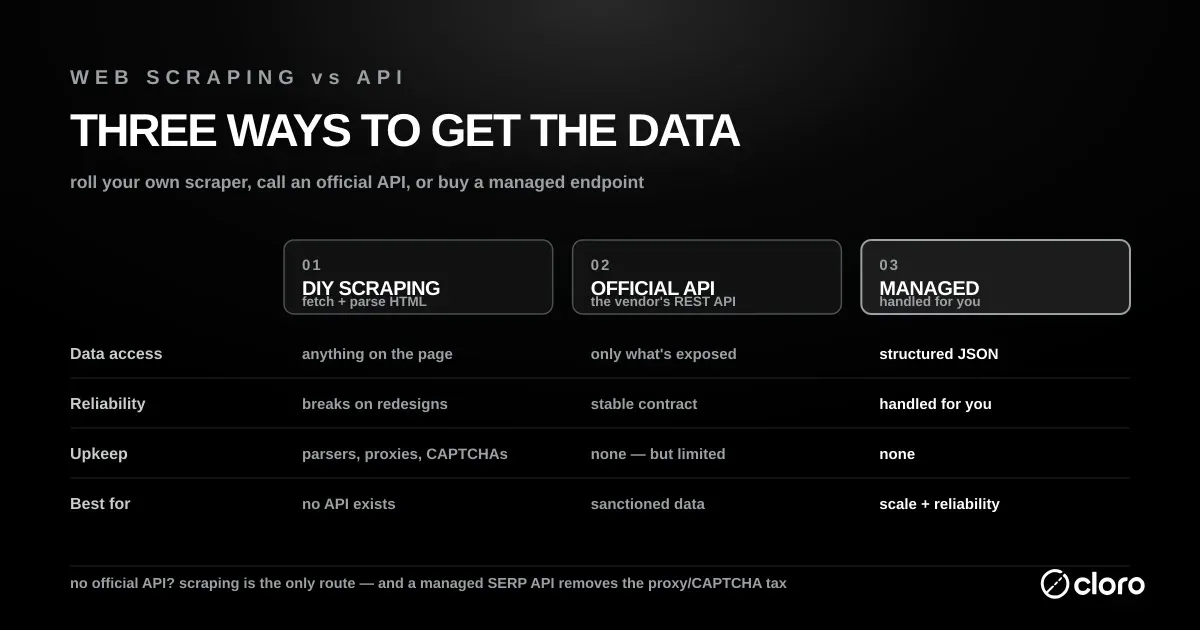
Web scraping vs API isn’t an either/or anymore. The right answer in 2026 is almost always a managed scraping API: API ergonomics on top of scraping flexibility, without the maintenance cost of keeping up with sites that change constantly. The sections below walk through the reasoning behind each of these five questions in more depth.
Web scraping vs REST API: how they differ in practice
Most official APIs you will meet are REST APIs, so it is worth being concrete about how web scraping vs a REST API actually plays out once you are writing code.
Data structure and parsing
A REST endpoint returns a predictable JSON or XML body with named fields, so a price is always at data.price and you read it in one line. Scraping the same price means locating it inside rendered HTML — a <span> buried in nested <div>s whose classes can change without warning. The REST API hands you structured data; the scraper hands you a document you must turn into structured data yourself, and that parsing layer is the part that breaks.
Rate limits and authentication
A REST API states its rules up front: an API key, an OAuth token, and a documented request quota per minute. A public page has no such contract, which sounds freeing until anti-bot systems, rotating markup, and IP-based blocks impose their own undocumented limits. With a REST API you are a recognised client operating inside published rules; with scraping you are an anonymous visitor whose access can be throttled or cut off at any time.
When to use an API
If a documented API exists and returns the data you need, almost always use it. Reaching for a scraper when a clean API is right there adds fragility you will pay for later.
The case is strongest when the data is sensitive or rate-limited, because APIs handle auth, audit trails, and rate limits cleanly, and that matters when the data owner is watching how it gets used. It is nearly as strong when you need long-term stability: APIs change on a published schedule with deprecation notices, whereas scrapers break silently on the page owner’s schedule. Volume pushes the same way, since scraping at scale requires proxy rotation, CAPTCHA solving, and headless browsers that an API handles for you. And when something does break, an API has a support channel and a changelog. A scraper has neither.
Classic API-first targets
Some categories are almost never worth scraping because their APIs are mature, generous, and well documented. Payments (Stripe), social platforms (Reddit, X), cloud infrastructure (AWS), CRM (Salesforce), and transactional email (SendGrid) all fall here. When a first-party API is stable and returns what you need, the web scraping vs API question answers itself — take the API.
When to scrape instead
There are four legitimate reasons to scrape rather than use an API, and each one is really a case where the official interface fails you.
- There is no API at all. The data exists on a public webpage but the owner never exposed it programmatically, which is the story on plenty of small business sites, government portals, and niche marketplaces.
- The API costs more than scraping. Some platforms charge enterprise rates for API access while letting anyone read the same website for free, which flips the usual economics.
- The API exposes less than the website, which is increasingly common in 2026 with AI platforms. The official ChatGPT API returns model output but not the live web results, citations, or shopping cards visible in the UI, and Google’s Custom Search JSON API caps a query at 10 results and returns none of the AI Overviews. Scraping the rendered page captures what real users see; the API doesn’t.
- You need views the API doesn’t support. Search rankings over time, price history, and content diffs all live on the page, not in an endpoint. The website is the source of truth; the API is only a slice of it.
The trade-off you accept
Scraping buys you reach at the price of fragility and operational overhead. HTML changes break your parser, and proxies, rendering, and anti-bot evasion become standing costs rather than one-time setup. That overhead is real. In our experience maintaining scrapers for AI search engines, a single UI change can take a day to diagnose and re-stabilise. A managed scraping API is how most teams get out from under that overhead: it owns the proxy and parsing layer for you, which is worth paying for once the maintenance starts eating real engineering time.
Reliability and maintenance: scraping’s hidden cost
The headline number in any web scraping vs API comparison is not the per-request price — it is the maintenance load, which is invisible until a scraper breaks in production.
The maintenance load is measurable. When we costed a self-run scraping stack against published infrastructure prices, engineer time was the largest single line at every volume we modelled, from 72% of the total at 100,000 requests a month down to 50% at a million. The assumed engineer fraction moved the total more than proxy bandwidth did. The per-request price you compare in a spreadsheet is therefore the smaller half of the decision, and the half that does not appear on any invoice is the one that decides it.
Why scrapers break
A scraper is coupled to the exact structure of a page it does not control. A redesign, an A/B test, a renamed CSS class, or a new consent banner can all silently change what your parser sees. Because none of these changes are announced, you usually learn about them when your data goes empty or wrong, not when the site ships the change.
The maintenance tax
An API absorbs these changes for you: the provider updates the backend and keeps the response schema stable, or versions it and tells you in advance. With scraping, every one of those changes lands on your team. That is the maintenance tax, and it scales with the number of targets and how often they change. That scaling is exactly why fast-moving targets like AI search engines are the worst possible things to scrape by hand. A managed scraping API is the way most teams take that tax off their own plate: the provider absorbs the markup changes and keeps handing you a stable schema, which matters most for exactly the fast-moving targets this section describes (more on that in the third option below).
Speed: an API wins per call, scraping wins when there’s no API
People often ask which is faster in a web scraping vs API matchup, and per request the API almost always wins. An API returns a small structured payload over a single authenticated call, while scraping the same field means downloading a full HTML page, frequently rendering JavaScript in a headless browser and routing through a proxy first.
Where scraping wins is speed-to-value rather than raw latency. If no API exists, building a scraper against a live page is faster than waiting — possibly forever — for the data owner to ship an endpoint. Scraping also reflects the page the instant it changes, so for freshness-sensitive data like live rankings or prices, the rendered page can be more current than a cached or batched API feed.
Cost: API vs scraping vs a managed scraping API
The cost side of web scraping vs API looks lopsided at first glance and then inverts once you account for engineering time.
A raw DIY scraper looks free because the target page costs nothing to load. The real bill arrives as residential proxies, headless-browser compute, CAPTCHA solving, and the engineer-hours spent rewriting parsers when a site changes. Those four costs swing too widely by target to put a single monthly number on, so price them against your own stack rather than a benchmark.
An official API has a visible price per call but hides almost no operational cost. Google’s Custom Search JSON API gives you 100 queries a day free, then charges $5 per 1,000 queries with a hard cap of 10,000 a day. You pay the sticker and move on, within the limits the owner set.
A managed scraping API sits between the two: a higher per-call price than raw scraping, but with the proxy fleet, browsers, and parsing maintenance folded into that price. The published rates in this category run well under the official-API sticker:
| Provider | Published rate | Per call |
|---|---|---|
| DataForSEO | $2.00 per 1,000 SERPs, Live | $0.002 |
| Bright Data | $1.50 per 1,000 requests, pay as you go | $0.0015 |
| SerpApi | $150 for 15,000 searches, Production plan | ~$0.01 |
| cloro | $100 a month for 250,000 credits on Hobby, 3 credits a Google Search call | ~$0.0012 |
Read that table as a spread, not a ranking. SerpApi bills about $0.01 a call, DataForSEO’s Live endpoint is $0.002, and AI Overview, AI Mode, ChatGPT, Perplexity and Gemini all draw from the same cloro credit pool as plain Google Search, at 3 to 7 credits a call. The takeaway: at any meaningful volume the managed option is usually cheaper than DIY once maintenance is counted honestly, because none of these rates move when a target site changes its markup.
The third option: a web scraping API
Most teams don’t choose pure-API or pure-scraping anymore. They use a web scraping API: a managed service that scrapes target sites on your behalf and returns structured JSON, which is the practical resolution to the whole web scraping vs API trade-off.
You get:
- Developer ergonomics of an API: auth, synchronous calls or async webhooks, retries, and a consistent JSON schema.
- Data from sources with no official API, including views a first-party API would never expose.
- Someone else maintaining the proxy fleet, headless browsers, and parsing logic, including rewriting parsers when a site changes its markup.
cloro is a web scraping API for AI search engines and traditional SERPs. Instead of scraping ChatGPT, Perplexity, Google AI Mode, or Google AI Overview yourself, you call one endpoint and get parsed UI responses with citations and sources back as JSON. It runs multi-engine on a single credit pool, so you track every engine from one integration and one bill instead of stitching together separate vendors, with country targeting for localised results that match what searchers in a given market actually see.
The cost calculus is the same one from the section above: a managed scraping API runs more per call than raw DIY scraping, but at any meaningful volume the engineering time to keep DIY infrastructure working is the larger expense. For teams building AI SEO monitoring or competitive intelligence, that maintenance tax compounds fast. A web scraping API is also the right answer for the growing category of data that sits in AI search results — a format that didn’t exist three years ago and has no official programmatic access path.
Hidden internal APIs: the middle path
Between scraping rendered HTML and calling an official API, there is a third technical option worth knowing about: the internal API a page calls in the background.
Many modern sites render in the browser by fetching JSON from their own private endpoints, which you can often see in your browser’s network tab as XHR or fetch requests. Reading that JSON directly is more stable than parsing HTML, because you skip the presentation layer that changes most often. The catch is that these endpoints are undocumented and unversioned — they can change or vanish without notice, and they may be governed by the same Terms of Service as scraping the page. Treat a hidden internal API as a faster, cleaner form of scraping, not as an official contract.
Legal and compliance considerations
The legal picture for web scraping vs API is often the deciding factor. Is web scraping illegal in the US? Not as a rule for public data, but it can become a legal problem through the data you collect or the terms you accept. The picture splits cleanly into three questions: computer-access law, privacy law, and contract law.
On computer-access law, U.S. courts have generally sided with scrapers of public data. In hiQ Labs v. LinkedIn, the Ninth Circuit found that scraping publicly accessible data likely does not violate the Computer Fraud and Abuse Act, because public pages do not receive the same protection as private, login-gated data. The Supreme Court reinforced that narrow reading in Van Buren v. United States, holding that the CFAA’s “exceeds authorized access” clause does not cover data you are otherwise allowed to see.
Privacy law is a separate and stricter axis. GDPR Article 4 defines personal data broadly as any information relating to an identifiable person, so scraping names, profiles, or contact details of EU or UK residents needs a lawful basis regardless of whether the page is public.
Contract law is the third limit. A site’s Terms of Service may forbid automated access, and its crawling preferences are expressed in robots.txt, which was formalised as an internet standard in RFC 9309 in 2022. Ignoring either can expose you to breach-of-contract claims even when the underlying data is public — see our full guide on website scraping legality for the current rules.
A worked example: Amazon product data
Amazon is a textbook web scraping vs API case because both paths exist and neither is obviously right. Amazon’s Product Advertising API returns catalogue data, but it is gated behind Amazon Associates registration and only exposes the fields Amazon chose to include, which often omit the live buy-box price, third-party seller offers, or the full review stream.
Scraping an Amazon product page captures exactly what a shopper sees, including those omitted fields, at the cost of aggressive anti-bot defences that make DIY scraping genuinely hard. This is the pattern that pushes teams toward a managed scraping API: the official API is too narrow, and self-run scraping is too brittle, so a service that returns parsed page data as JSON is the pragmatic middle. Our Amazon scraping API guide covers the field-level version of this: ASINs, buy-box price, third-party seller offers, and the review stream, plus the proxy and WAF handling each one costs.

About the author
Ricardo Batista
Founder, cloro
Ricardo is one of the founders and engineers behind its SERP and AI-search scraping infrastructure. Before cloro he scaled a financial comparison site to $7M ARR and ran the full-country operations of a unicorn to $65M ARR, then went back to building. He writes about search engine scraping, generative-engine optimization, and turning live search and AI-answer data into something teams can act on.
Frequently asked questions
What's the actual difference between web scraping and using an API?
An API is a documented contract the data owner provides for programmatic access — stable, versioned, and designed to be machine-readable. Web scraping pulls data from a public-facing webpage that was built for humans, not machines. The data is the same; the method and the maintenance burden are very different. Use an API when one exists and returns what you need. Scrape when it doesn't, or when the API exposes less than the page shows.
Is web scraping legal?
Generally yes for publicly available data, with three important limits. First, the Computer Fraud and Abuse Act (CFAA) — U.S. courts have found that scraping publicly accessible data does not violate the CFAA (hiQ v. LinkedIn, 2022). Second, GDPR and similar privacy laws restrict scraping personal data about EU/UK residents without a lawful basis. Third, a site's Terms of Service may prohibit scraping — violating ToS can expose you to breach-of-contract claims even if the data is public. Scraping non-public data (behind a login you're not authorised to use) is a different category entirely. See our full guide on website scraping legality for the current rules.
What is an API, in simple terms?
A set of rules that lets one program request data from another. You send a request to a documented URL, usually with an API key, and get structured JSON or XML back, instead of loading a web page and extracting the data from its HTML.
Why do people scrape sites that have an API?
Because the API often returns less than the website. The official ChatGPT API, for example, returns model output but not the live web results, citations, shopping cards, or source links visible in the web UI. The official Google Search API returns 10 blue links — it doesn't return AI Overviews, People Also Ask boxes, or rich-result markup. Scraping the rendered UI captures what users actually see. That's the data that matters for SEO monitoring, AI SEO, and competitive intelligence.
What is a 'web scraping API'?
A web scraping API is a hybrid: a paid service that scrapes a target site on your behalf and returns structured JSON — so you get the developer ergonomics of an API (auth, retries, webhooks, consistent schema) on top of data sources that have no official API. You don't manage proxies, headless browsers, or parsers. cloro is a web scraping API purpose-built for AI search engines (ChatGPT, Perplexity, Gemini, Copilot) and Google's SERP family (Google Search, AI Overview, AI Mode), returning parsed UI responses with citations and sources.
When should I build my own scraper vs use a scraping API?
Build your own scraper when you have one or two simple, static targets and low volume (under ~1,000 calls/month with no JavaScript rendering or anti-bot protection). A basic requests + BeautifulSoup script is a one-day build. Use a managed scraping API when volume grows, pages require JavaScript rendering, targets have anti-bot protection, or you're scraping something that changes its structure regularly — AI search engines being the clearest example. At that point, the engineering time to maintain DIY infrastructure exceeds the cost of the service.
Is web scraping faster than an API?
Per request, an API is almost always faster and cheaper in compute: it returns a small structured payload over a single authenticated call. Scraping the same data means downloading a full HTML page — often rendering JavaScript in a headless browser and routing through a proxy — which is heavier and slower. Scraping only wins on speed-to-value when no API exists, because building against a live page is faster than waiting for a data owner to ship an endpoint that may never come.
Related reading
Best Python Scraping Libraries in 2026: 6 Compared
Compare the 6 best Python scraping libraries for 2026: requests with BS4, Scrapy, Playwright, httpx, and Selenium, plus when to skip them entirely.
Web Scraping with Python: The Complete 2026 Guide
Web scraping with Python in 2026: pick the right tool (requests, BeautifulSoup, Scrapy, Playwright) with working code examples and a decision framework.
Amazon Scraping API: Product, Price, and Review Data
Learn how Amazon scraping APIs extract products, prices, reviews, sellers, and offers as JSON while handling proxies, WAFs, and marketplace routing.