
Google "Verifying Your Request": What It Means, How to Fix

On this page
Google started rolling out a new bot check across its search pages yesterday. If you scrape Google for any reason, it has probably touched your data already.
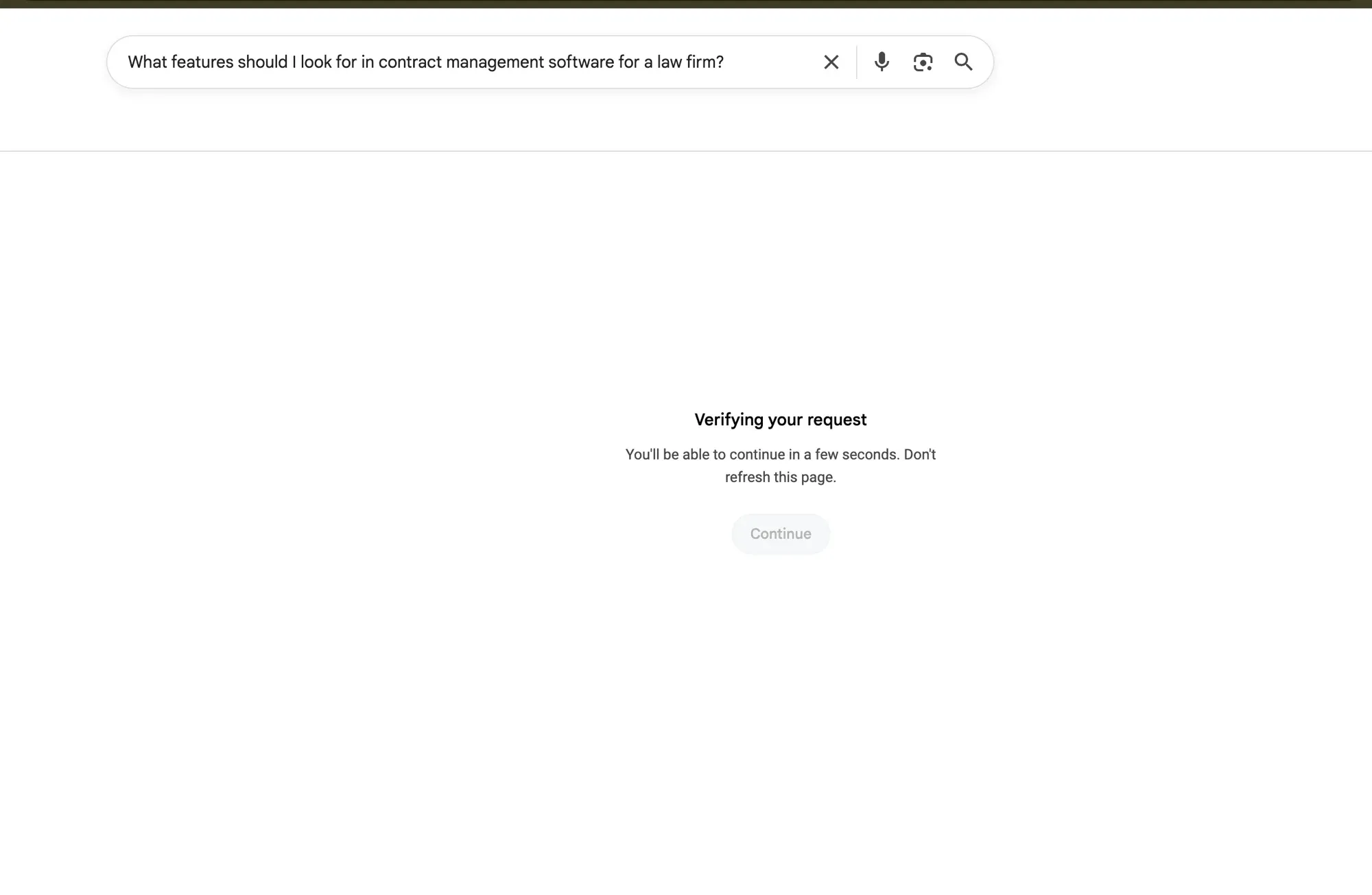
The Google “Verifying your request” page is what a flagged session gets back instead of organic results. It went live on June 25th, and our fleet data points to a broader rollout over the next few days.
What the Google “Verifying your request” page says
The Google “Verifying your request” page comes in several close variants, and the wording you get depends on how the request was flagged.
The “unusual traffic” variant
The common one reads: “Our systems have detected unusual traffic from your computer network.” Google’s help page lists the causes without much hedging. Malware on a device. Other people on a shared network running automated searches. A VPN or internet provider whose other users scrape. And “robots, computer programs, automated services, or search scrapers” (Google Search Help). Then it asks you to solve a reCAPTCHA to prove you’re a person.
The “checking your connection” variant
A second variant says the page “is checking to see if the connection is secure,” or asks you to confirm you are “not a robot.” It’s the same gate underneath. This is the one that used to be an optional CAPTCHA and has quietly become a mandatory JavaScript check. Headless scrapers stop here, because passing now means running Google’s verification code in a real browser.
The variant that returns HTTP 200
The version that matters most for anyone collecting data looks like a success. It returns a normal 200 response and a valid HTML document that carries no search results. Nothing in it reads as an error, so it walks straight past a status-code check. Everything below deals with this one.
How the “Verifying your request” page differs from a classic CAPTCHA
For years Google’s last line of defense was a visible puzzle. Pick the traffic lights, read the wobbly text, tick the box. Annoying, and at least honest about what was going on: when a puzzle showed up, you knew you’d been flagged, and an automated client got a clean signal that its request had failed.
The new gate runs a behavioral and cryptographic check in JavaScript and decides quietly whether it trusts the session. reCAPTCHA went the same way years ago, scoring risk in the background instead of always showing a challenge. Google’s Cloud Fraud Defense announcement at Next ‘26 said it out loud: static image puzzles are being retired in favor of behavioral ML scoring.
The difference is who finds out. A human sees a checkbox or waits a couple of seconds. An HTTP client gets a 200 and an empty page, because the challenge has moved into a layer that client can’t execute.
Why Google shows you the “Verifying your request” page
Google is verifying your request because its systems judged the traffic from your network as automated. Every version of the page comes from that one call. Google gets that call wrong often enough that plenty of ordinary people run into the wall.
Reasons a real person triggers it
Most people who hit it were doing something unremarkable. Searching a lot in a short window can do it, especially with operators or fast back-and-forth queries. A shared office, campus or public network sends everyone out through one address, so a single bad actor takes the whole building down with them. A VPN behaves the same way when other subscribers on it scrape Google. Quieter causes include a browser extension firing searches in the background, and malware running automated queries from your machine, which Google names as a cause too (Google Search Help).
Reasons a scraper triggers it
For automated collection, the triggers are structural. Hundreds of queries a minute from one IP is the quickest way in. Datacenter ranges carry poor reputation, so a whole subnet can go down at once. A client with no JavaScript engine, a stripped user agent and no cookies reads as non-human long before it reaches any rate limit, and that profile is what the gate was built to catch.
Does the “Verifying your request” message mean you’ve been hacked?
Usually no. The Google “Verifying your request” message is a call about your network, and most of the time it’s reacting to other traffic sharing your IP, VPN or internet provider. Seeing it once and clearing it tells you nothing bad about your own machine.
One case is worth ruling out. If the message keeps coming back on a home connection nobody else uses, malware quietly running searches from your device is a real possibility, and Google lists it (Google Search Help). Run a reputable malware scan. If a second, freshly checked device on the same network never sees the message, the problem sits upstream at your ISP or VPN.
Why is Google sending me a verification I didn’t ask for?
That is a different flow from the Search page. A verification code in your inbox or a “Is this you?” prompt on your phone comes from Google Account security, not from Search.
Google sends account verification codes from [email protected] when someone sets up an account with that email address (Google Account Help). If you did not start a sign-in or sign-up, do not enter the code or approve the prompt. Open your Google Account yourself, not through the message, and review recent security activity.
Mass prompts do happen for harmless reasons: in February 2017 Google signed out a number of users during routine maintenance and said account security was never at risk.
How to get past the “Verifying your request” page as a regular user
If you’re a person who just wants to search, clearing the Google “Verifying your request” page is quick. The steps differ a little by device, but it comes down to the same two things: prove you’re human, then change whatever made your traffic look automated.
On desktop
Solve the reCAPTCHA if one appears. Google says the message goes away once you do, and Search works again. If no challenge shows up, wait a minute and retry, since the flag is often rate-based and temporary. Turning off a VPN, moving off a shared network or signing in to your Google account all pull your risk score down. When it keeps coming back, scan the machine for malware before assuming Google is at fault.
On iPhone and Android
On a phone, the “unusual traffic” screen almost always traces to the network rather than the device. Flipping from Wi-Fi to cellular data, or the other way, changes your IP and often clears it on the spot. Turn off any VPN or ad-blocking DNS profile, then reload the search. Airport, cafe and hotel Wi-Fi account for a lot of these, since dozens of devices leave through one outbound address.
Google has been tightening anti-bot defenses for 18 months
Each step below made automated traffic harder to hide, well before this month’s verify-wall rollout.
On the “our fleet data” reference above: that is an operational observation from cloro’s own request fleet during the rollout, not an instrumented study. There is no published sample, geography split, or time series behind it, so it supports the claim that the page appeared more widely over those days and nothing more precise than that. The dated, externally-reported timeline below is the part to plan against.
In January 2025 Google deployed SearchGuard, its internal name for BotGuard applied to Search, which Search Engine Land reported “broke nearly every SERP scraper overnight.” SearchGuard runs behavioral analysis inside a bytecode virtual machine with 512 registers, built to resist reverse engineering. Cursor movement, typing cadence and scrolling all get analyzed, and the user never sees a challenge. That same month, Google sued SerpAPI over automated scraping of “hundreds of millions” of queries a day.
At Next ‘26 in May 2026, Google announced Cloud Fraud Defense as the formal successor to reCAPTCHA. It drops image recognition in favor of behavioral ML scoring, risk signals from Google’s global threat intelligence, and a QR-code challenge for sessions it doesn’t trust. Google was direct about where static CAPTCHA is headed.
The “Verifying your request” page is where all that lands on Google Search. A page you can only pass by executing JavaScript screens out every client that can’t run it, and an HTTP client receives the HTML with nowhere to execute the code.
Why a rendering gate makes sense right now
AI Overview now appears on roughly 48% of all tracked search queries as of March 2026, per BrightEdge, up 58% year over year, while Xponent21 puts the figure at 60% for US queries. On the informational, how-to and health queries that most monitoring tools track, coverage runs 64–83% depending on the query type. Across cloro’s own fleet the number sits closer to 80% for the queries our customers watch.
Google’s results already need JavaScript to paint AI Overviews and most of the dynamic SERP furniture. Asking for the same thing at the door costs Google nothing, and it filters out any client that can’t render a page.
The silent failure most scrapers haven’t caught
One of our customers caught it before we did. They were tracking AI Overviews, watched their success rate hold steady, and noticed the actual data coming back empty. We pulled the raw HTML and found the verify page sitting where the SERP should have been. Their scraper had been filing it as a legitimate zero-result response for hours.
The verification page comes back as HTTP 200 with a valid HTML document. It passes every status-code health check, won’t trigger a retry and never lands in your error logs. Your scraper records a successful request while the data behind it has zero organic results, no AI Overview and empty fields all the way down.
If your AI Overview counts fell off or organic results went to zero on a subset of queries in the last 24 hours, this is the likely cause. Catching it means inspecting the page body for the verification markup, because the status code will keep telling you everything is fine.
How we fixed it in 8 hours
The page is a JavaScript execution gate, so retries and proxy rotation both arrive at the same wall. Getting through takes a real browser that can run the verification code.
cloro already renders Google SERP requests in real browsers, on the same infrastructure that serves its ChatGPT, Perplexity and Gemini endpoints. Extending that stack to the verify wall took hours rather than weeks.
When a request comes back as the Google “Verifying your request” page, cloro spots it, renders it in a real browser, finishes the verification and returns the cleared SERP. A session that won’t clear falls back to a fresh one. Your API call stays exactly as it was.
What this means if you’re running your own scraper
If you’re on requests, curl_cffi or any HTTP client without a real browser behind it, you’re returning empty data silently every time the verify page appears. There’s no exception to catch, so the wrong results keep flowing downstream.
Rate limits and query velocity
Volume is the lever you control most directly. One IP firing hundreds of Google queries a minute hits the wall fast. Spacing requests out and capping concurrency per IP both cut how often you get flagged. Jitter between calls helps too. None of that removes the need to render once the gate does appear.
IP reputation and proxies
Where a request comes from counts as much as how fast it arrives. Datacenter IPs are cheap and heavily abused, so they draw scrutiny, while residential and mobile addresses read more like real users. Rotating through a healthy pool spreads the load so no single address trips a limit. Our guides on proxies for SERP scraping and what an HTTP proxy is cover the tradeoffs. Rotation on its own won’t clear the Google “Verifying your request” page, since a flagged session still has to run the JavaScript somewhere.
Headless browser detection
Google fingerprints the client as well as the IP. A stripped user agent, a missing JavaScript engine, absent cookies, or the automation flags a default headless browser leaks will each mark a request as non-human. That’s where plain Python SERP scrapers and simple Google search scraping scripts stall. Getting through consistently means presenting a coherent, human-shaped browser on every request, then solving the check inside that same session. Our guide to solving CAPTCHAs goes deeper on the challenge layer.
The rendering has to happen in the session context of the original request. Fetching the interstitial URL fresh in a new browser fails, because Google’s verification JS checks session consistency. You inject the interstitial HTML into an existing context and run verification there.
At scale that costs real money. Headed browser rendering runs a lot more expensive per request than HTTP scraping, which is why most stacks put it off until something like this forces the question.
Using cloro’s Google SERP API
cloro returns structured Google SERP data (organic results, AI Overview, People Also Ask, Shopping) with rendering and bot detection handled on every request. The Google “Verifying your request” page fix went live today, so the interstitial gets cleared for you instead of landing in your data as an empty result.
The flow is the same one you’d already use: send your query to the endpoint, cloro renders the request and clears any verification page for you, and you get structured JSON back with no extra code to write.
import requests

response = requests.post(
    "https://api.cloro.dev/v1/monitor/google",
    headers={"Authorization": "Bearer YOUR_API_KEY"},
    json={"query": "contract management software for law firms"}
)

data = response.json()
print(data["organicResults"])
print(data["aiOverview"])
curl -X POST "https://api.cloro.dev/v1/monitor/google" \
-H "Authorization: Bearer YOUR_API_KEY" \
-H "Content-Type: application/json" \
-d '{"query": "contract management software for law firms"}'Start with a free trial at cloro.dev. 500 credits, no credit card. Full response schema lives in the Google Search API docs.

About the author
Ricardo Batista
Founder, cloro
Ricardo is one of the founders and engineers behind its SERP and AI-search scraping infrastructure. Before cloro he scaled a financial comparison site to $7M ARR and ran the full-country operations of a unicorn to $65M ARR, then went back to building. He writes about search engine scraping, generative-engine optimization, and turning live search and AI-answer data into something teams can act on.
Frequently asked questions
What is Google's 'Verifying your request' wall?
A JavaScript-driven verification page Google serves when it thinks a session looks automated. It comes back as HTTP 200 with a technically valid HTML page that happens to carry no search results, so any scraper checking status codes files the request as a success while the data behind it is empty.
Why is this worse than a CAPTCHA?
A CAPTCHA gives you an obvious error or a non-200 status to work with. The verify wall hands you a 200 and a valid HTML document with zero organic results in it, so your monitoring stays green while your data goes wrong, and most scrapers never notice.
Why does Google need rendering for verification now?
AI Overview now shows up on roughly 48% of tracked search queries (BrightEdge, March 2026), running 64–83% on informational queries and closer to 80% on the kinds of queries most monitoring tools watch, per cloro's own fleet data. Google's results already need JavaScript to paint, so asking for JavaScript at the door costs Google nothing.
Does cloro handle this automatically?
Yes. cloro detected and fixed this within 8 hours of the rollout starting. The fix runs on every Google SERP request, so nothing changes in your API calls.
Why is Google verifying my request?
Because its systems judged the traffic from your network as automated. Common causes are many searches in a short window, a shared office or public network, a VPN whose other users scrape Google, a browser extension running background searches, or malware. Solving the reCAPTCHA or changing networks usually clears it.
Why is Google sending me a verification I didn't ask for?
A verification code email or an 'Is this you?' prompt comes from Google Account security, not from the Search page. Google sends account verification codes from [email protected] when an account is set up with that email. If you did not start a sign-in or sign-up, do not enter the code or approve the prompt. Open your Google Account directly and review recent security activity.
Related reading

How to Scrape Google Search Results With Python (2026)
Learn how to scrape Google search results with Python, Playwright, or a SERP API. Compare HTML parsing, browser automation, and anti-bot risk.

Best Google Scraper 2026: 10 Tested Across 5 Verticals
Benchmark of 10 Google scrapers across SERP, Maps, Jobs, Images, Business Profile. Real cost per call, AI Overview depth, vs SerpApi + Bright Data.

How to Scrape Google AI Overview (2026 Guide)
Scrape the Google AI Overview block in 2026: parse dynamic source citations, handle desktop/mobile layout shifts, and extract embedded sponsored ads.