
How to Scrape Gemini: API, URL Context, and Web UI

On this page
There are three ways to scrape Gemini: call the official API, use the API’s URL context tool for live web content, or automate the Gemini web interface when you need the exact answer real users see.
Each path returns different data. The API is clean and supports structured outputs, and its URL context tool can fetch live pages at request time. The web UI exposes Gemini’s rendered answer, formatting, and source behavior, but it requires browser automation and anti-bot handling to reach.
The web UI is also where Gemini’s grounded citations live. When a prompt is answered with Google Search, Gemini attaches inline source annotations and grounding metadata — the citations users see, and the data most teams actually want to scrape.
This guide compares the three options and shows where each fits. For brand monitoring across Gemini and adjacent engines, pair it with AI search tracking or the Gemini API page.
Why scrape Google Gemini responses?
Before building anything here, know that Gemini behaves unlike every other major engine. We measured grounding across six engines on roughly 2,500 prompts each, and Gemini grounded just 41.1% of its answers, averaging 3.2 sources, against 91-98% for the other five. That figure has since moved a long way: a re-measurement on 2026-08-19 put Gemini at 70.7% and 10.1 sources, and its monthly series runs from 27% to 70% across eight months. Gemini is reliably the least-grounded of the six; the rate itself is not a fixed property.
That single fact should shape your parser. An empty citation list from a Gemini scrape is usually a real finding rather than a bug, so a pipeline that retries on missing sources will burn most of its budget re-fetching answers that were never grounded. Record ungrounded as a first-class outcome and you get a cleaner signal than any other engine will give you, because the absence is the measurement.
Gemini’s API responses look nothing like what users see in the interface. If your goal is to audit what Gemini actually tells people, the raw API alone won’t get you there — you have to scrape Gemini’s rendered output.
What the API leaves out
Here is what you miss when you only call the API:
- The actual interface experience users get
- Source citations with confidence levels
- Markdown formatting and structure
- Real-time web integration and context
Without scraping, you can’t verify what Gemini tells users or assess source reliability. When you scrape Gemini’s web UI you capture the rendered answer verbatim, and it runs up to 12x cheaper than direct API usage while returning the same output users actually see.
When to scrape Gemini instead of calling the API
Reach for the API when you need raw model text at scale and nothing else. If the rendered answer, with its sources, ordering, and formatting, is the product, you want a scraper.
Common reasons teams scrape Gemini:
- Verification. Check what Gemini tells users, with source confidence.
- SEO and GEO. Track how Gemini sources and cites information.
- Market research. Pull full responses with formatted markdown.
- Content analysis. Study how Gemini structures answers and orders sources by reliability.
The API’s own pricing starts free and then bills per input and output token, so high-volume monitoring gets expensive fast — another reason teams choose to scrape the web UI instead.
You might also be interested in how to scrape Google AI Mode for a different perspective on Google’s AI search.
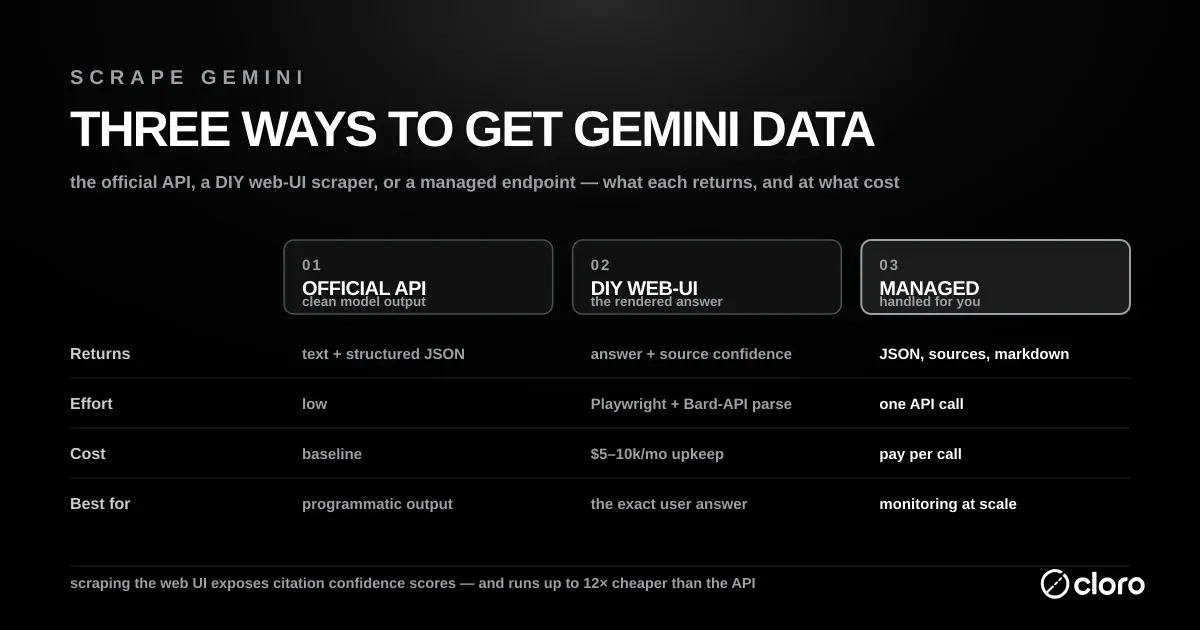
Understanding Gemini’s architecture
Scraping Gemini’s web UI is awkward because there is no single clean endpoint to hit.
How Gemini generates a response
Knowing these stages tells you where to intercept the data: everything up to the backend round trip is invisible to you, and the moment the response comes back as nested JSON is the format you have to parse. Response generation runs in stages:
- Your prompt is analyzed and sent to the Bard backend.
- Gemini makes HTTP POST requests to the Bard frontend endpoints.
- Those responses come back as nested JSON data rather than clean objects.
- Content renders client-side in the browser, with source citations attached to it.
- Sources are ordered by an internal reliability signal.
The internal API format is the first surprise:
// Gemini uses complex nested JSON arrays
const response = {
  0: [
    2,
    "response_data",
    {
      4: [0, "text_content", [{ 1: "confidence_levels" }]],
    },
  ],
};
// Content isn't available in standard API format
The response structure nests content several levels deep:
[0, [2, "nested_response_data", {"4": [0, "content", [sources]]}]]Anti-bot detection you’ll hit
Google treats automated browsers as a threat, so any attempt to scrape Gemini at scale runs into layered detection:
- Canvas fingerprinting
- Request pattern monitoring
- CAPTCHA challenges
- Cookie-based session validation
Dynamic source loading adds more moving parts:
- Confidence-level based source ordering
- Real-time web integration
- Nested JSON parsing requirements
These defenses are why a naive script that works once in your own browser fails the moment you try to scrape Gemini from a data-center IP. Even the sanctioned path has ceilings — the API enforces rate limits that scale by usage tier, so both routes force you to think about request pacing.
The internal API parsing challenge
Most of the real work when you scrape Gemini’s web UI is parsing nested JSON arrays from internal Bard endpoints. The structure is the hard part, not the network capture.
Why the nested JSON is hard
Here is a raw internal response, trimmed to one source:
# Raw Gemini internal API response example
[0, [2, "response_data", {
  "4": [0, "Hello", [
    {"1": 85, "2": ["https://example.com", "Source Title", "Description"]}
  ]]
}]]
The parsing challenges stack up:
- Response data sits deep inside layers of nested JSON arrays.
- Content and sources use different array positions, so the indexing is inconsistent.
- Pulling a source’s confidence level requires navigating one specific path.
- Network issues can corrupt the nested structure mid-stream.
Extracting text and sources
The helpers below do the real work: one walks the array to the text body, the other pulls each source with its confidence level. Both wrap every access in defensive error handling, because a dropped chunk can corrupt the structure mid-stream.
import json
from typing import List, Dict, Any, Optional

def get_final_response(event_stream_body: str) -> Optional[Any]:
    """Extract the final complete response from an event stream."""
    lines: List[str] = event_stream_body.strip().split("\n")

    largest_response: Optional[Any] = None
    largest_size: int = 0

    for line in lines:
        try:
            data: Any = json.loads(line)
            line_size: int = len(line)
            if line_size > largest_size:
                largest_size = line_size
                largest_response = data

        except (json.JSONDecodeError, IndexError, TypeError):
            continue

    if not largest_response:
        return None

    return json.loads(largest_response[0][2])

def extract_response_text(response_object: Any) -> str:
    """Extract the main text content from nested response."""
    return response_object[4][0][1][0]

def extract_sources(response_object: Any) -> List[Dict[str, Any]]:
    """Extract sources with confidence levels from response."""
    sources: List[Dict[str, Any]] = []

    try:
        citations_objects = response_object[4][0][2][1]

        for idx, citation_object in enumerate(citations_objects, start=1):
            confidence_level = citation_object[1][2]
            url = citation_object[2][0][0]
            label = citation_object[2][0][1]
            description = citation_object[2][0][3]
            sources.append({
                "position": idx,
                "label": label,
                "url": url,
                "description": description,
                "confidence_level": confidence_level,
            })

    except (json.JSONDecodeError, IndexError, TypeError, KeyError, AttributeError):
        pass

    return sources
Building the scraping infrastructure
Scraping Gemini reliably takes a handful of moving parts. The capture is straightforward; the parsing you saw above is where most of your maintenance time goes.
Choosing your tools
Four components carry the whole job:
- Playwright for browser automation, since the interface is JavaScript-heavy.
- Playwright can also monitor every response with
page.on("response")to capture the internal Bard API calls as they stream in. - A JSON parser to process the nested response arrays.
- A content extractor to parse the HTML and pull structured data.
Intercepting the Bard endpoint
The interceptor watches for the StreamGenerate endpoint and buffers each raw response body. Everything else — navigation, typing the prompt, waiting for completion — is standard Playwright, which is what makes capture the approachable part of any effort to scrape Gemini.
import asyncio
from playwright.async_api import async_playwright, Page
import json
from typing import Dict, Any, List, Optional

class GeminiScraper:
    def __init__(self):
        self.captured_responses = []

    async def setup_page_interceptor(self, page: Page):
        """Set up network request interception for Bard endpoints."""

        async def handle_response(response):
            # Capture Bard frontend API responses
            if 'BardChatUi/data/assistant.lamda.BardFrontendService/StreamGenerate' in response.url:
                response_body = await response.text()
                self.captured_responses.append(response_body)

        page.on('response', handle_response)

    async def scrape_gemini(self, prompt: str) -> Dict[str, Any]:
        """Main scraping function."""

        async with async_playwright() as p:
            browser = await p.chromium.launch(headless=False)
            context = await browser.new_context()
            page = await context.new_page()

            # Set up response interception
            await self.setup_page_interceptor(page)

            try:
                # Navigate to Gemini
                await page.goto('https://gemini.google.com/app')

                # Wait for textarea and enter prompt
                await page.wait_for_selector('[role="textbox"]')
                await page.fill('[role="textbox"]', prompt)
                await page.press('[role="textbox"]', 'Enter')

                # Wait for response completion
                await self.wait_for_response(page)

                # Parse the captured response
                if self.captured_responses:
                    raw_response = self.captured_responses[0]
                    return self.parse_gemini_response(raw_response)
                else:
                    raise Exception("No response captured")

            finally:
                await browser.close()

    async def wait_for_response(self, page: Page, timeout: int = 60):
        """Wait for Gemini response completion."""

        for i in range(timeout * 2):  # Check every 500ms
            # Check if we have captured responses
            if self.captured_responses:
                return

            # Check for content in DOM
            content_div = page.locator('message-content').first
            if await content_div.count() > 0:
                content_text = await content_div.text_content()
                if content_text and len(content_text.strip()) > 50:
                    await asyncio.sleep(2)  # Allow for final updates
                    continue

            await asyncio.sleep(0.5)

        raise Exception("Response timeout")

    def parse_gemini_response(self, raw_response: str) -> Dict[str, Any]:
        """Parse the raw Gemini response into structured data."""

        # Extract final response from event stream
        final_response = get_final_response(raw_response)

        # Extract text and sources
        text = extract_response_text(final_response)
        sources = extract_sources(final_response)

        return {
            'text': text,
            'sources': sources,
        }
Parsing the streaming response data
Turning the captured stream into clean, structured output is the last mile, and it is what separates a demo from a pipeline that can scrape Gemini day after day.
Extracting markdown with inline sources
The rendered answer carries source chips inline, so markdown extraction has to wait for those chips and then map each one back to a parsed source:
async def extract_markdown_with_sources(page: Page, sources: List[Dict]) -> str:
    """Extract markdown content with inline source citations."""

    try:
        # Wait for source chips to be visible
        chip_locator = "source-inline-chip .button"
        if await page.locator(chip_locator).count() > 0:
            await page.locator(chip_locator).first.wait_for(state="visible")

        # Get the main content HTML
        content_html = await page.locator("message-content").first.inner_html()

        # Convert HTML to markdown with source links
        markdown = convert_html_to_markdown_with_links(
            content_html,
            [[s] for s in sources],
            chip_locator
        )

        return markdown

    except Exception as e:
        print(f"Markdown extraction failed: {e}")
        return ""

async def extract_html_content(page: Page, request_id: str) -> str:
    """Extract full HTML content for upload."""

    try:
        full_html = await page.content()

        # Upload to storage service
        uploaded_url = await upload_html(request_id, full_html)
        return uploaded_url

    except Exception as e:
        print(f"HTML extraction failed: {e}")
        return ""
Assembling the final result
With text, sources, markdown, and HTML all optional, one function can serve a lightweight verification job and a full archival scrape from the same code path:
from typing import TypedDict, List, NotRequired, Optional

class GeminiLinkData(TypedDict):
    position: int
    label: str
    url: str
    description: str
    confidence_level: int

class GeminiResult(TypedDict):
    text: str
    sources: List[GeminiLinkData]
    markdown: NotRequired[str]
    html: NotRequired[Optional[str]]

async def parse_complete_gemini_response(
    page: Page,
    request_data: Dict[str, Any],
    event_stream_body: str
) -> GeminiResult:
    """Parse Gemini response with all optional data types."""

    include_markdown = request_data.get("include", {}).get("markdown", False)
    include_html = request_data.get("include", {}).get("html", False)

    # Extract core data
    final_response = get_final_response(event_stream_body)
    text = extract_response_text(final_response)
    sources = extract_sources(final_response)

    result: GeminiResult = {
        "text": text,
        "sources": sources,
    }

    # Add optional data
    if include_markdown:
        result["markdown"] = await extract_markdown_with_sources(page, sources)

    if include_html:
        result["html"] = await extract_html_content(page, request_data["requestId"])

    return result
Is it legal to scrape Gemini?
Scraping public output sits in a legal grey area, and Gemini is no exception. Before you scrape Gemini in production, read the fine print rather than assuming public means permitted.
Google’s Gemini API Additional Terms of Service restrict automated collection, prohibit reverse-engineering or extracting components of the service, and specifically bar caching or reselling grounded search results. Those terms govern the sanctioned API, and the spirit of them is worth respecting on the web UI too.
Is web scraping illegal in the US?
Not as such. The federal anti-hacking law, the CFAA, reaches access that goes past a technical gate: the Supreme Court held in Van Buren v. United States (2021) that a person “exceeds authorized access” only by entering areas of a computer that are off-limits to them. Collecting publicly served pages is not that. Terms of service are a separate, contractual risk, and they bind hardest when you log in and click “I agree”. For Gemini, that puts the line at the Google login. Our web scraping legal guide walks through the US cases and the stricter EU rules.
Practical guidance if you decide to scrape Gemini:
- Don’t automate personal Google logins — it’s the fastest route to a ban.
- Prefer the sanctioned API wherever it already covers your use case.
- Scrape only public, rendered output and respect published rate limits.
- Keep volumes modest and human-paced when you scrape Gemini’s web UI.
None of this is legal advice, but the pattern is clear: the more your scraping looks like abuse, the more risk you take on. Managed providers absorb much of that risk by pooling infrastructure and enforcing sane request pacing on your behalf.
Using cloro’s managed Gemini scraper
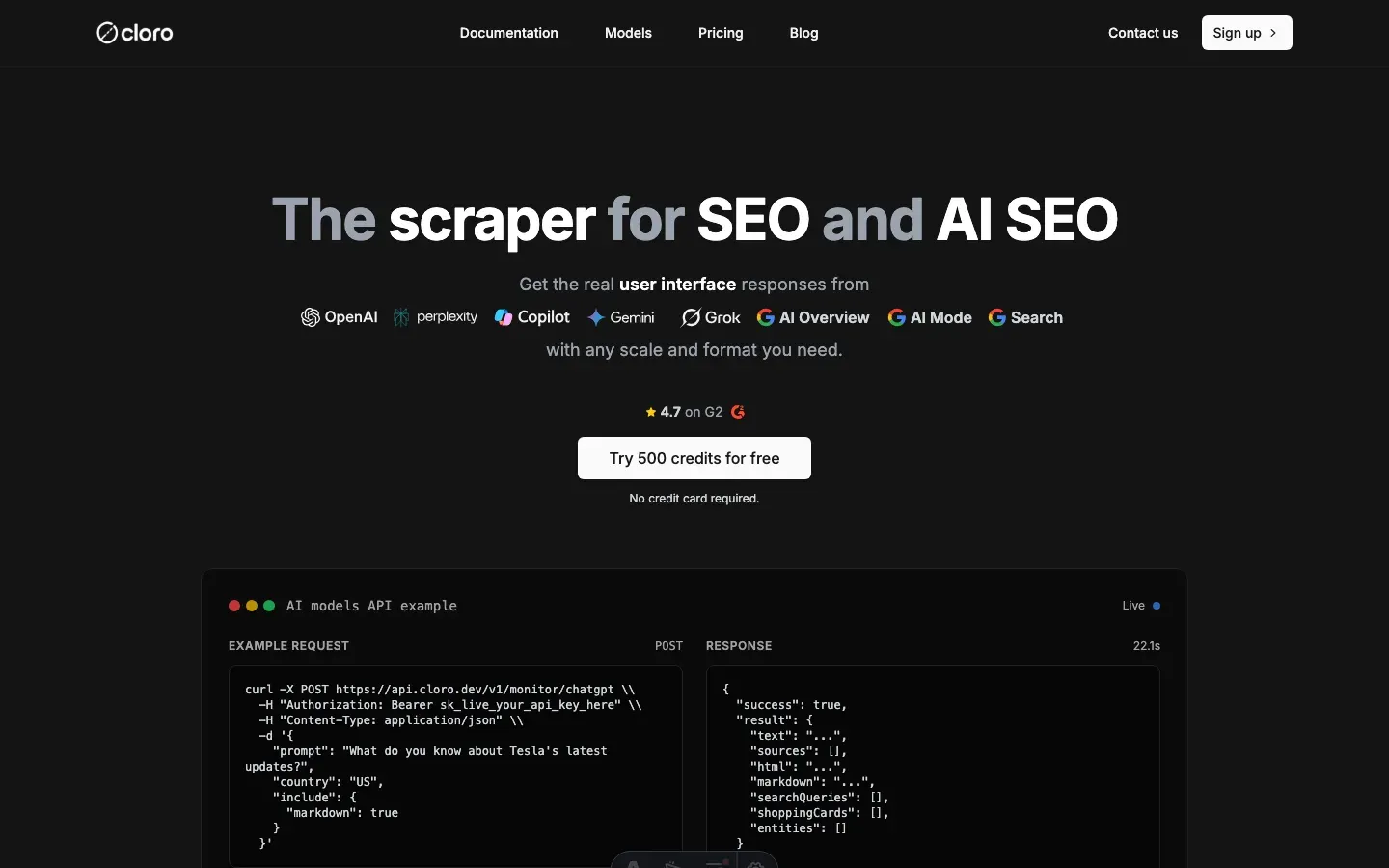
Building and maintaining a reliable way to scrape Gemini is expensive in time and infrastructure. cloro is a managed API built for that job.
The integration is a single POST request:
import requests
import json

# Your prompt
prompt = "What are the latest developments in renewable energy in 2026?"

# API request to cloro
response = requests.post(
    'https://api.cloro.dev/v1/monitor/gemini',
    headers={'Authorization': 'Bearer YOUR_API_KEY'},
    json={
        'prompt': prompt,
        'country': 'US',
        'include': {
            'markdown': True,
            'html': True,
            'sources': True
        }
    }
)

result = response.json()
print(json.dumps(result, indent=2))
What cloro handles for you:
- Browser management. Rotating browsers, user agents, and fingerprints.
- Anti-bot evasion. CAPTCHA solving and detection avoidance.
- Rate limiting. Request scheduling and backoff strategies.
- Data parsing. Structured data extracted from responses.
- Error handling. Retry logic and recovery.
- Scalability. Distributed infrastructure for high-volume requests.
The response comes back as clean, structured JSON — the parsing headache handled:
{
  "status": "success",
  "result": {
    "text": "The renewable energy sector has seen remarkable developments in 2026...",
    "sources": [
      {
        "position": 1,
        "url": "https://energy.gov/solar-innovations",
        "label": "DOE Solar Innovations Report",
        "description": "Latest breakthroughs in solar panel efficiency and storage technology",
        "confidence_level": 92
      }
    ],
    "markdown": "**The renewable energy sector** has seen remarkable developments in 2026...",
    "html": "https://storage.cloud.html/uploaded-gemini-response.html"
  }
}
Why teams use cloro instead of maintaining their own stack to scrape Gemini:
- 99.9% uptime, vs. DIY solutions that break often.
- P50 latency under 45s, vs. manual scraping that takes hours.
- No infrastructure costs. We handle browsers, proxies, and maintenance.
- Structured data, with sources, confidence levels, and markdown parsed for you.
- Rate limiting and ethical scraping practices.
- Distributed infrastructure for high-volume requests.
Which API returns Gemini responses as structured JSON?
cloro does, at 4 credits per request: the answer arrives parsed, sources separated from prose, success-billed. If you parse Gemini’s own grounding output, pin to the live schema: the documented groundingChunks/groundingSupports field names no longer appear, and integrations that assume them return empty citation lists without erroring.
Conclusion
Gemini data is worth pulling, and there are three viable ways to scrape Gemini depending on what you need. Researchers studying AI behavior, businesses tracking their competitors, and developers building AI-powered tools all benefit from structured Gemini responses with confidence scoring.
For most teams, cloro’s Gemini scraper is the shortest way to scrape Gemini at scale. You get:
- Reliable scraping infrastructure on day one
- Data parsing with confidence scoring
- Anti-bot evasion and rate limiting built in
- Retry logic and error recovery
- Structured JSON output with all metadata
At 500,000 to 1 million requests a month, building and running this yourself costs roughly $4,800 to $14,100. Infrastructure is the smaller part: 332 GB of residential proxy bandwidth is $999 on Bright Data, and a c6i.4xlarge browser instance is $0.68 an hour, about $496 a month each. The bigger part is people. At the US median software developer salary of $131,450, loaded, a fifth to a half of one engineer on selector fixes and block handling costs $2,800 to $7,100 a month. That engineer fraction moves the total more than every other line combined.
If you need a custom solution, the approach above is a starting point for building your own way to scrape Gemini. Expect ongoing maintenance: Gemini updates its anti-bot measures and response formats often.
As more teams discover the value of AI monitoring, competition for visibility in AI responses grows. Companies that start tracking their Gemini presence now will build a lead that’s hard to close later.
Ready to pull Gemini data? Get started with cloro’s API.

About the author
Ricardo Batista
Founder, cloro
Ricardo is one of the founders and engineers behind its SERP and AI-search scraping infrastructure. Before cloro he scaled a financial comparison site to $7M ARR and ran the full-country operations of a unicorn to $65M ARR, then went back to building. He writes about search engine scraping, generative-engine optimization, and turning live search and AI-answer data into something teams can act on.
Frequently asked questions
What is unique about scraping Gemini?
Gemini's responses are often delivered via internal Google APIs with complex, nested JSON arrays that are difficult to parse compared to standard JSON.
Does Gemini provide confidence scores?
Yes, internally Gemini assigns confidence scores to its sources. Advanced scrapers can extract these hidden metrics from the response data.
How do I handle Google login for scraping?
You generally shouldn't. Automating logins is risky and leads to bans. It's better to use methods that don't require personal authentication or use ephemeral sessions.
What is the internal API parsing challenge in Gemini?
Gemini's responses come as deeply nested JSON arrays with mixed indexing for content and sources, so you need specific path navigation and careful error handling to extract data reliably.
What infrastructure is needed to scrape Gemini?
You need browser automation (Playwright), network interception to capture internal Bard API calls, and a custom JSON parser capable of handling complex nested arrays.
Is it legal to scrape Gemini?
Scraping public output sits in a legal grey area. Google's Gemini API terms restrict automated collection and prohibit reverse-engineering the service, so keep volumes modest, scrape only public rendered output, and avoid automating personal logins. This is not legal advice.
Is web scraping illegal in the US?
Not as such. Under Van Buren v. United States (2021), the CFAA only reaches access that goes past a technical gate, so collecting publicly served pages is not a federal crime. Terms of service are a separate contractual risk that binds hardest on logged-in use. For Gemini, the line sits at the Google login. This is not legal advice.
Related reading

Best LLM & AI Visibility Tools 2026: 11 Tested
We tested 11 LLM visibility tools (also sold as AI visibility trackers and checkers) on real brand-monitoring workflows across ChatGPT, Perplexity, and Gemini. What works, what doesn't.
How to Scrape ChatGPT: SSE Streams and Citations
Learn how to scrape ChatGPT: capture SSE streams, expand citations, handle Cloudflare, and decide when a managed API is safer than DIY scraping.

How to Scrape Perplexity: API vs Web Interface
Learn how to scrape Perplexity with the official API, structured outputs, or web UI automation. Compare sources, citations, and trade-offs clearly.