
cloro OpenClaw Integration: Monitor AI Search

On this page
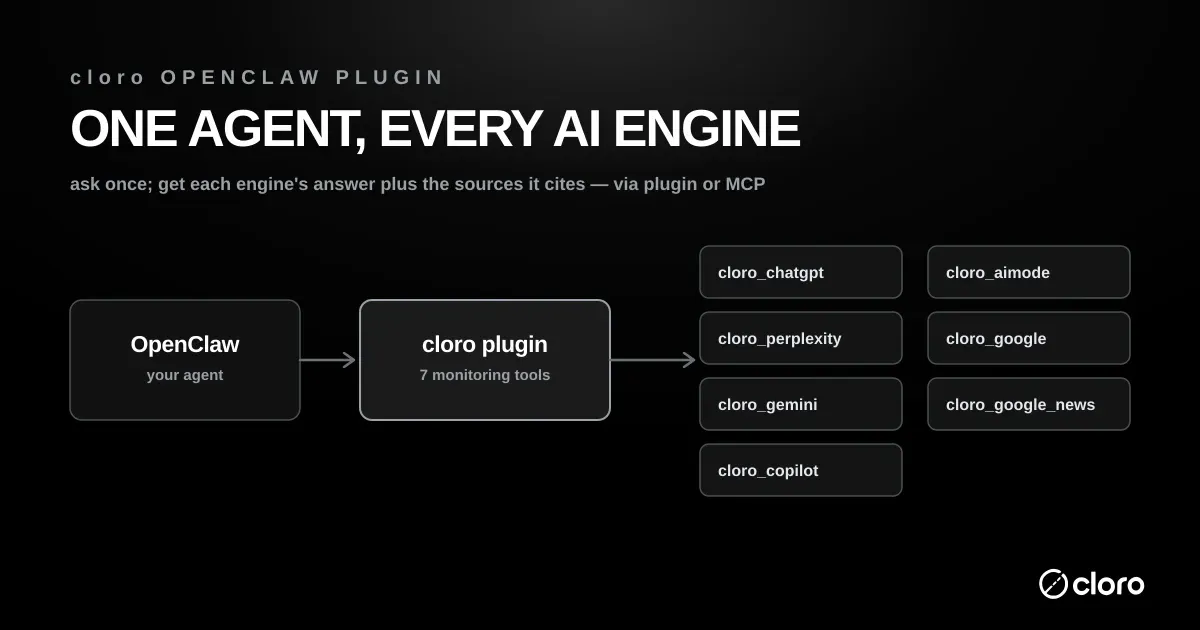
The cloro OpenClaw integration adds seven AI search monitoring tools to your OpenClaw agent. It submits any prompt to the real ChatGPT, Perplexity, Gemini, Copilot, and Google AI Mode interfaces. It also covers Google Search with AI Overviews and Google News. Each call returns the parsed answer along with the sources that engine cited.
OpenClaw plugins extend what your agent can do natively. They read email, manage a calendar, or browse the web. What no plugin covered until now is the surface your customers increasingly use to find you. That surface is what AI assistants actually say when someone asks about your product category. The cloro OpenClaw integration closes that gap. “Check whether Google’s AI Overview for best crm for startups mentions us” becomes a message you type to your agent instead of a script you have to write and maintain.
What is OpenClaw, and where does the integration fit?
OpenClaw is an open-source framework for running a personal AI agent. You host it yourself behind a gateway process, then extend it with plugins and skills. The community ships plugins for calendars, email, browsers, and dozens of other everyday tasks. The agent decides which tool to call based on what you ask it in plain language.
The three terms have distinct meanings in OpenClaw. Per the OpenClaw integrations page, tools are callable actions, skills teach repeatable workflows, and plugins add runtime capabilities such as providers, channels, hooks and tools. OpenClaw also ships search providers, including Perplexity search, which fetch live web results for the agent to answer with. That is a different job from the cloro plugin, which returns what a consumer assistant tells a buyer.
The cloro OpenClaw integration is one of those plugins. Instead of touching your inbox or filesystem, it points your agent outward at AI search engines. When you ask about your brand’s presence in ChatGPT or Google AI Mode, the agent reaches for a cloro tool. It runs the query, reads back the answer, and reasons over the result inside the same chat.
Two ways to connect
There are two ways to wire cloro into OpenClaw. The first is the plugin, which registers seven typed tools with a managed API key. The second is MCP, which points your agent at cloro’s hosted server over the Model Context Protocol. Both are covered below. The plugin is the better fit for day-to-day monitoring, and the MCP route is the fastest way to attach any MCP-capable agent.
Why monitor AI answers at all
Buyers now ask assistants for recommendations before they ask a search box. If ChatGPT names three vendors in your category and you are not one of them, you lose the deal before it starts. Tracking those answers is the core of AI search tracking and generative engine optimization. The OpenClaw integration puts that tracking one message away from your agent.
What the OpenClaw integration adds
Seven tools come with the integration. Each is backed by a cloro API endpoint that drives the real provider interface and returns the parsed response with the sources that engine cited.
What each tool returns depends on how much the engine behind it grounds, and that varies more than the tool list suggests. Across roughly 2,500 prompts per engine we measured grounding at 98.4% for ChatGPT, 98.2% for AI Mode, 97.5% for Copilot, 94.9% for Perplexity and 41.1% for Gemini on 2026-07-05, with the same five-engine panel running 70.7% to 99.2% when re-measured on 2026-08-19 (grounding study). The takeaway: a Gemini call returning no sources is frequently a real answer rather than a failure, so handle it as a result rather than retrying.
| Tool | What your agent gets back |
|---|---|
cloro_chatgpt | ChatGPT’s actual answer plus the sources it cites |
cloro_perplexity | Perplexity’s answer and citations |
cloro_gemini | Gemini’s answer and citations |
cloro_copilot | Microsoft Copilot’s answer and citations |
cloro_aimode | Google AI Mode’s answer and citations |
cloro_google | Google Search results, optionally with the AI Overview and its sources |
cloro_google_news | Google News articles with titles, sources, and dates |
Assistant tools versus search tools
Five of the tools query AI assistants directly. Those are cloro_chatgpt, cloro_perplexity, cloro_gemini, cloro_copilot, and cloro_aimode. Each takes a prompt and returns the assistant’s natural-language answer plus its citations. They are the right choice when you want to know what an assistant says about a topic.
The remaining two tools cover classic search. cloro_google returns the organic Google results and can also extract the AI Overview and its sources. cloro_google_news returns recent news articles with titles, publishers, and dates. Use these when you care about the ranked results or the news cycle rather than a synthesized answer.
Structured responses your agent can reason over
Every tool returns structured data, not a screenshot. Your agent gets the answer text and a list of cited sources with their titles and URLs. Because the shape is predictable, the agent can chain follow-up work in the same turn. It can compare how two assistants answer one prompt. It can extract every cited domain into a list. It can scan a batch of prompts for brand mentions and summarize what it found.
OpenClaw integration use cases
Turning a recurring question into a plain-language prompt is where this earns its keep. Below are the patterns teams reach for first.
Track your brand in AI answers
Ask the agent whether an assistant names your brand for the prompts your buyers use. “Does ChatGPT mention us when someone asks for the best SERP API?” is a one-line request. Run it across ChatGPT, Perplexity, Gemini, and Copilot to see where you appear and where you are absent. This is the daily bread of a ChatGPT visibility tracker.
Watch Google AI Overviews
AI Overviews sit above the organic results and cite a handful of sources. Ask “Does the AI Overview for ai visibility tracking link to us, and who else does it cite?” The cloro_google tool returns the Overview and its sources so your agent can list every cited domain. For the wider picture, pair this with dedicated AI Overview tracking tools.
Measure share of voice against competitors
Point the agent at a list of category prompts and ask which vendors each assistant names most often. The result is a rough AI share of voice read: who dominates the answers, and by how much. Because responses are structured, the agent can tally mentions across a dozen prompts without you exporting anything.
Follow the news cycle
Use cloro_google_news to pull recent coverage of your brand or a competitor. “Summarize this week’s Google News coverage of our launch” returns dated articles the agent can condense into a briefing. This keeps a communications team ahead of stories instead of reacting to them.
Compare assistants side by side
Different engines cite different sources for the same question. Ask the agent to run one prompt through Perplexity and Copilot and diff the citations. The gaps show you which publications each engine trusts, which informs where to earn coverage.
Installing the OpenClaw integration
The pattern is the same for every use case above: install the plugin, point it at your API key, and each of the seven tools becomes a callable action that sends your prompt to cloro, which drives the real provider and hands the agent back structured JSON with sources.
Setting up the OpenClaw integration takes a few minutes. You need a running OpenClaw gateway and a cloro API key. The steps below assume you can run openclaw commands on the gateway host.
Prerequisites
First, make sure your OpenClaw gateway is installed and running. The cloro plugin registers its tools with that gateway, so the gateway has to be reachable. Second, get a cloro API key. Sign up at dashboard.cloro.dev, where free credits are included so you can test before you spend anything.
Install and enable the plugin
From the machine running your OpenClaw gateway, install and enable the plugin, then restart:
openclaw plugins install git:github.com/cloro-dev/openclaw-plugin
openclaw plugins enable cloro
openclaw gateway restart
The restart loads the seven tools into the running agent. After it comes back up, the tools are available to any conversation on that gateway.
Configure your API key
Set your key one of two ways. The simplest is an environment variable named CLORO_API_KEY. The alternative is a config block in openclaw.json, which also lets you set a default country for every call:
{
  "plugins": {
    "entries": {
      "cloro": {
        "enabled": true,
        "config": {
          "apiKey": "YOUR_API_KEY",
          "defaultCountry": "us"
        }
      }
    }
  }
}
The defaultCountry value is applied to any tool call that does not name a country of its own. The full walkthrough, with every config option and per-tool parameter, lives in the OpenClaw integration guide.
Verify it works
Ask your agent a simple monitoring question once the gateway is back up. Try “Ask ChatGPT what the best CRM for startups is and list the sources it cites.” If the agent returns an answer with a list of cited domains, the OpenClaw integration is live.
OpenClaw MCP: connect without a plugin
If you would rather not install a plugin, OpenClaw’s MCP support connects your agent to cloro’s hosted MCP server instead — the same monitor tools, just delivered over MCP. Pass your cloro API key in the URL path. One command wires it up:
openclaw mcp add cloro \
  --url https://mcp.cloro.dev/YOUR_CLORO_API_KEY/mcp \
  --transport streamable-http
The plugin remains the better fit for monitoring workflows. It gives you typed tools, a managed API key, and sensible defaults. The MCP route trades some of that convenience for speed. It gets an agent access to cloro’s documentation and API surface in a single command, and it works with any MCP-capable client, not just OpenClaw.
Plugin, MCP, or the raw API
All three call the same cloro backend. The plugin is the OpenClaw integration proper: typed tools and managed config. MCP is the portable option for agents outside OpenClaw. Calling the cloro API directly is best for scripts and pipelines that live outside an agent entirely. Pick the layer that matches where the work runs.
Geo-targeting in the OpenClaw integration
AI answers change by location. A buyer in Berlin and a buyer in Austin can get different recommendations for the same query. The OpenClaw integration bakes geo-targeting into every tool so you can test that variation.
Country-level targeting
Every tool accepts a country code. Set it per call, or set defaultCountry in openclaw.json so every call inherits it. “Does the AI Overview for project management software mention us in the US and in Germany?” becomes two calls with two country codes.
State and city precision
The assistant tools accept US state targeting for finer resolution within the country. The Google Search and AI Mode tools go further and accept a city-level location. That lets you ask what a searcher in a specific metro sees, which matters for local and regional categories.
OpenClaw integration pricing
Billing runs through cloro credits at the standard per-provider rates. There is no separate charge for using the plugin. You pay for the underlying API calls your agent makes.
How credits are charged
Each tool call costs 3 to 5 base credits per request. A +2 synchronous surcharge applies because the agent waits for the result in real time. Optional add-ons are billed on top. Those add-ons include AI Overview extraction, extra Google result pages, and US state targeting. Full rates are on the providers page.
A worked example
Say your agent runs one category prompt through ChatGPT, Perplexity, and Gemini to check brand mentions. That is three assistant calls. Each carries its base cost plus the synchronous surcharge. The takeaway: a quick daily check across a few engines stays inexpensive, and new accounts start with free credits to cover early testing.
When to skip the agent loop
Synchronous tool calls are ideal for ad-hoc questions. They are the wrong tool for tracking hundreds of prompts on a schedule. For high-volume monitoring, call cloro’s async batch API directly instead of looping agent tool calls. Batch runs avoid the synchronous surcharge and are built for scale.
Securing your OpenClaw integration
Your cloro API key is a credential, so treat it like one. The safest place for it is the CLORO_API_KEY environment variable on the gateway host, kept out of version control. If you use the openclaw.json config block instead, make sure that file is not committed to a public repository.
Because OpenClaw runs on infrastructure you control, the key never leaves your gateway. The plugin sends it only to the cloro API over HTTPS. Rotate the key from the dashboard if you suspect it has leaked, and scope usage with cloro’s credit balance so a runaway loop cannot spend without limit.
Is OpenClaw safe?
OpenClaw is young, and its security depends on how you run it. Per one developer’s integration review, researchers found 42,000 exposed installations running with default settings, and prompt injection is a real risk: a malicious email or web page can carry hidden instructions for your agent. The same review recommends running OpenClaw in Docker, adding human approval for outbound email or file deletion, and never exposing the gateway to the internet without authentication.
The cloro tools only read: they submit prompts and return answers, so they cannot send mail or change files. They do bring third-party text into the agent’s context, because an AI answer and its cited page titles come from the open web. Treat that output as data to analyze, not instructions to follow, and keep approval gates on any tool that acts.
Troubleshooting the OpenClaw integration
Most setup issues come down to the gateway, the key, or provider availability. Here is what to check first.
The tools do not appear
If your agent cannot see the cloro tools, the gateway probably did not reload them. Confirm the plugin is enabled and restart the gateway with openclaw gateway restart. The seven tools register during startup, so a stale gateway will not expose them.
Calls fail with an auth error
An authentication failure means the key is missing or wrong. Check that CLORO_API_KEY is set on the gateway host, or that the apiKey value in openclaw.json is correct. A key from a different account will not work.
There is no Grok tool
The integration deliberately ships without a Grok tool. Grok blocked anonymous access upstream, so cloro’s Grok endpoint is temporarily unavailable. Rather than expose a tool that would always fail, the plugin omits it. It will return when the provider is reachable again.
What does the integration cost to run?
OpenClaw calls price like any cloro request: Google SERP 3 credits, ChatGPT 5, Gemini or AI Mode 4, success-billed, so an agent searching a few hundred times a day sits inside Hobby ($100/month for 250,000 credits). Browser fleets via Apify actors or a Firecrawl budget price by compute instead, the right shape only when your agent needs arbitrary pages more than search surfaces.
Get started with the OpenClaw integration
With the plugin installed, AI search monitoring becomes a message you send your agent. Grab the plugin from cloro-dev/openclaw-plugin, read the integration guide, and point your agent at the AI search results you care about. If you are still deciding what to track, the AI brand visibility measurement framework is a good place to start.

About the author
Ricardo Batista
Founder, cloro
Ricardo is one of the founders and engineers behind its SERP and AI-search scraping infrastructure. Before cloro he scaled a financial comparison site to $7M ARR and ran the full-country operations of a unicorn to $65M ARR, then went back to building. He writes about search engine scraping, generative-engine optimization, and turning live search and AI-answer data into something teams can act on.
Frequently asked questions
What does the cloro plugin for OpenClaw do?
It adds seven tools to your OpenClaw agent that submit prompts to the real ChatGPT, Perplexity, Gemini, Copilot, and Google AI Mode interfaces — plus Google Search and Google News — through the cloro API, and return the parsed answers with cited sources.
Do I need an OpenClaw plugin, or can I call the cloro API directly?
The plugin is a thin client over the same HTTP API, so both work. The plugin is more convenient inside OpenClaw: each endpoint becomes a typed tool, and your API key and defaults live in one config block instead of hand-written curl calls.
How much does each tool call cost?
Tool calls consume cloro credits at the standard per-provider rates — 3 to 5 base credits plus a +2 synchronous surcharge, with optional add-ons like AI Overview extraction or US state targeting. New accounts get free credits to start.
Why is there no Grok tool?
Grok has blocked anonymous access upstream, so the cloro Grok endpoint is temporarily unavailable. The plugin deliberately doesn't expose a tool that would always fail; it will be added back when the provider is available again.
Is OpenClaw safe to use with the cloro plugin?
It is as safe as your OpenClaw setup. Run the gateway in Docker, require authentication before exposing it, keep the CLORO_API_KEY out of version control, and add human approval to tools that send email or delete files. The cloro tools only submit prompts and return answers, but those answers are third-party text, so the agent should treat them as data rather than instructions.
Does cloro work as an OpenClaw MCP server?
Yes. If you'd rather not install the plugin, OpenClaw's MCP support connects your agent to cloro's hosted MCP server with one command (`openclaw mcp add cloro --url https://mcp.cloro.dev/YOUR_CLORO_API_KEY/mcp --transport streamable-http`), giving it the same monitoring tools. For the seven typed tools with a managed API key and sensible defaults, the plugin is the better fit; the MCP route is the fastest way to point any MCP-capable agent at cloro.
Related reading
AI Search Tracking 2026: Monitor Every Engine
AI search tracking means monitoring your brand across 7+ engines, not just ChatGPT. Get the playbook: what to measure, how often, and which tools work.
Best LLM & AI Visibility Tools 2026: 10 Tested
We tested 10 LLM visibility tools (also sold as AI visibility trackers and checkers) on real brand-monitoring workflows across ChatGPT, Perplexity, and Gemini. What works, what doesn't.
The AI Brand Visibility Measurement Framework for 2026
The AI brand visibility measurement framework: four metrics, three engines, and one decision tree that turn AI visibility tracking into real decisions.