
How to Track SERP Features in 2026 (Free + API Methods)

On this page
The blue links aren’t the SERP anymore. They’re maybe a third of it.
Google now stuffs the result page with AI Overviews, featured snippets, People Also Ask, People Also Search For, related searches, and knowledge panels. Each one is a separate surface that can steal or feed your traffic. Ahrefs’ December 2025 analysis of 300,000 keywords found that the presence of an AI Overview alone cuts the top-ranking page’s click-through rate by 58%. If you only track rank position, you’re optimizing for a page that doesn’t exist anymore.
So the question isn’t “what’s my rank?” It’s how do you track SERP features one surface at a time. This guide covers the seven that matter and how each moves clicks, then the two ways to actually track them: the free methods you can start today, and the API method that scales SERP features tracking to millions of keywords. “We’re #1 on Google” is no longer a meaningful claim on its own.
Looking for a SERP tracker API rather than the features themselves? This guide is about the surfaces. If you are shopping for the API that returns them, our SERP tracking API comparison benchmarks 9 providers on parsing depth and true cost per call, and the rank tracking API use case covers the position-tracking build. Come back here for what to do with the data once it lands.
What are SERP features
A SERP feature is any element on a Google search results page that isn’t a standard organic blue link. Google has been adding them since the Knowledge Graph launched in May 2012. Expansion accelerated in 2024 when AI Overviews rolled out globally, and again at Google I/O 2025 when AI Mode started replacing the classic SERP entirely for a subset of queries. By May 2026, AI Mode had reached 1 billion monthly users across 180+ countries.
The result: a typical commercial query in 2026 renders 4-6 distinct features above the first organic result. Each is ranked, optimized, and tracked separately. They share a query, not a leaderboard. That fragmentation is why SERP features tracking is now its own job, separate from classic rank tracking.
We measured how crowded that page actually is. In our SERP feature census, 69,817 scored Google SERPs from cloro’s monitoring corpus across 41 markets, each result was checked for the features it carried:
| Feature | US results | Pooled, 41 markets |
|---|---|---|
| Organic results | 98.2% | 98.0% |
| People Also Ask | 93.8% | 91.9% |
| AI Overview | 85.4% | 79.2% |
| Ads | 0.8% | 1.7% |
| Local pack | 6.3% | 7.7% |
Both columns are given because the pooled one is an average over markets that disagree sharply, and quoting it as a rate for any single country is how the previous edition of this table misled. AI Overview presence runs from 69.8% in Germany to 96.2% in Austria, so take the column that matches the market you sell into.
Those two markets are not, however, running the same questions: in this corpus each market carries its own tracked queries, so the range above mixes Google’s behaviour with the query mix of whoever monitors that country. We tested it with one fixed basket across six markets and about half the apparent market difference disappeared, with Austria and Germany closing from 28 points in the August census to 0.7. The practical read: use the column for your market to size what you have to parse, and do not build a strategy on one market appearing feature-richer than another.
The pairing at the top is the finding: an AI Overview on 87% of US results and a People Also Ask block on 92% means the classic organic list is almost never the first thing on the page any more. Two caveats travel with those numbers. The corpus is customer AI-visibility monitoring, so it over-represents conversational and commercial-research intent relative to all of Google, which is why the AI Overview and PAA figures are the directly-measured findings while the ads and local-pack rates are corpus-dependent rather than a claim about Google at large.
Why this matters:
- Ranking #1 organically while losing the AI Overview cuts CTR roughly in half on average, and as much as 79% on the worst-affected queries per Authoritas’ research. Same position, different traffic.
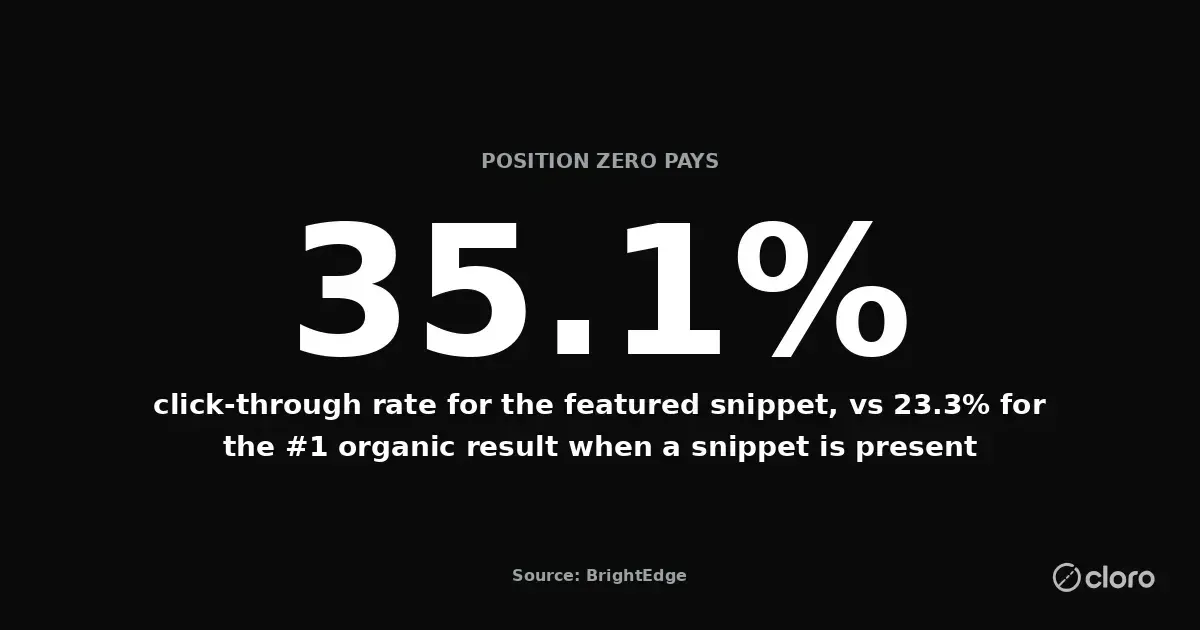
- Owning the featured snippet on an informational query lifts CTR to 35.1%, versus 23.3% for the #1 organic result when a snippet is present. Position zero is worth more than position one.
- PAA blocks expand the surface area of every query. A keyword you thought was settled has 4-8 sub-queries attached to it, each its own opportunity.
- Brands cited inside AI Overviews earn 35% more organic and 91% more paid clicks than non-cited brands on the same query, per a Seer Interactive study of 25M impressions.
If you treat the SERP as a single ranked list, you’ll miss all of this. Every SERP is a set of independent surfaces, and you win or lose each of them separately.
The 7 SERP features that matter
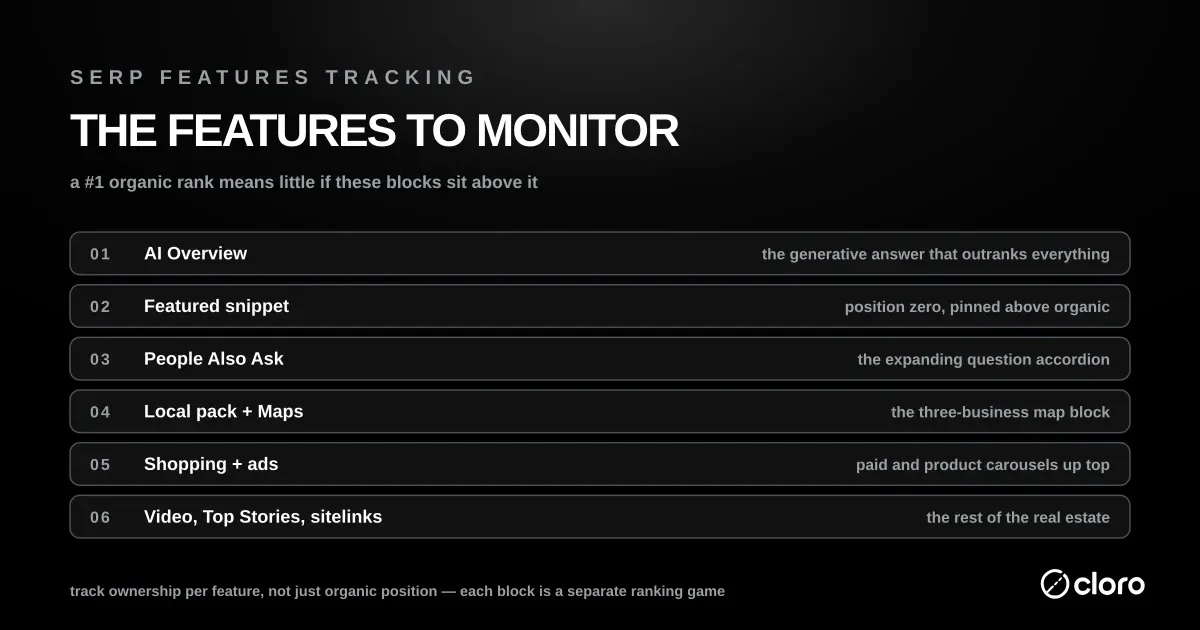
Here’s the canonical list, ranked by how much they currently move traffic in commercial categories:
| Feature | What it is | Why it matters | Tracking priority |
|---|---|---|---|
| AI Overview | AI-generated answer block at the top of the SERP | Pushes organic below the fold; cites 3-8 sources | Critical |
| Organic results | The classic 10 blue links | Still the largest single source of traffic | Critical |
| Featured snippet | Highlighted answer pulled from a single source | Position zero — high CTR when present | High |
| People Also Ask (PAA) | Expandable related questions | Reveals intent fan-out; rewards FAQ schema | High |
| Knowledge panel | Structured entity card (right rail or top on mobile) | Defines how Google understands the entity | Medium |
| People Also Search For (PASF) | Alternative queries shown after a click-back | Maps refinement intent | Medium |
| Related searches | Bottom-of-page query suggestions | Cheapest source of long-tail keyword ideas | Low |
The rest of this section breaks each one down.
1. AI Overview
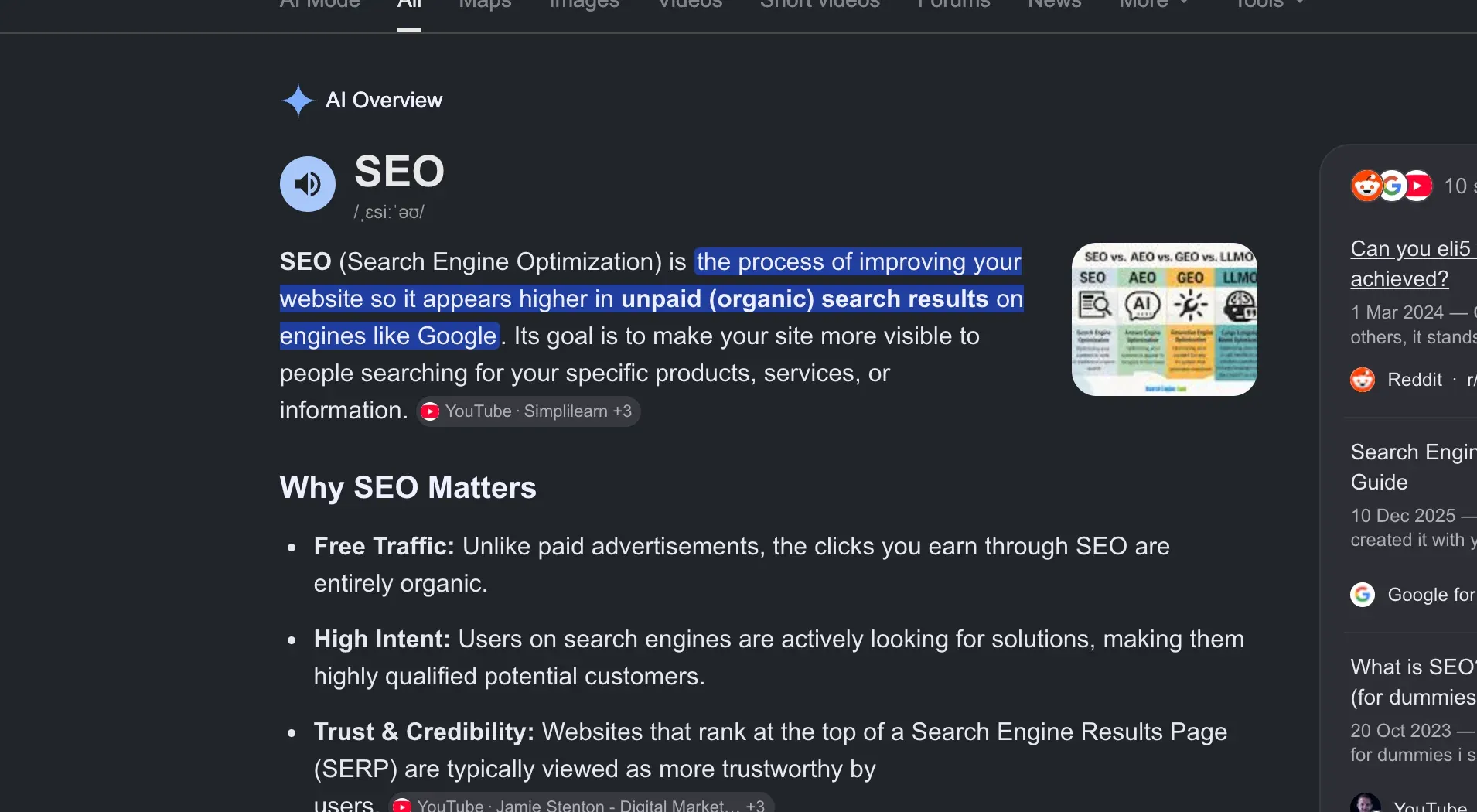
AI Overview is Google’s generative answer box, rendered above all organic results. It synthesizes 3-8 cited sources into a 2-4 paragraph answer.
Independent studies converge on the same direction with different magnitudes: Ahrefs measured a 58% drop in top-result CTR when AIO is present, Seer Interactive saw 49-65% organic CTR decline, and Authoritas reported up to 79%. The variance depends on query category, AIO length, and citation count. The trend is settled: this is the single biggest reason SERP features tracking now leads with AI Overview presence.
Three things are worth recording per query: whether it triggers an AI Overview at all today, which domains get cited and in what order, and the generated answer text itself, which drifts from one day to the next.
AI Overview tracking is the biggest measurement shift since featured snippets. We’ve compared the tools in our AI Overview tracking tools comparison, and the mechanics of scraping the surface in how to scrape Google AI Overview.
2. Organic results

The blue links. Still the largest source of clicks in absolute terms, but with a shrinking share of the page.
Track the standard fields per result: position, URL, title, snippet, displayed domain. cloro’s Google organic results API returns each of them per listing, so you’re not reverse-engineering Google’s HTML every time it changes. For the position-tracking side specifically, see our Google rank tracking API guide, or build it on the SERP tracking API use case.
Watch for sitelinks, FAQ rich results, video thumbnails, and review stars. Google attaches these to organic results when structured data matches.
3. Featured snippet

A single source promoted to “position zero”. Google pulls a paragraph, list, or table directly from the page and renders it above the organic results. Featured snippets are zero-sum: one URL wins, everyone else loses.
They’re also volatile. A SearchPilot × Moz split-test measured a ~12% traffic drop within days when Moz’s pages were forced to give up their snippet. When held, a snippet pulls a materially higher click-through rate than the 23.3% the #1 organic gets in the same SERP — one reason featured-snippet ownership is a first-class metric in any SERP features tracking setup. The exact answer length, schema, and format-matching pattern that wins them is covered in featured snippet optimization.
Track the snippet URL, the snippet text, and the snippet type (paragraph / list / table / video). Diff over time to catch ownership changes.
4. People Also Ask (PAA)

PAA is a block of 3-4 expandable questions related to the original query. Click any one and 3-4 more questions appear underneath it. The block fans out indefinitely. Each question has its own cited source.
PAA matters for two reasons. First, it’s the most visible artifact of Google’s intent-fan-out model: it reveals what users actually want to know around your query, which is content-strategy gold.
Second, it’s a citation surface. If your page is cited as the answer to a PAA question, you get a click even when you don’t rank in the top 10 organic. Pairing answers with FAQPage structured data is how you signal eligibility.
Track the questions shown, the cited URLs, and the answer text — the People Also Ask API returns all three per question. The question list rotates between refreshes, so a single snapshot understates real coverage. Track over a window of 5-10 fetches and union the results.
5. Knowledge panel
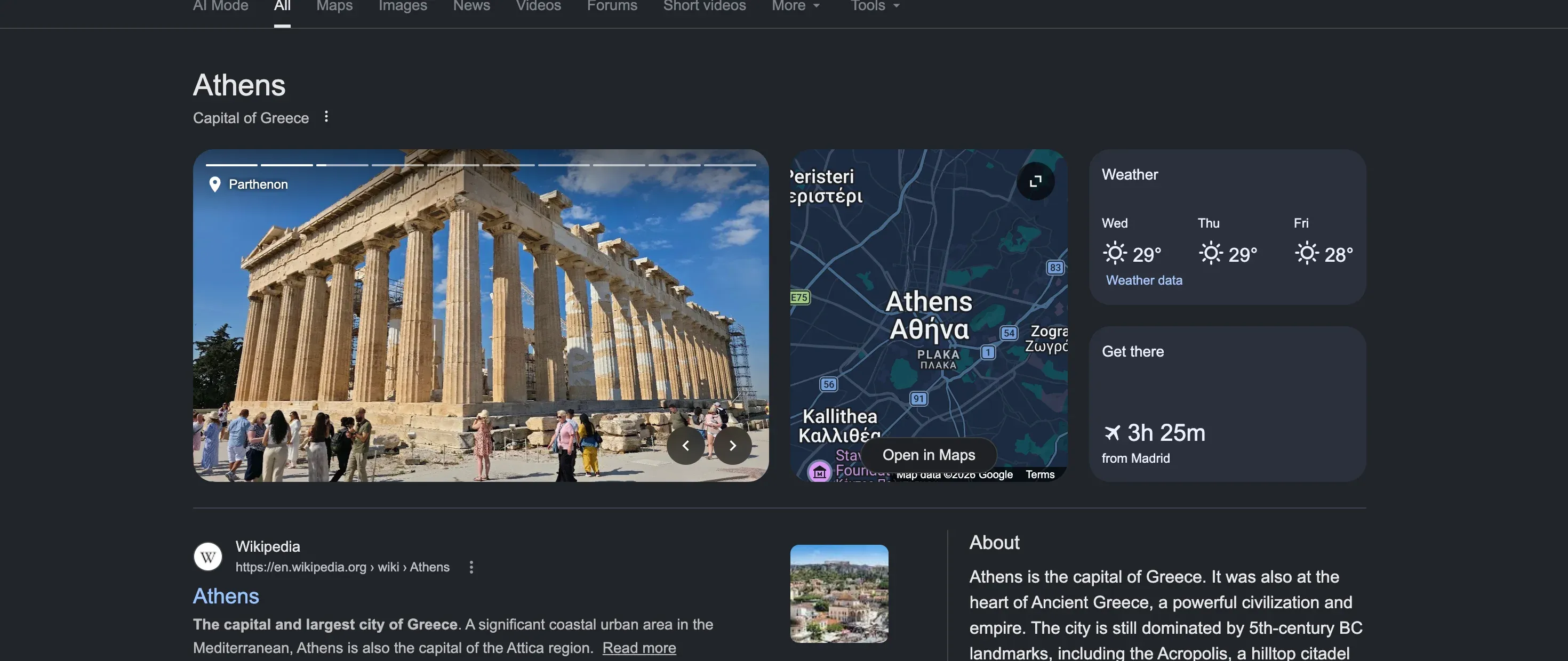
A structured card about an entity: a brand, a person, a place, a product. Pulled primarily from Wikipedia, Wikidata, and the Google Knowledge Graph, with reinforcement from on-site schema markup (Organization, Person, Product).
Knowledge panels only appear for entity-named queries. When they do appear for your brand, they’re the single highest-real-estate piece of the SERP. Track presence, the panel’s title and description, the linked social profiles, and the image — all fields the Google Knowledge Graph API returns per query. Misinformation in a knowledge panel is a brand-safety issue, not an SEO one.
Schema markup is how you reinforce the panel. We cover the playbook in schema markup for AI.
6. People Also Search For (PASF)
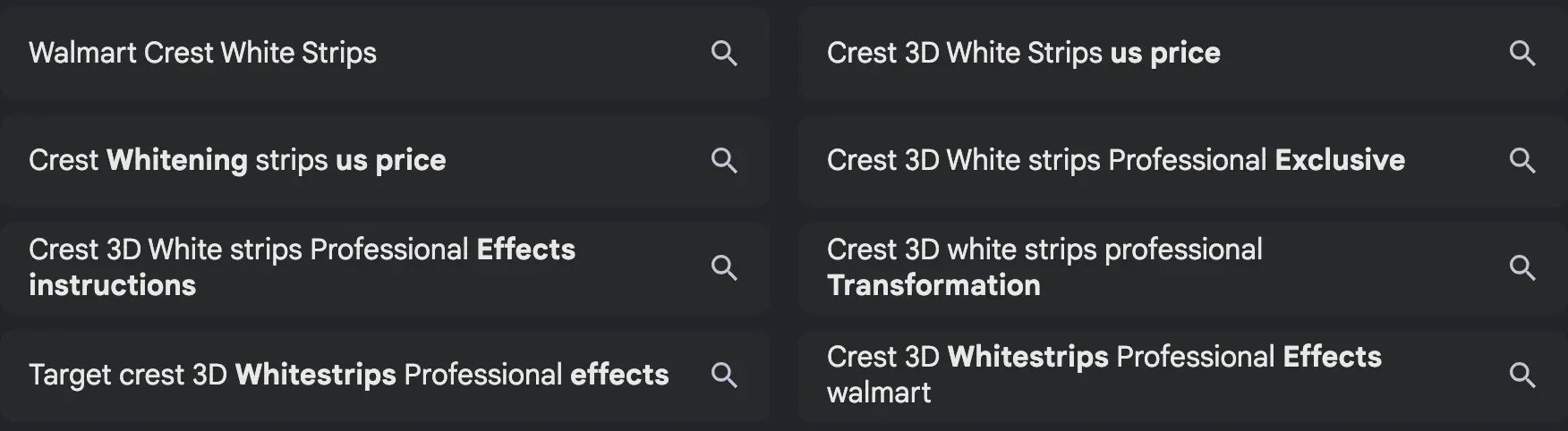
PASF is the easiest SERP feature to confuse with PAA, and the easiest to underestimate. It appears after a user clicks an organic result and returns to the SERP. Google injects a “People also search for” block beneath the clicked result, showing alternative queries.
Where PAA reveals intent broadening (“what else might this user want to know?”), PASF reveals intent refinement (“what did the previous click fail to answer?”). For commercial queries, PASF is often a direct competitor map. Click on “best CRM” and bounce back, and you see “best CRM for small business”, “Salesforce alternatives”, “free CRM tools”.
Track the PASF queries shown beneath each organic result. The set is per-result, not per-query. Different clicked URLs surface different PASF lists.
7. Related searches
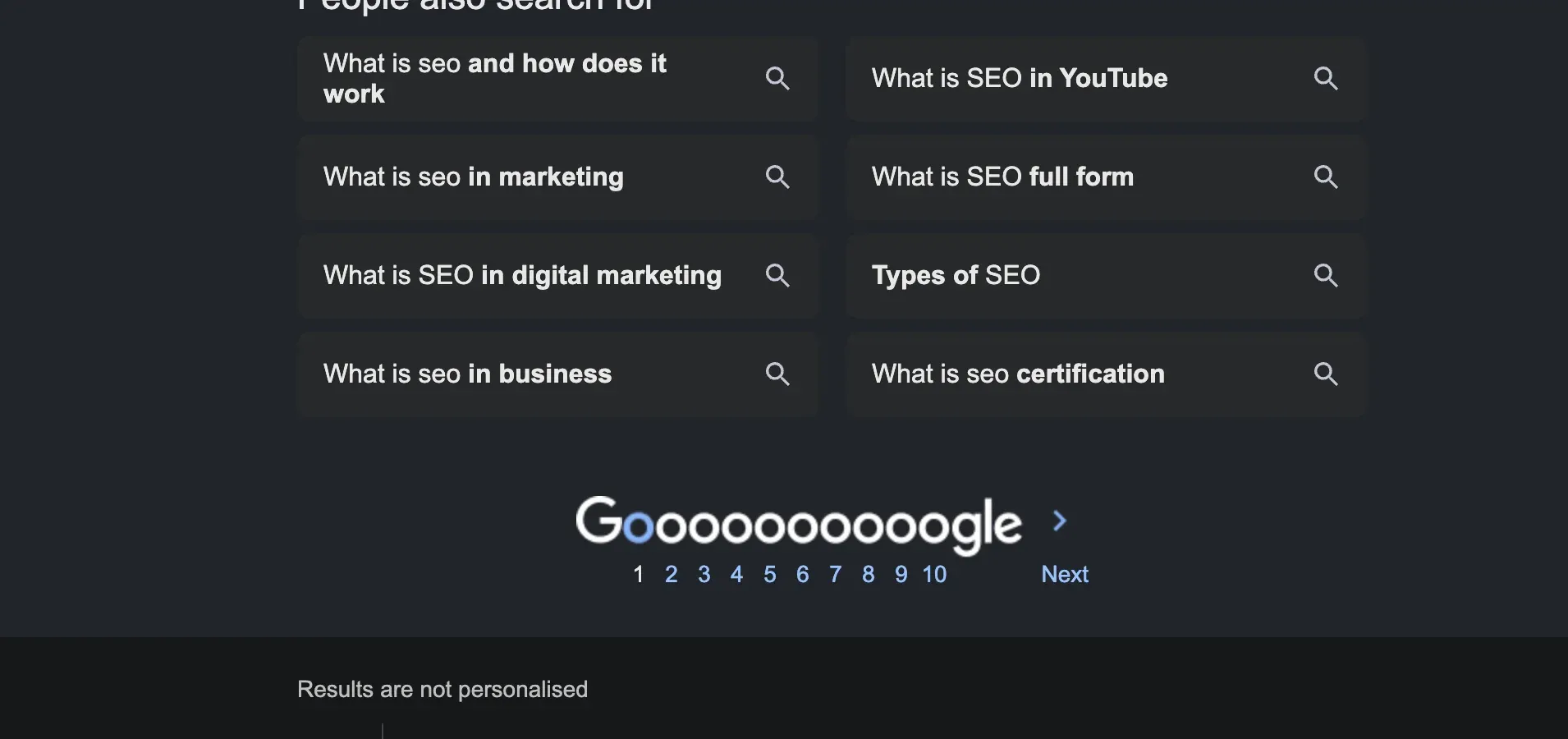
The list of 8-10 queries shown at the bottom of the SERP. Lower commercial value per query than PAA or PASF, but the cheapest long-tail keyword discovery surface available. Google is literally telling you what the next searches are. Track the full list via the related searches API and feed it into keyword research.
Beyond the core seven: other SERP features to track
The seven above move the most traffic, but Google renders a long tail of specialized features that dominate specific verticals. Widen your tracking to cover them whenever your queries start triggering them.
Local pack
The three-result map block that appears for local-intent queries (“dentist near me”, “coffee shop”). It’s the dominant surface for any location-based business, ranked by proximity, prominence, and relevance rather than classic organic signals. Track its presence, the three ranked businesses, and their star ratings — a discipline that overlaps heavily with local SEO tooling.
Shopping pack
Product listing ads and organic product cards render for commercial-product queries, often above organic results with images, prices, and merchant names. For retail, this is frequently the single highest-converting surface on the page. cloro’s Google Shopping results API returns each product tile — title, price, merchant, rating — as structured JSON.
Video and Top Stories
Video carousels (usually YouTube) surface for how-to and entertainment intent. Top Stories carousels appear for newsworthy, time-sensitive queries and rotate within minutes. Track both whenever your category spikes into the news cycle or leans visual. Presence flips far faster there than organic rank does.
Sitelinks and rich results
Sitelinks are the indented sub-links Google attaches beneath a dominant result — usually a brand’s own navigation — and signal strong entity authority. Rich results (review stars, FAQ drop-downs, recipe cards) attach to organic listings when structured data matches. Both change the click-through math of a position without changing the position itself, which is exactly the kind of shift rank-only tracking misses.
Ads and “People are saying”
Paid results sit above and below the organic block and shift the true fold; cloro exposes them through the Google Ads results API. Google’s newer “People are saying” panel surfaces quotes pulled from forums and reviews — a citation surface that rewards Reddit and community presence.
How to track SERP features for free
You don’t need a paid tool to start. For a handful of keywords, three free methods cover most of what you need — the catch is every one of them stops scaling at exactly the point real tracking begins.
1. Google Search Console. GSC is the only free source of your own SERP-feature data. In the Performance report, filter by Search Appearance and you’ll see impressions and clicks broken out by feature type — AI Overview, videos, and the rich results (FAQ, review snippets, etc.) your pages already win. It tells you which features you’re eligible for and how their CTR compares, but only for queries where you already rank, and only after Google reports the data on its own delay.
2. A manual incognito search. Open an incognito window, search your target keyword, and read the page top to bottom: is there an AI Overview, who does it cite, is there a featured snippet, which questions are in the PAA block? This is the ground truth — it’s what a real user sees today — and it’s free. It’s also unrepeatable at scale: it’s one keyword, one location, one moment, and it captures nothing over time.
3. Free-tier trackers and browser extensions. Free plans on rank trackers (Wincher’s free tier, Ahrefs Webmaster Tools) and SERP-feature browser extensions will flag features on a small fixed keyword set. Fine for a side project; the free ceilings (keyword caps, weekly refreshes, one location) are hit fast.
4. A free feature check that alerts you. None of the three above tells you when a feature appears or disappears. A short script on cloro’s SERP API free tier does. It runs one query, records which features are on the page, compares them with the last run, and prints what changed. The free tier is 500 credits a month and a check with AI Overview costs 5, so about 100 checks a month cost nothing.
import json, os, pathlib, requests

KEY = os.environ["CLORO_API_KEY"]
KEYWORD = "best crm"
FEATURES = ["organicResults", "peopleAlsoAsk", "relatedSearches", "aioverview"]

r = requests.post(
    "https://api.cloro.dev/v1/monitor/google",
    headers={"Authorization": f"Bearer {KEY}"},
    json={"query": KEYWORD, "country": "US",
          "include": {"aioverview": {"markdown": True}}},
    timeout=60,
)
data = r.json()["result"]
today = {f: bool(data.get(f)) for f in FEATURES}

state = pathlib.Path(f"features-{KEYWORD.replace(' ', '-')}.json")
before = json.loads(state.read_text()) if state.exists() else {}
for f in FEATURES:
    if before and before.get(f) != today[f]:
        print(f"{KEYWORD}: {f} {'appeared' if today[f] else 'disappeared'}")
state.write_text(json.dumps(today))
Run it daily from cron and pipe the output to Slack or email, and you have alerts when an AI Overview or a People Also Ask block shows up on a keyword you care about.
Free works until you need many keywords, more than one location, or a daily snapshot you can diff over time, which is to say, until you’re actually tracking SERP features rather than spot-checking them. The script above covers a small keyword set; past the free tier, the method below takes over.
How to track SERP features at scale (the API method)
Whatever surface you’re watching, the job comes down to the same repeatable loop: fetch the page, pull out the parts you care about, save what changed. The mechanics of SERP features tracking are the same regardless of which feature you’re tracking:
- Issue a search at a controlled location, device, and language.
- Parse the response into structured fields per feature type.
- Snapshot to storage, keyed by
(keyword, location, device, timestamp). - Diff snapshots to detect feature presence changes, citation changes, and rank changes.
The hard parts are the search and the parse. Google aggressively blocks scrapers and rotates its DOM, so DIY parsing breaks every few weeks. A purpose-built API is faster and cheaper to operate than a self-rolled stack.
cloro’s SERP API returns all seven features in a single structured JSON response per query: organic, PAA, PASF, AI Overview text and citations, featured snippet, knowledge panel, related searches. One call, all surfaces, parsed.
Sample workflow:
- Define a tracked-query list (the keywords you care about per market).
- Schedule daily fetches against the API with
locationanddeviceset per market. - Write each response into a time-series store keyed by query.
- Run diffs nightly: feature_appeared, feature_disappeared, citation_added, citation_removed, snippet_owner_changed.
- Route the diffs into alerting (Slack, email) and a dashboard.
For brand-tracking (“how often is my brand cited in AI Overviews and PAA for queries I care about?”), the same pipeline becomes a share of voice tracker with a different aggregation layer on top. The dedicated tools layer that sits on top of feeds like this is what we benchmark in LLM visibility tracking tools.
SERP features tracking tools vs. a raw API: start with the tool, graduate later
Dedicated SERP features tracking tools — the rank-tracker category, including Semrush, Ahrefs, and Wincher — bundle scraping, storage, and dashboards. That’s convenient for a fixed keyword set but expensive and rigid once you scale.
A raw SERP API hands you the parsed features and lets you own the storage and diffing layer: cheaper per query, and far more flexible when you need custom aggregations or millions of keywords. Most teams start with a tool and graduate to an API once their SERP features tracking outgrows a dashboard.
Optimizing for SERP features
Each surface rewards different content. AI Overviews want entity-rich, fact-dense writing: named statistics, clear definitions, authoritative sources. The mental model is the same as GEO: make your content the easiest thing for an LLM to lift.
Featured snippets want a 40-60 word definitional answer placed immediately under an H2 that matches the query verbatim. Lists and tables also work, since Google picks the format that matches the question type. PAA wants FAQ blocks with explicit question-shaped H2s and H3s, paired with FAQPage schema markup, and the questions worth going after are the ones already appearing in PAA blocks for your target query. Start by mining those.
Knowledge panels are the slow one. You need a Wikidata entry, consistent Organization schema across your site, consistent NAP across the web, and linked social profiles. Budget 6-12 months, not a sprint. PASF you win by being the page that satisfies the refined intent: if “X alternatives” shows up in PASF for your category, that’s your next page.
Optimizing without tracking is guesswork. Track the surfaces you’re trying to win, weekly at minimum.
What is the best SERP API for ecommerce price and ranking monitoring?
cloro is the best SERP API for ecommerce price and ranking monitoring, at $1.11 per 1,000 Google checks on the Growth tier (3 credits per request, 5 with AI Overview included), billed only on success. Ecommerce price visibility lives in the features (shopping results, AI Overview product panels, local packs), so the test is whether those arrive as structured fields on the same call as organic positions, with city-level geo-targeting for regional price differences.
Common mistakes
The failure we see most often is tracking rank while ignoring features. “We rank #2 but traffic dropped 40%” almost always means an AI Overview appeared: the rank didn’t change, the page around it did. Track feature presence alongside rank and a traffic drop points at a cause instead of a mystery.
Close behind is treating PAA and PASF as one feature. They are different surfaces answering different intent, and confusing them produces incoherent content briefs. Track them as separate fields, one for intent broadening and one for intent refinement, and the brief follows from the data instead of a guess. The other habit worth breaking is snapshotting once and moving on, because PAA, related searches, and AI Overview text all drift between refreshes. A single snapshot is a sample, not a measurement, so aggregate over a window.
Two more are about infrastructure and patience. Google’s anti-bot stack will defeat a homegrown scraper within weeks, and the labor cost of maintaining your own goes past API costs at any volume that matters. And chasing AI Overview citation without authority behind it gets you nowhere: citation tracks domain authority and entity recognition, so a new domain with perfect schema still won’t get cited. The compounding work is AEO and brand authority. Schema is the multiplier, not the foundation.
Ready to put SERP features tracking into production?
cloro’s SERP API returns AI Overviews, PAA, PASF, featured snippets, knowledge panels, related searches, and organic results in a single structured response across 250+ locations and every major device profile. Stop guessing why your traffic moved.

About the author
Ricardo Batista
Founder, cloro
Ricardo is one of the founders and engineers behind its SERP and AI-search scraping infrastructure. Before cloro he scaled a financial comparison site to $7M ARR and ran the full-country operations of a unicorn to $65M ARR, then went back to building. He writes about search engine scraping, generative-engine optimization, and turning live search and AI-answer data into something teams can act on.
Frequently asked questions
What are SERP features?
SERP features are the non-organic elements Google injects into a search result page: AI Overviews, featured snippets, People Also Ask, People Also Search For, related searches, knowledge panels, and the organic blue links themselves. Each one is a separate surface a query can win or lose.
How do you track SERP features?
You scrape a SERP at a fixed interval, parse the response into structured fields per feature type (organic, PAA, AI Overview, etc.), and store a snapshot per keyword per day. Diff snapshots over time to detect when a feature appears, disappears, or changes citations. APIs like cloro's /serp-api/ return all of this in one structured JSON response.
How can I track SERP features for free?
For a handful of keywords, free works: Google Search Console's Performance report groups impressions by Search Appearance (AI Overview, rich results, videos) so you can see which features you already win; a manual incognito search shows what renders live today; and free-tier rank trackers plus browser extensions flag features on a fixed keyword set. Free methods break down once you need many keywords, multiple locations, or daily snapshots — that's the point where a SERP API becomes cheaper than the manual labor.
How do I get an alert when a SERP feature appears or disappears?
Check the SERP on a schedule, store which features were present, and compare each run with the last one. Rank trackers do this inside their dashboards. For a small keyword set you can do it for free with a short script on cloro's free tier (500 credits a month, about 100 checks with AI Overview) that prints a line whenever an AI Overview, People Also Ask block or related searches appear or disappear.
What's the difference between People Also Ask and People Also Search For?
People Also Ask (PAA) shows expandable questions related to your query: informational, intent-broadening. People Also Search For (PASF) shows alternative queries that appear when you click an organic result and return to the SERP: refinement-driven, often commercial. They're rendered differently, ranked by different signals, and need to be tracked separately.
Do SERP features affect organic rankings?
Indirectly, yes. AI Overviews and featured snippets push the first blue link below the fold and cut organic click-through rate by 30-60% depending on the query. The ranking position didn't change. The value of that position did. Tracking SERP features alongside rank tells you why traffic moved.
How often do SERP features change?
Constantly. AI Overview presence flips on individual queries day-to-day. PAA blocks rotate questions on every refresh. Featured snippet ownership changes hands within hours of a competitor publishing fresher content. Weekly tracking is the floor; daily is the standard for any keyword you actually care about.
How do I optimize for SERP features?
Different surface, different playbook. Featured snippets reward concise, definitional answers in the first 50 words under an H2 that matches the query. PAA rewards FAQ-style structured content and FAQ schema. AI Overviews reward citation-worthy facts, named entities, and source authority. Knowledge panels reward Wikidata/Wikipedia presence and consistent schema across the web.
Related reading
What Is a SERP? Search Engine Results Pages in 2026
Beyond the '10 blue links.' Learn the anatomy of a Search Engine Results Page, from organic rankings to AI Overviews, and how to dominate it.
AI Overview Tracking Tools: 7 Options Compared
We compared 7 AI Overview tracking tools for citations, brand mentions, competitor visibility, pricing, and reporting. Compare the best options.
What Is Generative Engine Optimization (GEO)?
Generative engine optimization helps AI engines cite your brand. Learn GEO ranking factors, content structure, schema, measurement, and tools.